
Scripts
4,601–4,700 of 5,621 scripts
SelectionSetMaterial
Jim Jagger
Generates selection sets based on Material names. It will group all objects using the same material into one selection set.
0 commentsSquareTextureCheck
Jim Jagger
Checks all materials in the scene and reports any that do not have square textures(to the power of 2).
0 commentsToggleVertexColours
Jim Jagger
Toggles the vertex colours on/off for the selected objects.
0 commentsToggleVertexShaded
Jim Jagger
Toggles the vertex shading on/off for the selected objects.
0 commentsAnimated Align
Jim Jagger
This script keys the alignment of one object to another over a specified period of time. The user can chose to align the position - rotation and scale independantly or combined. Both the step size and frame range are user definable. It is…
0 commentsOpen Most Recent AutoBak
Jim Jagger
When 3D Studio Max crashes - do you find it frustrating searching for the most recent autobak file? If so - this is the perfect script for you. This tool will sort through all autobak files and load the most recent version. I find myself…
0 commentsjhOpenLastSaved
Jason Hayes
Here is a super simple script that will auto open your last saved file when MAX starts up. You can also have it prompt you to open the last file.
1 commentLightgen Converter
Chris Johnson
This script imports a txt file which was generated by Lightgen for Hdrshop. The difference to normal Skydome scripts is that the lights are very accurate since they were generated from an hdr image. Features include the ability to define…
1 commentImageDistributer
zhangy
"ImageDistributer is a image based model scatter tools that's very easy to use. Refer to the jpg file for an example. Current features: support bitmap as distribute image. support all kinds of objects - even cameras - spline...etc as…
0 commentsSnap Toggles
Martin Breidt
"Small suite of macroscripts that allow you to directly toggle the most important snap options via hotkey or toolbar. New: 'Axis constraint' toggle and 'Snap to frozen' toggle added"
0 commentsMapthief
Chuggnut
Wouldn't it be good if you could use your favourite UV layout on that new model your building - yes it would! Thats why we now have 'Mapthief'. A small util that allows you to use the unwrap information from another object and project it…
0 commentsResidential Roof Mapping
Chris Harvey
This script takes each roof piece - determines it's direction - and applies a UVW map modifier based on its direction. There is one instance of the the UVW Map modifier for each direction - so modifying the Gizmo size should be simplified.
0 commentsCreates Selection set
Chris Harvey
Creates a selection set from a list of names - and renames the objects to be the same as the selection set. Just select the items you want - and run the script - and then select the items in the list just by selecting them once.
0 commentsmoreAdditionalHelp
Dave Stokes
"A replacement for the standard “Additional Help†menu item - allowing any hlp - rtf - doc - .txt - .htm - or pdf file in the Help directory to be opened - in addition to chm files. Very handy for keeping track of various Read Me files…
0 commentsUnwrap UVW vertex Selection sets
Ariel Kuhn
"Creates and assigns names to selection sets of vertex in the Unwrap UVW edit box. Just open the edit UVW box and then load the script. "
0 commentsColor Clipboard Toolbar
Jon Seagull
A dockable color clipboard toolbar. Can also be a very compact floating color clipboard. Horizontal/vertical format Adapts to small/large icons setting Can auto-start in a new max session to be a permanent part of the UI Adjustable # of…
5 commentsUnwrap Tools
Chuggnut
A great update to the toolset that ships with the max 5 unwrap modifier that fixes the features that didn't work and adds many new ones to complete the set. 2008-08-05 Admin: updated broken DL link ...
9 commentsRandomat
Philippe Nouhra
It allows you to randomly (re)assign materials between objects or from sources of objects.
0 commentsselectioncommander
Michael Brempel
"Many new selectioncommander-commands are available now. the commands.txt is in v6.2 and there are ca 140command-presets available. the selectioncommander is a script which manage and interpretates simple maxscript-like commands from the…
0 commentsWrap Deformer
Martin Breidt
"A scripted modifier plugin that allows you to bind one polygonal object A to another editable mesh B. Any transformation/deformation of B will be transfered to A based on distance between vertices."
0 commentsPLY Export
Martin Breidt
Export utility for exporting editable meshes to .PLY ASCII or Binary format with support for vertex colors.
1 commentReadCSM
Martin Breidt
"Import utility for importing generic .CSM (Character Studio Marker) motion capture data as animated point helpers. New: fff"
0 commentsBakersfield
Chuggnut
Fancy a go on this? I've re-written the texture baker - as I didn't like the way it went about things.
0 commentsSectionSKAN
tboy
"Creates multiple section shapes in a lot of configurations at a single click. Works on mesh - shape - text... Interactive rotation - position - offset - scale and render control.Suitable for technical and graphic works; ghost objects -…
1 commentAsteroid Organizer
Thomas Kroes
Automated way to add and edit Asteroid geometry.
0 commentsLine to Plane
Unknown
Utility that takes a spline and essentially lofts a plane around it. Has controls for segments - taper - angle and more.
0 commentsVertexPlacer
Rico Holmes
"VertexPlacer 3 is now also a vertex Quantiser (similar to Lightwave Modellers 'Quantise'). It allows you to place a selection of vertices at a specific place on a plane - snap to the nearest given spacing - or snap to the nearest grid…
0 commentsRender Matlib 2 HTML
Frank Henze
"Creates a HTML page with renderings from all materials in a matlib or maxscene. Useful for creating a catalogue to keep the overview about your materials."
0 commentsTexMan
Brett Hartshorn
"TexMan is a simple interface for texture assignment. It is optimized for the workflow that comes with making video games. You can easily work with many texture maps - assign them quickly and safely. TexMan avoids creating dupilcate…
0 commentsRealSizeTB
tboy
"RealSizeTB is made to view and edit exact size of objects - single and grouped . You can scale to exact size on one or all axes without tools or coordinates switching. Interactive. Auto-updating. Simple and easy to use. view Screenshot"
3 commentsCheckUNC
Jeff Stewart
"Examines a scene's materials for filenames that are not UNC compliant. This helps avoid network rendering server failures due to 'File not found' errors."
0 commentsResize
Jonathan Jacobson
"Scales an object in the x y and z to exact lengths. can be used to uniformly scale based on one axis - or to non uniformly scale all axis at the same time. simply type in the length you desire in units and hit the button. added support…
0 commentsClever Move
Jim Jagger
This script cycles through the coordinate system of the move tool. Press once for 'View' - again for 'Local' and once more for 'Parent'. Each press advances a coordinate system. Best when mapped to the 'W' key - replacing the standard…
0 commentsClever Reset XForm
Jim Jagger
Resets and collapses the XForm of all selected objects whilst attempting to preserve the orientation of their pivot points. Unlike the standard 'ResetXForm' button - this tool can be undone.
1 commentClever Rotate
Jim Jagger
This script cycles through the coordinate system of the rotate tool. Press once for 'View' - again for 'Local' and once more for 'Parent'. Each press - advances a coordinate system. Best when mapped to the 'E' key - replacing the standard…
0 commentsCycle Coordinate System
Jim Jagger
This tool progressively cycles through the coordinate system of the current transform tool.
0 commentsXSnap
Xavier Wanadoo
"This tool is use for aligning Object -Quad or Edge from a source object to a destination object quad. It move the face and align it with the destination Object -Quad or Edge.And more it allow : Snap the vertex of the moved Quad -O or E to…
0 commentsE-Light
Ronnie Olsthoorn
This script generates a geosphere with lights on its vertices. The lights can be coloured using a bitmap. The settings let you create a lightdome that simulates complex environment light.
2 commentsScale Checker
Sergio Mucino
A VERY simple script that checks for non-uniform scaled objects in your scene and prints them onto a script file for analysis. A rather simple utility I popped for one our guys.
0 commentsProcedural Motion Baker
Sergio Mucino
This script will convert procedural/hierarchical animation into keyframe animation. Adds support for IK-driven chains (HI - HD and splineIK).
1 commentOctal Menu
Anonymous
"Octal Menu System is an alternative menu system for 3ds max 5. Unlike the quadmenu - it displays eight icon-based menus - which is suitable to access frequently used commands. The good thing about icon based menu - is your eyes will be…
0 commentsPhysique Weight Exporter/Importer
Anthony Delen
"Automates the i/o of physique weights: Exporting Physique Weights and Vertex Positions Importing Physique weights via Vertex Index Importing Physique Weights via Vertex Position Importing and Mirroring Weights "
0 commentsNURMS subdivide
coven
This is just a simple little script that you can assign to hotkeys. The purpose is to quickly NURMS subdivide your editable poly mesh. If you increase the subdivisionfrom 0 to 1 it will automatically turn on the NURMS. If you get back to 0…
0 commentsTubeCap
Martijn van Herk
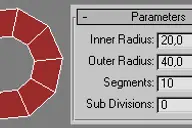
TubeCap is a simple primitive (a flat donut) which can be used as a basis in polygonal modeling.
2 commentsLayer[x] Interface
Ben Rimbey
This script creates an easy to use visual interface that allows the user to assign objects to selection set driven layers. The interface allows the user to quickly hide - freeze - or select all objects contained in the layer - as well as…
0 commentsmini Time
Rodrigo Flores
Mini Time is a small compact tool to configure the animation range.
0 commentsXAnim
Rodrigo Flores
"Xanim is a small compact tool to use when animating in expert mode to access max animation controls"
0 commentsGhost
Rodrigo Flores
Ghost is a plugin script that takes any object in the scene and haunts it with its ghost. You can also use Kghost that kills the selected object and turns it into a ghost.SGhost (sticky Ghost) to create 'Spirit leaving the body' like Fx.…
0 commentsNotes
Michel Weber
"This script allows you to add notes to your animation max file. Select the frame and type in your note. You can also edit and delete the notes. The notes are saved in a file with the same name as your max file."
1 commentrigHelp
Carl van Heezik
rigHelp will help you with the creation of a rig for your 3D character. A rig is a setup to make the animation of a 3D character easier. The rigHelp script uses standard 3dsmax features. You can share your rigged character with other…
0 commentsCleanCut
Roger Hyde
A replacement cut tool for Editable Poly. Allows you to orbit the view without interrupting the tool - and allows complex cuts with edge/vert snapping. Also gives the ability to do multiple - unconnected cuts without exiting and restarting…
2 commentsScene Explorer
Blur Studio
"Scene Explorer is designed to aid in well...um... Exploring your scene. A 'Launch Pad' of sorts - enabling common actions in one window. This script is concept only! There are some features working currenlty - but the script is NOT…
0 commentsProperty Changer
Blur Studio
"Property Changer is designed to change a single parameter on multiple (similar) objects in the scene. For Example: Change the length of all boxes in the scene. The New Value can be Absolute or Relative A Relative change will add or…
0 commentsBiped Worker
Blur Studio
"A biped tool that incorporates biped selection - key library and editing - and set key functionality. Features: Selection Sets Biped List Bip Part Selector Edit Keys Property Library Click here for the online docs."
0 commentsPostIt
Blur Studio
Add's a Post It note to an Object - a Modifier - Or a Material. The note appears in the modifier panel as a rollout - or in the material editor.
0 commentsRender Elements
Blur Studio
"Render Elements grabs the state of many areas of max and toggles them back to their saved state. Render Elements grabs: Camera to render From Render Settings Layers (on or off & alt material) Atmospherics (on or off) Effects (on or off)…
0 commentsCleanMaterial
Jonathan Jacobson
"A script that simply cleans out the material editor and replaces each material with a unique name and random color.unzip the file to the root directory of max and it should install everything you need."
0 commentsCONSOLUS-MAXIMUS
Borislav Petrov
"Consolus-Maximus (C-M) is a CAD-Style command line interface for quick access to some operations including: Creating Objects Editing Properties Selecting Objects Filtering Selection by Classes Renaming Objects Deleting Objects - Adding…
0 commentsWkSpaceLights
werwack
This script simulates global illumination. Based on the SkyDome principle - it allows you to choose an object as a light emmiter - it will hold one light on each of its vertices. Light color - intensity and common parameters depend either…
0 commentsWkModActi
werwack
This script allows to see easily modifiers and spacewarpmodifiers of every scene object in a given category (selection - geometry - shape - light - ...). Each modifier can be activated - desactivated - and accessed directly from the modify…
0 commentsWkAnimeland
werwack
"hese 2 scripts offer an other way to do cartoon rendering in 3DSMax 5. Althought somewhat limited - they offer very good results. AnimeLand material is made from 1 up to 3 colors - separated by sharp edges or by gradients. An outline -…
0 commentsWkLayerManager
werwack
"The very good script of David Humpherys - slightly modified. It creates a set of layers - exactly as in Photoshop - to classify objects of your scene. They are easy to select - hide or freeze. You can even use an alternate material for…
0 commentsWkScatter
werwack
A scatter - which instanciate - copy or just move a set of objects to vertices of a given support. Some parameters allow scattering on 1 or 2 axis only - this in any coordinate system.
0 commentsWkSequenceManager
werwack
"The purpose of this script is to facilitate the use of several cameras in a scene. For every part of the animation to be rendered - we associate a sequence - which is defined by a name - a time range - a camera - an index and a path to…
0 commentsRPManagerLite
Grant Adam
"RPManager is an extension of discreet 3dsmax 5.1 - intended to make the task of managing multiple render passes from a single scene file efficient and User Error free. In common pass-rendered productions - the user will typically either…
0 commentsneon
Marc Lorenz
Neon is a material plugin that converts any object to a lightsource. It works with the radiosity engine built into VIZ4/max5 or higher.
4 commentsReducer
Dim Gunner
"Let us suppose two objects are part of some motion transfer method (toothed - belt - chain etc.) with an assigned gear ratio. This script makes it possible to automatically change the value of the rotation of the sub object dependent on…
0 commentsDrawPath
Dim Gunner
Makes it possible to create a spline - which repeats the trajectory of the motion of an object or one of its vertices
0 commentsTrackMapper
Dim Gunner
"TrackMapper is utility that can set value for any objects animatable parameter in the array of the same object type (combined in Selection Set) based on pixel color of animated bitmap. For instance - with TrackMapper it is really easy to…
0 commentsincrementalSave
Martin Breidt
This macroscript is a replacement for the save function. It saves incremental file versions while keeping the name of the latest - most-up-to-date version always the same as the original file. This is good for XRef'ing because the filename…
15 commentsMB Collapse
Martin Breidt
Macroscript (without user interface) that will accurately collapse (bake) any transformation (position, rotation, scale) into keyframes (one keyframe per frame for the current animation range). Unlike the built-in tools, this works for any…
1 commentWriteCSM
Martin Breidt
Export utility for exporting .CSM (Character Studio Marker) motion capture data from any object selection.
0 commentsNotes Map
Jon Seagull
Inspired by Particle Flow's Note operator - this is a pass-through map with a large text field for making notes about your material or map tree.
0 commentsNamed Selection Floater Fix
Jon Seagull
"This is a fix/ enhancment for R5's named selection floater. bug fixes: Asks only once if you want to unhide/unfreeze RightClick menu's 'Highlight Selected' works Optimized code enhancements: 'Refresh' button - RCMenu - and keyboard…
0 commentsSpline IK Assigment
Anonymous
This is a replacement to the shipping version of SplineIK assignment which adds automatic spline creation and vertex reduction.
0 commentsMirror Bones
Anonymous
"Mirror Bones is a bone mirroring utility - which - unlike the standard mirror tool - it does not perform negative scaling. Therefore it doesn't flips the local Y axis - and thus prevents reversed rotation when rotating bones using local…
0 commentsAlign | Orient
coven
"A combination of two scripts. Align. Alignes selected object to picked object. Orient. Orients the rotation of selected object to the picked object."
0 commentsSlicer
Mauricio B. Gehling
"This script is useful to cut a polygon face several times. The user can enter the distance between them - the axis (local coordinate) that the slice plane will move and how many times this will happen. You should enable slice plane mode…
0 commentsController Assigner
Patrice Mille
Allows you to assign unique or instanced controllers to multiple objects at once.
0 commentsPSDPathUnwrapper
Grant Adam
This tool unwraps your mesh and exports the edges as paths in an Adobe Photoshop file - the unwrapped mesh is then easily used as a template for painting etc. and allows resizing of the psd file with no loss of precision in the accuracy of…
0 commentsBIGRender
Tomas Cayuela Caudevilla
Have you ever tryed to render a huge image (more than 3000x3000) ??? The result is unpredictible - most of time the computer crashes because of the amount of memory needed to store the resulting image. Whith this plugin you can render…
1 commentHand Control
coven
"Hand Control is a scripted modifier that aides in hand animation. It supplies a interface that you can use to rotate - spread - and alter the orientation of the hand. Demonstration videos: HandControls_1.avi - HandControls_2.avi. You will…
0 commentsCopy | Paste Animation
coven
"A combination of two scripts. Copy. Copies the animation from the current track. Paste. Pastes the copied animation to selected track. Max allows you to copy and paste controllers - but it doesn't have any way to copy/paste animation…
0 commentsSub-D:Tools
Tharyn Vanis
"Displays ‘Sub-D Surfaces’ or ‘Iso-Lines’ in MAX5 similarly to the way MAX6 - Lightwave - and Maya do. View Example Image"
0 commentsGimbal Fix
Jim Jagger
An elaborate rollout that contains easy tools to help overcome gimbal lock. Use in conjunction with the Curve Editor to apply simple rotations to all or selected keys. It’s never been so easy to add an extra 360 degrees to a bunch of…
0 commentsOrganise Scene Selection Sets
Jim Jagger
This tool creates a floating window listing all of the selection sets in your current scene. You can then toggle the visibility of each set by checking the appropriate check. If you decide to add more selection sets simply re-run the…
0 commentsCreate Align
Jim Jagger
Prompts the user to select an object in the current scene and creates and aligns a temporary object to it. Great for animating!
0 commentsCustom Attribute Manager
Jim Jagger
Custom Attributes (CAs) can lie dormant in a Max file taking up valuable file space. This utility checks for and deletes unnecessary CAs
0 commentsDelete All Keys
Jim Jagger
Deletes all the position - rotation - scale and custom attribute keys on all objects in the scene.
2 commentsDelete Custom Attributes
Jim Jagger
Deletes all custom attributes on all objects in the scene.
0 commentsWarmLight!
Evil Pumpkin
Script designed to recreate area lights by allowing you to create a dome of lights; u can set the x -y and z radius of the hemisphere - the side lights and ring lights number - the light color - mapsize and sample range - raytraced shadows…
0 commentsTracer
Mark Walters
The user draws any combination of top - front - right - bottom - back and left views of an object - scans in the pictures - and then this script will create the corresponding planes in your viewport with your pictures on them - allowing…
0 commentssuperLag
Michael Comet
Super Lag is a MAX Script to help automate rigging and animation of secondary action and follow through. It provides easy to use animation controls - that are stable - and won't go flying off like typical dynamics or spring systems.
1 commentPanoTour
Chris Johnson
"Uses a helper object to place panoramanodes and render for each node a spherical panorama and generates optimized htmlfiles. You can also connect the nodes - so that you can generate a whole tour! It works in 3ds max/viz 4 or 5 - with…
0 commentsBlackJack
Unknown
"Now we have the game of Blackjack for 3ds max! Click here for a screenshot"
0 commentsVolumePreview
Borislav Petrov
"VolumePreview generates a preview of environment effects in the viewport including volumetrics - lens effects and shadows. It requires a camera view to generate a preview. After generating the preview data - the viewport displays the…
4 commentsFracture
David Gohara
"Script designed to generate relatively simple fracture objects. Sample max scene file included."
0 commentsGame Tools
Andrew Oakley
"With a completely new and improved interface. Gametools offers every artist using Max a wide variety of helpful tools when editing their models. Inside GameTools there are now 5 improved and brand new utilities! These utilities are:…
0 commentsGame Level Builder
Michael and John Little
This Script is a complete package for building game levels in max - and is an essential tool for building Half-Life - Counter-Strike and Quake Levels. Building your level is easy - all you have to do is draw where you want your walls to be…
1 commentEPolyCounter
Juan Martinez
"Simple tool that displays the triangle face count on Editable Poly and Editable Mesh objects. You can select multiple objects at once - and it works in Sub-Object mode. Original script by Fred Ruff"
0 comments