.
New:
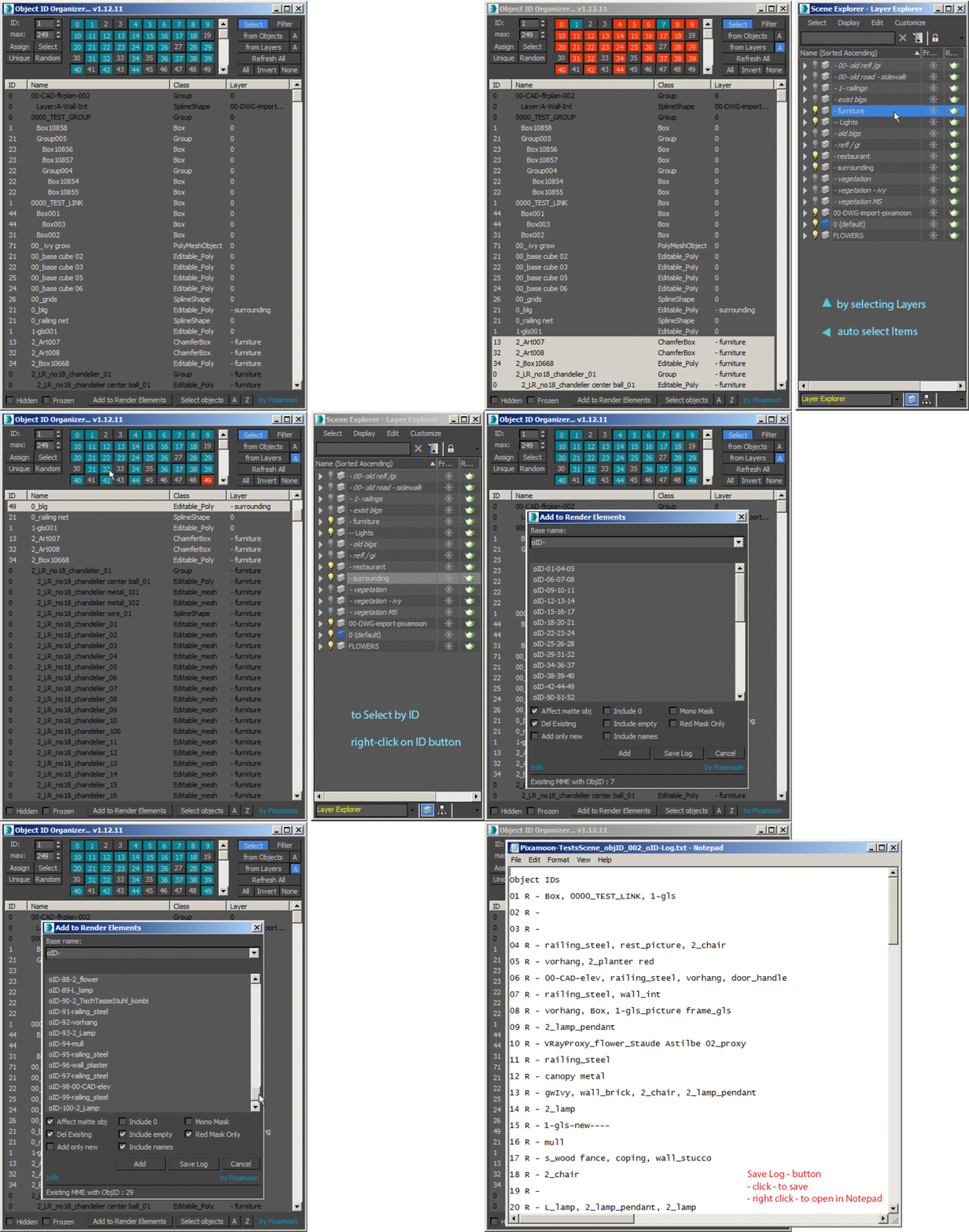
- Select / Filer from selected Layers
- assign Unique or Random IDs for multiselection
- new '-' and '+' buttons to shift selected IDs by +1 or -1
- added 'Add name prefix: #' (in Add to Render Elements) - for automatic channels in Pulze Post Manager
Free test versions available - Please check end of description
.
Object ID Organizer is similar to my previous Material ID Organizer.
It helps to quickly organize / inspect Object IDs in the scene and create MultiMatteElelemnts or Corona CMultiMatte.
- Sort object list by Name, ID, Class or Layer
- Multiselect and change ID
- Reset all MatID to 0 (select all -> press 0 button)
- Select on list by ID (switch "change" -> "select" or "add to select")
- Select and Auto-select by scene objects
- Filter and Auto-filterby scene objects (it will show only selected scene objects)
- And otherway - select scene objects by selected list items
- Add / Delete MuliMatteElements or Corona CMultiMatte (depends of current renderrer)
- Buttons 0 to 149 (just scroll down)
- 2 Highlight Button colors:
- Blue - shows used Object ID
- Red - shows selected items
______________________________________________________________________________________________
Columns:
- ID - G-Buffer Object ID - 0,1,2,3,4,5,....... (buttons up to 149 - let me know if you need more)
- Name
- Class
- Layer
______________________________________________________________________________________________
How to Use:
- It's a script only so simply drag and drop to 3ds max.
- To assign ID -> Left mouse click on ID button or A/S button
- To select with specific ID -> Right click on ID button or A/S button
- Add to selection -> Hold Ctrl and Right click on ID button
- To reset all to ID 0 -> select all -> Left click 0 button
______________________________________________________________________________________________
Changelogs:
v1.14.03 test (2023-07-04)
- fixed / removed empty IDs on the end of the render elements list
- fixed Automatic activation
- updated deactivation process - added Automatic (online) deactivation
v1.14
- new 'A/S' button to Assign / Select
- Left-Click - Assign
- Right-Click - Select
- new "Multi" (CheckButton) to enable Multi - Assign / Select option
- new 'U' Unique Assign (check-button)
- new 'R' Random Assign (check-button)
- new '-' and '+' buttons to shift selected IDs by +1 or -1
- added 'Add name prefix: #' (in Add to Render Elements) - for automatic channels in Pulze Post Manager
v1.13
- Select / Filer from selected Layers (similar to select form objects but recognize selected layers)
- New options in Add to Render Elements dialog:
* Include Names ( layer / group / object names in render elements names )
* Mono mask (all RGB has same id - it is black and white mask)
* Red Mask Only (each element has only Red channel is on)
* Button "Save Log" - saves .txt Log in same location as max file
+ it collects multimatte render elements and creates list of output IDs
+ collects names form layer / group / object and add it to the list)
* right click on "Save Log" it will open log in notepad
v1.12
- assign Unique or Random IDs for multiselection
v1.11
- save settings on dialog close: toggle buttons + dialog size and position
- fixed red button highlights - for selected IDs
- more options in Add to Render Elements dialog
v1.07
- fixed selection issues ( Ctr+A, Ctr+I, Ctr+D and All, Invert, None)
- fixed select objects by ID ( right click on ID buttons + "A" on - auto select objects)
- keeps settings till max is closed
- added "Z" button - zoom selected
v1.03
- Select + Filter can work together now
- Autoselect scene object base on list selection - "A" button next to "Select Objects"
______________________________________________________________________________________________
Let me know what you think or if you have any suggestions
Pixamoon
______________________________________________________________________________________________
Full version available on my web:
https://www.pixamoon.com/product-page/object-id-organizer
All purchases will be send automatically in few minutes.
All updates till v2.00 will be send automaticaly too to your email.
Free test versions available -> One condtion only -> You need to write comment / review after testing :)
Please let me know if you want to test it.
.

Automaticaly creates a list of used Object IDs.
Press Add button to create MultiMatte Render Elements (automaticaly recognize renderer, if Corona creates CMultiMatte )

 NicolasC · 2018-07-19
 arch3d · 2017-02-14