

ThinkingParticles MasterDynamic Control
Downloads
Version 1.2Listed version
Listing updated
Visit author’s download pagewww.racoon-studios.de
Release notes
version 1.2 - "ON in Render" won't turn on all of the scene TP systems anymore. Now it works object based - The currently selected TP system is written as Groupbox caption
- 3ds Max compatibility
- Unknown
Community compatibilityNo compatibility reports yet
No reports yet for the available releases.
Community reviewsNo reviews yet.
Listing details
- Version
- 1.2
- Other software required
- Thinking particles 4
- Author’s update date
- Legacy votes
- 13
- Listing created
- Homepage
- www.racoon-artworks.de
How compatibility works
Compatibility comes from the author’s supported range or requirements in the original listing. A tested version records what the author tried.
“2020 unconfirmed” in the catalog means support for 3ds Max 2020 is still unknown.
Community reports record successful tests on specific releases.

Description
Setup & notes
Hi,
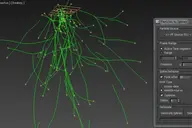
This is my first Script here at Scriptspot, I did it quite a while ago. TP MasterDynamic Control has pretty much the same function as the MasterDynamic Controls in TP itself. The Script makes it possible to change parameters outside of TP.
You can modify several TP systems in one scene. The script will either search for a System or will take the selected TP system on opening the script.
MasterDynamic Control is also able to Render TP systems where the Master Dynamic is turned off. Just check the "On in render" checkbox and it will render. This is very helpful if your TP-System slows down your Viewports too much.
I hope you will find it kind of useful =)
Use this script on your own risk!
*version 1.2
- "ON in Render" won't turn on all of the scene TP systems anymore. Now it works object based
- The currently selected TP system is written as Groupbox caption
Comments (0)
Comment policy