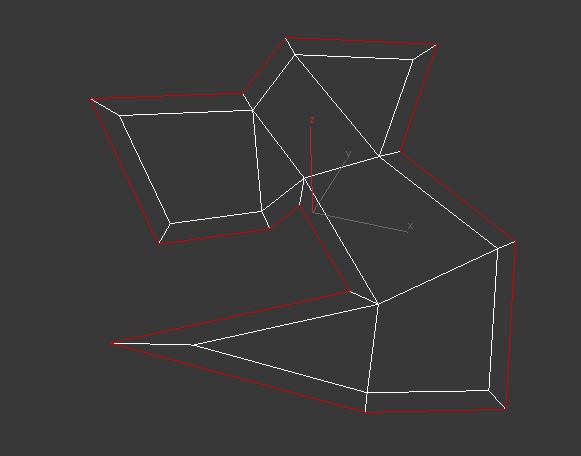
[UPDATE!] See description below for more
This Tool is useful for extruding border edges of an editable poly. You can also add a tilting angle and choose to use corrected corners. 
Script
 By DeadClown · 2014-06-02
Tags: edge, extend, extrude, border, tilt, straighten, corner, correct
[UPDATE!] See description below for more
This Tool is useful for extruding border edges of an editable poly. You can also add a tilting angle and choose to use corrected corners.
If you still have version 1.0 installed, make sure to delete the old files before installing the new one. You need to delete “RacoonScripts_Extend_Borders.mcr” and “extend_borders.mse” in your 3dsmax installation folder (files should be in /scripts/RacoonScripts and the /UI/Macroscripts or /usermacros or /Macroscripts folders, depending on max version.
The easiest way to install it is to run the .mcr via the “Scripting” menu + “Run Script” command. After that, open the “Customize User Interface” dialog and locate the tool in the category “RacoonScripts”. After you have made a hotkey, menu item or button, simply select some edges of your editable poly object and start the tool.
Extrusion Depth = the absolute amount the new edges are extruded
Angle = The tilting angle of the extrusion
Smoothing Group, Inherit = Inherits the smoothing group ID from the adjacent faces
Respect loop ends = If you are not using straighten corners, selections that end on corners are extruded perpendicular to the bending, if this is not desired, activate this option – it will extrude the those edge perpendicular to only the selected edges.
Alt + Apply = negate the angle value and apply
Alt + Cancel = undo the last apply
* Distorted polygons (e.g. skewed and rotated) may be problematic for the straighten corners algorithm. It’s better to disable this feature in these cases.
* Since it’s a Maxscript it is not very fast in calculation speed. Higher edge counts may slow down the tool considerably.
v1.2 - 2019/11/25
- added compatibility for max 2020 (some random thing changed for some reason, hooray!)
v1.1 – 2019/04/27
– materialIDs are ported to new faces
– fixed the updating issues in max 2017 and up
– removed encryption, have fun reading but keep in mind that this spaghetti code is OLD (and awful)!
v1.0 – 2014/05/31
– initial release
line
old man · 2019-12-07
add option its works with line
DeadClown · 2019-11-29
The window is probably still there, just outside the screen area. The window position is saved in this ini file: C:\Users\YOURUSERNAME\AppData\Local\Autodesk\3dsMax\2020 - 64bit\ENU\en-US\plugcfg\RacoonScripts.ini
If you just delete the file it will reset the window position and it should pop up again next time you start the script. Hope that helps, let me know if that solved your issue :) .
Thats it
KurcoGrahic · 2019-11-29
yep, deleting the .ini file solved it. finally i can have good extrusions again :D
Thank you for the fast response
That file isn't in that folder?
 The Jovial Brit · 2019-12-20
Hey I searched in that location and RacoonScripts.ini isn't in that folder so I can't even delete it.
It really sucks because 3DS Max 2017 has just become a crash-fest, as in it crashes so randomly. 3DS Max 2020 is stable but I can't get this thing to work.
Noob
KurcoGrahic · 2019-11-29
I`m probably doing something wrong but,
I`ve deleted previous versions, even in the User folder, and after installing the mcr file, in quad popup menu or as a macro button, the script just runs default settings, without the popup window to adjust andgle and extrude amount. Is it me or?
Max 2020 update 2020.2
By the way, best script on the market, huge lifesaver
So unfortunate that it doesn't work in ver.2020
The Jovial Brit · 2019-11-25
Firstly I want to thank you for creating this script! It's a brilliant script and I've been using it for over a year now.
I used to use 3DS Max a lot but it seems that the older versions of 3DS become more temperamental as new releases arrive. I can't even use 3DS Max 2017 these days without it crashing randomly.
I've had to downgrade from 2020 to 2019 in hopes of being able to use this script!
This isn't a comment demanding that you fix it. It's actually a comment praising yourself and the script that you made!
I do hope it can be fixed soon though lol.
 miauu · 2019-11-25
...
Took me a while to find it
DeadClown · 2019-11-25
@liuqianbo and @The Jovial Brit :
Took me a while to find it but I updated the script and it now works with max 2020 ;)
@miauu
I didn't say something the first time you blatantly plugged your commercial stuff under my (free) script, but twice?!
.
miauu · 2019-11-25
Removed.
Sorry.
Compatibility fix for 2020?
liuqianbo · 2019-08-05
Hello! Any chance of another compatibility update for 2020? It seems not working in 3dsmax2020
DeadClown · 2019-08-05
I haven't even installed 2020 yet but I'm already annoyed as hell that they seem to have broken something again... I'll have a look once I install 2020 but this might take a while.
OSTScore · 2018-12-26
The script works in the 2018 version!!!
extend-borders
3DcubIC · 2017-03-30
no funciona para 2016 ni para 2017
God bless you developer!
 NaderScript · 2016-06-12
A wonderful script for those with subtle taste in 3d modeling indeed ;)
Thank you so much
kavek · 2017-03-30
.
kyle108 · 2015-09-09
is it possible to get a version of this script where the extension depth spinner has 3 decimal places instead of 2? most of my work is done at smaller scales.
difficulties
Mirk217 · 2015-05-14
I use 3DS Max 2013 x64 wines 8.1 script is not run at all.
click on the button of the reaction is simply no.
.
miauu · 2014-06-03
vidivini500 · 2014-06-04
Nice miauu :)
Maybe you can add angle option too, is useful
.
miauu · 2014-06-04
Adding angle option is in my todo list, but I have to find time for it.
vidivini500 · 2014-06-02
Very useful script!
See this example, is normal script doesn't work fine?
Thanks
DeadClown · 2014-06-02
it should be working fine, at least I don't see a reason for it. If you could upload the un-extruded geometry somewhere I can have a look.
I attached an image of what I get (quickly tried to match your geometry). So I guess there may be a problem with some face normal or something like that.
vidivini500 · 2014-06-03
Well, is a random shape but I'm curious if you can see something bad. Think is not perfect shape with quad polygons, maybe this is the problem.
https://dl.dropboxusercontent.com/u/24733102/shape.rar
Edit: I copied your shape and works fine, maybe is a problem of angles?
Very rare
DeadClown · 2014-06-03
hmmm, yes, there is indeed a problem. If you have a look at the image attached: edges (1) and (2) are producing a problematic vector constellation which is causing a flip. It is currently not so easy to solve in my code but you can avoid such situations by adjusting the edge flow. If you're creating an edge (3) all works fine. Will see if I can fix that in the future. Thanks for reporting!
vidivini500 · 2014-06-03
Yes, I understand what happend.
Thanks for your time!