ScriptSpot

Script

Save & Restore Views

By DeadClown · 2014-04-14

Version
0.2
Date updated
2014-04-14
Votes
7
Download
Download
Description

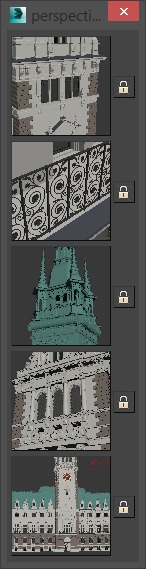
A simple script that is pretty similar to max's own "Save active perspective view" and "Restore active perspective view" functionality just that there are 5 slots with preview images. Un-comment the first 2 lines to install it as a macroscript. Click the little lock symbol to save a view, click the image button to restore it. 
Attachments

Tags: viewport, save, restore, View, perspective

Comments (18)

Thanks

GK3D · 2022-09-12

Thank you for this script. Nice one.

doesn't remember the views between sessions and the exact zoom

rachka · 2022-08-28

Awesome script but it does not remember the saved views after closing max and reopening the scene and it does not remember the exact saved zooming extents but only returns the saved view with the current zooming.

thank you good tool , can you modfiy some

dussla · 2018-07-16

thank you good tool
i would like to ask some
if i close script , next time all reset
can you save that and load preset auto next time ?

igamaximus · 2018-09-27

Great script DeadClown, thanks a lot !

Compact Version and Ortho

3dwannab · 2017-03-27

This works with Ortho views too. I think it worked with this anyway. If not download my EDIT1 in this thread or Martins Original. It's working here with top views etc on Max 2016. Maybe your Max version is incompatible. I can't test below 2016.

New EDIT:
-- Toolbar Size.
-- Drag the little blank grey bit on the right to move the UI. It saves position when you reopen.
-- RMB to save View
-- LMB to activate View

Also to change the size of the ICONS it can be done to suit. Just modify the width and height value of this line and the script will do the rest.

rollout perspStore "View Store" width:205 height:35
Attachments

mistyrian · 2018-05-04

nice

saved Views are deleted once 3dsmax is closed

robox · 2019-08-13

Hi,

thanks for your modificationes on this script. One thing i`m still missing is a way of
having the perspectives being saved after a restart of max. ATM all views are deleteed once i close and restart max. Is there a way to have the views and the thumbnails being stored till manual deleted ?

Thanks for your help.

Robin

top view

stevirt · 2017-03-20

Nice script. Thank you! Is it possible for me to change the script to use top view instead of perspective view? The script will save active top views (at least create a thumbnail of them) but not restore them.

Thanks again!

3dwannab Revamp

Kurai · 2015-06-27

Thanks 3dwannab (and Deadclown)... I have adopted your revamp of this script cos you have made it smaller. I find this script crucial for final camera position and quickly moving from inside to outside of a building to make alterations since moving around gets sluggish with big models. It should be re-named: Teleport Tool :)

But... could it be smaller?

I would prefer it to be toolbar size so it can be docked easily.
For me the size of the picture is not important.
Really fed up of floating toolbars.

Thanks

DeadClown · 2015-03-19

@3dwannab: Yes, that's a good idea. I will implement it when I time for it. I'm not using the script myself so I haven't even noticed ;)

@Ariel NM: It's possible that I'm using a maxscript function that does not exist in max 2011. I don't have 2011 to test it here, sorry.

Thanks

3dwannab · 2015-03-20

Just that orbiting in max bugs out when you're in tight spaces so this was the perfect solution. Thanks once again.

Changed the code

3dwannab · 2015-04-23

Hope you don't mind deadclown but I've found time to get the script like I descrided. Simple enough really but only works for max 2015 or more because it uses: NitrousGraphicsManager.GetActiveViewportSetting()


I modified and hidden all but two of the views (Felt 5 was too much for me :) ) in this script and changed the name to View Store (I hope you don't mind :P). Fixed saving the pos when dialog is moved and I've added a reset viewports button also to with the following settings:

		actionMan.executeAction 0 "40043" -- Selection: Select None
		viewport.ResetAllViews() --resets to Max Standard
		actionMan.executeAction 0 "311" --frames all viewports
		viewport.zoom .6 --fix to make perspective view appear closer
		completeredraw() --redraw the views
		viewport.setGridVisibility #all false --turns off all grids
		actionMan.executeAction 0 "40829" --show statistics

For anyone wanted basic shading saves in 2015 max or less you can look for the code and change:

		fn saveTM =(
			try(
				vpedgedfaces = viewport.GetShowEdgeFaces()
				VisualStyleMode = (impl = NitrousGraphicsManager.GetActiveViewportSetting() impl.VisualStyleMode) -- 2015 max version
				--vprenderlevel = viewport.GetRenderLevel() -- 2015 less max version
				vpType = viewport.getType()
				tmMatrix = getViewTM()			
			)catch()
		),
		fn getTM =(
			try(
				viewport.SetShowEdgeFaces vpedgedfaces
				impl = NitrousGraphicsManager.GetActiveViewportSetting() impl.VisualStyleMode = VisualStyleMode -- 2015 max version
				--viewport.SetRenderLevel vprenderlevel -- 2015 less max version
				viewport.setType vpType
				viewport.setTM tmMatrix
			)catch()
		),

And replace with:

		fn saveTM =(
			try(
				vpedgedfaces = viewport.GetShowEdgeFaces()
				--VisualStyleMode = (impl = NitrousGraphicsManager.GetActiveViewportSetting() impl.VisualStyleMode) -- 2015 max version
				vprenderlevel = viewport.GetRenderLevel() -- 2015 less max version
				vpType = viewport.getType()
				tmMatrix = getViewTM()			
			)catch()
		),
		fn getTM =(
			try(
				viewport.SetShowEdgeFaces vpedgedfaces
				--impl = NitrousGraphicsManager.GetActiveViewportSetting() impl.VisualStyleMode = VisualStyleMode -- 2015 max version
				viewport.SetRenderLevel vprenderlevel -- 2015 less max version
				viewport.setType vpType
				viewport.setTM tmMatrix
			)catch()
		),


Attachments

Only gray squares

Ariel NM · 2015-03-19

Hi DeadClown! Your script works fine in versions 2013 to 2015, but in 2011 it doesn’t show the thumbnails –only the original gray squares. Who is wrong, me or Autodesk? ;)

Very useful.

3dwannab · 2015-03-17

Put it in my startup scripts folder. Thank you.

I think it would it be useful to save the type of shaded mode. So, lets say, if I'm in a view in wireframe mode I click the thumbnail and it brings me to the view with whatever mode was enabled. Would that e something you could implement?

robobear510 · 2014-06-17

wow great script - also I'm using octane 2.0 on max 2015, works fine at the first few test, I think I'm gonna use this one :)

Dom · 2014-04-16

After some tests, I can say it works, but if I move the point of view in octane viewport, the script no longer call back the saved perspective.
If you want, you can try octane, there is a demo version, it's similar to corona, but only GPU renderer, and its viewport is a kind of activeshade, like corona activeshade viewport.
I hope you can update it, it's a good script anyway, I can use it, even if it is not "octane friendly", thanks you for this release.

Not working with octane

Dom · 2014-04-15

I like this script, very usefull, but don't work very well with Octane render.
When I open the Octane viewport, I can't recall the saved perpective views, can you insert a sort of "force recall" button, or something similar ?

DeadClown · 2014-04-15

I'm not using octane, so I've no idea what an octane viewport is but it only works with max viewports.