 By merlinpy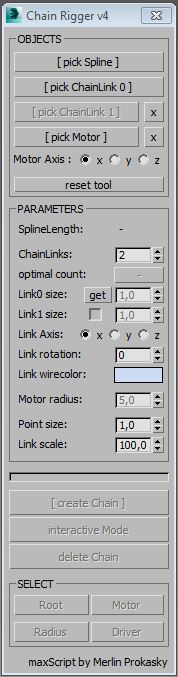
Description:
Tool for creating a rigged chain along a spline.
Functions:
* create a chain of 1 or 2 different chain segments along a spline
* spline can be animated or linked and the chain will follow
* when spline is closed chain drive can be animated by an objects X-Rotation
* chain drive speed can be ajusted by a radius (of the rotation motor-object)
Manual:
Please watch video tutorial below.
* create a spline and 1 or 2 chain elements
* run script and select objects
* if chain should be animated choose a motor (rotating object)
* set parameters interactive (optimal count is the number of chainLinks needed to close the chain)
* create chain and play with parameters interactive
* all chain objects are linked to a root-helper so they can be selected easy
* animate the X-Rotation of the selected motor-object to move the chain
Legend:
ChainLink = objects which the chain is made of
Motor = object which moves the chain by its X-Rotation along the selected Spline
SplineLength = length of the selected spline in system units
ChainLinks = number of links the chain is made of
optimal count = number of links needed to close the chain
ChainLinkSize = distance between the chain elements
wirecolor = wirecolor of the ChainLinks (objects are instances of the choosen ChainLink-objects)
Motor radius = the radius of the gear object
Axis = the direction the ChainLinks look at (depends on the ipvot of the selected ChainLink-object)
Link rotation = rotation of the ChainLinks along the spline
Point size = the size of the helpers which control the chain
Point scale = scale of the helpers and the ChainLinks
I'm looking forward for your feedback!
 jgk1981 · 2014-05-21