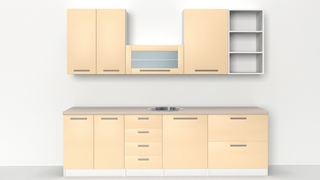
Kitchen Cabinet Creator is a script for 3ds Max which is intended to automate process of making kitchen cabinets.
Version 1.01 is available.
Script
By goruss · 2010-11-07
Tags: modeling, Objects, object
Kitchen Cabinet Creator is a script for 3ds Max which is intended to automate process of making kitchen cabinets.
Version 1.01 is available.
Kitchen Cabinet Creator is the ideal program for users who require frequent design of kitchens, furniture and interior design as well for all of those who want with a couple of mouse clicks to fill some empty space and very easy and simple to do some things that otherwise take much longer.
Kitchen Cabinet Creator with its intuitive and logically arranged user interface that offers the possibility of a large number of combinations of kitchen cabinets, both through pre-defined, ie. settings that you specified, or with random button which can provide you with very interesting results.

New in version 1.01:
Tip: The best way for using this script is on clean scene, or at least make sure that no other objects around point of creation(script use ProBoolean Compound Object for creation of sink hole).
If you download macroscript zip file just extract files to 3ds max main directory.
Thank you all guys!!!
 todor · 2026-07-21
Good work !
kavek · 2016-06-09
awesome
detile on materials
 3dmax farsi · 2016-06-09
This script need more detail on materials
farsi tutorial of this http://www.3dmaxfarsi.ir/?p=2982
 oliverwilliam · 2015-01-09
Can this be an accurate similar guide to use when making actual cabinet of that specific designs, will it gives proper measurements and output result?
Excellent!!
Carol Rein · 2014-08-06
Congrats, it´s a very useful tool!!
Installation scripts
Anmoar2013 · 2013-10-28
Lords is in reference to how to install this script on my operating system 3ds Max and create a quick access from the same program.
Toolbar
 3dwannab · 2013-09-09
Can this be assigned a Toolbar, cannot find it in the customise UI>toolbars. What category is it in?
Got it dragged the Macro into the window. Cat>Albero Tools ;]
max 2009
 perspectivista · 2012-10-11
i need know if this plugin is able to use into 3ds max 2009
 Motiva · 2010-11-29
Thanks for your work, very good script. Only one suggestion, if accepted: You could add an option for remove the smoothing in big flat surfaces (maybe convert to editmesh and doing autosmooth when creating every element).
Regards
curmeiste · 2010-11-11
Great work excellent Scripts
Congratulations!²
3dlife · 2010-11-09
Nice one! This script is a good idea. But I'll suggest you to give us the option to use also meters [or centimeters] as units too.
In any case, that script is awesome!
 Michele71 · 2010-11-07
WoW! Thanks!! Great Script ;)
