
Edit: Demo version is available on our demo page.
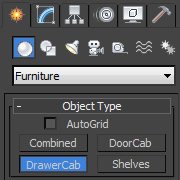
Furniture is a collection of four scripts for 3ds max that makes easier creation of furniture elements within 3ds max software package.Furniture plugin consists of four sub-scripts with which you can easily create, modify and manipulate:
- cabinets with doors,
- cabinets with drawers,
- combined cabinets,
- shelfs (vertical or horizontal)
Furniture plugin can be used as the final product to create a modern piece of furniture or as a starting point for complex cabinet creation.
Since the plug-in is fully integrated into the 3ds Max, after the creation of elements you can easily change the dimensions of the cabinets, panel thickness, spacing between the doors and drawers, set in percentage the extent to which the door is open ... as you do with the basic primitive objects in 3ds max in (Box, Sphere).
When you create cabinet element, script automatically assign Material ID's to the created polygons (sides, front panels, bottom mask, back cover) and converting that element to "Editable Poly" you can very easily select and manipulate with his polygons.
Some of the features of the Furniture plugin:
- Full integration in 3ds Max
- You can animate all spinners
- Simple creation of elements
- A large number of options for the Cabinet costumization
- spacing between front panels
- panel thickness,
- rounded edges of the panel,
- setting for bottom mask of cabinet,
- adjust percentage door is open,
- setting front panels on the outer or inner side
of the cabinet, - set the horizontal and vertical shelves
- and lots of options to enhance performance
- On the creation time , you can use "Snaps to grid points",
- Scenes with our plugin can be saved and used again,
- Automatically add Material ID's

We try hard to enable our plugin for 3ds max 2009-2010 (actually it`s working, but we have some minor bugs to fix)
Comments (5)
Comment policy
I am also looking to create my own version of this one, looks potential to use.
How about using this technology in woodworking project, does it gives accurate details and that will really works?
Is is possible for this to add stain glass or a acrylic type of door?
Good plugin
hi, i need know if this script work into 3ds max 2009, i'm interested to buy it