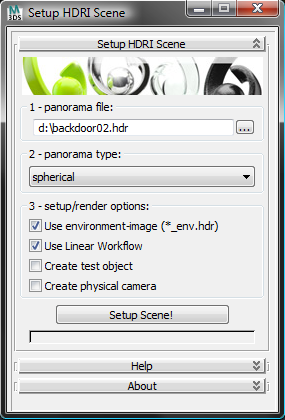
This tool creates a scene setup for HDRIs downloaded from www.zwischendrin.com and adds a test object (with materials), a camera and uses linear workflow if you like to.
Script
 By 48design · 2009-12-30
Tags: VRay, scene, hdri, Setup, hdr, zwischendrin.com, scene setup, LWF, linear workflow, 48design.com
This tool creates a scene setup for HDRIs downloaded from www.zwischendrin.com and adds a test object (with materials), a camera and uses linear workflow if you like to.
In 3DsMax run this installer (mzp file) and navigate to your scripts folder to 48design. Run zwischendrin_hdri_setup.mse afterwards. (MacroScript coming up next...)
step 1: select the HDRI to render.
step 2: select spherical or hemispherical type.
step 3: choose setup/render options.
step 4: create scene setup.
Contact
48design · 2011-10-05
Hi Raphael,
you can simply use the contact form from the support-link in the footer of zwischendrin.com.
Best regards
Fabian
 Graph · 2011-10-02
Hey there,
Nice addition to what you offer on your site..
I've got a proposal for you but couldn't find a method of contacting you, would you mind shooting me a mail?
mfG Raphael