ScriptSpot

Script

SnowFlow - make snow with the click of a button

By 48design · 2010-01-25

Version
1.8
Version requirement
3ds Max 2009, 2010, 2011
Date updated
2014-12-04
Votes
228
Download
Download
Description

snow bench test scene

This plugin is out of date. Please use the new SnowFlowPro instead!

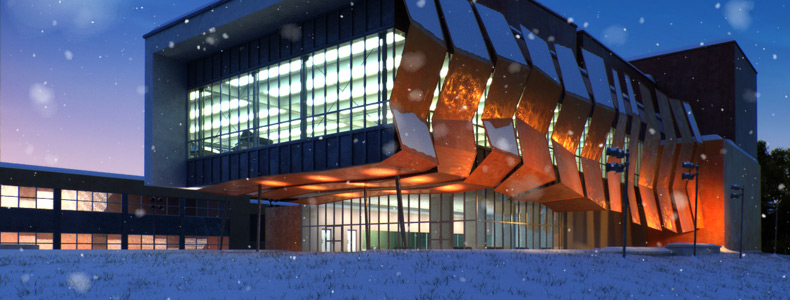
SnowFlow is a 3D Studio Max script/plugin that creates realistic snow with ease! You just pick an object and SnowFlow does the snow for you! Let the snow fall on your 3D objects and scenes with the click of a button.

Additional Info

features

  • self-explaining user interface with integrated help
  • one-click-solution in most standard situations
  • multiple snow methods for different needs
  • advanced settings to get the best out of SnowFlow
  • different reality levels to control object interference
  • preset system for a faster workflow
  • full control over the calculated mesh
  • network rendering with any network rendering solution
  • system unit check and conversion to achieve full snow details
  • autoTune options for better performance
  • caching system to prevent unnecessary recalculations
  • "SnowPlug" to stick objects into snow surfaces
  • "SnowPrint" to make footprints and things like that

notes

You do NOT need VRay to use SnowFlow, but it can create a VRay snow material automatically. If you have problems installing SnowFlow, make sure you run the setup as administrator!

changelog

  • SnowFlowPro released
  • [v1.8]
    • SnowPrint feature added
    • optimized "extrusion method"
    • "shell method" added
    • UI enhancements
    • new activation system
  • [v1.7]
    • new VRay material without transparency
    • check for updates on startup (can be disabled)
  • [v1.6]
    • all parameters are now saved when closing SnowFlow
    • significant performance boost in selection phase (snowfall reality high)
    • performance boost in snowflakes method
    • optimized caching
    • fixed a small "wind / rough surface" bug
    • fixed a bug with particles, Creativity Extension not needed anymore!
      (thanks to scanline vfx!)
    • search for update ("About" rollout)
  • [v1.5]
    • added preset system
    • added standard material
  • [v1.4]
    • added material rollout
    • procedural snow material (Standard, VRay or manual)
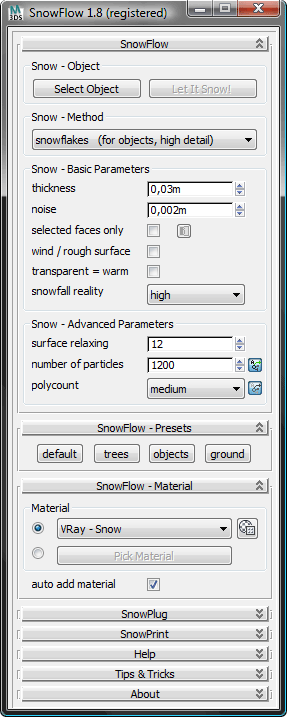
 

SnowFlow Interface Screenshot

examples:

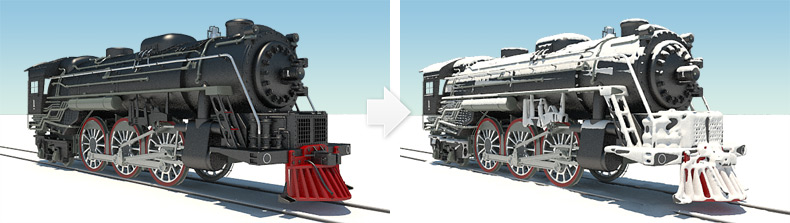
Locomotive

settings

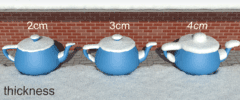
Setting 'thickness' Thickness
This parameter controls the height of fallen snow. Please note that if noise is added, the final snow height can be a bit higher than the value set here. It’s also possible to add more thickness to the final snow mesh with a push modifier.
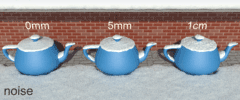
Setting 'noise' Noise
Noise controls the amount of turbolences of the snow surface. This makes the snow surface look more natural. You can also add a noise modifier on top of the final snow mesh to get the same effect or use bump/displacement in your material.
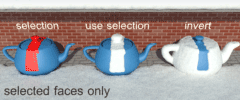
Setting 'selected faces only' Selected faces only
Preselect regions where you want snow to fall on. You can also invert the selection. With this option activated, you must select faces to get a result. This option speeds up the selection process.
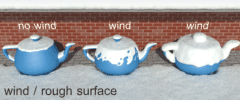
Setting 'wind / rough surface' Wind / rough surface
This parameter lets more snow fall on vertical parts of an object, like it can be seen on the side of trees. You will get natural looking holes in your snow surface if thickness is small and you don’t adjust particle count.
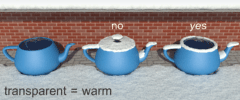
Setting 'transparent = warm' Transparent = warm
Transparent materials “melt” the snow. Check this option for roof windows or car windows for example where you want to mimic the effect of a warm interior. Note that this can only be used with transparent materials, not textures.

Setting 'snowfall reality' Snowfall reality
Snowfall reality controls parts of the object to be not occluded at all (normal), be occluded by the object itself (high) or be occluded by all objects around the scene (real). Reality set to “real” pushes rendertimes up a lot!
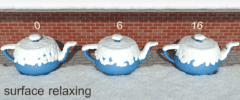
Setting 'surface relaxing' Surface relaxing
Surface relaxing makes a “smoother” surface and makes it look less “blobby”. It has effect on the snow surface even if noise is on. It fills holes in the snow as well. With our “extrusion” method you should keep this parameter relatively low.
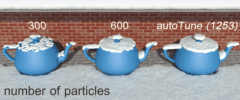
Setting 'number of particles' Number of particles
This parameter controls the density of the snow surface. You should leave this “autoTuned” most of the time. The “Status & Progress” window will show you the calculated particle count which can be used to finetune this setting.
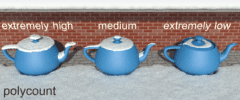
Setting 'polycount' Polycount
This controls the number of polygons created by SnowFlow. Possible selections are:
extremely high, very high, high, medium, low, very low, extremely low. You should start at medium or high and go up or down as you need it.

You might also want to download our SnowFlow Quick Guide PDF that includes detailed explenations as well as Tips & Tricks for workflow optimisation.

Videos
Attachments

Tags: script, VRay, 3dsmax, vray material, Scripted plug-in, plugin, snow, snowflakes, commercial, auto update, 3d studio max, inverno, invierno, kostenlose updates, license, lizenz, logiciel, neige, neiges, neve, nieve, one-click-solution, schnee, scripted plugin, śnieg, software, 48design

Comments (52)

SnowFlow

ElvisSuperStar007 · 2025-03-15

I bought both plugins – the snow plugin and the one for creating tracks – but they stopped supporting newer versions of 3ds Max. Alright, I thought, I’ll just install the older 3ds Max 2020. But when I request a license, I don’t receive any emails with the key. Did I just waste my money for nothing?

Attachments

JokerMartini · 2012-06-06

The collision map detection system you have going on? Is that c++ stuff or is that some sorta trick inside of max your executing?

SnowFlowPro – OUT NOW!

48design · 2012-01-30

Besides adding new features and improving the look and usability of our site, we have spent the last months developing a completely new version of SnowFlow, featuring exceedingly decreased calculation times and improved quality of the generated snow. Depending on the complexity of the scene, the generation pro­cess can be around 100 times faster (and nope – that's not a typo...). Scenes that would not have been possible to snow up within reasonable time even on high-end systems will now be literally ready within minutes. Like many of you requested, there is now a demo version available, so you can try out SnowFlow before buying it. For the first two months, there will be a special upgrade offer: If you already own one or more SnowFlow 1.8 licences, you can upgrade to SnowFlowPro for €65 only! And if you purchased your previous version after December 01, 2011 (GMT+01:00), you can even get it for the fabulous price of €48 only! Learn all about the exciting new features and get the demo!

SnowPrint 2.0

48design · 2011-06-15

SnowPrint is now a standalone plugin for 3D Studio Max to print objects onto other objects to create imprints, footprints, pencil strokes, wetmaps,...

Grab it on http://www.zwischendrin.com/goto/detail/233

How to get SnowFlow for free:

48design · 2011-02-08

For all of you that want to have SnowFlow 1.8 for free we do now offer a solution: ask us by email which language we need to have zwischendrin.com translated into and translate our website to get a free copy of SnowFlow! More in our blog: http://www.zwischendrin.com/blog/

nice

xyjiang · 2010-11-26

this is a beautiful tool, i like it,so i want to know how to make it ,,,thankyou!

48design · 2010-12-02

Please use our support form provided on zwischendrin.com to get support for SnowFlow.
Thank You!

SnowPrint explanation

48design · 2010-10-31

Hi! I attached a super fast SnowPrint tutorial. (SnowPrint_explanation.png) This should explain the main parameters even if I think everything should be self explaining... ;o)
SnowPrint will go through the animation range and create a bitmap for each frame with a collision map (greyscale image, watch SnowPrint teaser 02). It automatically adds a displacement modifier on top of the surface modifier stack if you enabled this checkbox.

If you have problems read the post here: http://www.zwischendrin.com/blog/

wicq08 · 2010-10-30

HI 48design,
can you make a video tutorial showing the usage of the SNOWPRINT feature please? I wan to buy it with the descount before it reaches the dead line, but I would like to see the usage of the snowprint since theres i no info about it in the entire web.
best regards,
wicq

worth the money!

shawnolson · 2010-10-29

This is a nice plugin! I bought it and was very pleased. When I saw that it was on discount, I felt I needed another license and bought it again! Nice script. Keep up the good work.

GO AND GET IT NOW!

48design · 2010-10-25

We offer SnowFlow for 75% off until 01.11.2010!

Best wishes,
Fabian
www.zwischendrin.com

br0t · 2010-10-21

Looks great! If I ever need snow, I definitely know where to go now. Fair pricing also.

Sauber, weitermachen ;)

48design · 2010-08-13

@aaa: is that a question, just a statement,...? What useful comment! ^^

aaa · 2010-08-12

not free

subburb · 2010-06-03

woaw !! these demo videos of snowprint feature sounds just amazing !
Keep up the good work, guys, this tool is really unique..

48design · 2010-05-17

@beaver and all others:
Please don't use scriptspot to get support for our scripts/plugins. We can't be everywhere so please use
zwischendrin.com and it's contact options.
Thank you!

beaver · 2010-05-15

I just purchased the script, installed the license, but when I start it I get this error message :

--Unable to convert: undefined to type: Integer

Help !

48design · 2010-05-05

We just thought it might be interesting to you to see what we are currently working on...
Take a glimpse at our latest video, showing a preview of a brand new feature called "SnowPrint", which will be included in the next release of SnowFlow, coming soon!
http://www.youtube.com/watch?v=Lxj6ANjRqNI&fmt=18

48design · 2010-04-23

I attached a quick guide to help people running SnowFlow for the first time.

caner07 · 2010-03-06

good script = metarial, thank.

Siger · 2010-03-06

Yes, and me it shocked a little. I already to smoke went on street with T-shirt :)

48design · 2010-03-06

We have snow again here in germany! Everything is white! :oD
I thought we finally had spring...

48design · 2010-02-25

@JCinthe303: Thanks for your question. What do you mean by "low poly options"? You can use our polycount option to reduce polycount. You can also use the optimize modifier in the modifier stack like on any other EditablePoly. By right clicking on the modifier you can select if the reduction only to happen to your viewport and not to your rendering for better performance.
Especially our "extrusion method" can be used on larger scenes. This method is used for landscape objects or similar...

We have other pojects going on, so there is not much time to prepare another example. Sorry! Maybe someone who bought SnowFlow can show a rendering? :o)

We plan other snow methods for future release and raise the performance of SnowFlow. There are lots of things to do so stay tuned! ;o)

JCinthe303 · 2010-02-24

I'm wondering if there are low poly options for using this plugin with large scenes. Also, do you have any examples of this being used with large scenes? Any examples of use on buildings? Thanks.

48design · 2010-02-22

Thanks for the nice feedback! :o)

Waxmodeler · 2010-02-22

looks like a cool program. too bad it does not work with my version of max. Max version 8. maybe one day I can upgrade

xisco · 2010-02-22

I purchase this awsome plugin ¡¡

Thanks so much

Gregory K. · 2010-02-12

Bought it - love it! =) Thanks to the devs and thanks to ScriptSpot for pointing it out! :)

48design · 2010-02-04

Updated to version 1.6!
Grab it! It's even cooler than before! :o)

Stetz.Anton · 2010-02-02

Hi, i'm purchased your product, but can't register it. In "activation key" i see "undefined"...
What shall I do?

48design · 2010-02-02

You got help by eMail that fixed your problem immediately. Sorry for that and have fun with SnowFlow!

Stetz.Anton · 2010-02-20

Big Thanks, all works!!!

subburb · 2010-02-02

Really intersting vids !
The plug-in part is just awesome...

fajar · 2010-02-01

what, how can I , in single proc ???

48design · 2010-02-02

@fajar: Maybe I misunderstood your question?

sknne77 · 2010-02-01

awesome work dude, all seems working fine with the new version and nice one for the vids and the test scene, much appreciated sir. :)

Ian S.

fajar · 2010-02-01

in my country which is in tropical weather , can I use it in the scene?

48design · 2010-02-01

@fajar: LOL... yes, you can! But keep in mind that snow is melting in tropical temperature, so you should render fast! ^^

48design · 2010-01-29

Part one of two videos showing how to make a little winter scene with 3D Studio Max and SnowFlow is online...
... part two is online, too!

48design · 2010-01-28

I attached a testscene... it's the one from the settings renderings above (teapots in front of a wall). You can start with this scene to test SnowFlow.
It's also a good idea to just take an old scene from your harddrive and turn it into a winterwonderland! ;o)

48design · 2010-01-28

Hi sknne77,
thanks for purchasing a copy of SnowFlow. You buy a "per seat license" so you can only use it on one machine. We did not want an "online-activation-thing" that checks online for activation each time you start the script, so we had to do it that way...
Demo scenes is a good idea, thanks! :o)

sknne77 · 2010-01-28

There needs to be proper documentation on how to use this plugin correctly, could this be done? also how about some demo scenes that the people that download and buy your plugin can download also?? this would help a helluva lot! cheers.

sknne77 · 2010-01-28

Hey there, ive just purchased this plugin, now i havnt generated Hardware-ID for the key generator because it says it locks it to the computer. Does this mean i cannot install it to my work machine and my home machine?? because thats ideally what i need to do.

subburb · 2010-01-26

Hey ! Sound really nice plug...
Is there a demo somewhere ?

Are you interested by a licence exchange with solidrocks ? ;)

48design · 2010-01-26

Hey subburb! 🙂

I bought solidrocks some time ago, sorry!

There is no demo at the moment, but we plan to release a demonstration video soon.

subburb · 2010-01-26

no problem !
Was my try ;)

Next time i need snow, be sure i'll bought your product !

I wish you lot of sellings !

sknne77 · 2010-01-26

Im tempted to purchase this plugin, but it says the material is Vray? Is it possible to use Mental ray or the scanline renderer also?? I dont own vRAY and have no plans in purchasing it.

48design · 2010-01-26

Yes, of course, you can change the material afterwards! SnowFlow generates a poly mesh and adds a VRay material to it. This material can be changed to whatever you want. There are some converters on scriptspot that could transfer this material for you. Future builds will have more control on the snow material!

Michele71 · 2010-01-25

Nice Plugin. Good!

48design · 2010-01-26

Thank you!