Script
Teamwork
 By andrasmiklos · Credited author: András Miklós Balogh · 2011-08-30
- Version
- 3.00
- Version requirement
- tested on max2011
- Date updated
- 2011-09-22
- Votes
- 13
- External download
- External download
Tags: layers, save, workflow, manager, merge, Teamwork, collaboration, sub-layers
Description
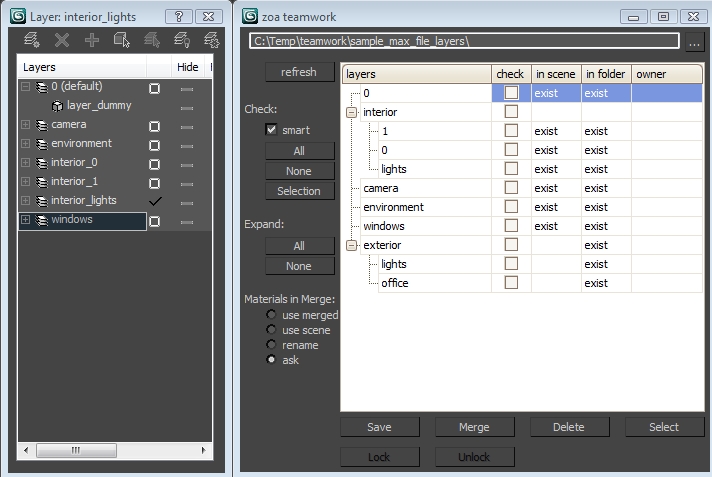
ZOA's flagship maxscript is part of a development project going on since two years now, and has been created to help our whole studio work together on one project. If you want to use ZOA's teamwork you not just have to understand the different functionalities of the script itself, but probably also how our studio works. We tried hard to work our ways trough xreffing but it didn't sem to fit our needs. Unlike Xrefs ZOA's teamwork is a democratic tool without the need of a leader who pulls the pieces together. The principle is that each team member is working on his own set of layers. The script actually saves your work by saving layers to individual *.max files. Then it builds scenes from individual layers either for further manipulation or for rendering. The script creates a working environment to use a directory-like sub-layer system through a delicate dotnet window.
Additional Info
Notes and limitations:
1. The script is highly sensitive on layer naming. Don't use spaces, hyphens "-" and any other characters that you would not use in a filename.
2. There's an "owner" column for showing who is working with a specific layer. Owners are stored in the project directory in a separate file.
3. Material instanciation is lost when saving to different layers and merging back. Try to keep this in mind when building up the scene-structure.
4. You need to work on mapped network drives for the script to work properly.
5. Also save your work constantly using the "normal method". We just can't guarantee, that there is no bug left somewhere.
VIDEO TUTORIAL: http://zoa3d.com/teamwork-a-maxscript-video-tutorial/
TEAMWORK_V3 is out: The bughunt begins: http://www.zoa.hu/maxscripts/teamwork-v3.ms
 viscato · 2015-08-30
 I-CG Renderer Group · 2015-02-15
 Gomi · 2014-03-22
 br0t · 2012-10-25
 Michele71 · 2011-09-12
 onodi.andras · 2011-09-01
 Admin · 2011-08-31