
This script creates a pop-up window with the list of all the grids in your scene. You can easily navigate between the grids and create new ones aligned to selected surfaces.
Grid controller
Downloads
Version 0.1Listed version
Visit author’s download pagewww.zoa.hu
- 3ds Max compatibility
- Unknown
Community compatibilityNo compatibility reports yet
No reports yet for the available releases.
Community reviewsNo reviews yet.
Listing details
- Version
- 0.1
- Legacy votes
- 19
- Listing created
- Homepage
- www.zoa3d.com
How compatibility works
Compatibility comes from the author’s supported range or requirements in the original listing. A tested version records what the author tried.
“2020 unconfirmed” in the catalog means support for 3ds Max 2020 is still unknown.
Community reports record successful tests on specific releases.

Posted by
andrasmiklos
More by this author
Description
Setup & notes
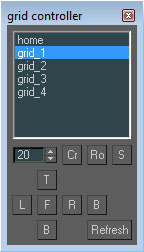
You can activate any grid -including the home grid- by doubleclicking them.
You also have additional buttons:
Cr - you can create new grids aligned to selected surfaces(editable poly: poly or edge level, spline: segment level) The spinner modifies the size of new grids.
Ro - rotates selected object (object level) in the direction of the active grid.
S - select the grid (without activating it)
And you also can choose different views aligned to a certain grid: top, left, front, etc.
Installation:
- run the script
- then you find it under 'customize user interface', category: zoa scripts
Comments (0)
Comment policy