This script creates stone walls, quad stones pavements and irregular stone patterns for various uses. It's suitable for both realtime and production.
Script
Stone Placement Tools
 By alelink · Credited author: Alessandro Ardolino · 2010-08-06
- Version
- 1.0
- Date updated
- 2010-08-09
- Votes
- 254
- Homepage
- www.aardolino.com
Downloads
- aa_stoneplacementtools.zip — aa_stoneplacementtools.zip54 KB
Tags: Texture Baking, procedural, generator, baking, stone, normal map, AO map, real time, production
Description
Additional Info
aa_stonePlacementTools 1.0 for 3dStudio Max
this script collects some utilities for the creation of stone walls, stone pavements and an irregular stone pattern to simulate both walls and floors.
the script automatically bakes normal maps, AO maps and height maps for realtime use.
the images from the video are rendering of some script-generated patterns, without any material, only postproduction and compositing.
the script is now available for download!
tha script can be used for both personal and commercial purpose,
I you like it and found it useful, just let me know and let me see
some results :)
Please refer to the video to see almost all the features in action.
Videos
Comments (80)
ok installation solved for me at least
 Dancelknight · 2017-05-18
You have to move both, the whole folder with the seperate scripts as a folder:(aa_stonePlacementToolsSource) + the scriptfile (aa_stonePlacementTools_1x0) into your max root. enjoy
How to install it in 3ds max 2017?
marche · 2016-08-26
This looks like a amazing scrips, hope the author can meke it work properly and put some information about the installation
How to install it in 3ds max 2017?
hisam · 2017-03-06
You must change the file name as in the photo (aa_stonePlacementToolsSource)
Attachments
- untitled.jpg — untitled.jpg15 KB

How you mean change the name?
Dancelknight · 2017-05-18
mine is already called like this but sill i get encrypted script only
normal map and AO
Peperoni79 · 2016-03-30
hi
has anyone figured out how to bake the normal maps and AO correctly? Im using 3ds max 2016 and v-ray 3.2
render Vray
 Waltez · 2016-08-18
It is not possible
But if all the max system is in standard mode is possible.
You have to run the plugin in a file with "Assign Renderer" all standard.
Do not worry about the error DirectX.
Once this is done make a merge object and load it into V-Ray files
changing the standard material.
It doesn´t Work
Jonan · 2016-03-25
Hi.
I am interesting in that Script but doesn´t work for me.
When i run the script in Max 2012 doesn´t happen anyting.
Why? Is it not for Max 2012?
magilla · 2015-06-05
doesn't work
Create Button
Musthafa · 2015-04-28
Hi Thanks for this Script,
But How can I create a button for this
Very useful script
mikeone · 2014-12-20
Thank you! And happy Holidays! ;)
bangmay · 2014-08-16
thanx..
Do not bother downloading
That Random Guy · 2014-06-24
After trying this script with multiple versions of 3ds max, I would recommend against using this script. Only part of the script works.
What you CAN do:
Create procedural Stones and rocks using the settings boxes.
What you CAN'T do:
Create Normal Maps.
Create Ambient Occlusion (AO) Maps.
Create Height Maps.
Conclusion: Not worth the headache of trying to find someone who knows what is going wrong with the script and getting support for it. This script is pretty much useless, and with the script file itself being encrypted (yes I tried to open it in 3ds Max's script editor and it said it was), you can't actually debug and fix the script yourself.
Also, the poster did NOT state what version of 3ds Max this works with and on top of that, he cropped out the Max version he uses in the video.
Overall a waste of time and with the poster not bothering to help people with fixing his own script, its just not worth the headache and time.
Hi and big thank you
 rezoloot · 2014-04-15
Max 2014 (16) SP5 win7 64, works like a dream, every parameter, not one problem, it actually helps me out in a few ways, will post results, on another tip, in your new version, will you be adding spline's for the walls to follow, I know its a big ask but its such a great script.
Once again, thank you
how it works?
sebs17 · 2014-06-13
what did you do??? i try tu used but i had the same problem that everyone have with 3dmax also i'm using 3d max 2014
Derp Meowslurp · 2014-04-14
copy the .mse and the folder into your scripts folder in max root.
Then you need to make a macroscript and drop it into your viewport. Preferably save .mcr in the maxroot/Macroscripts folder.
Here is the template:
macroScript stonePlacement
	category: "Derp_Meowslurp"
	internalcategory: "stonePlacement"
	toolTip: "Stone_Placement"
	buttonText:  "StonePlace"

(
	scriptFile = (GetDir #scripts) + "\\aa_stonePlacementTools_1x0.mse"
	if (doesFileExist scriptFile) then
		fileIn scriptFile
	else
		messageBox "Unable to locate the script." title:"ERROR!!!"
)
You can change the top four strings in the quotes to whatever you want; the category string will make any new name you put in it. so it will be found in the customize menu.
Update
jla · 2013-11-28
Very nice script Alessandro however after reading through the comments here i see you mention a version 2.0 in the works, can we have an update on how far along that update is? :D
Instant Error
 Kidd Kosmonaut · 2013-08-19
Hello,
Just downloaded and installed Stone Placement Tools and I am getting an error right out of the gate. I'm working in 3dsMax 2014 x64. I installed everything that came in the zip to the same level in my Max plugins folder. Is there a fix for this or did I not install it properly? Thanks for any help.
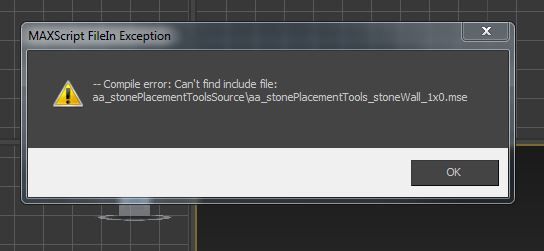
Script don´t work
 jc_bahia · 2012-10-09
Hi, really great script but, don´t work in 3DS Max Design 2012 x64?
Thanks
Attachments
- 1.jpg — 1.jpg21 KB

Unknown Property DirectX_Manager in Standardmaterial
 lightcube · 2012-07-25
Someone else reported this (below) for Max 2012. I'm getting it in Max 2013:
-- Error occurred in aa_stonePlacementTools_bakeNormalMap(); filename: C:\Program Files\Autodesk\3ds Max 2013\scripts\aa_stoneplacementtools\aa_stonePlacementToolsSource\aa_stonePlacementTools_utility_1x0.mse; position: 12537; line: 499
-- Defined in encrypted script
-- called in nmapBakeB.pressed(); filename: C:\Program Files\Autodesk\3ds Max 2013\scripts\aa_stoneplacementtools\aa_stonePlacementTools_1x0.mse; position: 10243; line: 257
-- Defined in encrypted script
>> MAXScript Rollout Handler Exception:
-- Unknown property: "DirectX_Manager" in Standardmaterial:Standard <<
ayudame por favor INSTALACION
PoloAlberti · 2012-06-25
Hola, acabo de bajar el plugins para instalar el Stone Placement Tools, sin embargo tengo problemas para instalarlo, porque el archivo aa_stonePlacementTools_1x0.mse no lo tengo, por ese tengo el aa_stonePlacementTools_1x0 (sin extension)lo que dificulta la ejecución y el run correspondiente, y hay otros archivos que son aa_stonePlacementTools_irregularStones_1x0 aa_stonePlacementTools_stoneQuads_1x0 aa_stonePlacementTools_stoneWall_1x0 aa_stonePlacementTools_utility_1x0 Por favor necesito con suma urgencia me ayuden porque es una herramienta super!... Confio en su pronta respuesta. Gracias y Exitos.
 JokerMartini · 2012-06-06
Super quick to block out scenes and environments.
Thanks for this.
Error click normals
Milo · 2012-03-20
Hi Alessandro
Fantastic script !!!
But I have an error max when i click on normals :
MAXScript rollout Handler Exception
--Unknown property: "DirectX_manager" in Standardmaterial:Standard
using max 2012 design x64
any idea ?
Milo
Create more than one element
BVallori · 2011-11-24
Hi Alessandro,
I find really mazing your script and I was surprised of how easy to run was it! The results are impressive and coul help me -they started already- to improve my models, but... to do so I need the script to be able to create more than one wall/pavement, and it seems to be a problem, as someone has pointed out before. I tried converting a pavement created with StonePlacement into meshes, but when I try to create a new wall it replaces the previous pavement... Have you found any solution for this problem?
Thank you in advance,
Provisional solution
BVallori · 2011-11-24
I think I've just found a provisional solution. I saved a pavement built with StonePlacement in File_1. Then I made a new wall with StonePlacement in File_2, and then I imported the pavement from File_1, and then it works! They were both converted into editable meshes.
Hope this will be useful for someone!
scale
azzalei_rcc · 2011-11-07
hi
i'm happy to have this amazing script..it's very helpful..i already used it in one of my work & it's a 2 thumbs up!!!really great...
i only have a problem though....i would like to ask if there is a way to have the baked stone's scale be the same scale w/ my max set up...i,m using millimeters in my set up...so if i use this script the stone is very small, i still have to upscale it just to fit it properly with my scene's scale...
i hope to have a positive reply... : )
azzalei
HarryPotter · 2011-09-25
So, how do i install this and the Rock Generator scripts in max 2012 and place them as a button on a toolbar?
Nothing seems to work, except if i run them through the "Run Script" command, which is not very intuitive each time...
Thanks for the help still errors
chris62 · 2011-04-25
Thanks for the help. Im using max 9 is that my issue? I installed as per instructions. And doesnt show up when I use run scripts panel -- placed in max root/scripts.
Just getting error messages on startup;
Error occurred during fileIn in
>> MAXScript Auto-load Script Error - C:\Program Files\Autodesk\3ds Max 9\scripts\startup\aa_stonePlacementTools_1x0.mse Exception: -- Compile error: Can't find include file: aa_stonePlacementToolsSource\aa_stonePlacementTools_stoneWall_1x0.mse <<
-- Error occurred during fileIn in
>> MAXScript FileIn Exception: -- Compile error: Can't find include file: aa_stonePlacementToolsSource\aa_stonePlacementTools_stoneWall_1x0.mse <<
-- Error occurred during fileIn in
>> MAXScript FileIn Exception: -- Compile error: Can't find include file: aa_stonePlacementToolsSource\aa_stonePlacementTools_stoneWall_1x0.mse <<
Installation
Nick · 2011-04-17
Extract Zip file to maxroot\Scripts
Run aaStonePLacementTools_1x0.mse
How to install?
chris62 · 2011-04-15
Looks like a great script. I cant get it to work either and cant find the solution below any comments.
Thanks for your help.
Installing ?
Dariusz · 2011-03-13
Hello
How do u install it ? I try run/drag and nothing happens... What category is it?
JCR2011 · 2011-02-24
This is amazing! Thanks for writing this and I hope there will be version 2 someday :)
I like it
alanvava · 2011-02-20
Very nice and easy to work
installation.
 arq_pelr · 2011-01-25
Ciao.
I am new to the 3D and download the plugin.
Please tell me exactly where to put the content folder?
Will place the script in the scripts folder of 3ds max. thanks, I hope your answer.
Baking
lobsterkid101 · 2011-01-23
Hello!
First of all this is a fantastic script...the only problem is I really have no idea how to use it properly. I've figured out how to make high poly walls with stones etc. However, I don't know how to bake it and make it a low poly wall instead... Does anyone have a step by step method to do this?
Much obliged...
Lobster
missing script
orsobruno · 2011-01-13
ciao, volevo utilizzare lo script, ma dice missing script quando cerco di scaricarlo, è hostato da qualche altra parte? oppure potresti inviarmelo tramite mail a 5.orsobruno.5@gmail.com? sarebbe davvero fantastico! grazie mille anticipatamente!
don't work
andrerosh · 2010-11-30
great script, but don't work. I'm trying to lunch, and getting error like http://www.scriptspot.com/files/error_msg.jpg
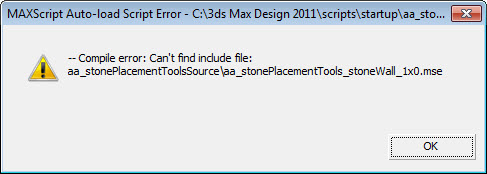
please help!
alelink · 2010-12-23
below in the comments there's the solution to your issues.
Feature Requests
shawnolson · 2010-10-22
This is a great script! It would be nice if you could pick a path (or set of paths) for the wall to build along. That way you can have walls that intersect realistically.
I also noticed that if you build a wall in the scene but later open the tool, your original wall is replaced by the new wall grid. It would be convenient to have the tool not do that or, at the least, make it an option rather than the only way.
Being able to give the new wall a name would also be good. Right now, if I build a wall in the scene, the blocks are named such: stoneBox001, stoneBox002, stoneBox003, etc. You should be able to prefix the walls with a name so if I am building the Front Wall, I can call this new wall "Front Wall" and all the blocks will be named "Front Wall stoneBox001", etc.
Another good idea would be to have a checkbox that will automatically create a selection set for the wall that matches the Wall Name. In the case above, there would be a new selection set called "Front Wall" that will automatically select the blocks that are part of that wall.
Just some ideas and food for thought.
Nice script!
alelink · 2010-10-23
Hi Shawn,
thank you for your suggestions.
for the naming part and the selection sets there will be no problems for the next release.
on the building path...it's not so simple to implement, but I'm thinking about it... :)
thanks again,
Alessandro
Rock pattern bond
Spacelord · 2010-10-20
Is there any chance of using a custom bonding pattern to generate the stones walls ?
Example I have a bridge thats made of stone, I need the stones to follow and arch, stones stack bonded on top of the arch.
So if I could create a custom pattern, using splines, convert to editpoly it would be really nice to run your script to generate the rocks.
BTW great script.
alelink · 2010-10-22
hello,
I'm developing a 2.0 version of this script, I'll try to implements this feature too, but it will be no easy due the
underline code...
I'll try :)
bye,
Alessandro
problem
amir_ejk · 2010-09-29
please help me
i copied the files in to script dir but it dosent work
what i must do
alelink · 2010-10-04
you don't need to put the script in any particular folder...
just run through the MAXscript->run script menu
below in the comments there's a post about creating a button for the script
gorillamilk · 2010-09-22
How do I make a custom button to access the script. Does your script have a category? I didn't see it.
button
Dancelknight · 2017-05-18
You figured how to make a button for this script? i need that for my life
daimyo · 2010-09-18
Hi, I dont understand how to bake the texture to make the stones lowpoly... can somebody explain that please
alelink · 2010-09-18
can you be more clear about your doubt please? what exactly can't do?
nirsul · 2010-08-19
I get a recompile error upon running the main MSE file
any idea?
I am using max design 2011
NIR
alelink · 2010-08-20
uhm....have you the main script and the _source folder in the same place?
sorry, but the script isn't tested with max design.
can you be more clear about the error?
nirsul · 2010-08-21
Hi
I attach an image of the error message.
I tried using the script with the file in a different folder (as zipped) and in the same folder as well
Regards
Attachments
- stone.jpg — stone.jpg32 KB

alelink · 2010-08-22
please, try to run the script through the maxScript menu and not installing in the startup folders.
nirsul · 2010-08-23
Solved.
MAybe you should instruct other people to do this.
We tend to install it in the startup folder.
NIR
TimothyDel · 2010-08-25
Hello,
I'm getting same error as Nirsul posted on 8-19:
"I get a recompile error upon running the main MSE file"
I am also using max design 2011 X64 in Windows Ultimate X64. I know this script wasn't tested in Max Design 2011 but is there a way to get it to work? I could start using this amazing script ASAP! I checked out the Rock Generator link as posted but could not find how to correct for the compile error.
The scripts are all in the same directory (C:\Program Files\Autodesk\3ds Max Design 2011\Scripts\aa Stone Placement Tools) and I am only running the main script: aa_stonePlacementTools_1x0.mse by simply manually running MaxScript.
Please help.
TIA,
Timothy
Attachments
- error_msg.jpg — error_msg.jpg32 KB

alelink · 2010-08-27
Hi,
as I stated in the email,
try to put the script outside the max folders.
TimothyDel · 2010-08-27
Works Great!!!!!!!!! Thank you again. Looking forward to your net release.
Timothy
 holycause · 2010-08-11
really nice script. good work ;)
Script_Butler · 2010-08-11
Very useful script. How can i make a button to run it?
Cheers.
alelink · 2010-08-11
@script_butler
see in the comments of this page to get a solution to you question :)
http://www.scriptspot.com/3ds-max/scripts/rock-generator
Jophus14 · 2010-08-10
I can get the aa_stonePlacementTools_1X0.mse to run but not the other four mse files that come along in the zip. Why is that? Thank you.
alelink · 2010-08-10
hello,
you need to run only the aa_stonePlacementTools_1X0.mse file,
the others in the folders cointain the function used in the whole script.
they are included by the first one, on the first run.
I've splitted the script in more files for pratical use :)
Jophus14 · 2010-08-10
I understand now. Sorry for the confusion. This is a remarkable script. Great work.
 hughie33 · 2010-08-10
Thanks very nice script, easily managed results similar to the video. I have not got as far as the texture baking, which I think will be essential for any larger scene
I seem to have a scale problem, where it creates each block at 5mm. and was not resolved with empirical
What would be nice is if the displacement procedural maps were instanced so it would be easy to change the pattern on the whole wall in one go rather than having to change each block individually.
alelink · 2010-08-10
Hello,
try to create some stones using meters as scale units, I've done all the tests using that scale.
yes, in the next revision I could use less procedural textures and add some controls to batch modify all the stones, good idea :)
mahreeooce · 2010-08-10
Thank you! This script and the rock generator one are real time savers. Can't wait to see the new features.
fajar · 2010-08-09
thank you
IKS2k · 2010-08-09
megathanks!!!
alelink · 2010-08-09
the script is now available free of charge :)
a special thank to Michele71 for his very useful encryption script :)
hope to have the time to update it soon with some new features such "spline driven pattern", "stairs generation", auto color map generation, and so on...
habibasola · 2010-08-09
thx very much very nice
 Svennovich · 2010-08-08
damn, looks nice, i'm really curious about this one :) good luck with the final developments
 Michele71 · 2010-08-08
Great Script! Very very nice and useful :)
E' veramente ben fatto e utilissimo per moltissimi lavori, semplice e chiaro...da non chiedere altro! Come detto un percorso su Spline sarebbe il massimo!!
Un punto per te :)
hello
alelink · 2010-08-08
not yet, but it's a very interesting feature....maybe I'll include it in a next version..
thanks for the suggestion :)
 raistlin · 2010-08-08
Wow very interesting one !
is there an option to make some pavement or wall with a spline, like a path?
I'm waiting your script ! :)
alelink · 2010-08-07
@wireframe: you can't download the tools because it is'nt available yet. I'm doing some tests and then I'll put here.
alelink · 2010-08-06
grazie ;)
jinj · 2010-08-06
ma questo tool è fantastico.... complimenti ;)
alelink · 2010-08-06
Hello!
the script will be free :)
I need only some days to complete few tests, and it will be released among
the rock generator script I posted here before.
wireframe · 2010-08-07
Thanks in advance! I hope you get it up soon! I thought I couldn't download it due to not enough points or something... N00by. haha. Anyway I'm working on a scene for class and I need a few rocks... the video's and functionality look great. I was thinking about trying Z-brush for the rocks but I'm really behind and I figured that if I could find a rock generator that would make my life a little less hectic!
 jsrocha · 2010-08-06
Wow, very nice tool! it will be a free script? or a comercial one?
thanks,
Jsrocha
wannabeartist · 2010-08-06
Nice!
I hope you get it released soon!
mexico · 2010-08-06
SO!!! it looks great. I want it :)