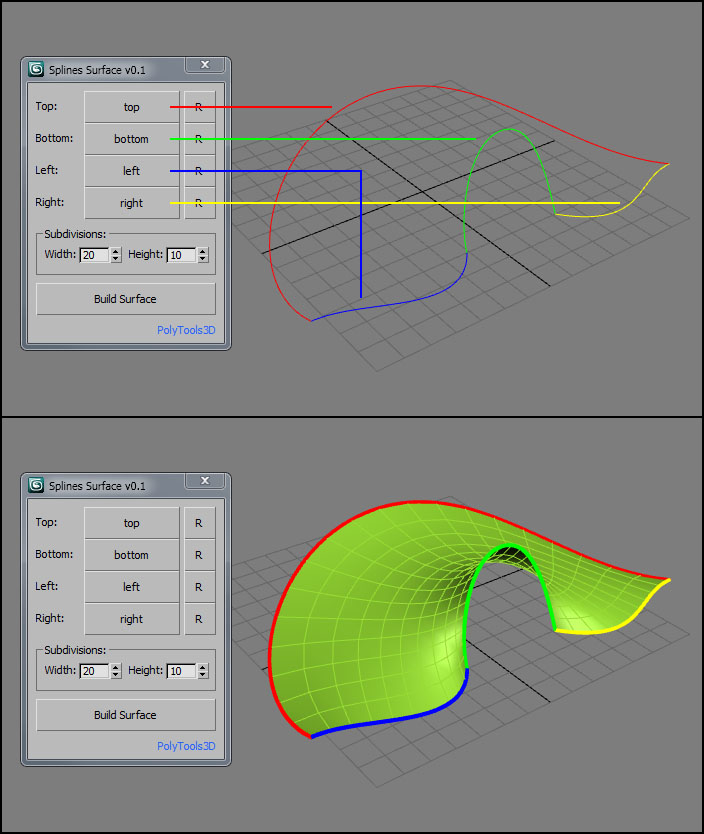
SplineSurface is a small tool that creates a quad surface based on 4 spline shapes.
Usage
Pick up your 4 splines, set the number of subdivisions and click on Build Surface. You can reverse the order of each shape with the "R" button.
Script
 By PolyTools3D · 2016-03-08
Tags: modeling, hard surface, spline surface, quad polygon
SplineSurface is a small tool that creates a quad surface based on 4 spline shapes.
Usage
Pick up your 4 splines, set the number of subdivisions and click on Build Surface. You can reverse the order of each shape with the "R" button.
This is the way to build quad surface. . . . .
sketchupmaster · 2026-04-27
Thank you so much for the script.
It is very easy to use and build a surface that is very fast and interactive.
Super script!
z140 · 2017-03-14
Many thanks. It's very easy and effect. Better then Polygon Creator. What is needed for organic modelling.
reminds me Rhino
visualizer · 2016-03-28
I am a Rhino pro and that reminds me the sweep command in rhino... specially sweep2....!
I guess the future of this would be...
two paths ( may be varying in profile ) and multi cross sections.... ! Would be a must tool for anyone i believe !
 pi3c3 · 2016-03-17
Nice and simple... :)
Do you plan to make it smarter?
Could be...
PolyTools3D · 2016-03-25
@pi3c3,
I am not sure what you mean by "smarter". If you mean if I will add more features, I would think I will probably do it.
There used to be some plugins to do this. When I posted it, my idea was to show a very simple algorithm (and so limited), that can do certain tasks pretty well.
What features would you like it to have?
pi3c3 · 2016-03-28
For example automated side/corner point recognition, or solving that task on more then one selection. Something like these. :)
Can't pick splines...
PolyTools3D · 2016-03-09
That's because the splines needs to be converted to SplineShape.
I've added support for lines now.
strange
bronius · 2016-03-09
Can't pick splines made by mine. Your's script splines is working..
Edit: I made four separate splines one-by-one - those are not pickable. :O
Then made rectangle, converted it to editable spline and detached to four splines. Now script is working - splines are pickable. Why? What is the difference?
How to...
PolyTools3D · 2016-03-09
There are 4 buttons labeled "Pick Spline". You use them to pick the "top", "bottom", "left" and "right" splines and then click on "Build Surface" button.
I've added an image to better picture it. Also, here is a little code that will recreate the splines shown in the image if you want to test it.
(
	/* Test SplineShapes */

	gc()
	delete objects

	sp = splineshape adaptive:true wirecolor:red name:"top"
	addnewspline sp
	addknot sp 1 #beziercorner #curve [-80, 0, 0] [-80, 0,  0] [-80,50,-20]
	addknot sp 1 #beziercorner #curve [  0,80,20] [-50,80, 20] [ 50,80, 20]
	addknot sp 1 #beziercorner #curve [ 80, 0, 0] [ 80,50,-20] [ 80, 0,  0]
	updateshape sp

	sp = splineshape adaptive:true wirecolor:green name:"bottom"
	addnewspline sp
	addknot sp 1 #beziercorner #curve [-20, 0, 0] [-40, 0, 0] [-20,5,10]
	addknot sp 1 #beziercorner #curve [  0,10,35] [-15,10,35] [15,10,35]
	addknot sp 1 #beziercorner #curve [ 20, 0, 0] [ 20, 5,10] [40, 0, 0]
	updateshape sp

	sp = splineshape adaptive:true wirecolor:blue name:"left"
	addnewspline sp
	addknot sp 1 #beziercorner #curve [-20,0,0] [-20,0,12] [-40,-25, 0]
	addknot sp 1 #beziercorner #curve [-80,0,0] [-60,0, 0] [-80,  0,45]
	updateshape sp

	sp = splineshape adaptive:true wirecolor:yellow name:"right"
	addnewspline sp
	addknot sp 1 #beziercorner #curve [20,0,0] [20,0,12] [40,-25, 0]
	addknot sp 1 #beziercorner #curve [80,0,0] [60,0, 0] [80,  0,45]
	updateshape sp
)
how?
bronius · 2016-03-09
How to pick spline?