

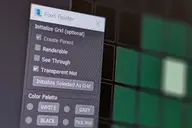


A spline based rig. An alternative approach to using PathDeform with more control over twist and scale.
1. Create a straight Spline - every vertex on that spline will be a helper to control the position
2. Run Script
3. Pick Spline
4. Adjust X Y Z to align the orientation of the box to your spline
5. Adjust width and length
6. Set twist helpers - this controls the amount of helpers to control twist and scale
7. Subdivisions - this controls the final resolution of your mesh
8. Press Go
Comments (9)
Comment policy
Can't create more than one splinerig
This script is very nice, however I have a problem.
I am not sure if it is me that use the tool wrongly or it's because it doesn't work properly in 3dsmax 2011.
I can create one splinerig just fine but as soon as I try to create one more I get errors.
What I tried is this:
1. choose the first spline and press go (it works perfectly)
2. I select the next spline
3. I press "set new"
4. I get the error 'No ""+"" function for undefined'
I also tried to not "set new" put that results in another error where it generates some helpers but not correctly and it gives the error 'No "delete" function for undefined'
sorry
I never really finished this script. Maybe you can create the splines in different scene and then merge them together?
This works
Yes that is possible, thank you.
And thank you for your work on this script.
Thanks Daniel really big help with adding the skinwrap, I now have full control over my sweep. :-D
АФИГЕТЬ, ДВА РАЗА КУ
Great script, just one addition I'd love to see.
I've been using your script as a rig for controlling wires on a set of earphones. I've added a sweep modifier to the spline stack which gives me most of the control from your original script but not the ability to rotate the sweep mesh. Is there any way to add all functionality as you have for the box to a sweep? Allowing you to have any shape as the base object.
@bandyandy: via skinwrap you can use my box to control your sweep object. greetings
nice script!
do you think its possible to update/modify it, so that an array of objects could be used as well?
imagine creating 100 boxes, and using these inside your rig, and using any amount of helpers inside to deform the boxes seperately?
thanks! not sure if I understand correctly. your idea is to enable the script to pick any geometry (like 100 boxes) and then skin it? that would be nice, but honestly beyond my scripting abilities :(