another script for today :)
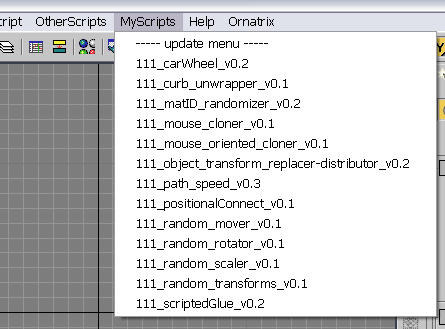
this script scans a folder on your PC and creates a menu in 3dsmax's interface with all scripts it finds there (you must specify the path to scan in the script by yourself). all you need to do with your new script is to place it in that folder, and you will be able to access it in 3dsmax interface. no macroscripts support.
Script
smart menu
 By 111 · Credited author: Andrei Kletskov (111) · 2007-04-09
- Version
- 0.1
- Votes
- 42
- External download
- External download
Tags: menu, max, 3dsmax, 111, easy, access
Description
Comments (17)
what to do with .MCE ?
Custom · 2013-12-31
Thank you for this "candy" )
My experience:
I've tried to edit script as suggested by Jennyltd, but no luck >>> they (*.mce scripts) opens in editor + I get "Maxscript macroscript error exeption" messages.
MaxFiles
 johncrawshaw · 2013-08-06
Hi, I Really like this script and use it for my scripts at the moment. I I was thinking would it be able be converted to use max files.
I've changed the file type in the script and it populates with max files. The only problem is that it opens in maxscript editor. Any ideas on how to open the max file? Cheers, John
some notes
111 · 2011-11-11
1 - macrosripts are not processed by this script, only regular scripts, because it makes its own macroscripts from regular scripts. You need to edit a macroscript you want to use, just remove macroscript definitions with brackets.
2 - be careful while messing with menu structure , it is easy to broke main 3dsmax menu.
Nice work
 jannyltd · 2011-06-09
I let myself editing a bit this
for the "files =" I let it select *.m* so it finds macros and mse scripts and then
str = "macroscript smartmenu" + (ii as string) + " category:\"smartmenu\" buttontext:\"" + (getFilenameFile i) + "\" (filein \"" + i + "\")"
so it executes them from the macros. I hope you find it useful
Also put the script itself in the directory for the menu so I can start it and update the scripts without having to restart max ;)
ladyluck777 · 2011-06-09
I put some of your code under that line. Now I get on start up
Unable to convert: undefined to type: FileName <<
Sorry I dont know how to code. :(
v
files = getFiles "C:\Scripts\*.m*"
sort files
str = "macroscript smartmenu" + (ii as string) + " category:\"smartmenu\" buttontext:\"" + (getFilenameFile i) + "\" (filein \"" + i + "\")"
------------------ deleting previous menu
if ((menuMan.findMenu "MyScripts") != undefined) then
sorry for my english %)
 ibm · 2011-06-09
ladyluck777,
You forgot to put (")
files = getFD C:\Scripts"
Should be so -> files = getFiles "C:\Scripts"
Ok I'm stupid girl. Now
ladyluck777 · 2011-06-09
edit
Ok I'm stupid girl. Now a
ladyluck777 · 2011-06-09
edit
Ok I'm stupid girl. Now a
ladyluck777 · 2011-06-09
triple post. sorry.
Max listener says ok. But I don't see any script under Myscript menubar.
sorry for my english;)
ibm · 2011-06-09
Hello, ladyluck777
problem in the path to the folder "files = getFD C: \ Program Files (x86) \ Autodesk \ 3ds Max 2011 \ execs "- move your folder \ execsv another place where there is no Program Files (x86) - (x86) - causes an error
**my tests were 3d max 2009 64 bit
Thanks for the reply :DI put
ladyluck777 · 2011-06-09
Thanks for the reply :D
I put new path
files = getFD C:\Scripts"
but I get this error
-- Error occurred in anonymous codeblock; filename: C:\Program Files (x86)\Autodesk\3ds Max 2011\scripts\startup\111_SmartMenu_edited.ms; position: 539; line: 17
-- Syntax error: at bad, expected
-- In line: files = getFD C:\s
scan path
ladyluck777 · 2011-06-09
Hi, I tried to install this and I'm getting an error on start up. I edited the path in notepad to this
files = getFD C:\Program Files (x86)\Autodesk\3ds Max 2011\execs"
This being the directory of my collected scripts.
C:\Program Files (x86)\Autodesk\3ds Max 2011\execs
Anyone please help
Fantastic Script!
 Ace-Angel · 2011-05-30
I must say, it's useful like...well, whatever you want to say, it's useful!
shopkeeper · 2011-05-30
Excellent! Just what i've allways been looking for. Thank you very much.
yhcnils · 2009-09-01
Wow, Never seen this before.
Excellent tool! +1
 frnkcrnk · 2009-08-28
I have been using this since a while. Highly recommend for anyone who uses lot of scripts from scriptspot.com .
free-agent · 2009-08-27
cool like sketchup