
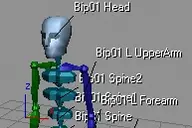

Displays a small RGB icon at each bone's pivot point to indicate the local coordinate system; useful for adjusting bone orientations - for example.
View Example Image
showBoneAxis
Downloads
Version 1Listed version
Listing updated
Visit author’s download pagescripts.breidt.net
- 3ds Max compatibility
- See original listing claims
Community compatibilityNo compatibility reports yet
No reports yet for the available releases.
Community reviewsNo reviews yet.
Listing details
- Version
- 1
- From original requirements
- 7, 6, 5
- Original version requirement
- 7; 6; 5
- Author’s update date
- Legacy votes
- 9
- Listing created
- Homepage
- http://www.breidt.net
How compatibility works
Compatibility comes from the author’s supported range or requirements in the original listing. A tested version records what the author tried.
“2020 unconfirmed” in the catalog means support for 3ds Max 2020 is still unknown.
Community reports record successful tests on specific releases.

Posted by
Martin Breidt
Description

Setup & notes
Installation:
Run the script - then install the macro 'showBoneAxis' from the category 'MB Tools' into a toolbar - a quad menu - a hotkey or the menu bar
Known limitations:
Axis icons will be drawn outside of the safeframe region
Run the script - then install the macro 'showBoneAxis' from the category 'MB Tools' into a toolbar - a quad menu - a hotkey or the menu bar
Known limitations:
Axis icons will be drawn outside of the safeframe region
Comments (0)
Comment policy