•••••••••••••••••••••••••••••••••••••••••••••••••••••••••••••••••••••••••••• VERSION 1.6
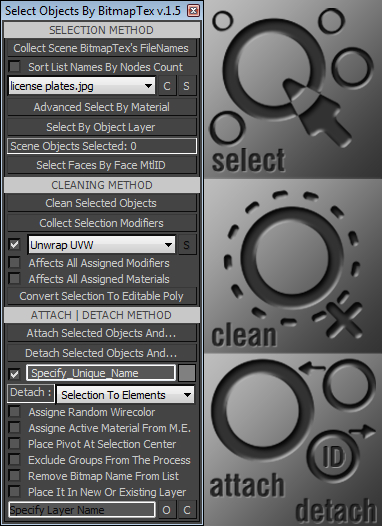
With this tool you can quickly perform certain operations that normally require more time to perform, such as:
. Selecting all scene objects by choosing a specified bitmap texture used in the current scene file. >>>
. Selecting objects with the same material as the first object in the selection.
. Selecting all scene objects by choosing a specified modifier from the other objects.
. Cleaning all unwanted modifiers or materials from selection.
. Attaching or detaching objects with given options.
Script
Select Objects By BitmapTex
 By barigazy · Credited author: Branko Živković · 2012-05-25
- Version
- 1.6
- Version requirement
- 2010+
- Date updated
- 2012-05-26
- Votes
- 17
Downloads
- bga_selectobjectsbybitmaptex_v.1.6.ms — bga_selectobjectsbybitmaptex_v.1.6.ms20 KB
- bga_selectobjectsbybitmaptex_v.1.5.ms — bga_selectobjectsbybitmaptex_v.1.5.ms20 KB
Tags: selection tool attach detach layer material
Description
Additional Info
••••••••••••••••••••••••••••••••••••••••••••••••••••••••••••••• Usage:
All commands and options are self-explanatory.
If you have problems or questions please post them on this page.
••••••••••••••••••••••••••••••••••••••••••••••••••••••••••••••• Update: [version 1.1]
-> Fixed some minor bugs
-> Optimized code
-> Added attach method (works with geometry objects only) with options:
...#1: Specify new name for attached object
...#2: Auto assigne material from the Material Editor (active mtl slot)
...#3: Place pivot at center of newly attached object
...#4: Automatically remove the texture filename from dropdown list
...#5: Add newly attached object to specified layer
NOTE: If the name (from edittext field) matches the layer name (from Layer Manager) then new object
will be added in that layer else it be placed in the new layer (with name from edittext).
••••••••••••••••••••••••••••••••••••••••••••••••••••••••••••••• Update: [version 1.2]
-> Improved performance and code optimizations
-> New options:
...#1: *Advanced Select By Material* (perform searching inside groups)
...#2: *Convert Selections To Editable Poly* objects
...#3: Select all objects with specified modifier
...#4: Added cleaning method (for unwanted modifiers and materials)
...#5: Added *Detach* operation with some options
...#6: Object wirecolor colorpicker
...#7: *Assigne Random Wirecolor* when perform Attach | Detach operations
...#9: *Exclude Groups From The Process* option
NOTE: Attach | Detach operations works only with Editale Poly types of objects.
Detach operation not supports options:
-- *Exclude Groups From The Process*
-- *Remove Bitmap Name From List*
••••••••••••••••••••••••••••••••••••••••••••••••••••••••••••••• Update: [version 1.3]
-> Code optimizations
••••••••••••••••••••••••••••••••••••••••••••••••••••••••••••••• Update: [version 1.4]
-> Improved detach method (now supports multiple selected objects)
-> Also you have two new options (radiobuttons):
...#1: *Detach Selection To Elements*
...#2: *Detach By Face Material ID*
NOTE: All objects that have only one material ID assigned will be excluded from process.
...#1: *Sort List Names By Nodes Count* (sort texture list by greatest number of assigned textures first)
NOTE: if this option is not checked then list will be sorted alphabetically.
...#2: Added button for cleaning the texture dropdown list.
...#3: *Open / Close Layer Manager Dialog* checkbutton
...#4: *Clean Empty Layers* button
••••••••••••••••••••••••••••••••••••••••••••••••••••••••••••••• Update: [version 1.5]
-> A few bugs fixed
-> New options:
...#1: *Select By Object Layer* (select all objects that are placed in the same layer as selected object)
...#2: *Select Faces By Face MtlID* (select all faces of EPoly that are used the same face ID as selected face)
...#3: *Detach Types* dropdown list (replaced radiobuttons)
-- *Selection To Elements*
-- *By Face Material ID*
-- *Selected Faces* [NEW] (supports multiple selected object with already selected faces)
NOTE: You can use this (last) option in combination with *Select Faces By Face MtlID* button.
••••••••••••••••••••••••••••••••••••••••••••••••••••••••••••••• Update: [version 1.6]
-> New option:
...#1: *Assigne Sub-Material Name* (every detached object will have sub-material name)
••••••••••••••••••••••••••••••••••••••••••••••••••••••••••••••• Requested: by asymptote
Comments (37)
Goods
fxkim · 2022-03-08
Detach by Material id
good scripts
One of most amazing scripts around, but ?
hansolocambo · 2020-02-13
Very well done with a nice UI and all. Damn impressive mate. Thanks !
I'm facing a problem that of course can be solved by hand, but on hundreds of textures it takes a lot of time :
I have a mesh with hundreds of parts and about a dozen different Bitmap used. But it's been auto generated by a software that creates one Standard material for each object even if 50 more objects share the same bitmap. So thanks to your script, I can select all those objects and, by hand, assign the same material/bitmap. But I was excpecting the "Clean Selected Objects" to do that automatically which it does not.
Could you please advise ?
Thanks ;)
barigazy · 2020-02-14
"Clean Selected Objects" works on selected objects.
You have 3 options ie checkboxes. So you can remove the specified modifier from selection, all modifiers from selection and all materials from selection. Just check one option.
Edit mesh
stanley_asbeek · 2015-08-24
Hi,
Your script looks great, unfortunately it doesn't work with edit mesh objs.
I often work with object that can't be converted to poly and need to stay as mesh. (otherwise the geo wigs out)
Would it be possible to get this working with edit mesh?
Thanks
Stan
Help me
Nicholas87 · 2014-08-05
I hope Guy can make tutorial by video to introduce this Plugin's function ,Thanks so much
barigazy · 2014-08-05
This tool is pretty much self-explanatory. Maybe someone have free time to make video for you
 Wilbert · 2014-08-04
With me on Max 2013 x64 the bitmap textures will also not load into the dropdown box. No error messages. 'Collect Scene BitmapTex's FileNames' does nothing.
barigazy · 2014-08-05
Send me test scene and I will check tomorow
Great
ccrusher · 2013-03-31
Thanks a lot for this extremely handy script !!
I am not familiar with MAXScript, but is it possible to get some automation to it ?
My suggestion would be:
Collect BitmapTex-> for each entry in the list do for example select, attach and clean materials until the list is done.
It would be a huge timesaving function for our workflow.
Thx
barigazy · 2013-03-31
Yep.It is possible. Are you want to attach all objects that share same textures (from any map slots) and then remove material from newly attached object or jus from script list?
ccrusher · 2013-04-01
Wow, fast response.
I actually ment just to remove the entry from list.
Cannot populate texture list in 2013
kino · 2012-10-22
I have max 2013 64-bit and the problem is that "collect scene bitmaptex's filenames" button does nothing. There is even no error message in maxscript listener. Any ideas?
With 2012 64-bit script works just fine, on a different computer that is.
barigazy · 2012-10-22
I just test the script on max2013x64 and works very well.
 asymptote · 2012-10-09
no worries, i didn't realize it would be a big job.
thx
asymptote · 2012-10-09
Cool, thanks for the update, is it possible to assign the individual functions to hot keys/buttons rather than launch the UI ? So i can make my own toolbar of most used functions.
thx
barigazy · 2012-10-09
Then for each operation would have to make a different macroscript.
I made this scipt on your request but I think it would be unnecessary in this case to chopping main code. Sorry.
If you have another idea for this script, then I'll take that into consideration.
 miauu · 2012-09-09
delvpier, put the AVG in PLUGINS directori inmaxRoot folder.
I've just test it on max9 32 bit, and the SELECTION and CLEANING METHODS part of the script works. Sometimes n error occures, because Branko uses container, which is not a part of max9, so be aware.
You're right about about AVG
delvpier · 2012-09-10
Yes indeed, it was my mistake. I put AVG library in Plugin folder and now it's working in Max 9 32bits.
Thanks for your support and for all your scripts.
miauu · 2012-09-06
delViper, do you have AVG extension installed? The appendIfUnique is part of this extension( not in the standart max9 installation). So, install AVG(attached below), unzip and copy the proper,32 or 64 bit. dlx file to maxRoot - plugins folder, restart max and try the script again.
Attachments
- avg_dlx_900.zip — avg_dlx_900.zip226 KB
barigazy · 2012-09-07
Thanks Kostadin for the support.
Not working in Max 9 32bits
delvpier · 2012-09-08
In fact, I had already AVG Library. I tried again but no luck.
Maybe it is because of a wrong installation of AVG ? I put it in stdplugs folder... am I wrong ?
I can do without it by exporting to Max 2013 64bits (I've it also) but it is quite frustrating to have to switch all the time between the two versions...
Is it possible to adapt it for 3ds Max 9 ?
delvpier · 2012-09-06
I'm using Max 9, importing ripped frames with 3DxRipper and so I get several objects, each with his own material even if they use the same bitmap as diffuse. I love your script but I get this error in Max 9 :
-- Error occurred in b loop; filename: C:\Program Files (x86)\Autodesk\3ds Max 9\Scripts\bga_selectobjectsbybitmaptex_v.1.2.ms; position: 5869
-- Frame:
-- b: Map #47:Bitmap
-- appendIfUnique: undefined
-- called in btn_collb.pressed(); filename: C:\Program Files (x86)\Autodesk\3ds Max 9\Scripts\bga_selectobjectsbybitmaptex_v.1.2.ms; position: 5905
-- Frame:
-- bmptexArr: #(Map #47:Bitmap, Map #58:Bitmap, Map #59:Bitmap, Map #60:Bitmap, Map #3:Bitmap, Map #53:Bitmap, Map #62:Bitmap, Map #63:Bitmap)
>> MAXScript Rollout Handler Exception: -- Type error: Call needs function or class, got: undefined <<
So, is It possible to get it working in Max 9 or to give just the code to collect all bitmaps names in scenematerial and select all object corresponding to one bitmap ?
Thanks for your work
barigazy · 2012-09-06
Sorry but i not have installed max9.I curently use max 2013x64
version 1.6
barigazy · 2012-09-05
Requested: by Gabriel G.
asymptote · 2012-06-02
Wow I take a few days off, and when I come back there are 3 revisions, from a simple request, this is turning into the "must have" tool for importing scenes.
Many thanks for the revisions and updates/additions.
I will test them after this weekend, I live in the UK and have the Jubilee Celebrations to avoid ;)
Fantastic scripting again.
barigazy · 2012-06-02
Thanks asymptote,
For the next week I'm preparing another very useful update.
You are wrong, not only for importing scenes, but for "every day" use.
:)
Awesome!
 The Mind Forest · 2012-06-01
I was just looking for this feature in max the other day to select an object by material. I found in the Material Editor/Utilities menu an option to select by material. I couldn't figure out how it worked though, lol. Seems to just be a select obj by name function. This script looks like it might do the trick though.. Thanks for sharing!!!
barigazy · 2012-06-02
Thanks The Mind Forest,
Do you have any suggestion for the next update? :)
I already prepared a few options but new ideas are always welcome.
.
kimarotta · 2012-05-28
Yeah, this is a very good script man...
Thanks Barigazy for share this.
barigazy · 2012-05-28
Thanks,kimarotta
Just wait to see new version :)
Cheers!
What to do next
barigazy · 2012-05-26
Affter using this tool i suggest you to do some cleaning with
another great script by real08121985
http://www.scriptspot.com/3ds-max/scripts/cleaner
Awesome
Andriano · 2012-05-26
Your work is truly impressive. Thanks for this useful script.
Cheers!!!
Thanks andriano,Big Regards!
barigazy · 2012-05-26
Thanks andriano,
big regards!
asymptote · 2012-05-26
Awesome, you are they "time-saver" guy on Scriptspot, your work here is truly impressive.
A minor detail I noticed, is the script displays the number of objects selected as double that of what is in the actual scene.
thanks again.
Thanks, asymptote
barigazy · 2012-05-26
I try to fix that bug.
Later i will post updated version with some new features.
Thanks asymptote, I added
barigazy · 2012-05-25
Thanks asymptote,
I added alphabetically sorting list items.
Cheers!
asymptote · 2012-05-25
This is fantastic, such a huge timesaver, Is it possible to sort the texture names alphabetically ? it's a bit tricky selecting the desired texture when they appear as a random list.
Thanks for your time and effort on this, and your fast reply.