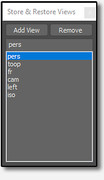
Simple tool for storing and restoring different viewports.
Script
Store & Restore Views
 By barigazy · Credited author: Branko Živković · 2022-07-23
- Version
- 1.5
- Version requirement
- 2017.1 +
- Date updated
- 2022-07-29
- Votes
- 2
Downloads
- bga_store_restore_views_v1.5.ms — bga_store_restore_views_v1.5.ms7.3 KB
Tags: viewport
Description
Additional Info
This tool supports different viewports: orthographic and non-orthographic
Top, Bottom, Front, Back, Left, Right, Orthographic, Perspective, Camera and Light
All data are saved with the *.max file (no external files), so it's very important to save
max scene after you finish adding or deleting viewport presets.
How it works: the process is self-explanatory and there is some tooltips on the buttons.
To restore any view, just use double-click on the list item.
update 1.1 (request for fix by titane357)
- fixed some minor bugs (restoring views after you reopen maxfile)
- now script save last Rollout position on the screen
update 1.2 (request for fix by Juliano Salazar Rocha)
- changed some code: before MAX 2022.1 there was no support to converting string value to point2 value
update 1.3 - code optimizations
update 1.4
- fixed bug reported by rachka
update 1.5 (request for fix by rachka)
- now the list is sorted in ascending order
Comments (27)
good work!
denisT · 2023-11-13
But I recommend removing the custom attributes feature.... it will make the tool simpler, safer, and thus more reliable.
barigazy · 2023-11-19
Thank you denisT,
I thought that the simplest solution for this case was to use CA,
but after your comment, my opinion changed. :)
I'm very interested in what your suggestion would be for this type of "scenario"?
 MAXTools · 2022-12-06
Stop sending viruses to Scriptspot!
You or someone on your behalf sends viruses in comments to other scripts.
You should stop doing this and delete all your comments with links to viruses.
You have been reported to the Scriptspot administration!
barigazy · 2022-12-06
I don't know what's going on. I never posted zip files, only *.ms.
Someone is playing at my expense. This is the second time this has happened.
MAXTools · 2022-12-06
You need to contact the Scriptspot administration so that they can resolve this issue! Otherwise, your account will be blocked forever and all your posts will be deleted automatically.
PS: Urgently change the password for your account!
barigazy · 2022-12-06
I hope ADMIN can fix this issue
titane357 · 2022-11-15
Hi barigazy !
Version 1.5 is blocked by my navigator. (trojan inside )
Any idea ?
barigazy · 2022-12-05
...
barigazy · 2022-11-22
Now is safe
MAXScript Listener Message
rachka · 2022-08-08
-- MAXScript Rollout Handler Exception:
-- Type error: Call needs function or class, got: undefined
-- MAXScript callstack:
-- thread data: threadID:5504
-- ------------------------------------------------------
-- [stack level: 0]
-- In k loop
-- Parameters:
-- k: 1
-- Locals:
-- node: undefined
-- vpd: undefined
-- vpdStruct: undefined
-- k: 1
-- FindNode: undefined
-- p3TOp2: undefined
-- Externals:
-- this: viewportDataAtt:viewportDataAtt
-- owner: undefined
-- ------------------------------------------------------
-- [stack level: 1]
-- called from getVPData()
-- member of:
-- Locals:
-- Externals:
-- this: viewportDataAtt:viewportDataAtt
-- owner: viewportDataAtt:viewportDataAtt
-- ------------------------------------------------------
-- [stack level: 2]
-- called from bga_srvRoll.open(); filename: C:\Users\Rachka\Downloads\bga_store_restore_views_v1.2.ms; position: 7228; line: 179
-- member of: Rollout:bga_srvRoll
-- Locals:
-- Externals:
-- cbx_views: RolloutControl:cbx_views in rollout:bga_srvRoll : ComboBoxControl:cbx_views
-- rootNode: SystemGlobal:rootNode : $
-- bga_srvRoll: Global:bga_srvRoll : Rollout:bga_srvRoll
-- owner: Rollout:bga_srvRoll
-- ------------------------------------------------------
-- [stack level: 3]
-- called from top-level
saved some views
rachka · 2022-08-08
I saved some views, saved the max file then I closed max and opened the saved file - this pops up:
MAXScript Rollout Handler Exception
Type error: Call needs function or class, got: undefined
(3ds Max 2020)
barigazy · 2022-08-08
post me what MaxScript Listener shows
rachka · 2022-08-08
-- MAXScript Rollout Handler Exception:
-- Type error: Call needs function or class, got: undefined
-- MAXScript callstack:
-- thread data: threadID:5504
-- ------------------------------------------------------
-- [stack level: 0]
-- In k loop
-- Parameters:
-- k: 1
-- Locals:
-- node: undefined
-- vpd: undefined
-- vpdStruct: undefined
-- k: 1
-- FindNode: undefined
-- p3TOp2: undefined
-- Externals:
-- this: viewportDataAtt:viewportDataAtt
-- owner: undefined
-- ------------------------------------------------------
-- [stack level: 1]
-- called from getVPData()
-- member of:
-- Locals:
-- Externals:
-- this: viewportDataAtt:viewportDataAtt
-- owner: viewportDataAtt:viewportDataAtt
-- ------------------------------------------------------
-- [stack level: 2]
-- called from bga_srvRoll.open(); filename: C:\Users\Rachka\Downloads\bga_store_restore_views_v1.2.ms; position: 7228; line: 179
-- member of: Rollout:bga_srvRoll
-- Locals:
-- Externals:
-- cbx_views: RolloutControl:cbx_views in rollout:bga_srvRoll : ComboBoxControl:cbx_views
-- rootNode: SystemGlobal:rootNode : $
-- bga_srvRoll: Global:bga_srvRoll : Rollout:bga_srvRoll
-- owner: Rollout:bga_srvRoll
-- ------------------------------------------------------
-- [stack level: 3]
-- called from top-level
barigazy · 2022-08-24
Mr @rachka,
sorry for delay, I was busy with work last two weeks.
I managed to find and remove issue, please let me know is it work for you now
Cheers!
working fine now but
rachka · 2022-08-28
Thanks barigazy! Seems to be working fine now. I made it a macro and it worked. I noticed one thing: if you name the view like 1, 2, 3, 4 etc. the script puts 1 and 2 properly, after that it puts 3, 4, 5 etc at the top of 1, 2 and if you continue with the naming it puts 10 between 6 and 7, then 11 between 7 and 8, 12 between 8 and 9, but after 13 it seems to put them in the right order although 1 and 2 continue to be at the bottom. Something with the order in the list is not right. Another thing is that if you remove all the views (right click) and start naming the views again with one digit like 1, 2.. etc. it does nothing but as soon as you type two digits like say 12 or 25 it returns all saved views. And if I'm not mistaken it does it more often than not i.e. sometimes this doesn't happen and everything works fine. Sometimes it even returns the views after typing 4 but next time if you type 4 it does nothing. There is a script from DeadClown here: https://www.scriptspot.com/3ds-max/scripts/save-restore-views which is very good-looking with its horizontal thumbnails (unnamed though) and handy especially the modification in the comments done by 3dwannab but unfortunately it seems like it does not remember the saved views after closing max and reopening the scene and it does not remember the saved zooming extents but only returns the saved view with the current zooming.
Cheers!
barigazy · 2022-08-28
Script is updateted to version 1.5
@rachka
If you use 1,2,3 ... , the first double-digit number, like 10 for example, will be sorted after number 1
So, if you plan to use numbers as view names, for better sorting use 01,02,03 ...
Script is updated to version 1.5
rachka · 2022-08-29
Thank you barigazy!
barigazy · 2022-07-29
script is updated to version 1.2
titane357 · 2022-07-25
Thanks. But it would be great if it save view in file.
barigazy · 2022-07-25
That's not the problem, but what would be the purpose of that file?
All view data are stored in custom attribute which is connected to 0 layer.
Every time when you open the file, the view data will be there.
titane357 · 2022-07-26
Hi,
Sorry but I tested the script in max2022, french win 10.
I create some views ( I verified it works ) I save the file.
Close it. Then re-open, script window is empty... :-(
( another one : position window is always centered )
barigazy · 2022-07-27
Thanks @titane357 for checking this out.
The tool is updated to version 1.1.
Now everything should work properly.
titane357 · 2022-07-28
Thanks, it works fine now ! :-)
 JokerMartini · 2022-07-26
Why not just create a camera if you want the view to be saved? It's the same thing and saves with the file
barigazy · 2022-07-27
One of the main purposes of this tool, at least for me, is for keeping (saving) specific positions during modeling of large architectural scenes.
In this way, endless zooming and scrolling is avoided.
Modeling in camera view is very annoying and adding additional cameras (to store specific position) in the scene which already has a tone of cameras for final render, IMO it's not so smart move.
;)
I need to talk.
zahid hasan · 2023-11-27
Hi, I sent an email through your site. didnt get any reply.
Could you confirm pls.
zahid2895@gmail.com
Simple...
trick · 2022-07-24
....but oh so neat :)