

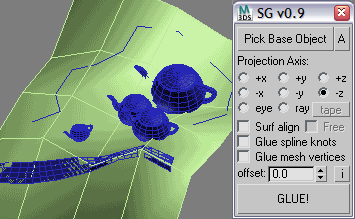
this scripts does the same thing as a free plugin GLUE does, namely it glues objects to a surface. i've written this sript because i was tired of necessity of looking for new recompiled plugins with every new max release. and this script can do a bit more than original: it can align glued objects to normal, and you can glue along any vector, defined with tape helper object. more with newer version - vertex projection, eye ray, more precision
Comments (25)
Comment policy
Script as modifier
Would it be possible to make it a modifier ?
I often haven complex terrain, on which i place proxies.
In the working process it would be genious to have a modifier keeping the objects on level with the terrain....
THX
Thank you, Good job!
x- and y-coordiantes moved when using ""Surf align"
Hello Andrej, thank you very much for your awesome script. Sadly I have a litte problem. When I hit "surf align" the x- and y-coordinates are moved a litte bit from the one of the original spline. When I hit "Glue spline knots" additional all is fine with these coordinates. But in that case the pivot remains in the position of the original object. What can I do? I want a accurate projection of the z-coordiante to the surface while the x- and y-coordinates should be exactly the same as before and he pivot x-axis should be orientated along the axis of the new generated spline. It would be fine if you could give me some advice. Sadly I found no script which does these step seperatly (aligning the pivot). Thanks in advance.
this move pivot z
$.pivot.z = $.center.z
Amazing tool,
saves hundreds of hours of time
Thanks a lot <3
Can you add spline interpolation like the Glue utility has? I'd like to use your script, but it lacks this critical feature.
what do you mean?
subdividing the spline? you can do it with Spline Normalize modifier before glueing your spline.
multiple or selection set surfaces
Great Script Andrei, Is it possible to have base object to select a list of surfaces option ?
Andrei, Thanx very much for this script. Looking forward to new features.
squeakybadger, use Macrotize script to do that.
http://www.scriptspot.com/3ds-max/scripts/mindflow-macrotize
new version 0.9
http://andklv2.narod.ru/maxscripts/111_scriptedGlue_v0.9.ms
new features:
- offset (positive and negative)
- automatic selection of ground object (closest along shooting ray)
- keeping front direction of glued objects with "Surf. normal align" option (now objects do not rotate randomly)
- UI changed to be more compact
is it possible to install this as a macroscript?
Thank you mate, awesome script you got here.
great script, just one small request: use the glued object local axis to project.
also, being able to select multiple base objects would be handy :)
:-)
How about making it animated by using a Scripted Controller? That would be really great!
hm... the script processes EVERy object in selection, if you want to glue a group of objects, perent all of them to a dummy (or simply have a parent for all) and then just glue the parent object, all other will follow the parent.
and there is a newer version which supports perspective views and cameras
--- 111 ---
I tested the script on a forest terrain by selecting ground plane and approximately 180 trees (each tree is agroup ; all 8 variations).What happens is that it uses only 1 variation out of the 8 + some elements of the group depart away from the others.Is it possible to work with groups and how ?
Very good! I need it. Thank you very much!
Nice tool !!
If only there was a Scatter tool like the native Max Scatter that would support multiple source objects and the "Distribute Using All Face Centers" option ;) Filling a theatre with people looking in the direction you want would be a breeze.
this is great script!! woow!! i`ve been loking it for a while!
yeah~ good
it is just TWO new words in the code :)))
--- 111 ---
Wow. Less than 2 hours later and a useful feature added. Great job!
updated to version 0.3
now it supports undoing (some limitations with spline knots)
http://andklv2.narod.ru/maxscripts/111_scriptedGlue_v0.3.ms
--- 111 ---
Good but can't undo.