ScriptSpot

Script

Render 3D

By thedour · 2010-04-17

Version
1.5.1
Version requirement
3ds Max 9 (or higher)
Other software required
.Net Framework 2.0 (or higher)
Date updated
2010-10-19
Votes
210
Download
Download
Description

Simple script for rendering in 3D (Anaglyph / Polarized / Stereo Pair)
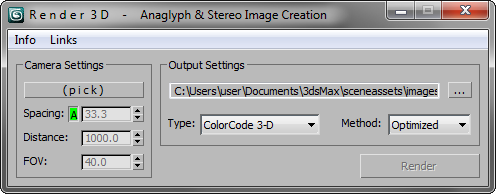
• Supports ColorCode 3-D (Amber/Blue), Red/Cyan, Green/Magenta, Polarized, Stereo Pair, and separate Left / Right

NEW Choose from various Anaglyph Methods (Color, Half Color, Optimized, and Gray)

NEW Super fast compositing process

• Animated Output (Image sequence)

• See "Info" for general instruction

While working on a game that was going to be in 3D, the studio was doing a lot of research on various stereoscopic 3D methods. We were dependent on programmers to tweak values in engine every time we wanted to test new settings (both camera and color). I created this tool to put the power back in the artists hands.


Intended for rapid testing, the output images could easily be compared side-by-side to help us choose the best 3D settings for our game. In my research I discovered there is a large subculture of people who are WAY into anaglyph imagery, so I thought I'd release this to the public to benefit all the anaglyphers out there.


Special thanks to the folks at CGTalk for reviving this project through their interest and feedback.
 

Additional Info

*******IMPORTANT:  NEW Installation steps for v1.5 and up ******
If you are UPGRADING from an older version:   go to MAXROOT\ui\macroscripts\  then DELETE "Render3D.mcr" and "Render3D.mse"
___________________________________________________________
• Download & unzip/unrar to MAXROOT\scripts\startup\ **MUST INSTALL HERE**
• In Max: Customize > Customize UI > Toolbars (under "TheDOUR" category) > drag to a toolbar to create a button
• Pick Target Camera, adjust settings, choose output location and settings; render
• The result is a composited stereoscopic image using the chosen anaglyph
• You may want to invest in some 3D glasses 😎

New in version 1.5.1:      *Please note the new installation info above*
• Anaglyph METHODS!   (Color, Half Color, Optimized, and Gray)
• Removed 'Saturation' settings in favor of new Anaglyph 'Method' controls *see above*
SUPER FAST new compositing process (written for v2.0 but you are getting it early!) 
• Fixed error with interaxial/convergence distance when compositing anaglyphs (All v1.5 Anaglyphs will be wrong... sorry 😳)

previous fixes:
• Fixed render aspect ratio not being reset when rendering a sequence
• Fixed bug where some renders were turning out all black
• Added new 'Type' option: LEFT / RIGHT (saves images separately)
• Fixed error "b in undefined" in 3ds Max 9
• Fixed various 3ds Max 9 compatability issues
• Fixed render width not being reset after rendering Stereo Pair
• Fixed error with animation not resetting camera position
• Fixed Green/Magenta being reversed  **thanks to dmd78
• Fixed error that occurred on first use (when no camera selected)
• Added support for Vray cameras
• Added type: Polarized
• Lowered numeric value minimums for camera settings
• Added support for 3ds Max 9 - 2011 (and you may get lucky on older versions too)

KNOWN ISSUES:

• Animated sequences using Stereo or Green Magenta can cause left image zoom to be thrown off.  (fixed with v1.4.5)
• Legacy "composite" features (Max 9 & 2008) are causing a few pixels on the right side of images to not be composited (only from right image) (fixed with v1.4.6)

TO DO List:

• v2.0 coming... this Fall ...sometime

Attachments

Tags: render, red, Cameras, VRay, camera, 3d, Blue, stereoscopy, anaglyph, stereoscopic, stereo render

Comments (80)

Deselecting the Camera

BionicDance · 2013-07-05

After I've rendered, I find that I cannot deselect the camera by any method, and thus cannot manipulate any objects in the scene to, say, revise the picture if it didn't quite come out right.

What's going on, here?

Okay, so I got it working.

BionicDance · 2013-07-05

Turns out you have to run the script from within MAX; putting it in "startup" sounds an awful lot like it'll just run at Start-Up, but that's not the case.
Might wanna put that in the instructions.

"TheDour" does not exist as a category

BionicDance · 2013-07-05

I've installed the files as instructed, but when I go to Customize > Customize UI > Toolbars, "TheDour" is not an available category.
Why not? What am I doing wrong? I see that some other people have fixed this, but they don't say how.

"TheDour" does not exist as a category, Render 3d glasses

jenswe · 2013-10-09

I put the two macroscript files and the dll file in the startup folder but also the two macroscript files in 3dsMax2014/MacroScripts

After that i found the category "theDour" with the render 3d button.

Black Renders

ckhajadorian · 2013-02-17

Hi Andrew,

When it finishes rendering all I am left with is two black images when I try and render.

I am using 3Ds Max 2012 and Vray adv 2.00.03

Any thoughts?

max 2013 x64 ok

lsbernal0 · 2013-01-26

The best resource I´ve found ever !!!
it still brings black screens if you modifie the scene after using it, but anyway...
Fully working on max 2013 x64.
joust follow the previews posts instructions.

.net framework

bdylan4771 · 2012-12-11

I get the same error as Bleeding_me.. I am using max design 2013 64 bit. Seems the script is not compatible with .net framework. Is there a workaround or fix?

Attachments

Problem when loading Max

bleeding_me · 2012-12-11

Hello,

I have a problem with the script. When i load Max i get the error showed in the image attached. I tried put the following code to the 3dsmax.exe.config file but still doesn't work.


  <runtime>         
    <loadFromRemoteSources enabled="true"/>
  </runtime> 

I have 3dsmax 2012 32bit. Can anyone help me ?

thanx,
Bleeding_me

Attachments

no display TheDour in category after install

bioclimatic · 2012-11-17

hello ! ihave the same problem that Aldelob
i dont't see theDour in the category under Customize > Customize UI > Toolbars.
i tried under max 2013 and max 2012.
same thing.
i take the three files, dll,mcr and mse in scripts/startup.
correct ?
regards

problem solved

bioclimatic · 2012-11-17

re hello.
i downloaded from your site.
and so it's working perfectly !
great job !
thanks a lot !
regards

how to stop rendering sequence ?

bioclimatic · 2012-11-17

i don't know stopped a rendering sequence .
how to do ? oups ! esc for cancel ... sorry.

and about State Sets... and Netrendering ?
best regards

JokerMartini · 2012-05-22

Any word or updates on an update?

SUPER

spirobg · 2012-05-14

Man God bless you this is amazing everything is working perfect. I love you.

Thanks spirobg!

thedour · 2012-05-14

 Thanks spirobg!

PERFECT

spirobg · 2012-05-14

Man Good bless you this is amazing everything is working perfect. I love you.

Not working in Max 2012 64bits

albelop · 2011-12-15

Hello, I use the 64bit version of 3dstudio Max 2012, and I can't see any "TheDOUR" category under Customize > Customize UI > Toolbars. I've checked the folder where I copied the files is right, and even deleted them and reinstalled; still not working. Is anyone else having this problem? How can I solve it? Is there any way to access the buttons through MaxScript, even if I can't show the "TheDour" menu?

Thanks!!

Alberto.

Solved.

albelop · 2011-12-15

I solved it. If you run the scripts from Max, you get the "TheDour" category. It's the "startup" which seems that is not not working.

holycause · 2011-08-10

got an error at the end of the rendering,

no ""display"" funtion for undefined.

i m using max 2011 X64.

More Info please...

thedour · 2011-08-15

@holycause
I am unable to get the error you mentioned.
It seems like the image location you were saving to couldn't be opened.

What path/folder were you outputting to? Try something like C:\ and see if
it actually works (that will give be a better idea of what is going wrong)

Also, check to see if the bitmap is actually created in that folder but just
failing to display.

Last question I had, where you using Left/Right type or red/cyan etc.?

Let me know about the questions above and I'll try to help resolve the
problem.

Target Only

thedour · 2011-05-03

@hockley91 -
Yeah, that is outlined above in Additional Info -- "• Pick Target Camera, adjust settings, choose output location and settings; render"

v2.0 is in the works and no longer has that limitation  🙂

Thanks for your patience.

Can only get "target camera's" to work

hockley91 · 2011-05-03

I am using 3DS Max Design 2011 and the only camera's I can utilize are target cameras. "Free" cameras cannot be selected. At least this is my experience right now with the plugin.

3D POLARIZED samsung 3d

montenegro · 2011-01-26

Good!

I have a samsung led tv series 8000 40-inch 3D and want to test this script on it and i have to use polarized 3d! Can someone help me?

So close to perfect!!

longerlife · 2010-11-29

Oh if only the script paid attention to the camera's rotation this would be perfect!!

Please can version 2 orientate to the camera so that I can have angled shots without having to rotate the entire world....

Thanks for the efforts!

Optimized issues

dmd78 · 2010-10-30

Hi, dour. Perhaps it is user error, but I am not getting the optimized anaglyph results I am expecting. They look more like default anaglyph. Still great plug-in, look forward to more and more and more. Thanks.

pifitas · 2010-10-26

hey thanks andrew, rar file 31.63kb works fine now! :)
it also still working fine on max design 2010x64
nice job

still waiting for 2.0 ver

pifitas · 2010-10-26

Previous versions where working ok on max design 2010, so hope it can be easily fixed.
btw can you reupload rar file please, it's corrupted.
thanks!

ScriptSpot corrupting DLLs in zip files!

thedour · 2010-10-26

So apparently ScriptSpots file upload corrupts DLLs that are contained within ZIP files. (very odd and bad thing to have happen) I've now uploaded a RAR instead (which seems to not be messed up by the upload) Thanks for bringing this to my attention pifitas

Admin · 2010-10-26

That doesn't make any sense. There's nothing on the server that would decompress a ZIP but leave a RAR file intact. What if you try again? Maybe there was some bizarre net glitch that happened simultaneously...

No it doesn't make sense *shrugs*

thedour · 2010-10-26

I tried uploading again, but when I D/L it and try to extract: the DLL screams.
This is the same ZIP found on my personal website (which is not corrupted)
The only thing I've noticed Scriptspot uploader does for sure is convert the case to lower.   I had thought that may *possibly* be playing into it, so I created a new lowercase named ZIP and got the same results once uploaded.

Very odd indeed, especially because this is not happing to another one of my DLLs found on Scriptspot.

-- I don't mean to defame Scriptspot in anyway.   Let me know what you find Chris.

pifitas · 2010-10-26

hey, hello again andrew!
I want to try new version, but render3d.dll file wirhin rar is corrupted, also it shows:

-- Error occurred in anonymous codeblock; filename: C:\Program Files\Autodesk\3ds Max Design 2010\scripts\startup\Render3D.mse; position: 607; line: 5
-- Defined in encrypted script
-- Error occurred during fileIn in
>> MAXScript Auto-load Script Error - C:\Program Files\Autodesk\3ds Max Design 2010\scripts\startup\Render3D.mse Exception: -- Runtime error: dotNet runtime exception: Invalid directory on URL. <<

tested on max 2010design x64

Not designed for 3ds Max Design (at least not intentionally)

thedour · 2010-10-26

@pifitas - I've not created this with 3ds Max DESIGN in mind.  I don't have access to this version either, but if I can download a trial I may look into it for you. 

I will try to help if I can, but again it was never my intent to support DESIGN versions of 3ds Max. *Hopefully it can be an easy fix*

Okay, thanks

dmd78 · 2010-10-25

Should I set my units to something in particular?

It is fixed now dmd78

thedour · 2010-10-25

@dmd78 - That problem you were having was not a units issue after all, it was another problem that I fixed in v1.5.1   (Update if you haven't) 🙂

Very cool but...

artm · 2010-10-20

This is a very cool script, but when I try to do animation the max crashes with this error: "--Unknown System Exception--" The crash occurs during processing.

The scene is not too big, just under 500k polys, sometimes it renders 1 frame and crashes, other times it goes up to 9 frames. Hope there is some way to fix this error, otherwise, this script is really amazing, I only tried cyan/blue glasses and it works great for still renders!

Anything different?

dmd78 · 2010-10-19

Hi. So I just rendered a few and they are all coming out as though the interaxial is not scaling correctly. THere is about a 2 inch gap between the red and cyan shades on a 1920x1080 page. Perhaps I missed something but I thought it waa all auto. Any suggestions? Thanks.

Auto interaxial

thedour · 2010-10-19

This may not be scaling appropriately depending on your Units in 3ds Max. I'll do some testing.

Yessssssssssssssssss

dmd78 · 2010-10-19

sssssssssssssss!!! You rock, the dour. Loadin it now. Thanks again.

That is fantastic new

dmd78 · 2010-10-17

Really cool. You just made my day, month, and year with that news. Can't wait to test it out. Thanks!

Nodda yet, huh? Life needs a nap

dmd78 · 2010-10-13

Okay. Well, is there going to be any chance of an optimized anaglyph filter added? I have noticed a dramatic difference in the quality when using this.

Anaglyph Methods

thedour · 2010-10-13

@dmd78  -  Thanks for reminding me.  I've slowed down work on this, but may get to work heavily this next week, maybe I will make a release of the new image methods.  I do have 'optimized' (and others) tested and working on my new version, but not everything is finished yet.  I should be able to just release this change.

Black output

dav3design · 2010-10-09

Hi Andrew,

Thanks for writing this script except I have a problem.

When it finishes rendering all I am left with is a black image when I try and render an anaglyph image.

I am using 3Ds Max 2010 and Vray 1.5 SP3 I am rendering with GI and two scene lights.

Any thoughts?

Vray Errors

thedour · 2010-10-09

@dav3design - Lets see if we can figure this out, send me an email with the following info:
• Which Anaglyph type are you using?
• Were you using a Vray Camera?
• Were you doing a sequence or a single frame?
• Also, attach the Max Scene (or sample scene that gives same error)

@agang - Seems like you both may have related issues with Vray.  Can you email me this info:
• When you say "pixel ratio" are you referring to the image that is output, or do you mean 3ds Max's Rendering dimension?
• What verion of 3ds Max?
• What Vray version?
• What Anaglyph type are you using?
• Were you using a Vray Camera?
• Were you doing a single frame or an animation? 
• Can you also attach the Max scene, be sure to point out the name of the camera that gave this problem.

Thanks for reporting these bugs, I'll try to figure out whats going on once I get more info from you guys.

agang · 2010-10-08

After using vary renderer does not match the pixel ratio

agang · 2010-10-08

Good use, I ask you how to set the distance between left and right eye? Whether the figures that out, thank you
------Did not pay attention, I see

How to get 2 separate frame (left and right) renders?

hugodog · 2010-10-01

Hi,,

Thanks for your script. Have a question thou, I was trying to get 2 separate rendered frames for left and right cam. How do you do that?

I thought Stereo Pair should do it. But it only renders 1 frame...

So what is Stereo Pair for?

Thanks again,

Separate Left/Right

thedour · 2010-10-03

*EDIT* Separate LEFT/ RIGHT output added in version 1.4.6

@hugodog: Stereo Pair is where you cross your eyes and the image(s) will then pop out when they overlap from crossing --- http://en.wikipedia.org/wiki/File:1080par.jpg   🙂  
*sorry I didn't notice your question until now*

A.K.Gandhi · 2010-09-22

Hi Thedour really its great effort buddy.But it doesn't work with 3dsmax9 32bit.if possible please upload for max9 also
Thanks.
):------

ERROR with 3dsmax 9 SP2 32bit

A.K.Gandhi · 2010-09-28

Hi buddy everything is all right but during compositing the rendered images an error displays as; (--Unknown property:"b"in undefined)

dmd78 · 2010-08-30

so late august as in within the next 21 hours, 45 minutes?

thedour · 2010-08-31

:P

So life got in the way a bit. Lets push it back another month (to be safe)

mohdmistry · 2010-08-24

hey there everyone

this is the all waited answer to my 3d render capabilities in 3ds max.

thanks a million to you sir.

i do have a request though, in you upcomming release can you make it render in various polarized types?
like circular, diagonal, etc...?

plus is this goin to work on any monitor? and plasmas?

archiexelent · 2010-08-13

Hi.!How can I see this polarized mode? Which glasses: passive or active.... Monitor?
What kind of Polarization is: linear, circular, interlaced?
Thank you very much Andrew, and thank you, scriptspot community.

thedour · 2010-08-16

You are very welcome.

This uses interlaced polarization. I actually don't have polarized lenses and had added polarized at the request of another user :D So I'll be up front and say I'm not really sure what you need to view this.

hockley91 · 2010-08-12

Does this script work with 3DS Studio Max Design 2009? I can't get it to work. It starts the rendering process, but then it stops at the end and gives me this error message:

--Unknown property: "b" in undefined

thedour · 2010-08-16

With regard to Max Design 2009, I've not tested/designed for that. I'll try to see what differences it has, but I'll have to get a 30-day trial as I don't have access to that version of Max.

I believe "b" is referring to the blue channel of an image or the blue component of a pixel color. So that means it is most likely failing to composite the renders together. This gives me a good lead for now.

dmd78 · 2010-08-06

Any way to have v2 allow for use of the default "render button" inside Max? None of the render farms I have contacted (over a dozen) will allow the script because of the need to manually click the dialog box render button. Thanks

dmd78 · 2010-08-05

PERFECT!!! Great job on the fix.

---You can do this by animating the cameras target distance (either from the modify panel, or actually moving/animating the target node).----

True. The only problem is keeping the target box "square" on the target when the camera and the target box are moving. I will attempt to attach the target box to another target box's coordinates...or something similar. Thanks

EDIT....actually, it will probably work fine now. I believe the problem was one in the same.

dmd78 · 2010-08-04

Yeah, no prob. I will send some samples within a couple of days. But, quickly, is there any way to add a feature(or maybe there is a way to do this already in your plugin or max itself that you know of?)that can set a specific distance you want your divergence point to be away from the object at start and then have it auto adjust as the camera weaves in and out of the "comfortable" zone? I am doing layered imaging so I am only concerned with the "center" object in this regard. Thanks again

thedour · 2010-08-04

You can do this by animating the cameras target distance (either from the modify panel, or actually moving/animating the target node).

dmd78 · 2010-08-03

Hi. So I straightened myself out and can now take fantastic still images. However, the camera seems to falter when I put it in motion. Even after going over it every third or fourth frame or so to verify divergence correctness. Is there something eise that i am missing? Love this script, btw...I use it more than standard renders now, thanks

thedour · 2010-08-03

Great to hear! I'm making good strides on version 2. I'm rebuilding almost everything in the script, but would still like to look in to the problems you are getting. Could you send me an email/message with a sample scene attached? Also let me know which version of Max you are using (I've got some different functions depending on which version, and that may help me narrow down the problem) Thanks for the feedback and compliments!

dmd78 · 2010-07-12

Hi, Andrew. Cool plug-in for sure. Though sometimes, and not sure why, I get a much less than desired output. I am fairly new to 3ds and 3d in general and am having a problem with the image sometimes having too little anaglyph coloring. e Is there any type of planning or configuration I should do with your plugin? thanks

thedour · 2010-07-12

Thanks. With Anaglyph 3D there are many components that go into achieving a nice effect (Lighting, Color, Composition, Perspective, FOV, and other camera settings).
Most people hope for a magic tool that makes awesome 3D images, but its tricky and requires some understanding of how things work in Anaglyph/Stereoscopic imagery. I recommend watching the "Basics" video found here: http://area.autodesk.com/blogs/louis/stereoscopy_in_3ds_max_with_stereoc… It explains some concepts behind what makes an image feel 3D :)

I am working on v2.0 of this script and it will have several new features for output options and previewing. Not sure of the ETA yet since I'm working on this in my free time, but aiming for Mid-Early August. Stay tuned.

pifitas · 2010-05-28

Hello again Andrew

any news for 2.0 update?
thanks man

johandoe · 2010-05-04

Hey Andrew

I get this error when i try to install the script.

i'm runnin max9 32bit on win xp sp3

hope you can help me out

Attachments

thedour · 2010-05-04

Hey,
I tried a fresh install with those specs and it works fine. It seems from your screenshots that you don't have the service pack 2 installed for Max 9.

Try downloading and installing it.

If that does in fact fix it, please let me know and I'll update the version requirement listed for the script.

(sorry for any trouble that causes)

johandoe · 2010-05-05

thx a lot it did work after installing the sp2 for max

the script works great but it has a small problem when rendering in green/magenta the effect is reversed you have to put the magenta lens on the left eye so you could see the effect

and another thing if you could make it possible to animate the distance betwen the cameras when in manual mode it would be great :P

Attachments

thedour · 2010-05-05

Glad to hear. I am aware of the green/magenta mix up. I am working on major 2.0 overhaul of this script (you'll see fixes then). If you'd like a fix sooner let me know.

With regard to animating the eye spacing: I've had several people mention this, but I maintain that you should not animate the eye spacing ever, but rather distance and other values (if you feel you aren't getting the effect you want). The one constant is that our eyes do not change spacing. That being said though, I may look into it.

johandoe · 2010-05-08

i've found another problem maybe you could fix it in your next release "or sooner"

when rendering in active time segment or range=my case the cameras go off axis messing up the effect, and from the second frame till the end it's the same effect

the problem seems to be when it renders from the 2nd camera or the auto spacing which keeps it's original offset and doesen't animate even when locked

i've tryed rendering with the auto spacing locked and not and i get the same effect in both renders starting whith frame 2 so it seems that the spacing it's not animating as it should when you animate the camera target

Attachments

thedour · 2010-05-09

Yeah that's in the todo list:
• Fix issues with Green/Magenta (and similar errors caused by bad frame size data)

I've narrowed it down to a frame size reset issue with Green/Magenta & Stereo.

I've not reproduced it myself yet since adding animation was a secondary feature (and I mainly use it for single frame) but I'll fix this one "sooner"

Thanks again.

pifitas · 2010-04-22

Hey

Hello Andrew

Finally working on 2008x64 and vray 1.5!!!

I attached some test files, a very basic camera move, with all camera types, but found some differences in offset distances each one, is that normal?. I don't know if thats the way images should be. m4v video files

also,stereo test is a little weird.

So, can you tell me a little bit more about 3d glasses for each one? there's a way to build one by myself?

thanks

Attachments

pifitas · 2010-04-20

Hey..I attached a funny test
If you need 3d glasses:
http://puntozip.files.wordpress.com/2008/10/lentes.jpg

Space between eyes is too higher as you can notice...so minimal amount could be 0.001 I guess (for close ups).

please...max 2008 :)
thankssss for this funny tool

Attachments

pifitas · 2010-04-18

Hello again Andrew

After testing script and watch CGtalk forums, I've noticed I can't get any 3D effect from your script :(.

I saw an 3d skull on cgtlak, and yes, it shows a real 3D effect, but mine has nothing, even I changed all settings, and switch between vray and scanline render engine.

Tested on 3ds max 2008/vray 1.5 both 32/64 versions. I attached my file

Attachments

thedour · 2010-04-18

I'm not sure what is happening. I opened your file and rendered it out without changing anything and it works fine (see attached video).

You have to render via the script (not through regular render scene dialog). Did you do that by chance?

I tested on 2010 w/ vray 1.5 trial.

Attachments

pifitas · 2010-04-20

Yes, you're right

If I test it on max 2011x64, and vray 2010, runs fine. Images have 3D effect.

So...It means not working on max 2008x64...:(. This is the one I use.
Hope you can fix it, also adding vray cameras support as well more output formats (and settings), will be really appreciated.

Also noticed frame window is not showed while rendering...is that normal?
Autospacing minimal amount is 0.05m? (my eyes are 15cm separated...:P)

BTW. seeing scenes on 3D is REALLY AMAZING,

Thanks for all you efforts and help.
Good man:)

thedour · 2010-04-20

I looked farther into 2008. I'm using a function "pasteBitmap" which is supposedly supported by 2008 and higher, yet they enhanced it in 2010; I am using one of the 2010 enhancements. I'll look into another way of making this work on older versions: but it may not work at all. We'll see 😕


I've changed the minimum values, got Vray cameras working, and added more image formats.


I am still working on a few other things before releasing the next version, so be looking for it soon.


Thanks again for your feedback.

pifitas · 2010-04-17

Ok, sorry if any mistake...

Didnt realized render image is already "3D" mixed...i was expecting a "blur" like 3d movies. I have to check that again.

Btw, I guess everybody would like to see Vray cameras support, so please..dont stop working on it. About file format..well, I usually use an alpha channel for post production :)

Dude, your scrip seems to be the best one on 3D render
cheers!
I'll be waiting new release please.

pifitas · 2010-04-17

Thanks for this nice tool

Unfortunately seems not working with Vray cameras :( Can you make it compatible please?

I tried to use, but i only get 1 image per frame but window script says "rendering left/right" image so, there won't be 2 images per frame corresponding to RIGHT and LEFT shots?

what about including TIFF output format?
thanks in advance

thedour · 2010-04-17

Thanks for your feedback!

The script uses a camera's Target as the Distance variable for the 3D calculations; so as long as the Vray Target systems works how I suspect this should be easy to add. (I'll look into it)

Regarding left and right image:
This script actually composites them for you!  😆

I'm doing all the necessary channel mixing and math behind the scenes so you are left with a true "3D" render.

As stated in the description, I had never planned on releasing this, that being said the output format is very limited and sloppy.  (I'm also not mixing the Alpha channels yet).    I'll try to add as many formats as i can think of.