ScriptSpot

Script

PIX3LED

By thedour · 2010-10-09

Version
2.0.1
Version requirement
3ds Max 9 (or higher)
Other software required
DirectX, .Net Framework 2.0 (or higher)
Date updated
2010-10-09
Votes
83
Download
Download
Description

PIXELED

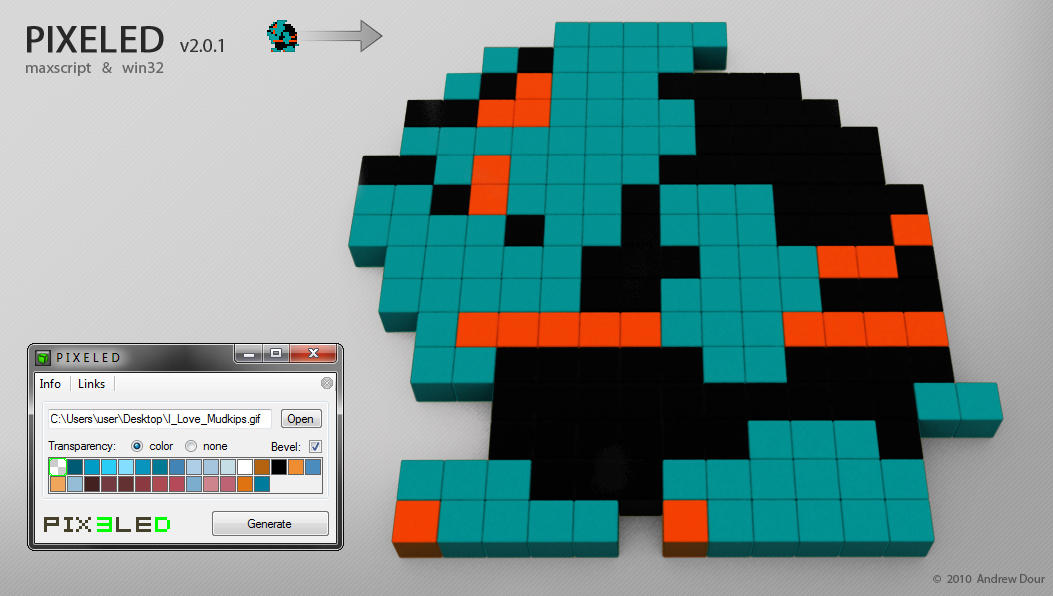
This tool converts 2D sprites into 3D in seconds.

Inspired by the Pix3leD Project, a project based or rendering retro sprites in 3D (started by my good friend Matt Raithel) We would share links back and forth to cool websites devoted to cataloging old sprites, then it dawned on me: I had recently been working on some maxscripts revolving around reading bitmap data... so why not automate the whole process from the sprites we find instead of building out the 3D pixels on a grid one by one. 

PIXELED User Interface

Additional Info

Version 2.0 comes in two flavors (three if you want to get technical)

3ds Max Edition:

• 3ds Max 9 and up
Legacy Edition will run for 3ds Max 2009 and older (new features only compatible with 3ds Max 2010 and up)
• Download & unzip to MAXROOT\scripts\startup\ **MUST INSTALL HERE**
• In Max: Customize > Customize UI > Toolbars (under P I X E L E D category) > drag to a toolbar to create a button
• Load any GIF > Pick your alpha color/source > Pick bevel option > Press 'Generate'
• The result is a 3D representation of the sprite that you can light, render, tweak, and even animate (if you wish)

Standalone Edition:

• Download, extract & run the .EXE
• Load any GIF > Pick you alpha color/source > Pick bevel option
• Press Generate > Choose .OBJ to output (this also generates a .MTL)
• The result is a .OBJ that can be loaded in your preferred 3D software

** if you post any creations from this script online at a site like DeviantArt, feel free to link myself and Matt Raithel
__________________________________________________________________________________________
New in version 2.0.1:  (affects 3ds Max & Standalone Editions)
• Fixed issue with 64bit / 32bit assemblies not working properly together (causing "system.badimageformatexeption")
• Fixed some text fields being unreabable with darker visual themes
Attachments

Tags: Color, image, 3d, fun, sprite, sprites, Pixel, retro, GIF

Comments (15)

PIX3LED

alexnguyen · 2014-04-24

excellent work

Neither plugin nor standalone working

CrewmanInRed · 2014-04-22

Thought I'd post this since no one has responded in a while. I'm running max 2014 64bit on a windows 7 machine. I've checked .net installation version as well as directX version. Both are beyond required versions. Standalone will continually crash when export to .obj file. It will create the file and the .mtl file but they're empty, no data. If you find time to look into this I'd appreciate it. Thanks.

ninja edit: words

fajar · 2011-10-26

With great power, comes great responsibility
- uncle ben

whats those word mean related to this script .....:XD cheers

BTW its great script

lantlant · 2011-10-25

very good script. thank you :)

Couldn't import in maya2011

the3rdK · 2011-03-30

I tried this nice script standalone edition.
And succeeded gif convert for obj.
But maya system will be freeze when imported obj.
Someone tell me why, please.

My system: Win7 64bit
Software: Maya2011&2010

I haven't tried importing to Maya

thedour · 2011-03-30

@the3rdK
 I've not tried importing the .obj into maya.   Perhaps maya takes a specific .obj format (there are several different types actually).

I'll look into it if I can get ahold of a maya trial.

1 Color = 1 Mesh

rs3d · 2011-01-14

Would be great if the pixels of the same color are fused to singular
object without any inner-mesh :-)

I thought about that

thedour · 2011-01-14

@ rs3d - I considered adding that at one time, but thought if people wanted to animate these in some way that it would be best to have them be separate object.  Additionally if someone wanted to changes colors/materials: they may not want to change all the blocks at the same time.  But maybe I can add that as an option. 🙂

For now though, each color is given its own material, so you could "select by material" and merge them together very easily/quickly.

RE: System Information

Anubis · 2010-10-10

@thedour - I mailed to you but forgot about my sys info:
XP x64 SP2, DirectX 9.0c, most uptodate .Net Framework

Found the problem

thedour · 2010-10-11

The bug has been found; a fix will be coming later today!  is OUT: v2.0.1

Thanks Matyrix and Anubis!

Matyrix · 2010-10-10

It seams great script!
But it break down to me as well... I tried the image by Anubis, but can't generate .obj file.
My op.: win7, 64 bit.

Anubis · 2010-10-10

I test the exe version only for now, and it crash on all gif's with same error: system.bedimageformatexeption . I attach a simple gif file for testing (100x100 px, 11 colors).

Attachments

System Information

thedour · 2010-10-10

@Anubis - What operating system are you running? is it 32 or 64-bit? Which directX version do you have installed? 

It worked fine for me (tested on XP 32bit, 7 32bit, and 7 64bit.  see below), but hopefully we can figure out what is different on your system, as I'm sure others may run into this too. Thanks for your help.

W DIGITAL · 2010-10-09

nice script!
tried it with a .gif it took forever and didnt produce any mesh, but im sure it will work :)

any plans on updating .jpg and .bmp ?

Thanks

thedour · 2010-10-10

@MINDFLOW  - No mesh? Just making sure:  After the load you'll have to also press 'Generate' (it doesn't do both at load time).  If thats not the case, please do Email me any repro steps/version info I should know about, also what were the dimensions of the gif? Depending on gif size it can take awhile to process and gather the palette. I'm kicking around some ideas for speeding that up. 

I may look into other Indexed formats (such as .bmp,.png, etc.) I won't be supporting any images that do not have a palette, as they could end up with millions of colors.