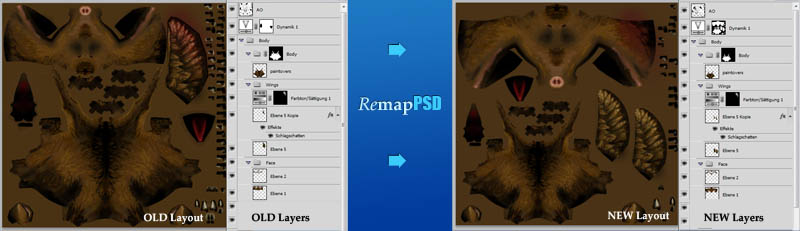
With RemapPSDyou can easily map your entire photoshop file to a different set of uvs. The script will handle any complexity in your photoshop files:
- layers with masks
- folders with masks
- nested folders
- adjustment layers with masks
- layered tiffs
Script
 By 3dhippie · 2011-12-02
Tags: layers, photoshop, baking, psd, render to texture, remapping, remap, masks
With RemapPSDyou can easily map your entire photoshop file to a different set of uvs. The script will handle any complexity in your photoshop files:
An example case: You have worked on a lowpoly game character and are almost done when the lead artist approaches you with the request to give the character's face more space on the texture. This is not so difficult if you are working on a flat image, but impossible to do with complex photshop files. With RemapPSD it's inredibly easy. You can change the uv-layout of an existing model and the psd file with all the layers, folders, adjustment layers, masks etc, will be remapped with just the click of a button.
I hope you will find it just as helpful as I do. To get started it is probably best to watch the video tutorial on vimeo:
INSTALLATION:
USAGE:
Basically you need three things to make the script work.
RemapPSD will do the rest for you.
The script will run through four phases:
That's it. You can now continue working on your psd file which will be organized just the same as before, with all layers, adjustment layers, folders and so on.
LIMITATIONS
You cannot remap vector elements, such as vector masks, or text layers, or smartobjects. All of those elements will be rasterized.
Long layernames will be truncated.
SATISFIED?
If this script has saved your life maybe you could donate me some money? I have setup a paypal donation button on my blog: http://davidshelton.de/blog/?p=249
I am looking for part-time or full-time positions as a 3d generalist in the games or films industry, as well as for freelance jobs. Please take a look at my current showreel:
If you have comments or critique, you are always welcome to write me a line. I can't promise that I will implement new feature requests, but I will try my best.
History:
[0.1]
2011-12-02
first release
[0.2]
2011-12-03
- fixed problem with too long layernames (more than 31 characters)
- fixed error when trying to clear an adjustment layer
- fixed error caused by slashes in layernames
- fixed spelling error in messagebox
[0.3]
2011-04-26
- fixed problem with slashes in remapped_name variable (thanks to Pixhellmann)
[0.4]
2012-07-06
- fixed problem where projection was turned off and automatic unwrap got applied.
[0.5]
2013-04-03
- checked with Photoshop CS6
- fixed issues with empty layers
- cleaned photoshop history
- fixed issue with wrong settings in RTT dialog
- fixed issue with forwardslashes in layernames
- improved general stability
[0.6]
2013-04-30
- fixed bug when render to texture dialog wasn't opened (thanks trebor777)
[0.7]
21.05.2013
- removed unneccessary command and execute steps. Compatibility to 3dsmax 2012 established.
[0.8]
2013-05-31
- Proper handling of premultiplied alphas (no more black halos).
- fixed bug that occured when the baked layer's alpha was empty
3ds max 2016-2018
 Leoneli · 2021-09-17
Hi
I test this script whith 3ds max 2016 and have a error
--Runtime error: createOLEObject: cant find server Photoshop.Application
I use photoshop cs6 and 3ds max 2016/2018/2020/2022
Can I fix it?
3ds max 2016-2018
Leoneli · 2021-09-17
Hi
I test this script whith 3ds max 2016 and have a error
--Runtime error: createOLEObject: cant find server Photoshop.Application
I use photoshop cs6 and 3ds max 2016/2018/2020/2022
Can I fix it?
PSD layer issue
trebor777 · 2014-06-05
I don't think it's related to your script, but i'd like to ask if you had notice d issues with psd layers in max.
For me they're not all the time "fully loaded", only half of the layer is and the other half is just a color(black or white) and it's offsetted as well. And i'm talking about the original texture, not the remapepd one.
I was looking for the problem why it wasn't transfering correctly to my new layout. turns out it's because of this.
RemapPSD Bug
ScoobyDoofus · 2013-05-18
Hi! I downloaded your script with high hopes, as I’ve got quite a large project for which it would be VERY useful. However, after installing and using the script, it just returns a PSD which is identical to the original. It doesn’t move anything. I’m using Photoshop CS6 and 3D Studio Max 2012. Any help would be greatly appreciated!
oh
3dhippie · 2013-04-22
Thanks for pointing this bug out. I will implement update the script.
trebor777 · 2013-04-22
Yo!
Found a bug: basically if you never have opened the render to texture dialog during your max session before starting the script, you get an "undefined" error on gTextureBakedialog at line 765
So, I added this to fix the issue.
if gTextureBakeDialog == undefined then macros.run "Render" "BakeDialog" asymptote · 2013-02-01
I had that error when some of my uvw's had strayed outside the uvw area in max, maybe worth checking.
asymptote · 2013-01-22
I'm happy to report this now works perfectly in Max 2010 64, many thanks for the update.
My earlier issue of it not working (it skipped the render to texture stage) was fixed by simply exporting & re-importing the 3ds file.
I haven't a clue why this single mesh stopped the RTT stage, but a quick imp/exp fixed it.
Hope this may help if people may have similar issues.
3dhippie · 2012-11-28
I don't have a copy of CS6 yet. But as soon as I've bought a new license (maybe a christmas present to myself) I will update the script.
Error Message
Miguelito · 2013-02-01
Hi,
I am getting an error with my PSD:
Error 1302: No such element
Line: 194
-> selBounds = otherImage.selection.bounds
The error occured only with Layers that only had gradients or very little painted in. So maybe the script has problems with getting over that selection, or something similar like that?
Thx
Edit: I only used white color in those layers.
Daniel
CS6 Update in near Future?
 pixhellmann · 2012-11-28
Hi David,
are you planning to update your script to work with CS6?
This would be really great, because we don't have CS5 here anymore and it's pretty usefull sometimes if it would work without the stops..
thank you!
 JokerMartini · 2012-07-31
Such a time save let me tell you.
Thanks man for this solid script.
3dhippie · 2012-07-31
Great to hear it's working for you.
cptSwing · 2012-07-31
To be fair, while the bug stops the script from completing successfully, the renderoutput is still saved and salvagable, so a little copying around worked out fine for me.
I haven't tested it in CS5, no..
3dhippie · 2012-07-31
haha, whatever gets the job done :-D
But still...I will need to take a look CS6.
Showstopper
cptSwing · 2012-07-27
While the rendering etc. seems to be working well, I get an error in Photoshop:
Error 8800: General Photoshop error occurred. This functionality may not be available in this version of Photoshop.
- The command "Set" is not currently available.
Line: 123
-> executeAction( idsetd, desc304, DialogModes.NO
);
It'll probably be CS6's fault? (I'm running Max2013 and CS6, both 64 bit)..
Thanks for looking, and from what is actually working, it looks pretty impressive!
3dhippie · 2012-07-29
Oh. Photoshop CS6 must have introduced changes to the scripting language. Thanks for pointing this out. I haven't debugged the script for CS6 yet, but will do so in near future. Have you successfully used it with CS5?
Old \\ Error still there
pixhellmann · 2012-07-13
Hi David,
the old error we fixed together is still there..
if I put the old code back in to fix the \\ it works for me again.
I really want to know why this is not a problem on your computer..
I have Windows 7 Pro, German on an i7 PC. 3dsmax 2012 with the newest update and servicepacks.
search for this in the "preparation part" (around line 507):
remapped_name = (getFilenamePath original_name)+(getFilenameFile original_name)+"_remapped.psd"
and replace it with:
remapped_name = substituteString ((getFilenamePath original_name)+(getFilenameFile original_name)+"_remapped.psd") "\\" "/"
3dhippie · 2012-07-14
yes you're right. I must have updated the old script. Thanks for reminding me. I uploaded a correct version.
I don't know why both lines of code work on my computer whereas only one works on yours. I have the same system. Is your Max version english or german?
pixhellmann · 2012-07-24
I have 3dsmax in english 64 bit (2011,2012 and 2013) on win7 home premium german.
perhaps its the mix of german operating system and english max.. don't know
asymptote · 2012-07-04
Cool, thanks for the update.
As far as my problem goes it's not the script, it works fine on a box mesh I create, but not on a RocketBox Libraries figure, and I can't work out why not.
I'll give your new script a go and see what happens.
It's just cool to watch it work ;) superb script.
unknown property "rollouts" error
ibizanhound · 2012-07-04
Hello!
Your script looks incredible, but i cant make it to work. I get the same error as Asymptote said:
I get unknown property "rollouts"
I use win 7 3dsmax x32 2011
The first steps happen as they are supposed to, ps opens and rearranges layers, but the the error appears when the dialog box for render to texture appears.
Hope this info helps you improve it.
Congratulations for your script once again!
Additional notes: If i have PS open before i run the script, the script wont run. I have to have PS closed before. Also for everyone else to know, when importing the psd in the beginning in your diffuse slot, make sure you don't collapse its layers when it asks you.
3dhippie · 2012-07-04
Hi. I updated the script again and made some bugfixes. It should be more stable now. I don't know if I adressed your problem, but I tested it on different scenes in 3ds Max 2011 and 2012 and it always succeeded.
David
asymptote · 2012-05-16
I just tried it in 2012 64 trial with CS5 64 and i'm afraid it refuses to bake the textures for me too. It runs through everything, opens the psd in ps, goes through the baking procedure in max but doesn't actually bake anything, and nothing is changed in the psd, I've just spent a good 2 hours re-running and trying different methods including the ones posted here, but it won't work for me.
Maybe I'm missing an important step? can anyone suggest a cure ? I'd love to get this working
appreciate any advice, thanks.
asymptote · 2012-05-16
I tried this in max 2010 and 2011 64, both times when I switch the uv channel on the unwrap uvw from 1 to 2 I don't get the channel change warning box.
In max 2010 I also get unknown property "rollouts" in undefined on this line...
oldpath = gTextureBakeDialog.rollouts.commonBakeProps.eFilePath.text
I know you say other versions "could" work do you have any suggestions for earlier versions. thx
I so want this script to work :)
yes it works
pixhellmann · 2012-04-26
haha, you just wrote 1 line and I copied 100 lines of code together :D
nice.
Note:
in v.0.3 I changed the bake map to DiffuseMap() .. I forgot to change it back.
V0.4 is working and standard as it was before. thank you!
3dhippie · 2012-04-26
Okay. I updated the script inside the mzp file. Thank you for your help pixhellmann. Also thank you for the donation :-).
bye, David
3dhippie · 2012-04-26
Please try the following and look if it will do the job.
Change the orignal line:
remapped_name = (getFilenamePath original_name)+(getFilenameFile original_name)+"_remapped.psd"
to this:
remapped_name = substituteString ((getFilenamePath original_name)+(getFilenameFile original_name)+"_remapped.psd") "\\" "/"
and tell me if it works
i think i fixed it. but testing is required
pixhellmann · 2012-04-26
http://www.scriptspot.com/3ds-max/scripts/converttovalidfilename
I used this nice little function to convert the path. and now it starts baking!
JIPPY :)
but i have to check if everything is connecting correct.
I added the code and commented my changes. Hope this will help :)
I really would like to get this script working!
I attached the script in v0.3
3dhippie · 2012-04-26
Thanks for the hint. I will look at the part as soon as possible and fix it if it is required.
I'm not sure but perhaps this is the error:
pixhellmann · 2012-04-25
I stepped through the script and noticed, that in line 492 the part:
command = "BitmapLayerManager.getLayerCount \""+ remapped_name +"\""
numlayers = execute command
produces a 0 value because the variable "remapped_name" is written in this style:
"C:\Ordner\Unterordner\Dateiname.psd"
and if I manually change it to "C:\\Ordner\\Unterodner\\Dateiname.psd"
the BitmapLayerManager.getLAyerCount Command returns the real count of the layers.
and that's why later in the script the count is zero and nothing starts to bake!
but I don't know how to add the \ to the paths..
perhaps someone could help or Dave, the goodmaster of remapPSD could fix this!
I would really appreciate that!!
Not working at both locations
dkreset · 2012-02-27
So I tested at home as well and same thing happened. The maps were not baked and brought straight back to the PSD. When I checked the folders for the baked maps there was nothing in there.
I took some screenshot of the settings as well as how I've set the uvs up with the modifier stacks so you can take a look at them.
You can download the images here from my domain
http://www.dkreset.com/ScreenShots.zip
I really hope we figure this out! It's such a great script :)
Thanks in advance!
3dhippie · 2012-02-27
Hey dave
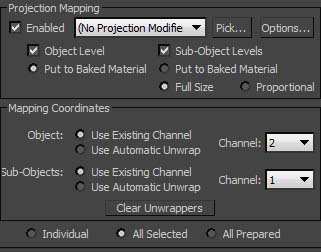
thanks for the screenshots. I can tell easily that something is wrong. All the automatic unwrapping shouldn't be there. I have attached an image with the important settings. If you enter them manually and hit remappsd it will use those settings (so one can also map from channel 5 to 3 or whatever). Please try that and look if it works. Also try to delete the bake element called REMAP. This will force default values. Hopefully one of these tips will help. Although I don't really know why it doesn't bake at all. I will have to dig deeper into the problem if none of the advices were helpful.
By the way, I have a fresh windows and 3dsmax install at hands and notice the same wrong behaviour with automatic unwrapping. I will need to do some debugging.
David
Thanks Dave!
dkreset · 2012-02-27
I really appreciate the fast response and support. I will give the new settings a try to see if this works! Since you mentioned the OS. I am on Win7 professional 64 bit both at home and at work. Not sure if that's of any help but thought I'd mention it. I will update you on the status of the script with the new settings :) Thanks again! Can't wait to get this to work :)
David
didn't quite work out...
dkreset · 2012-02-27
Hey Dave,
I gave the settings you showed me a spin. It didn't really work either, but I noticed something interesting. I get different results by assigning your script to different parts of max menu. eg. when the script is customized into the quick access tool bar, or the main tool bar where you put yours in the video, the script gets activated when I have the UV unwrap modifier stack selected. However I tried assigning the script to a hotkey today, and it would not activate unless I have the editable poly bottom stack selected. It also then calls out the script editor in photoshop for some reasons.
I don't know if this is of any relevance but I thought I'd mention it anyway!
thanks for the effort :)
David
same problems here and nothing helped
pixhellmann · 2012-04-17
Hi Dave,
i love the idea and youre script! But i have the same issues here.
Win 7 englisch, 64 bit. 3dsmax 2012 64bit. photoshop cs5 extended.
it stops when it's back in 3dsmax and should start the baking progress.
exactly the same problem like dkreset has it.
i hope there is a solution!
greetings!
philipp
3dhippie · 2012-04-18
Unfortunately, I wasn't able to track down the error yet. But please try it again but be sure to have the rtt dialog opened before you run the script this time.also, look if there is a remap component in the dialog and delete it. This forces a reset for the script.
I hope it will work then.
David.
thanks for the quick response
dkreset · 2012-02-25
Will do! I was on my work machine though, will be giving it a try at home tonight. If they both don't go through I will screen cap both and post them on Monday for you :)
This is a great script, definitely worth supporting. I'd be super happy if this is working!
Thanks again!
Script not baking properly
dkreset · 2012-02-24
Hi!
thanks for the awesome contribution, I just have this small issue. The script runs through properly until the baking part. No render view is brought up, and the same map is brought back to photoshop with almost no wait time (the chance of the maps not even being baked is quite high in this case I believe)
Do you have any ideas? I looked at the render settings and it's using some funky settings as well with automatic unwrap and all...
I'm using max 2012 and photoshop cs3!
Thanks in advance! If I could get this working it will definitely be a life saver and I will put out my effort to see more scripts like this from you for sure :)!
3dhippie · 2012-02-25
hey dkreset. Could you send my a screenshot with your render to texture dialog opened (with all rollouts expanded) just after the script failed? That would be very helpful.
tech news
ashbcl19 · 2012-02-22
I like this kind of blogs. You did a great job by posting these nice pics and descriptions of exotic tourist.tech news
 mad · 2012-02-07
you are genius :) thank!
Normal maps
cptSwing · 2012-02-05
Hello there, impressive script! I wonder wether one could make it correctly rotate tangent space normal maps as well? (more info and an example: http://www.polycount.com/forum/showthread.php?t=83102)
3dhippie · 2012-02-06
oh. good question. I will have to think about it.
3dhippie · 2011-12-05
Okay, I found a very good tutorial on the subject of registering Photoshop in the registry. Can you please try the following instructions here:
http://support.timeexposure.com/tt/index.php?action=kb&article=204
good luck.
3dhippie · 2011-12-05
hm. that configuration should work... I am a bit puzzled and will have to ask for help on the forums. I would guess that photshop is somehow not registered as an application in your registry. Do you have admin rights on the computer? What windows version are you using?
I'm really sorry, that I can't offer immediate help.
3dhippie · 2011-12-04
oh. what versions of photoshop and 3dsmax are you using?
3ds Max x64 and PS CS5
 br0t · 2011-12-04
3ds Max 2011 and PS CS5, both 64bit
3dhippie · 2011-12-04
Can someone please verify that the script works on his or her machine? Have you encountered any bugs or so? let me know.
@br0t: Okay. I can talk a little about how the script works. The basis of it all is the bitmaplayermanger interface of maxscript. It allows you to load layers from photoshop as bitmaps in your material. This is cool in itself, but a little limited. If a layer has a mask, neither the mask nor the layer itself will be visible to the manager. So the first thing the script will do is to seperate all masks from their layers, which will make both visible to the manager. It will also rename each layer as a way to pass over variables (e.g "vtrue" or "vfalse" for the layer's hidden state, or "MASK" if it's a mask).
If the preparations are finished, all maps can be loaded and baked to a different uv-channel with maxscript. Nothing fancy here.
In a second java script all layers will be loaded again to replace the same-named layers. If the variable MASK is written in the layername, the layer will be used as the mask for the corresponding layer.
so that's essentially how it works. Are you interested in any other specifics?
br0t · 2011-12-04
Thanks David for the explanation! I just tried your script with a very simple example and hit this:

The script crashed in line 466, when trying to open photoshop. Mhm the picture got compressed you cant read anythign I see, the error says: "MAXScript Macroscript Error Exception --Runtime error: createOLEObject: can't create instance Photoshop.Application" No idea yet why that would happen.
Cheers
br0t · 2011-12-03
Niice! Thanks for sharing the code, I'll enjoy to have a look at it and learn something hopefully. I am curious, may you want to lose a few words on how this works?
3dhippie · 2011-12-03
Hey, thanks Norman3D. My first donation :-). Hope there will be more to follow. Initially I wanted to encrypt the script, now I am happy I didn't.
I have updated the script so if you haven't tried yet, go and update first.
3dhippie · 2011-12-02
thank you. I am amazed myself that I managed to find the time to script this. I carried the idea around for years already...
Arg. It's always the same, the instant I upload a script I discover a nasty bug...and a typo... will have to wait until tomorrow...
Well and for the opensource: It's my christmas present to the community :-). Photoshop macros nested in java script nested in maxscript and just a little bit of dotnet, too :-D
Norman3D · 2011-12-02
hehe awesome man! I'm going to need to find some time to check the code and learn.
In return I did a small donation ;).
To be honest I haven't even had time to test the script yet, but I'm letting all my friends know ;)
Cheers,
Norman
Awesome!
Norman3D · 2011-12-02
This is great! You totally beat me to it! I wanted to make this exact thing but never managed to find the time. Congrats! :D
edit: woah! also un-encrypted! You are the man! :)