ScriptSpot

Script

RappaTools v1.92

By RappyBMX · 2008-11-23

Version
1.92, 1.99, 2
Version requirement
3ds Max 9+ (x64, x86)
Date updated
2013-05-01
Votes
557
Download
Download
Description

RappaTools3 and RappaTools2 available... see new website: http://remusjuncu.com/rappatools/

See RappaTools3 PlayTime 02 Here  and RappaTools3 PlayTime 03 Here !

See and download RappaTools v1.99 here ! | also see RappaTools3 http://vimeo.com/20935321

New RappaTools v1.98 Beta Preview Video! | RappaTools v1.97 Beta Preview Video!
Old RappaTools v1.96 Beta Preview Video Part 2! and RappaTools v1.96 Beta Preview Video!

Go to http://remusjuncu.com/rappatools/ and donate to get the latest beta version or Just make a video and get the latest version... see more > remusjuncu.com/?blog/?2010/?11/?get-rappatools-now/ .
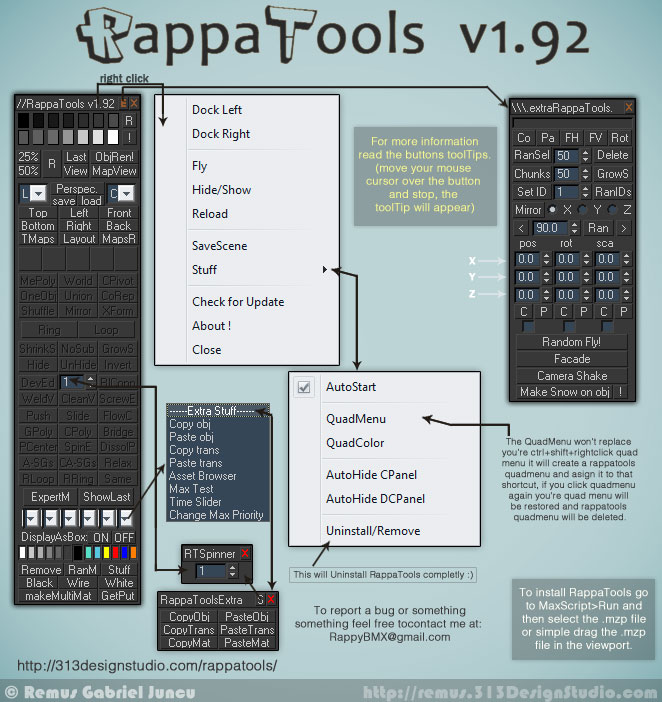
rappatools v1.92

Additional Info

Tags: modeling, Misc, Material, Tools, Rendering, unwrapping, workflow

Comments (74)

fajar · 2010-06-25

<i>does anyone have any suggestion for version 2.0 !? will start working on it soon... i have a few ideas but maybe someone has better ones...</i>

I see the right image "with toggle word" when I post mine earlier not left (old concept).and what I mean by one window is everything in one box including extra tool, see your extra tool still need second windows, which I think this is still crowded in my 15" laptop, this I what I face in daily work. But still love your script tho.

sorry little bit miss preception here, you asked some suggestion for your script and I suggest what I had in mind,I just suggest new UI (mine suggest), thats all and I dont talk about new concept of yours or any rollout (dns tab isn't rollout, I guess you know it. Its a dotnet properties), Concept or other (including feature or the layout for your script)and you take it or not is depend on you. Relax and take it easy.

Thank and sorry for bothering you.

PS : still dont undertand tab-ish concept of yours coz still dont see it how it work, and once again if my perception are wrong.

fajar · 2010-06-24

its good but I think its to long in my 15" laptop (if open all rollout).... hehehe.... I think dns tab is more simple all in one place.

take a look at the attachment

well in the end youre maker of the script , whatever you do I always follow you up

best regard
fajar

Attachments

RappyBMX · 2010-06-24

no you got it wrong... this is the new concept... no rollouts... rappatools 2.0 concept

it will just change the modeling tools with the extra tools... and back... sort of tab-ish :)

fajar · 2010-06-23

Hey rappy, just a little suggestion about ui, why not make it using Tab view using dot net dns_tabview. it'll put your extra and main script and one place , you just click tab and it's all there (like modmod modifier z-orb...hehehe).

Thank again for your script last days.

RappyBMX · 2010-06-22

does anyone have any suggestion for version 2.0 !? will start working on it soon... i have a few ideas but maybe someone has better ones...

crystal3d · 2010-07-08

hello,
i had a sugestion untill i found the "hide" button,

really great tool box, you are a very succeslfull person in opinion.

RappyBMX · 2010-05-25

glad you like it freaky and crystal3d :) see my blog for more updates on rappatools :)

crystal3d · 2010-04-30

Rappatools have so many useful options that it took 45 minutes to get back to the voting page. i wish i could vote 10s

freaky · 2010-04-12

dude, just found your script and want to say Thanks !! nice work!

jinj · 2010-03-26

hi,
very very nice script thanks for sharing,
I had installed it on 2010 and it run well.
there is a way to ad rappatools short cut in the tab-bar.
I can't find a command to ad for the entire panel.
There is a work around how to do that?
can you post the code for the *.ms to ad this option
many thanks again

RappyBMX · 2010-03-28

hi, u want to add rappatools to the ribbon menu?
never played with the ribbon, i rarely use 2010,
can't u add the macro scripts from rappatools ?
also if u check the macro scripts you'll see what's
getting 'executed'... i would say to look at the v313.14
source code but that's irrelevant since the new versions
are rewritten... i'm planing another rewriting of rappatools,
for version 2 (so you don't have to keep it opened to use
stuff from it) but that's not going to happen very soon since
i don't have time because of college... also i don't think
i have the patience anymore to do that :) so that might
not happen at all... best, rappy

RappyBMX · 2010-03-24

is the autostart checked because by default it is :) also when i released it, it had a bug with the autostart... i updated it 10min after i posted it :)

fajar · 2010-03-24

I did check "Auto start" and after I restart max , it wont auto start......
I dont know about what happen to yours but it happen to mine.

thank

RappyBMX · 2010-03-21

v1.92

- AutoStart toggle in the rightclick menu.
- Uninstall/Remove in the rightclick menu.
- Fixed AutoHide Command Panel.

RappyBMX · 2010-03-19

version 1.91 has timeslider toggler :) (autoupdate)

fajar · 2009-10-17

Why I cant use Ctrl+Shift+rmb fetarure for modeling in 1.8 Version!!?

Edit:

Sorry for my bad.... I don't know that I must setup it my self, is that suppose to be automaticly done like the previous one? and where I can acces rappa tools stuff?

RappyBMX · 2009-09-10

you can create your own quadmenu with the rappatools stuff... that's a predefined one :)... or you could assign a shortcut to it :)

Ankebut · 2009-09-10

Great script but I have a question: How can I change the Hotkey for the QuadMenu? STRG+SHIFT+RIGHT CLICK is a little bit tricky...i would change it..how can I do it?

Or it would be better if I could integrate the QuadMenu in the Right Click Menu...please write back

thanks

RappyBMX · 2009-09-02

hey 70086504 try this version http://313designstudio.com/rappatools/RappaTools-v1.7c.mzp let me know if it works...

@YoyoGraphics - hmm... no error... don't have 3ds max 9 so i can't do test (also i don't have free space to install it) ... i'll add the old method to ctrl+click...

GushingDizzy · 2009-09-02

Ever since I installed this latest version, DivEd hasn't been working. It just puts me in vertex mode without creating any new vertices no matter how many I tell it to make.  I am using Max 9.

Thanks 

- Geoff

70086504 · 2009-09-01

70086504...why is that ? are you getting an error or what ?

thank you for your reply

i got an error like this img

my max is max2009

Attachments

cg_max_wu · 2009-09-01

Great~~
Thank you very much~it's working in my max9!
非常感谢,我的英文不好,不知道用什么言语来感谢你,打几句Chinese吧~谢谢你的热情帮助~
Thank you very very very much!!

RappyBMX · 2009-08-31

cg_max_wu now that you posted that i figured out your problem :)... i've sended you rappatools version 1.7the version that i'm working on... shoud work :)

70086504...why is that ? are you getting an error or what ?

70086504 · 2009-08-31

i cannot instal it
my max is 2009

RappyBMX · 2009-08-30

got it... i know i should change the image, maybe make another intro video... but i don't have time to do that now.... if i find some time i'll do it...

fajar · 2009-08-30

Hey Rappy I already sent you a script I promise you yesterday , check your mail! and maybe you should change the picture Rappa script (relevan to current new one) here

thx

fajar · 2009-08-29

Damn you are younger than me but you'll already in that scripting level, shame on me....hahahahaha

RappyBMX · 2009-08-29

just finished high-school (still 18 years old)... i just do this kind of stuff because i like it... and i started drawing recently... i wanna get into a design collage since it's the closest one to 3D stuff in romania...

yea post it and i'll take a look at it.

fajar · 2009-08-29

O...now I know that I can't split up edge more than 4 is the bugs , I'll contact you but when I tried it again it can devide more than 4, strange huh?!.

Ok i'll give report or some suggestion after I finish my work...btw is your work (drawing stuff) already finish, look like you got some time!!? are you architect or animator (monster stuff modeling) or kind of like that?

Hey I already make this uv stuff, may be you can take look at it, if you want!! (but there's some bug), i'll attach tommorow, OK!

Thx

RappyBMX · 2009-08-29

hey fajar... well the interface a little bit different for the moment (i'll change it more) ... now you can devide an edge in more then 4 :)... fixed the quad problem when u remove rappatools... changed the code structure... that's pretty much it... now i'm working on version 1.7 :>... allready I added - to World. ctrl+shift: Move group selection to [0.0.0].

and changed - The Facade(button) to Union(button).

i'm going to add uv stuff to rappatools also... dunno if in version 1.7... and i'll divede it in two... the main rollout and the extra rollout :)...

got any suggestion let me know :)


best,

http://remus.313designstudio.com/

fajar · 2009-08-29

Hey Rappy, btw what's new for this script instead of performance tweaking? and you need to change the post title too...hehehehe, I thought theres no update for this script!

Thx

fajar · 2009-08-29

I always feel eager to try new version for this script!! I 'll try it tommorow, now is rendering time!

Thank Rappy.

RappyBMX · 2009-08-29

rappatools v1.6 it's out :) just realeased it !

---

hi cg_max_wu, thats weird, try to open rappatools manualy.... in max go to Maxscript>Run... then run rappatools... the rappatools.mse file inside 3ds max/scripts/rappatools/rapaptools.mse...

also try the new version... if still not working let me know...

----

http://remus.313designstudio.com/

cg_max_wu · 2009-08-30

Thanks for your reply !
---I'm so sorry to tell you , still the same error occur when i install the new version V1.6 and manualy install it in maxscript,it's still not working!
---I'm counting on you to help me!Thanks!

cg_max_wu · 2009-08-31

Thank you very much!
See the Attachment~

Attachments

fajar · 2009-08-28

When you release the v313.16 ver.

cg_max_wu · 2009-08-29

hi,RappyBMX
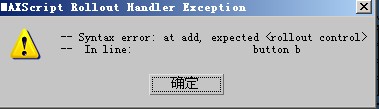
I install this tools ,it popup that:"
-- Error occurred during fileIn in
-- Error occurred in anonymous codeblock
-- Defined in encrypted script
-- Error occurred during fileIn in
>> MAXScript Auto-load Script Error - D:\3ds Max 9 64bit\scripts\startup\RTC.mse Exception: -- Syntax error: at add, expected
-- In line: button b <<"

How to solve it?Thank for your Helps!!
when i finished installation ,it popup
"--syntax error:at add,expected -- in line: button b "
why?
and how the "avg_dlx90.dlx" works?

Attachments

RappyBMX · 2009-08-09

hi spooner04, it would be pretty hard + i don't use the edit poly modifier... but i shall look into it... if it won't take too much time to add support for edit poly modifier i'll do it :)...


rappatools v313.16 preview... http://www.youtube.com/watch?v=SLljznPsP4o - speed improvement

spooner04 · 2009-07-08

Great collection of scripts you have here. Love the tool.

How hard would it be to configure the selection tools, i.e. ring, loop, etc. to work in the edit poly modifier?

RappyBMX · 2009-03-23

and i explaine why i can't make the temp files to be saved in autoback folder..

"i can do that but the thing is when you have to diferent versions of
max... u have max 2k9 and 2k8... and you wanna copy an object from 2k8
to 2k9 or u have max 2k9 x64 and x86 and you wanna copy an object from
one to another it won't work using  thecopypastedir = getdir
#autoback... i could just make it: "c:\windows\temp\" :)"


http://remus.313designstudio.com/

fajar · 2009-03-23

OK thank man ! it work corectly!! i've tested it now!! by the way the temp file wasn't in "c:\windows\temp\" but autoback folder!!

it's OK bro!! it work as I expected though!!

Thank's man!!!

RappyBMX · 2009-03-22

C:\WINDOWS\Temp\ :)

fajar · 2009-03-22

Um a little question! where do you put the the paste object temp?

fajar · 2009-03-22

ok downloading now! try it leter !thank for the support! very much thank!

fajar · 2009-03-22

ups sorry where is the download link!? is that already in RappaTools-v313.153.mzp

fajar · 2009-03-22

OK thank Im downloading now!!!

RappyBMX · 2009-03-21

 hey fajar, ups  forgot about that...sorry... modified that right now... download the setup again :)


best,

Remus 'RappyBMX'

----

http://remus.313designstudio.com/

fajar · 2009-03-21

hey rappa !! thank again !! may I already a noisen to you with the comment and thing!!I just want to ask about this release , is this version already made copy&paste to temp folder or still in C:/win-system?

by the I ask because in my country I dont have internet my own in my own house so I download it and try it later!!

I hope that not make you mad !!

thank!

fajar · 2009-03-15

Thank for respon and the link !

RappyBMX · 2009-03-14

hey fajar,

well rappatools should autoupdate to v313.152 :) if not http://313designstudio.com/rappatools/RappaTools-v313.152.mzp


i can do that but the thing is when you have to diferent versions of max... u have max 2k9 and 2k8... and you wanna copy an object from 2k8 to 2k9 or u have max 2k9 x64 and x86 and you wanna copy an object from one to another it won't work using  thecopypastedir = getdir #autoback... i could just make it: "c:\windows\temp\" :)


glad it helps that's the point :D


---

http://remus.313designstudio.com/

fajar · 2009-03-14

Hey remus excuse me but where's I can grab this 313.152 beta version, I already looking in your site but i can find the link!!

thank's so much!!

and a little suggest may be would you mind to change the copy paste folder to autoback or else folder that not visble!!

maybe like this:
thecopypastedir = getdir #autoback

if you can`t just never mind this suggest!! your scripts already help so much!!

RappyBMX · 2009-03-08

thanks radiosity80 :)

----

v313.152

Added:

-Explode to OneObj...ctrl!

-to Colors... save colors list, load colors list, delete colors list !

-more things to Loop.

-click > Loops.

-ctrl > Loops then shows the Chamfer dialog if when your in edge or vertex mode, if in poly will show the Bevel dialog.

-shift > Loops then enters chamfer mode for edge and vertex and for poly in bevel mode.

-alt > shows the Chamfer dialog for edge and vertex mode and for poly mode shows Bevel dialog.

-to R|Conn when u have 2 or more edges connect it will connect them, if you press ctrl it will loop then ring the connect.

-to A-SGs ctrl:Auto SmoothingGroups threshold:180.

Fixed:

- Expert mode bug.

- Dock mode !

- makeMultiMat... the new material was saved allways in the first material inside the editor...now it will be saved in the selected meditmat.

Changed:

- The info text ( like: Please select something ! ) now will show up better.

-XForm.

----

http://remus.313designstudio.com/

radiosity80 · 2009-02-10

very good

Sourpickles · 2009-01-13

Hey Rappa I wrote you an email....wondering if you can take a look an see whats going on. Thanks man.

fajar · 2009-01-07

did'nt see that !!! sorry for my false!!! sorry!! sorry 4 troubling you too!! I should'nt do that !!

RappyBMX · 2009-01-06

Hey fajar  like i said in previows post "added the material thing now working on that floathing thing :)" then released the next version... why after because i made that as u can see in the image.


also in the changelog on the website:

"v313.151 beta >

Added:

RappaToolsExtra rollout."


Click ----Extra Stuff---- and i will apear... on in the quad menu the box next to RappaTools...


also you can make your own dialog with stuff from rappatools :) in the next video that i will make for/about rappatools i will cover most of the things... i will make that soon... Have Fun!


-----

http://remus.313designstudio.com/

Attachments

fajar · 2009-01-05

Hey rappa Im very sorry but would you take look at this!!
the thruth is this is what I relly mean!!

Attachments

fajar · 2009-01-04

Sorry rappa ,I've never online for 4 weeks lately,i've been busy in my office. But Thank,thank very much you're very kind person!! I'll try your product this night and i'll report it to you as soon as I find the errror or something wrong with your product!!! or may be sugestion for your next product!! if you still want it !!

by the Im working in Architechtural/home design, im 3d artis in that way. this script is very suit me.

Very much thank!!

RappyBMX · 2008-12-20

released the new version! v313.151 beta 🙂

hey fajar try now and see if it will work... if still not try using the another way ctrl and click on 25% or 50%...

--copy mat ( click    the

RappyBMX · 2008-12-20

--copy mat

(

click    the selected material in the material editor

ctrl      the selected object material

)

--paste mat

(

click     paste copied material to selected material slot

ctrl       paste copied material to selected obj

shift     paste copied material to selected obj and selected slot

)

--medit mat < click on this and it will update the names of the materials

( this refers to the materials in the dropdown

click    assign mat to selected obj

ctrl      copy that material

shift    paste copied material to that slot

)


added the material thing now working on that floathing thing :)


Attachments

fajar · 2008-12-18

that happens when u have render setup dialog (F10) opened close that and then hit 25% or 50%... if that's not the case i will have a look.
answer:
in my case your second opinion is right!!
sometime it can be resolve by reload rappa tools but sometimes it wont work too!! why !!

a little sugest your tools is very great but can U add some floating tool for copy/paste transformation/object couse its too small I can found it for first time I use it!!
Can u add copy/paste material , it wont be hurt couse some one already make it ,you can just add it to your tool, can you?!

pbiswal · 2008-12-16

hi...i am using 313.15 beta of your tool...it's great with all the feature in one page...just a lil problem...when i created the rappa tool quad menu..it replaced my existing custom quad...eventhough my existing quad is in the quad option dialog...i am not able to access and i cant seem to find rappa tools quad menu in that list?

RappyBMX · 2008-12-17

u can create your own custom quad menu... the rappatools quad menu that u see in the video, on the website it's predefined, can be activated from rappatools as u can see in video... the thing is that i still have to do some research with the quad thingy...

after u activate the quad menu u can find it inside custom user interface/quads... in the right where it says "Default Viewport Quad" click that and u should find RappaTools thats the quad menu that gets a signed... i will make a better video for the presentation of rappatools, as soon as possible and maybe it will have audio too :)


-----

http://remus.313designstudio.com/

fajar · 2008-12-13

I found some strange in rappa "313.15 beta" when I click 25%/50% render it won't render at the size it must be(I mean 25%/50%from original size), I found this error when I change renderer or after I using it long time!!

please check this out, bro!!

thx!

RappyBMX · 2008-12-17

that happens when u have render setup dialog (F10) opened close that and then hit 25% or 50%... if that's not the case i will have a look.


thx!


 ----

http://remus.313designstudio.com/

fajar · 2008-12-11

wooww this script I`ve been loking it for years.

very cool script .

thx!!

RappyBMX · 2008-12-02

thanks 🙂, glad u like the script :D

...by the way the source code for version 313.14 it's available on the script' website :)

GushingDizzy · 2008-12-02

Wow! This is great, Remus! 🙂

Every single one of little modeling scripts I use are right here in one package and more!!

Looks like I have some uninstalling to do

 - Geoff

redwatty · 2008-12-01

hey Remus, great to see your script on here, this really is a nice set of scripts and a great ui, its saved me quite abit of time over the past few weeks. :)