ScriptSpot

Script

Random Wire Color Tools

By dandg · Credited author: David Mackenzie · 2010-07-21

Version
1.0
Date updated
2010-07-21
Votes
37
Download
Download
Description

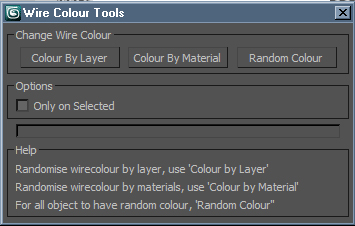
Wire Colour Tools is a simple script for setting random wire colours to all of the objects in the scene. Anyone who does allot of post work either in PS or a compositing package should find this script useful. Being able to adjust any element or of your project in post by the object enables you to get the most of your image, rendering Wire Colour passes is very simple and inexpensive from render time point of view.

Wire Colour Tools has three way in which you can use it:

  • Colour By Layer. This sets a random wire colour all of the objects on each layer. 
  • Colour By Material. Perhaps the most useful of the three options this one will set all objects wire colour based on the material that is applied to it. 
  • Random Colour. This is pretty self explanatory it allows you to set a random wire colour to every object in the scene. There is also the option to run these only on selected objects.
I hope you find Wire Colour Tools useful. Again if you are doing allot photoshop work on your images I imagine this tool will save you some time. If you have any suggestions for new features please let me know and I will do my best to get them in there. If you do come across a bug please let me know.
Cheers,
Dave


Tags: VRay, wire, random, Color, colour

Comments (18)

help

yigitsenakin · 2023-10-27

if anyone has the original of this script, can they mail it to me .please.

yigitsenakin@yahoo.com

thanks

the script

Ali_essawy · 2023-10-27

in the attachments

Attachments

xx

yigitsenakin · 2023-10-27

thank you so much

help

yigitsenakin · 2023-10-27

if anyone has the original of this script, can they mail it to me .please.

yigitsenakin@yahoo.com

thanks

help

yigitsenakin · 2023-10-27

if anyone has the original of this script, can they mail it to me .please.

yigitsenakin@yahoo.com

thanks

Feature Suggestion

ChinmayT · 2021-05-23

Hello David Mackenzie,

First of all great script..
It is very useful.
Thank you.

I have a suggestion / feature request.

I work with X-Refs sometimes.
I know due to 3ds max limitations this script cannot be used on X-Ref scenes.

But I think I have found a work around for it to work on X-Refs.
Let me know what you think -

-----
Set a color range in the script to choose from for example - R / G / B.
For example if I have multiple X-Ref scenes
For scene 1 - I will choose Red Range
and then click on "color by material" -
the scene object must be wire coloured only in the shades of red.
Then in scene 2 - I can have Green Range.
the scene object must be wire coloured only in the shades of green.
And my main scene I can go for Blue range.
the scene object must be wire coloured only in the shades of blue.
When I will render my scene I should get a wire color in the shades of R-G-B combined.

R-G-B is just basically to explain to you the example.

But in the main script I would suggest you to go for
V I B G Y O R / more the number of colours more - X'Ref scenes can be attached

Ofcourse in the best scenario - a user can choose a color range.
But V I B G Y O R option must be present all times.

-----

Let me know what you think...

Cheers - Chinmay T.

Hi,I just want to say thank

Waseem3D · 2019-02-23

Hi,
I just want to say thank you for making "Random Wire Color " Script for 3ds max, it help me a lot.
But I have a small question, how can I make this script to be on a button in 3ds max interface instead of draging it from it's file every time.
Thank you

JokerMartini · 2015-11-04

you dont need to put a help section.
just use tooltips.

add groups

themaxxer · 2015-11-04

is it possible to add groups to get a random wire color? as an option.

thanks for your effort
themaxxer

plz

abdelrahman · 2018-02-07

send me the script sir (worksabdelrahman@gmail.com)

DIY

vusta · 2018-02-08

what's wrong with clicking on 'tools' ?

themaxxer · 2014-12-10

would it be possible that all instances get the same color?

best regards
themaxxer

assign the same color to the instances

fedemas1969 · 2020-02-20

hello, have you found any way to assign the same color to the instances? thanks.

fedemas1969 · 2020-02-20

hello, have you found any way to assign the same color to the instances? thanks.

is it possible to

crystal3d · 2011-07-28

prevent same colors on selection?
like if have 300 objects at selection.

will use the 16 colors (sorry 15, black is null)for the first 16 objects
then use mid colors of 16 main colors
and will keep dividing the color ranges so on...

bragibjornson · 2010-08-10

Hey David:

Great script and a quick comment/suggestion. Ive been using this script (Colour By Layer tool) to give meshes a random wireframe color based on its layer when importing geometry from ACAD. This is because all the geometry comes in with its object color as white, but also the color column in the layer manager is white as well.

This there any way you could make a checkbox (or maybe just another button) to take the color the "colour by layer" tool generates, and assign the random color to both the object wire color and the color column of the layer the object is on in the layer manager?

It would be great cause then you could identify the layers the objects are on at a glance.

Thanks, B

dandg · 2010-08-20

Sure should be able to, I have never tried to change the layer colour before but should be possible.

Cheers,
Dave