 By spacefrog · 2014-06-04
PowerCoreTools:
Just released version 1.2 of my PowerCoreTools CPU managment script for 3ds Max
A tool to control CPU usage while 3ds Max is rendering. Automatically sets process priority and affinity ( the number of CPU cores the render process uses) at render start. Restores the initial settings when the rendering is done. Can be configured to run in a complete transparent No-UI mode, which is launched right after 3ds Max has started.
This keeps your workstation responsive for other tasks while rendering. A second 3ds Max session stays responsive and can be used to continue work on different tasks.
A look at the following screenshot will probably tell more than thousand words:
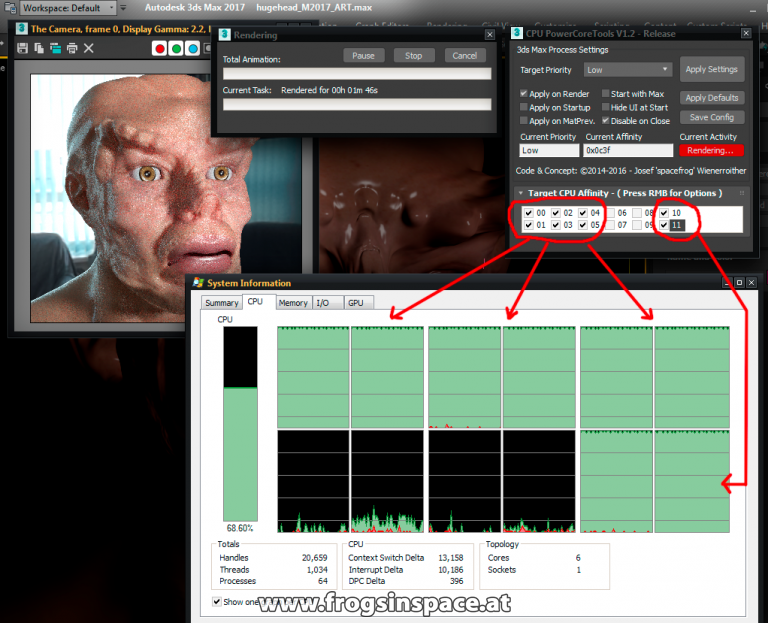
POWERCORETOOLS V1.2
PowerCoreTools : Control CPU Priority and Core Usage during Rendering
Created: June 4, 2014
Modified: August 29, 2016
Requirement: Max 2010 or higher
HISTORY:
Version: V1.2 - Fixed 3ds Max 2017 UI issues, fixed ART renderer support, DC20160829
Version: V1.1 - Exchange Store Release, DC20140816, Autodesk Exchange store release
Version: V1.0 - Initial Release, DC20140604
AUTHOR:
Josef 'spacefrog' Wienerroither - www.frogsinspace.at | spacefrog@chello.at
CONFIGURATION & USAGE:
Use the tooltip pop-up's on the UI elements for detailed info. As this is a tool for advanced usage, basic knowledge of CPU priorities and affinity settings are presumed.
INSTALLATION:
Just use the install package ( the xxx.mzp file) and drop it onto your 3ds Max viewport.
Choose one of the install options and the tool is ready to be used. A 3ds Max restart might be required
The install package provides an uninstall option too.
RELEASENOTES:
New features in V1.2 are 3ds Max 2017+ compatbility and support for 3ds Max's ART renderer. Currently MaxToArnold is limited, as this renderer manages CPU resource usage by itself.
DOWNLOAD (see bottom of the page):
http://www.frogsinspace.at/?p=2998