Outliner2-SF
Outliner2-SF - the revived 3ds Max Scene Manager is ready !
The initial release of my 3ds Max 2027 compatible Outliner build is here.
I’ve just published a revamped and updated version of the well-known Outliner scene manager for 3ds Max. The original Outliner by P.J. Janssen has been a reliable tool for many years, but it has stopped being compatible with newer 3ds Max versions many years ago (starting around 3ds Max 2015)
* 3ds Max 2016 → 2027 support
* Native 3ds Max Layer Hierarchy (no whacky Custom Attributes)
* New Scene Explorer–style iconset
* Transparent hotkey pass-through
* etc...
I hope this tool still provides good value to the 3ds Max community !
Free download on my website.
Please consider a donation for future support via buymeaCoffee!
https://buymeacoffee.com/frogsinspace
| Attachment | Size |
|---|---|
| outliner2x.mov | 3.96 MB |

Comments
I forgot to say that I do use
I forgot to say that I do use the "Invert" option, as a glowing lightbulb indicates layer/object visibility for me.
That being said, is it possible to somehow edit or redraw the icons? Or are they hardcoded deep inside and inaccessible?
-Edit after test-
I disabled the "Invert" option and the layer icons look perfect now, plus the lightbulb displays correctly. (My mistake—for some reason it looked different on the first launch, so the issue was on my end).
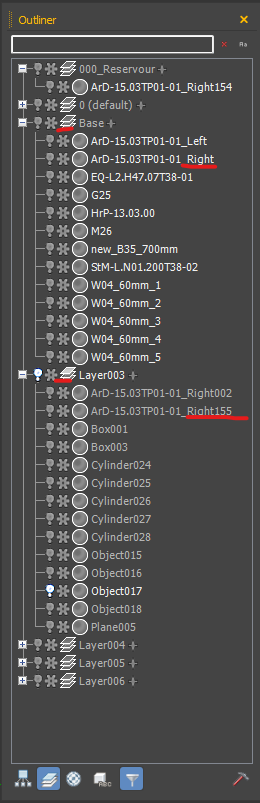
I'm still wondering about my second question, though: is it possible to make the text for objects on hidden layers grey instead of white? It makes it much clearer visually what is hidden.
Seems you have the "Invert"
Seems you have the "Invert" Checkbox enabled in the User Interface settings. Uncheck it and the contrasts should work better. I think it defaults to enabled in the original Outliner code and i missed to change that
Thank you!
Thanks for the script! It's wonderful to have it working again.
How can I increase the contrast of the selected layer icon to make it more visible? (I couldn't find its file in the script's icon folder).
Is it possible to set the text color of object names in hidden layers to grey instead of white?
Thank You!
Longtime MAX user since 2003, just want to thank you for your efforts in updating this to modern versions of MAX. Scene Explorer has gotten better over the years but I still greatly prefer Outliner.