Polyline Pro is an easy to use yet powerful and intuitive tool which provides a clear and efficient user interface to create splines precisely with measurements and angles in a manner similar to AutoCAD. The main purpose of Polyline Pro is to bring the spline drawing in 3dsMax at a higher level.
With Polyline Pro you can:
draw splines in Orthographic, Polar, Arc and Freehand mode
create points using Absolute or Relative coordinates
use direct distance entry - point in desired direction and type the length and/or the angle to create a segment
edit splines
use guides and tooltips
use short commands for quick access to almost all of the features
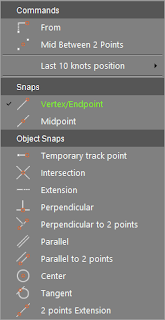
use Object Snaps to mark certain points/lines and continue to draw in their projection or intersection
draw spline using World Coordinate System or User Coordiante System
Added an option to set the text position relative to its opaque box
Polyline Pro version 3.8.01
miauu · 2023-05-15
Polyline Pro is updated to version 3.8.01
Changelog:
+ Added support for 3ds max 2024
Polyline Pro version 3.8
miauu · 2023-01-16
Polyline Pro is updated to version 3.8
Changelog:
+ Added an option to show the length of the snapped segments.
When the segment is a straight line the length of the segment match the distance between the points which defines the segment.
When the segment is curved, the measurements will show:
- the distance between the two points which defines the segment
- the actual length of the segment(the length of the curve).
Changelog:
+ UI is redesigned
+ Added "Distance and angle" section in the UI which shows, in real time:
◦ the distance between the last created point and the point that is moved by the cursor.
◦ the angle between the currently drawn segment and the 0-angle line.
+ Added an option to show the Osnap menu permanently on the screen. To do it click the OSnap button with the right mouse button.
+ Added button in Main button bar to switch between 3D and 2.5D Snap. The added button works as a toggle.
miauu · 2022-04-11
Polyline Pro version 3.6.01 is available.
Changelog:
+ Added support for 3ds Max 2023.
miauu · 2021-04-19
Polyline Pro version 3.6 is available.
Changelog:
+ Added support for 3ds Max 2022.
miauu · 2020-09-07
Polyline Pro version 3.5.03 is available.
Changelog:
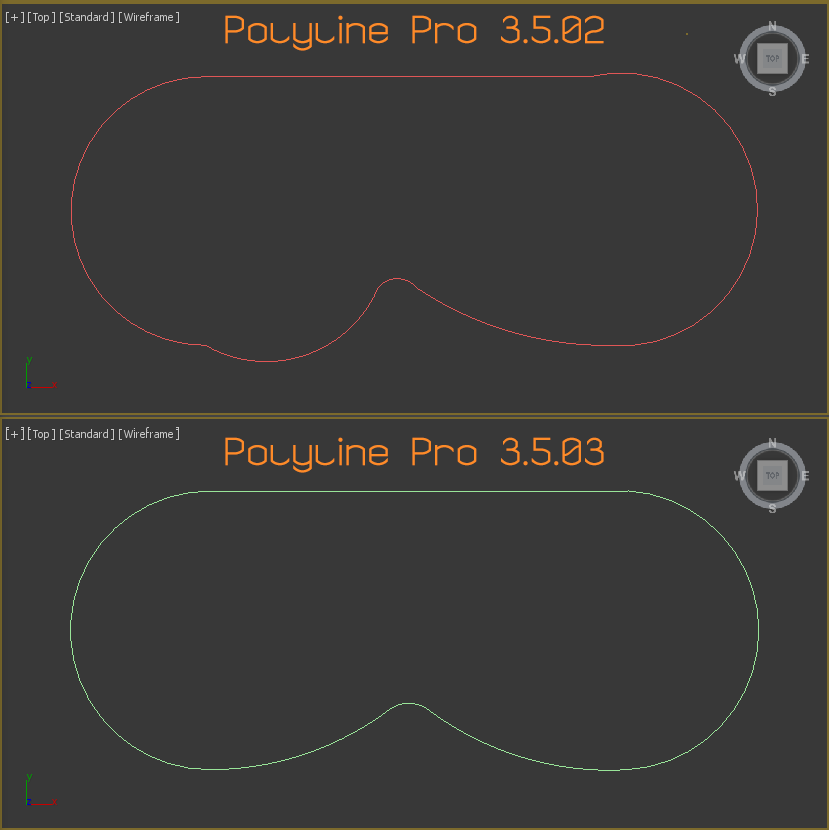
- When drawing arcs, by default, the transition between the arc and the previous segment will be as smooth as possible.
miauu · 2020-07-13
Polyline Pro version 3.5.02 is available.
Changelog:
-- Added support for 3ds max 2021
-- Fixed an error when additional SNAPS are installed
miauu · 2019-06-17
Polyline Pro version 3.5.01 is available.
Changelog:
-- Added support for 3ds max 2020
SStormBrig · 2019-03-12
Thumbs up. Thank you for this excellent tool.
.
miauu · 2019-03-13
Thank you.
Polyline Pro version 3.5 is available.
miauu · 2018-11-12
Changelog:
-- Edit Mode: allows the user to choose wich segment to edit by pressing the TAB key.
-- Edit Mode: while editing is active pressing the Escape key will cancel current edit and will allow the user to snap to new vertex to start new editing
If you are drawing an arc and you use the CLOSE command to close the spline(via hotkey or using the menu) the spline will be closed with the arc, not with the straight line. Please, watc the attached video file.
Now I understand you. But the price of POlyline Pro is fixed.
the price
Ggazarika · 2017-01-02
I live in Egypt and 1 Eur = 20 EGP which is my currency so this script will cost me 400 EGP
so could u lower the price or add an option to people like me so we can buy it by donations or somthing?
.
miauu · 2017-01-02
Hi!
The price is fixed. If I lower it for you I have to do it for the rest of the customers.
What do you mean with "buy it by donations or somthing"? If you do not have a paypal accout you can use direct bank transfer.
miauu · 2016-12-13
Polyline Pro version 1.7 is released.
Changelog:
- Added support for User Coordinate System.
Nice work! Osnap looks impressive.
Perspective view would be perfect, tho
:)
Polyline Pro version 1.1 is available
miauu · 2015-11-02
What is new:
- when you right click in the viewport you can choose to continue drawing the current line.
- 2 points Extension OSnap - you can create as many reference guide (alignment path) as you want.
- when Polyline Pro is started while a viewport that is not supported is active, or when viewport that is not supported becomes active while Polyline Pro is running a message window will be shown to informs you while Polyline Pro is closed.
- the Tooltip line will show which OSnap is active and how to use it.
- the Object Snap Menu will show(with check mark) which OSnap is currently used.
.
miauu · 2015-10-23
Thank you, guys! :)
+1 Purchased!
HHumma · 2015-10-21
Thank's for this Miauu! Please make update to work with your Work Plane! :)
Request
mustafa mamdouh · 2015-10-20
Can you add "arc creation with second point on curve" .. cause I trace all curves on AutoCAD using this technique?
.
miauu · 2015-10-21
Can you show me how this "arc creation with second point on curve" have to works?
+1
Ppixamoon · 2015-10-21
very impressive !
Congratulations :)
arc create with second point on curve
mustafa mamdouh · 2015-11-03
sorry for late repaly .. I means like attached pic