 By lbrooks
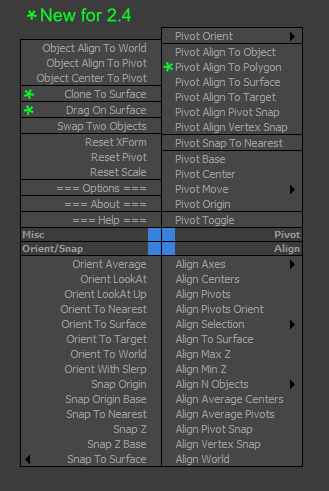
Pivot & Align Tools (PAT) are a set of macros bundled into a quad menu that allow you to perform various object alignment, pivot alignment and object snapping functions... among others. Most of the functions can operate on a selection of multiple objects at once, including grouped objects as part of the selection (open or closed).
NOTE: This script now handles quad setup for both 3dsmax 2025 and above, as well as previous versions of Max.
See online guide in links section.
The "LBTools - PAT Quad" menu can be found under the Quads tab in Customize. Assign hotkey to access it.
Latest Updates:
Version 2.5;
- Quad menu now works with 3dsmax version 2025 and above for the new menu system that replaced the old one. Previous versions are still supported.
Version 2.41;
- Fixed quad submenus from creating duplicates after each 3dsmax shutdown, due to not unregistering existing submenus before creating which caused config file bloat.
Version 2.4;
- Added "Pivot Align To Polygon" which aligns the selected object's pivot to the center of a single polygon selection and orients it to the surface normal.
- Added "Clone To Surface" which allows creating of new selected object instances onto a picked surface for each mouse click, with optional dragging via the options menu.
- Added "Drag On Surface" which allows a selection of objects to be tagged as draggable. It will use each of the selected object's negative local Z-axis to find any surface intersection point in the scene and continuously snap to its surface normal. The quad menu toggle will display a tick to indicate status.
 Marco999 · 2021-12-17