




miauu's Live Measure Pro provides several options for measuring various aspects of your scene - distances, areas, lengths, angles, sizes, axis difference, volumes, radius, diameter, slopes.
- Each measurement can be controlled separately.
- Export all measurements as a .txt file.
- Add custom notes to each measurement.
- Manual update or update in real time.
- User defined colors and captions for the measurements.
- Color coded.
- The measurements are always facing the viewport/camera.
- Can keep track of your dimensions.
- Save and Load all measurements with your scene. This will saves you time and the time of your colleagues.
- Fully functional mini UI.
- Measurements can be written in the User Defined Properties of the object
- Resizable UI
- Custom font size
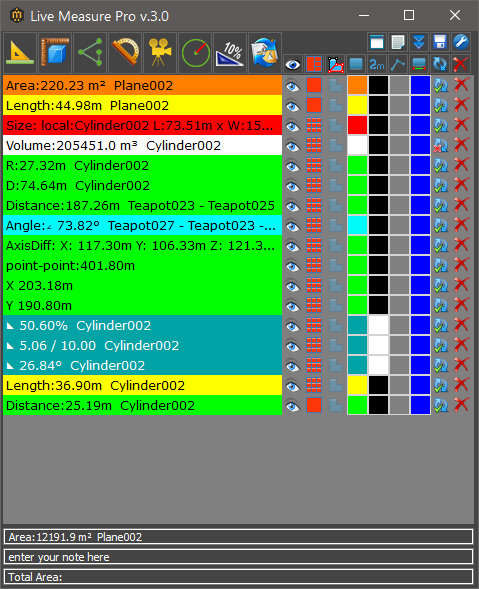


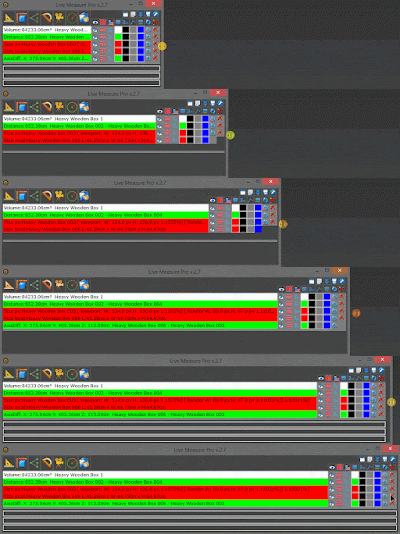


Works best when the display driver is Nitrous(3dsMax 2012 +)
Known Issues:
- In the .txt file with exported measurements some of the special signs as cubic meter, square meter, angle will not be shown properly.
The measurements, that are visible in the viewport can't be rendered.
This is a commersial script.
You can find more information here.
Comments (59)
Comment policy
miauu's Live Measure Pro version 3.6.05 is available.
miauu's Live Measure Pro version 3.6.05
Changelog:
+ NEW.
Added support for 3ds max 2027.
miauu's Live Measure Pro version 3.6.04 is available.
Changelog:
+ NEW.
Added support for 3ds max 2026.
miauu's Live Measure Pro version 3.6.03 is available.
Changelog:
+ NEW.
Measure angles in the screen 2D plane by picking 3 points with an option to snap to the screen X or Y axis.
Video demonstration.
miauu's Live Measure Pro version 3.6.01 is available.
Changelog:
+ Added New Custom Font* for 3ds Max 2022 and 3ds Max 2023. The same custom font will be used for 3ds Max 2024 and 2025. Its size and bold properties can be changed.
To see the whole images open them in a new tab.
miauu's Live Measure Pro version 3.6 is available.
Changelog:
+ Added Measure shortest and longest edge of selected objects.
+ Added Measure smallest and largest face of selected objects.
+ Added Measure the knots position as percentage of the total spline length.
+ Added New Custom Font* for 3ds Max 2019, 2020, 2021, 2024, 2025
Video demonstartion: https://www.youtube.com/watch?v=_cp5yGDIchU
miauu's Live Measure Pro version 3.5 is available.
miauu's Live Measure Pro version 3.5.
Changelog:
NEW: + The closest/farthest from object's center vertices and two most distance vertices will be displayed in the viewport
NEW: + Added a Sidebar with buttons for faster access of measurements. The sidebar can be toggled via the Settings panel.
Video demonstration: https://www.youtube.com/watch?v=NCFDvcthaZA
miauu's Live Measure Pro version 3.3 is available.
miauu's Live Measure Pro version 3.3
Changelog:
+ NEW: Added measure distance between the object's center and its farthest vertice. Works with mesh objects only.
+ NEW: Added measure distance between the object's center and its closest vertice. Works with mesh objects only.
+ NEW: Added measure distance between farthest pair of vertices. Works with mesh objects only.
+ NEW: Added an option to set the position of the text relative to its opaque box. Allows you to set the horizontal and
vertical offset of the text, shown in the viewport, relative to its opaque box.
miauu's Live Measure Pro version 3.2 is available.
Changelog:
Fixed Measure size of Local Bounding Box
miauu's Live Measure Pro version 3.1 is available.
Changelog:
+ NEW: Added support for 3ds max 2024.
miauu's Live Measure Pro version 3.0 is available.
Changelog:
+ NEW: Added measure Slopes in degrees, gradient, and percentage.
Video demonstration.
miauu's Live Measure Pro version 2.9.01 is available.
Changelog:
+ added support for 3ds Max 2023
miauu's Live Measure Pro version 2.9 is available.
Changelog:
+ added support for 3ds Max 2022
+ now you can change the font size of the measurements
Video: https://youtu.be/xO8kxEVb4V0
miauu's Live Measure Pro version 2.8.1 is available.
Changelog:
+ added support for 3ds Max 2021
miauu's Live Measure Pro version 2.8 is available.
Changelog:
+ when a closed group is scaled the Live Update will show the changes of the group's dimension.
+ The Volume and Area measurements will follow the objects when it is moved.
Video demonstration: https://www.youtube.com/watch?v=-lJZ_VOyMwM
miauu's Live Measure Pro version 2.7 is available.
Changelog:
NEW:
+ fixed an error when Angle between faces are updated
+ The UI can be resized.
miauu's Live Measure Pro version 2.6 is available.
Changelog:
NEW:
- New measurements added:
- distance between two selected vertices
- distance between the centers of the two selected edges
- distance between the centers of the two selected faces
Video demonstration: https://www.youtube.com/watch?v=fJBj_ysR5Jg
miauu's Live Measure Pro version 2.5 is available.
Changelog:
FIX:
- the length of the selected spline segement is not updated in real time
Video demonstration:
https://www.youtube.com/watch?v=zX9U-qkY9f0
miauu's Live Measure Pro version 2.4 is available.
Changelog:
NEW:
- the whole length of selected line can be measured by pressing the [Measure Length/Area] button(the first button from let to right in the UI) with middle mouse button.
FIX:
- fixed error when the [Update] button is pressed and the length of spline have to be updated.
- error in 3ds max 2019.1 that prevents the script to run
Video demonstration:
https://www.youtube.com/watch?v=ke0Su5ggtCA
miauu's Live Measure Pro version 2.3.
miauu's Live Measure Pro is updated to version 2.3.
Changelog:
- in 3ds Max 2009, 2010, 2011, 2012 the Area and Volume will be shown as "m2" for square meter and "m3" for cubic meter.
- added "copy to clipboard" - performing Ctrl+click over the measurement in the UI will copy only the numerical part of the measured value in the clipboard.
Video demonstration: https://www.youtube.com/watch?v=QlcKLo8Cbh8
miauu's Live Measure Pro version 2.2.
miauu's Live Measure Pro is updated to version 2.2.
Changelog:
- added support for 3ds Max 2019
miauu's Live Measure Pro version 2.1.
miauu's Live Measure Pro is updated to version 2.1.
Changelog:
- added Write to User Defined Properties. Works this way:
1) click over the selected measurement with middle mouse button to add the text in the edit full info textbox in the User Defined Properties. The user can enter custom text if he wants.
2) click over the selected measurement with Ctrl+MMB to add the text in the Custom notes textbox and the text in the Full Info textbox.
- fixed the bug that erases all measurements when you press LiveMeasure button when there is already one opened.
A QUESTION
Thank you for you work; I want to know if possible a command key for the 3dmax Tool XYZ Dimensions, or maybe a litle script for that... in the image you see marked with the *. Thank you!
.
Where is the image?
miauu's Live Measure Pro version 2.0 is available.
Changelog:
- Added support for 3ds Max 2018
miauu's Live Measure Pro version 1.9 is available.
Changelog:
- Added:
- Display custom text for each measurement in the viewport.
Video demonstration: https://www.youtube.com/watch?v=X--DYT76Wq8
miauu's Live Measure Pro version 1.8 is available.
Changelog:
- Added:
- Measure the area and volume as mm2, cm2, m2 or mm3, cm3, m3. Measure the total area of the selected object in object level. To do it press the Length/Area button with Middle mouse button.
- Fixed:
- when the group is selected and the Size is measured the script will measure the size of the whole group. To measure the size of the objects - open the group and select the desired object. If the open group is selected the script will measure its size.
When the group is selected and the Volume is measured the script will measure the volume of each object individually, so be careful when the group contains hundreds of objects.
Video demonstration: https://www.youtube.com/watch?v=SegYg1cJ2Nc
First at all I want to thank you for such a great tool.
A few suggestions:
- I think would be convenient to have opportunity to change area and volume units independently of the Display units. So you can work in mm and control area in m2 (e.g. 13.123 m2 instead of 13123000.000 mm2)
- There is no ability to measure area on object level, only on sub-object. What involves additional actions to measure some area, especially on standard geometry.
.
Your suggestions are included in the last update. :)
miauu's Live Measure Pro is updated to version 1.7.
Changelog:
- added ability to measure the size and the volume of many object at once.Select the objects, whose size(volume) you want to measure and press the appropriate button. For each object will be showed the values of its size(volume.
https://dl.dropboxusercontent.com/u/35093423/OTher/Pictures/miauuLiveMea…
Name of objects
Hello to all,
looks like very usefull tool. Is it possible to show in viewport Name of objects with this script ? Thanks.
have a good day,
Martin
.
This is not the purpose of the script. Showing name of the objects is a very simple taks and there is a script here that you can use.
miauu's Live Measure Pro is updated to version 1.6.
Changelog: - added ability to add custom notes to each measurement
Video demonstration: https://www.youtube.com/watch?v=mmyJS_Ly324
Can we add custom notes to the measurements?
.
I will add this feature in some of the next updates. If you have some ideas how this to work send me a mail.
.
Done.
Perfect. Thanks.
Version 1.5
miauu's Live Measure Pro is updated to version to version 1.5.
Changelog:
Added support for 3ds Max 2017
Added Export all measurements as a TXT fil:
Version 1.4
miauu's Live Measure Pro is updated to version to version 1.4.
Changelog:
New measurements types - Radius and Diameter.
The radius/diameter can be measured by selecting 2 or more edges/segments or 3 verts/knots. Supported objects are Supported objects are Editable Poly, Editable Spline, Line and Edit Poly modifier.
Video demonstration: https://youtu.be/K4ki8vbET-I
Version 1.3
miauu's Live Measure Pro is updated to version to version 1.3.
Changelog:
- Added Linear dimensions - measure distances between points but only on X, Y or Z axis.
- Added Decimal precision of the shown measurements - limits the number of digits after the decimal sign.
Video demonstration: https://www.youtube.com/watch?v=8Eb8IpmpTuU
.
Works with 3dsMax 2016
.
miauu's Live Measure Pro is updated to version to version 1.2.
Changelog: -
Added ability to hide the rollout from the screen. Press the RollUp/RollDown button with right mouse button and the dialog will dissapear. To show it again press the toolBar button or the hotkey that you use to run the script. While the dialog is hidden all measurements will be updated and will stay visible. - Now you can measure angle between two selected faces that belongs to one object. To do that press the Angle button with middle mouse button.
Video demonstration
.
miauu's Live Measure Pro is update to version 1.11
Changelog - fixed a bug
Thanks
Now with this pro version everything is completely finish for my workflow.
Another Great
I'll get this one too, carry on the great work
.
Thank you.
I'm glad you like it.
.
miauu's Live Measure Pro is updated to version 1.1
Changelog - fixed a bug when the used units is set to inches.
Thank you very much for this wonderful script.
.
Glad you like it.
.
Alexander(...91@vodafone.de), please send me an email to miau_u@yahoo.com.
Perfect.
Thank you.
fantastic plugin
thanks
omg, egress paths dimensioned during conceptual design, epic. thanks!
.
Welcome.
:D
Awesome, Going to buy some pieces of these when I get grant money from work :)
There are some things I think has been lacking in 3DS Max in terms of the job I do every day.
- Measuring Tools
- Better control of splines (some Autocad functions)
- Animatable catenary curves
However: Håvard (http://www.scriptspot.com/users/haavards) here on script spot has begun on a script that might been the subject of future work (catenary curves). :)
I'm not going to post it here, but a link to our Norwegian 3d forum where he has published what he has so far: http://www.3dhue.com/viewtopic.php?t=11100
.
Those catenary curves stuff - too much math for me. :)
+1
Congrats! Great work.
.
Thank you. :)
god damn...maybe autodesk should buy your tool too....hmmm
good thing
.
Thanks. :)