


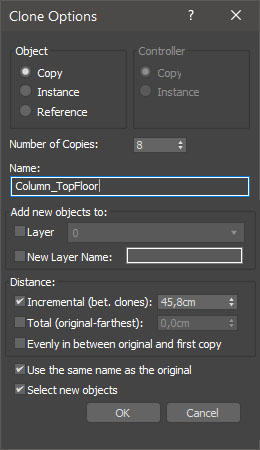
miauu's Extended Clone Tool adds new options to the standard Clone Options dialog.
The main goal - save time using these features:
- move the created objects to a new layer,
- move the created objects into existing layer
- select all new objects after their are created.
- place all clones at even intervals in between the original object and the first clone that you create
- set the total or incremental distance between created objects
- set the names of the newly created objects to be the same as the names of the objects they originated from. Works properly only when objects are copied with Shift+Drag.
This is a commersial script. You can find more information here.
Comments (25)
Comment policy
miauu's Extended Clone Tool version 1.5.06 is available
Changelog:
+ Added support for 3ds Max 2026
miauu's Extended Clone Tool version 1.5.05 is available
Changelog:
+ Added support for 3ds Max 2025
miauu's Extended Clone Tool version 1.5.04 is available
Changelog:
+ Added support for 3ds Max 2024
miauu's Extended Clone Tool version 1.5.03 is available
Changelog:
+ Added support for 3ds Max 2023
miauu's Extended Clone Tool version 1.5.02 is available
Changelog:
+ Added support for 3ds Max 2022
miauu's Extended Clone Tool version 1.5.01 is available
Changelog:
+ Added support for 3ds Max 2021
miauu's Extended Clone Tool version 1.5 is available
Changelog:
+ fixed: error when "Use the same name as the original" is used
+ certain checkboxes will remember their states
miauu's Extended Clone Tool version 1.4.01 is available.
Changelog:
+ fixed: error when "Use the same name as the original" is used
+ IMPORTANT: "Use the same name as the original" works properly only when objects are copied with Shift+Drag.
miauu's Extended Clone Tool version 1.4 is available
Changelog:
+ set the names of the newly created objects to be the same as the names of the objects they originated from.
Video demonstration:
https://www.youtube.com/watch?v=cRd62-d9YT0
The download URL does not work! Please check!
.
Fixed. Thank you.
The download URL does not work! Please check!
interactive!
one thing i came across when using the script is a button for interactive mode so we can see the changes before closing the window, that gonna be a good thing to add.
I attached examble image for that.
Thanks in Advanced.
Attachments
.
Yes, this will be usefull but the problem is that 3ds max creates clones after the OK button is pressed. So I have to find a workaraound(if it is possible). :)
miauu's Extended Clone Tool version 1.3 is available
Changelog:
-- added [Distance: Evenly in between original and first copy]. Works only when Select and Move tool is used. Not works with Select and Rotate and Select and Scale
tools. It allows you to place all clones at even intervals in between the original object and the first clone that you create.
Video demonstration:
https://www.youtube.com/watch?v=52Y54LQO41s
:)
Now its perfect thx.
is there any way to buy it without PAYPAL?
.
Yep. There is no need to have paypal account to make a donation to a paypal account. Go to this page: http://miauumaxscript.blogspot.com/p/about-me.html
Press the Donate button, use your card to make a donation and send me an email with the donation details.
Done
i bought it no problem, thx in advanced.
Going to solve my purpose for sure. Hope it working fine without any bugs.
.
If there are any bugs, please report them. :)
miauu's Extended Clone Tool version 1.2 is available
Changelog:
- added "Set incremental or total distance between cloned objects".
Video demonstration:
https://www.youtube.com/watch?v=d8mHoUhEQ2E
Thanks
One issue for total and incremental , the distance should be taken automatically (not 0.0) from the distance between the original and the new moved object.
Thanks
good script but the missing feature is ,if i want to make the new copies in between the original and the new moved object (like the difference between Total and Incremental in Max Array Tool).
.
This will be added in the next versions:
- shift+drag object, set the number of copies, all copies will be placed at even intervals between the original and the new moved object
- shift+drat object, set the number of copies, set the distance between the original and the new moved object and all the copies will be placed at even intervals between the original and the new moved object.
miauu's Extended Clone Tool version 1.1 is available
Changelog:
- added "Set distance between cloned objects".
Video demonstration:
https://www.youtube.com/watch?v=6K8OIuG99bA