Script
Materials to Editor
 By JokerMartini · Credited author: John "Joker" Martini · 2010-04-26
- Version
- Version 2.0
- Version requirement
- Max 9+
- Other software required
- 3ds Max
- Date updated
- 2012-06-26
- Votes
- 91
- Homepage
- www.JokerMartini.com
- External download
- External download
Tags: selection, reset, editor, copy, materials, Mats, Clear
Description
Comments (17)
Usefull script
milie · 2014-03-19
Hey, i have two small suggestions, if it's possible :)
1. If no selection is made when running the script, it should fill with all the materials found in the scene.
2. The materials should be sorted alphabetically when placed in the editor slots.
How does this sound ? :)
Thanks
 asymptote · 2012-10-15
This errors for me when more than one object is selected, I've been using it for years on single objects and never needed, or bothered to find out what the problem was.
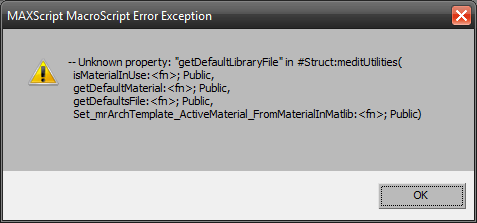
I was trying to find out what happens if I selected more than 24 objects, and suggest it could be combined with S.M.E.S.
thx.
Edit: That's in Max 2010 64 btw.
 W DIGITAL · 2012-10-12
i tried it
but got error after executing (installed as .mcr and executed as button in toolbar)
but i noticed soulburn scripts already offer this featuer with a simple quick button that does it
would it be possible to have show standard map in viewport turned on for all newly populated materials?
Update
JokerMartini · 2012-06-26
Branko is correct. It does work with 2012. Although here is another update anyways.
It now will display the materials in the slate editor as well as the compact material editor. Whichever one you are using it will work for. Check the download URL for location to download it.
Thanks again for the compliments.
John
 barigazy · 2012-06-26
Very nice update, John.+1
JokerMartini · 2012-06-26
Thanks buddy.
Doesent work in Max 2012 anymore
blaxxun75 · 2012-06-25
Used it a lot in Max 2011 but it doesent work in Max 2012 anymore.
Would love to have it again in Max 2012!
Thank you! :D
barigazy · 2012-06-25
MaterialsToEditor2.ms works fine with max2012x64.I don't see any problem.
great scripts
NikkoN · 2011-06-22
Thanks for the great scripts!
yes but.... SoulburnScripts
phicata · 2011-03-09
 tommym · 2010-10-16
It works like a charm!
Thanks
asymptote · 2010-07-22
Great time saver in big scene's
thx
JokerMartini · 2010-07-22
Thanks for your comments.
I'm in the process of converting this over to 2011 so it works with the new material editor in Max.
JokerMartini · 2010-04-28
I'm working on two new scripts, one that randomly move,scale and rotates the current selection with a choice of absolute or relative. I've also got a key transfer script in the works that copys keys from one object and places them on onto another selection of objects. That will be uploaded late this week. Finally is a Render Sheet script, which will work like Zbrush's Zapplink Character Sheet, only difference is that it will be for 3ds Max!
boudini · 2010-04-27
Simple and really useful. Works perfectly, thanks!
JokerMartini · 2010-04-26
Of course, I will start working on that next right away. I'll let you know as soon as I get it get done. I'll be sure to post a link in here.
 harumscarum · 2010-04-26
good one!
could we expect another one which put material to the new SlateMaterialEditor in max2011?
thank you!