Script
Light Detictive
 By doctor_3d · 2015-02-18
- Version
- 1.2
- Version requirement
- max 9 and above tested on 2018 - vray - vray next
- Date updated
- 2019-05-29
- Votes
- 2
- External download
- External download
Tags: render, Rendering, mental ray, VRay, lighting, light, include, exclude
Description
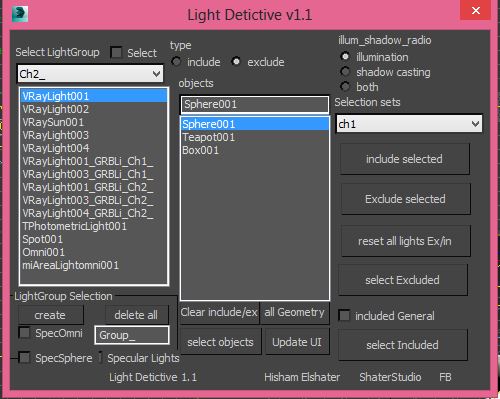
Light Detictive is a Tool designed to mange complex lighting setups. --not only control include and exclude by selection or sets fast , but olso investigate the lights on the scene see exclude and include lists , --olso investigate objects which light affect them of not. -- fast Group Lighting specific objects .
support Vray.
Additional Info
How to use it:
-for fast ex/include: select a light on the script then select meshes on the viewport or from selection sets in the script hit include/exculde selected .
-to check objects led by a light just choose the light from the list
-to check an object and which lights affect it 2 ways just select it and then press "select in/exclude lights"
-the other way from the object list just press all geometry button and choose the object select either include or exclude it will show you the lights related to that object
-if you check "included general" it will show you all lights affecting the geometry.
everything else is almost self explanatory.
-light groups is a way to copy all lights and make a copy include selected objects.-it needs cleaning for optimal results/rendertime plz test it before you decide to use it on production.
History:
v1.1 fix issues with vray lights , now supports Vray lights without issues.
v1.2 update:
tested for vray lights ,I don't know about other engine but should work in any renderer.
better ways to invisticate lights on your scene.
-change light type include to exclude or the oposite not just showing the type
-when typing mesh name now update the list of lights -just click outside if it has problems- or select the object you need to know which lights ex/including it then hit "select in/exclude lights" it will be selected.
-added toolips for ease of use
-known issues: photometric lights makes error when selecting it on the menu.