GK3D · 2022-09-12
This one will save me time thanks.
Script
 By JokerMartini · Credited author: John "Joker" Martini & Andru Phoenix · 2010-04-28
Tags: Animation, Rotate, scale, copy, transform, move, key, animate, transfer, Pase, Offset
Key Transfer
v1.0
- Copies keys from one object to another
- Copies individual object transform keys from position, rotation, and scale to other objects
- Randomly offsets keys in the timeline based off desired settings
- Keyframe offset variation in the timeline using custom min and max values
- Delete all keys of selected objects
v1.04
- Control offsetting of keys and animation based on objects proximity relation to desired object
- Type of delay easing
- Grouping objects based on units
- Set desired animation time duration
- Delay stagger control
- Copy keys based on Relative or Absolute transform properties
- Visibility option
- Updated instructions and credits
v.1.06
- New & Improved Collapsible UI
- Local Linear Sorting (X,Y,Z)
- Live Preview of Groups
- Reverse Object Order of Stagger
Things to do.....a lot of work is being put into updating this script with a handful of new functions and controls. Be sure to check back often for updates!
I hope you find this as useful as I do. This is open source and free for anyone to add to.
Please post a link to anything you to with the script. I'd like to see what you come up with. I think this script could grow into something pretty interesting.
ENJOY!
GK3D · 2022-09-12
This one will save me time thanks.
 vyle · 2021-03-31
Any chance to have it for max 2021? Or if you know something similar?
fasle
 HamedAnimo · 2020-07-24
I run the script and nothing happened but just a blue false on the maxscript listener. can you help me get this gold piece script working?
Looks fantastic - but I get an error
minky · 2016-08-30
Using this in Max 2015. Not sure where I'm doing wrong, suspect it is a simple script issue but lacking experience I have no idea how to fix it.
I pick the animated object, then pick the target object, set the axis/ rotation settings, but when I click "Transfer Animation" every time it throws the exception "Unknown property: "x_position in undefined" - or it will be "y_position in undefined" or "x_rotation in undefined", depending on whatever axis to transfer is selected first.
If anyone has any clues on how to fix this or any similar which work in Max 2015, that would be really helpful! Thanks.
JokerMartini · 2016-08-30
I would suggest you check out the newer version of this animatorstoolkit.com
skeay · 2016-03-02
This is a great script & thanks for sharing it. I have a query :
Can you tell me how to know the order it applies the transfer to?
(I get the feeling this is a really basic fundamental of max I'm missing the point of?!)
Eg. I transfer the visibility of an object to an array of copied objects, when timeline scrubbed the visibility appears randomly, how can I ensure it goes in a line?
Thanks!
mali · 2015-08-22
Proximity doesn't work for me at all or I'm doing something wrong... :/ I was following the first video but I'm not sure any of the advanced options work. I'm using max 2015
EDIT: never mind, I didn't understand how groups worked, now I kind of get it...
RELEASED!!!
JokerMartini · 2013-06-03
The new Keytransfer has been released. Check it out at
http://www.animatorstoolkit.com/
http://www.scriptspot.com/3ds-max/scripts/animators-tool-kit-atk
ATK is a compact suite of modular tools to rig, copy and manipulate animation in a few clicks, without plug-in dependency. There is no need for extra licenses because ATK uses methods native to 3DS Max, so it can easily fit into any production pipeline.
Check out the free lite version today!
COMPATIBLE WITH
3DS MAX (2010-2014)
An error description
 NDC · 2012-12-19
I have just come across the following error (3ds Max 7):
"Unknown property: "x_rotation" in Controller:Linear_Rotation".
What might it be due to?
:)
Fonte Boa · 2012-11-22
Just now i saw the teasers. Cant wait to try it: would it be our Christmas gift? Thanks for share it, Martini! :)
Teasers
JokerMartini · 2012-10-08
The teasers begin!
Check it out https://vimeo.com/51005373
Check it out https://vimeo.com/51018897
Donald2B · 2012-11-21
Wow!
I could really, really utilize this on my current project!
ETA?
Troy
Spring control
mark pigott · 2012-04-18
You can not transfer the animation from an object with a spring controller added to the position[XYZ] or a Peter Watje spring add on
for the PositionX,Y,Z seperately.
This would be a nice add on!
Great script!
mark pigott · 2012-04-18
you however can bake the spring motion with another script before
running KeyTransfer.
mark pigott · 2016-01-11
confirmed that this script will not work with spring controller on position
3ds max 2012 crash
b_52 · 2012-04-01
after using this script my 3ds max keep crashing.
anyone facing this problem with max 2012?
i have been searching for an update for key transfer but so far nothing.
plz light me with anyhting.
thx ...
pit3ds · 2012-02-19
Is it possible to make a script to play sounds when particular action on each object?
can be useful- "http://howiem.com/wordpress/?p=126"
Just wait!
JokerMartini · 2012-02-17
Oh it wont be long my friend. You'll be very pleased with the final product. Which will be releasing not to far from now. You'll know when its released!
Thanks for your interest, I appreciate it.
Everyone's comments, ideas and support has really helped push both Andru and I to push the envelope on the next version. It has many new features. The list is not worth mentioning just yet. A video would be best.
Be back soon.
mwaif · 2012-02-21
Thanks for the heads up John. I'm waiting with impatience.
pit3ds · 2012-02-14
Hello
I would like to know how the work and the long wait?
 lantlant · 2012-01-17
😮WOW!!! simple amazing! +Vote
 3D R.n.D · 2012-01-15
really nice script and usefull too but i dont know why its not working anymore!!!!!
when i run the script nothing happens i tried it on more than one machine .. it used to work before . pls help
done
JokerMartini · 2011-12-06
consider it done and already implemented into kt 2.0
coming sooon!!!
Chapeau
 Alaa alnahlawi · 2011-09-16
I really appreciate ur work THANX
I like Mwaif idea about specifying the start frame of the copy
I have some ideas
Sometimes my objects have more than one layer in the position
I dont know if this is hard but can you put a spinner that defines the layer I want to copy the animation to
it gives me an error when I try to do that and I have to rerun the script , if this is not possible why not just discard my command without the error
Second thought is that you might want to change the speed of the animation (scale the track -+) according to the first,Middle or last key ,by specific percentage is that possible
and finally a reverse animation option
Regards
Alaa
Alaa
JokerMartini · 2011-09-17
Thanks for all your comments and ideas.
We have completely rewritten and updates KeyTransfer with around a dozen new features.
Everything you have mentioned + more!
The release of the KT will before the end of this year. We are nearing the end of out development and rolling into Beta testing.
So keep a look out for it and I'll be sure to post all over the place when the new one is out so everyone knows!
It's going to be great!
JokerMartini
It's going to be great!
Alaa alnahlawi · 2011-09-17
I believe u
mark pigott · 2011-12-06
would be neat if you had a key transfer for box height!
Praise
zorend · 2011-09-15
Hi joker
Just wanted to give u and Pheonix a major thumbs up for your great work.
Key transfer is brilliant and very usefull! I'll definatly help spread the word
(and invest) if and when u guys go commercial. Good Job!!!!
Update Coming!
JokerMartini · 2011-07-04
Hey Ian,
Glad you asked. Andru Phoenix and I have been hard at work on developing the next version of Key Transfer. The release of the newer version will be before the end of this year. I know that may seem a bit far away but considering all the new functions and abilities of KeyTransfer it doesn't seem like much time.
I'll keep you guys updated on things.
Thanks for the interest and support!
 W DIGITAL · 2011-07-04
sounds great! wow end of the year, i feel like something big is coming!
email@ianclemmer.com if you need good alpha testing and support
presets
mwaif · 2011-06-15
Saving copied animation as a preset would be cool. So in a fresh scene I can work with previous values. Load preset > blabla animation
Done!
JokerMartini · 2011-06-15
Already in the works but thanks for the continuing ideas!
W DIGITAL · 2011-07-03
when can we see new versions?
and will this script be able to transfer any animation, for example of lights?
thanks john and keep em comin!
Great
JokerMartini · 2011-06-14
groutcho, Great ideas man. Thank you for the idea. That seems like it would be a very useful and straight forward thing to do. I like that idea a lot.
Thanks.
John
No problem!
JokerMartini · 2011-06-10
No problem. I'm glad you find it useful and enjoy using it.
Feel free to suggest any other ideas you may have that you would find useful.
And we will do our best to implement those that best work!
John
copy selected keys
 groutcho · 2011-06-14
Is there a way to copy only selected keys instead of the whole controller ?
Also, it would be useful to either add a "all checked" option to copy everything without checking every axis and controller type box.
Example :
I've got a master camera moving all around the scene. I have got sample cameras here and there. I'd like to add the several keys of the sample camera to the end of the master camera track.
mwaif · 2011-06-10
Great news. Thanks for implementing my suggested feature. It will be a lifesaver for me. I'm currently working on a construction assembly animation. There are identical pieces which have identical animations starting at different frames. So easiest way for me would be; copy the source object's animation and paste it to other objects which will start the animation at current time slider frame. I'm sure many others will appreciate this feature.
Thanks for your hard work and thanks for bringing us this useful script free of charge. Looking forward version 2.0
mwaif
JokerMartini · 2011-06-10
That is a great suggestion. I'll be sure to implement that into the next release.
It is a very good idea that no one has ever brought up. I could see that being very very useful. Thanks for your suggestions.
By the way. Be sure to check back, the release of the new 2.0 wont be to far from now. We have been working intensively on 2.0 for over a year now and we are getting very close to the finalizing stage.
offset to current frame
mwaif · 2011-06-10
Can you please add an option so that transfered animation starts at selected frame? Let me give you an example:
I have an animated object. I select it in the script. Then I select another object, go to frame where I want this object start to animate, an press transfer animation, so keys will be automatically offseted to my current frame.
Thanks.
offset modifier keys
smashley · 2011-04-22
Any chance to support the offset of keyframes on the phase of a noise modifier?
thnx.
-chad
How about other keyable properties not only transformations?
cyb3r · 2011-02-16
For example the script like this could be used for animating complex light systems like LED tubes or lightboards like in LasVegas by turning on and of lights in repetable pattern. Maybe the script could control switching material id to achieve interesting color effects if used with multisubobject material? I see the whole bunch of possibilities for this :)
KeyTransfer Wishlist!
JokerMartini · 2011-02-03
We will be releasing the new version of the Newly revamped KeyTransfer this year.
Over the course of the next few weeks we would like to gather together everyone's ideas for things they'd wish for us to incorporate. Feel free to list those ideas them below.
zahid hasan · 2011-02-03
very nice script.it helped a lot in a recent project.thanks a lot. here is the link
Beautiful! :) I love the
 artkitekt · 2011-02-03
@Zahidhasan - Beautiful! :) I love the different ways elements animated in, very elegant. I'm glad to see KT helped you out. Please feel free to share your suggestions on how it could be improved or features you would like to see. Again, great job & thanks!
help me
rako · 2011-01-06
I've downloaded the KeyTransfer1.06.ms script, but when i run it or even drag drop it in max nothing happens at all, I've done it in max 20011-64. Any help? Thanks
Rako - A fix
thedour · 2011-01-07
@rako
Open the script, scroll to the bottom and look for this line (9th from bottom):
rfKeyTransfer = newRolloutFloater "Key Transfer v1.06" floaterWidth floaterHeight 1200 300
Now, put 2 dashes -- before the last two numbers:
rfKeyTransfer = newRolloutFloater "Key Transfer v1.06" floaterWidth floaterHeight --1200 300
It has likely been working this whole time but being positioned off of your screen 😉
Cheers,
i am very hapy
rako · 2011-01-08
thank you very much i am very happy thank you fot your answer
SOLVED MY PROBLEM
HamedAnimo · 2020-07-24
thanks a lot. you solved my problem.
help me
rako · 2011-01-06
I've downloaded the KeyTransfer1.06.ms script, but when i run it or even drag drop it in max nothing happens at all, I've done it in max 2009-64. Any help? Thanks
Nothing happens
3d-agent · 2010-12-21
Hi,
I've downloaded the KeyTransfer1.06.ms script, but when i run it or even drag drop it in max nothing happens at all, I've done it in max 20011-64. Any help? Thanks.
ykk · 2010-06-21
It can be select all object follow to 1 object. Is't can do mlti object follow to multi object like "A", "B", "C" objects follow to "A1", "B1", "C1". Is't possible?
W DIGITAL · 2010-12-01
this script is so nice!
any update on transfering parameters as well?
another idea i just had, is to apply damping, so that the transfered animation is not linear, but each object has damped transferred keys, this would rEALLY add to the feeling of animation being real
i have code where damping is applied if you are interested
also i think selection sets are very important, it would be great if one could just use the hierarchy as an option, also a zebra selection would be great, where it is 1,3,5,7,9,2,4,6,8,10
i also have the code for this (by raphael steves),let me know if you are interested in that
to sum it up, this amazing script needs
-object paramater transfers (sorry if i missed that and it has that by now)
-damping & drag force affected transfer keys
-advanced selection sets
:)
 tommym · 2010-06-12
OK Dru,
Thanks for the nice comment.
I am looking forward to what you come up with. Part 3 of my work shows how a family of 8 cubes are inter-related and I show it changing through the from one to the other. This can be done very simple with your method just by the touch of some buttons. Thank you for your interest.
Paul
JokerMartini · 2010-06-11
wanyda81
Make sure to reset xform on the polygons after detatching them. All the rotations are based off the world axis. I'm hoping to implement local/normals based pivot rotation and movement in a future update.
tommym · 2010-06-08
Hi John,
I have tried your script and it works on some simple tests it is very
interesting. I have checked out the reverse but it did not work may it is
because I'm an ol tonto. I would like my cubes to rotate as if in a mirror to each other. You can see what I mean if you check my videos called CubicWonder on youtube. If you need the primitives let me know I could use some help I am a old age pensioner and not as sharp as you 64 bit-ers.
Thanks Paul
 jaijinsunrise · 2010-06-12
Hey Paul,
Great idea regarding the mirror functionality! Right now "Reverse Order" simply reverses the order in which the objects stagger, essentially reversing the "cascade effect". I'll see if I can find an intuitive way to implement mirroring key frame values in this upcoming release. BTW Very interesting work done with your CubicWonder studies! It's very beautiful, the phenomena of symmetry found in simple geometric combinations.
wanyda81 · 2010-06-08
Hi I have a question. I tryied key transfer tuto. I made sphere and splited
each polygons. And detached. But my polygons of sphere didn't rotate each polygon normal y axis. Help me please. I uploaded my file.(max2010)
JokerMartini · 2010-06-07

Key Transfer Website!
Updates coming soon.
 3D_Animator · 2010-06-05
Fantastically ! ! !
W DIGITAL · 2010-06-05
hi, great script,
but can can update version also copy any keys, not just transform keys?
like any other parameters of objects or modifiers, that would be great to copy those keys onto any other parameter
JokerMartini · 2010-06-05
Hey phizikl that is a great idea. I'll definitely look into this and make sure to implement this into the script. Be sure to look for it in upcoming updates!
 Michele71 · 2010-06-04
Fantastic Script! :) Great Work!!!!! One point to you :) ;)
Waxmodeler · 2010-06-04
This Script is Top Notch. Magnificent! Thanks a bunch. Works great in Max version 8 too. :-)
wicq08 · 2010-06-04
Hi.very impressive script. I have a question. how can I transfer animation from one object to an object that has already lots of controllers added like for exmple posittion and rotation list(zero position xyz) animation controllers and weight controllers. what I want to do is to transfer facial mocap data to objects that move bones like paul neales rigging. everytime I try to do it with this script it show and script error. please help
JokerMartini · 2010-06-04
Hey wicp thank you. I'm glad you like the script and find it useful. If you want to setup a little sample scene of something that resembles what you're trying to do and upload it, we will be able to look into fixing the problem easier if that works for you? Just upload it whenever you get a chance and just describe what you want to do and when the error occurs.
Joker Martini
wicq08 · 2010-06-04
HI John, I attach 2 files. one is paul neal`s ogre from his rigging dvd. it is a complete facial rigging character . when you open it you can see that the face has lots of spline controllers objects . when you move one of then you can see that the controller object moves that area of the face in a realistic way. every controller is linked to bones via position and rotation controllers list. This mean that this spline controllers objects are not free. they already have lost of constraints or controller lists. the second file is a TRC file (in a .RAR file) which is a facial mocap data made from a program called zign track. what I would like to do is to apply this mocap data to the spline controllers objects in the face of the ogre so this way I can add realistic facial animation to my characters. I tried it with your script and many others , but it doesn`t work I think because every spline controller object in the ogre`s face has lots of position and rotation controllers list. when I try to pass the animation from one sphere in the mocap data to a spline controller object it pops up the script windown saying something like position y or x or z . something like that. Now I wrote once paul neal asking him for this issue. he told me that this has something to do with matrix transformation, whatever that means . the problem is that im not an scripter and I dont know how to do this. well I hope you can help me with this that Im sure wil l be usefull to other users.
best regards,
Ivan
 Nafetsu · 2010-06-04
Excellent, thanks guys.
jaijinsunrise · 2010-06-03
New KeyTransfer 1.06!

Now with 4 brand spankin' new features :
Behind the scenes demo of how this animation was created by animating 3 objects coming tomorrow afternoon along with a tech demo of 1.06's new features! Why the hell am I yelling?! Goodnight :)

http://www.youtube.com/watch?v=VCQtBSqh4wY
A demo showing off the new UI, live preview of groups and other various features in KeyTransfer 1.06
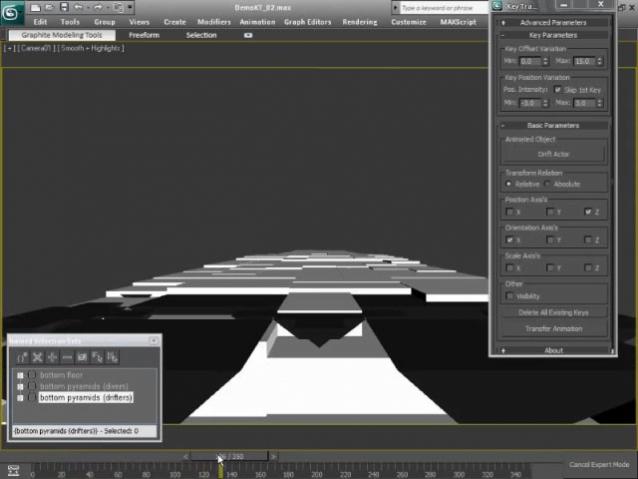
http://www.youtube.com/watch?v=ZxPMsKYbDUQ
A demo showing how the main animation of "corridor" was made by animating only 3 objects using KeyTransfer.
JokerMartini · 2010-06-03
Fun sample with Key Transfer!
2.13 MB Video
jaijinsunrise · 2010-05-27
Added intensity parameters. This allows you to randomize the values of copied keys. Right now it only affects the position keys. Additional support for all axes coming soon!
JokerMartini · 2010-05-26
Updated script with some bug fixes thanks to Andru.
Check it out the script. KeyTransfer-1.04!!!!
jaijinsunrise · 2010-05-26
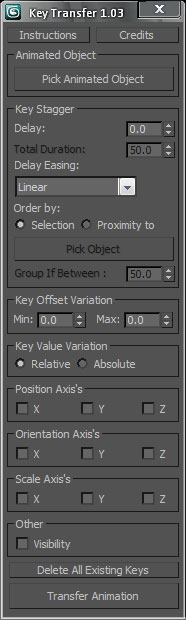
With John's approval I simplified the interface a little, fixed a few bugs and made it unbreakable(i think ;) ) Let me know if anyone finds any bugs.
Thanks,
jaijinsunrise · 2010-05-25
Thanks John. You've created a monster! :) Indeed, keep the collaboration goin'! I look forward to the iterations to come.
I created a demo of how KeyTransfer works here : http://www.youtube.com/watch?v=Q5bGhRZyWeU

BTW you can message me on AIM @ jaijinsunrise if you have any questions or want to bounce anything off of me
Best,
JokerMartini · 2010-05-25
Just as a heads up, I'm working on adding an additional option for key Variation.
Updates coming soon.
jaijinsunrise · 2010-05-25
fantastic! i'll keep my fingers off until you update. Have you looked into supporting modifiers? I've been able to list of every modifier and it's keys but haven't gone any deeper..
userAnimatedObj = $Plane01
userSel = getCurrentSelection ()
for s in userSel do
(
for k in userAnimatedObj.modifiers do
(
for i in 1 to k.numSubs do
(
print k[i].keys
)
)
)
JokerMartini · 2010-05-24
Hey Andru could you post a video showing how the additional features of the script work and/or what they do. Just go ahead and use the object in the imaged you posted. That would be great.
Thanks
John
JokerMartini · 2010-05-24
Great work Andru Phoenix. I'm glad to see the collaborate work on the script. You have added a great amount of control and function the script. I'm looking forward to downloading and checking it out. We will have to keep working on this script and pushing it more and more.
Great job man.
John Joker Martini
jaijinsunrise · 2010-05-24
Major Updates ============
Had to sign up for a new account, the spam filter wouldn't let me post anywhere :(
Major updates to the stagger engine
+ Added staggering by proximity. Very exciting concept. Your objects stagger themselves in the order of how close they are to an object you specify.
Additional functionality of this feature includes being able to stagger by groups that are clumped together based on distance ticks :)
Also added staggering based on total duration which you can affect by several different easing equations : Linear, CubicIn, CubicOut, CubicOut, CircIn, CircOut, CircInOut (More to come)

+ Added relative / absolute options
+ Added visibility support

Enjoy!!
- Andru Phoenix
artkitekt · 2010-05-22
Nice script! Very much needed this for awhile.
I modified it a little bit by adding another parameter "Keyframe Stagger". You can now enter a value by which the keys offset in time. This allows you to get a clean cascading effect.
At the moment it staggers the object's keys based on the order of which the objects were selected :\ perhaps a function that sorts them by name/index before the staggering operation would solve that :) Anyways, thanks again & cheers!
nimitz · 2010-05-20
Scale doesn't work in max 2009, it gives me the error : unknown properties scale x in bezier scale...
mickatt · 2010-05-08
Amazing script !!
Thanks a lot for sharing
 NicolasC · 2010-04-28
Nice ! thks for sharing :)