 By Martin Breidt · 2007-07-29
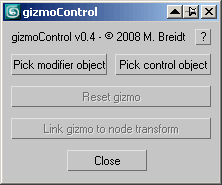 This macroscript (to be found in the "MB Tools" category after executing the .mcr) will allow you to link the transformation of a modifier gizmo to some other scene object. Afterwards, the gizmo will always be fully aligned to that other scene object, which can be freely animated by any kind of controller and linked to any other scene node. In some way this is very similar to World Space Modifiers but it works for any kind of modifier gizmo.
This tool can be very useful for creating complex modifier animations, for example animating a Slice modifier's plane along a path, attaching a UVW Map modfier to some animated helper object, transforming a Displace modifier with some other object, or having an extra node control the- symmety plane of a Symmetry modifier.
New in v0.43:
- Fixed a small typo (linebreak) in the UI code that caused an error when running the script.
New in v0.4:
- Fixed a major bug that caused incorrect gizmo transformations when used with objects that have an edited pivot point.
- Some minor UI tweaks
New in v0.3:
- Added the option (hold SHIFT when pressing the 'Link' button) to keep the initial offset. The gizmo will stay where it is but follow any further movement of the control node.
- Added the option (hold SHIFT when pressing the 'Reset' button) to keep the current gizmo transformation. Use this if you don't want to move the gizmo but want to remove the link to the control node.
New in v0.2:
- Copy/pasting a modifier that has a linked gizmo now works correctly
- Added a button to remove the scripted controler that links the gizmo to the control node
- Should work correctly with Merge and Xref
 Royal Ghost · 2017-10-15
 3dline · 2015-01-30
 ionut9 · 2015-11-10