ScriptSpot

Script

Detriangulator

By IN_human · 2008-01-05

Version
1.0
Version requirement
3DS MAX 6+
Date updated
2008-04-01
Votes
191
Description

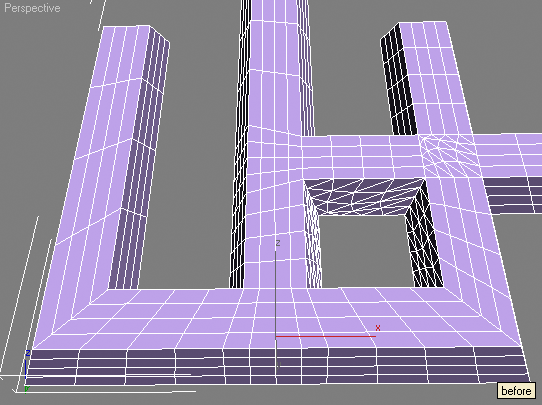
This tool is intended to remove diagonal edges from triangulated editable poly.

Optional features are:

- keep edges that have angle between faces more then specified (set 0 if this feature is not needed)

- keep UV border edges (only 1st UV channel used)

- keep non-smoothed edges

Hint: if you're not happy with the result of the script function just execute undo once, you'll get all removed edges back and selected so you can fix selection and remove edges manually.

Attachments

Tags: modeling, remove triangulation, quad poly, simplify

Comments (47)

The Tool I was looking for!

nikobus · 2020-03-18

Thank you so much!!

pankration44 · 2020-03-09

Спасибо ,отличный скрипт , в 2017 работает без проблем

Thank you, great script, in 2017 works without problems

Thank you

todor · 2019-09-22

Works good, thank you very much !

IN_human · 2019-11-09

It's so nice someone still could handle this.
Cheers!!!

_

IN_human · 2014-05-22

graphite tools do not have angle threshold, UV and smooth settings, so this script still may be useful

not working

pankajcomp · 2014-02-21

hello,
i treid with obj model after click pick poly button its not working

This script - is a relic

Nik · 2014-02-21

This tool present in the conventional methods 3dsMax 2012

kurt_hectic · 2019-09-19

Thanks!!!

berislav · 2013-09-15

..or you can do it a lot faster: Modifiers -->Mesh Editing --> Optimize: just tick those three boxes (auto edge, mat bound. and smooth bound.) and you're all out of triangles.

Great! IF!

Heimdal · 2012-01-13

You really like progressbars! The Quadrangulate script is a lot faster.

Slow

lwjacob · 2011-08-11

Way too slow in high quality models.

Great script,

onodi.andras · 2010-11-12

Thanks for the awesome work you have done!
As Jordan Walsh suggested, you could really add the feature to have multiple objects detriangulated.

hawkarena · 2009-12-01

its great. i lost my so much time to remove these triangles.
thank u creator

Salve of Allah

rendera62 · 2009-05-29

thank you very much........

jackieteh · 2009-04-28

does this tool support 3ds max 64bits version?

Jordan Walsh · 2009-04-29

Awesome tool!

You should add support for it to process an array of objects rather than just one!

chotolarg · 2009-03-18

i now its a stupid cuestion, im noob at this, where is the download button?. Xd

IN_human · 2009-03-21

🙂

Take a look at the attachments section under description.

CRISTOBAL DIAZ MONTESINOS · 2009-03-09

very good.

snazzy · 2008-12-03

i run it but after i click the pick poly. the process doesnt poke out so i can't click it.and the checks are fade so i can't select the keep uv nor keep smothing. please help me.

IN_human · 2008-12-24

You may select editable poly.

Didn't it work on some particular model?

Or it fails to work every time on your system?

smallc28 · 2008-11-30

wow how do u uses this thing lol not like other scripts i need help

Pewi · 2008-11-26

Great!
Many thanks for this handy little gadget!

RaaFayr · 2008-10-16

Good Idea ^_^
I tested this script.
See result on images.

Attachments

IN_human · 2008-10-19

Man, this script does EXACTLY same things that I mentioned in description above.

Sorry no miracles, this one will not replace good modeler, it will give him time for a cup of tea )))

At least you need TRIANGULATED poly for your tests

Admin · 2008-10-06

In attachment area ... Beneath "version requirement" and above the first comment...

Christopher Grant

Admin, ScriptSpot.com

maxwell246 · 2008-10-06

where is the download link

lwp539 · 2008-09-10

it's good,thanks

sigan6 · 2008-08-02

very Good

subburb · 2008-06-03

Exceeeeeeelent idea !!!!!

The tool of my dreams...

Can we imagine in the same way a unsubdivider ?? ;)

Grea great job, man, keep up the good work !


jerome Prévost (Subburb)

ricardorr · 2008-05-23

I want to download this file but i cant seem to find where i can download it from. Can you please help me ?

Admin · 2008-05-24

Sure, its in the blue attachment area below the script but above the comments... The author attached the script as a txt file so you'll need to rename it from *.mcr.txt to *.mcr to use it with 3ds Max.

bisba66 · 2009-07-05

Hello!! I am a new user in general and it is my first time that I am going to install a maxscript. I didn't understand the way to install it :(... Where can I found the zip file to download it? or there is another away..? I read the http://www.scriptspot.com/3ds-max/tutorials/script-installation-in-3ds-m… but I was confused. please if it is possible for you to help me with steps that I have to take. I have 3ds max 9. Thank you very much.

mrgrotey · 2008-05-19

Great script! thanks a lot!

everan · 2008-03-05

interesting plugin i like it cheer's

IN_human · 2008-03-01

Yepp, just another tool to try. Some people like it.

IN_human · 2008-02-29

This script offers some useful options and works on editable poly.

Unfortunally no bombs here.

 😉

sergo · 2008-03-01

Ok, I didn't mean to say something bad about this script. I just want to say that in production with really crazy meshes it doesn't work. And if it happens to someone, hi/she can use another method.

Lord Of Art · 2008-02-16

Thanks you

jarvart 2000 · 2008-02-14

Thanks for the quick reply. Will try that:)

jarvart 2000 · 2008-02-14

This looks great. I downloaded the file, and in max I went to maxscript and run script. I navigated to the downloaded file and it didn't show up as a msc file. When I tried to run it nothing happened. Please tell me what I am doing wrong!

IN_human · 2008-02-14

jarvart 2000

http://www.scriptspot.com/script-installation-in-3ds-max

Run .mcr through MAXScript>Run Script

Nothing will happen except OK appears in listener window, but now new macro appears in UI settings.

Now go to Customize>Customize User Interface

Select tab Keyboard/Toolbar/Quads/Menus depending on where you want to run this macro from, select category IN_tools and attach detriangulator to your interface.

deepika gandhi · 2008-12-11

hey can you plz tell me how to download this script.

wine3d · 2008-02-13

That's a nice tool what I am looking for.
Thanks for providing!