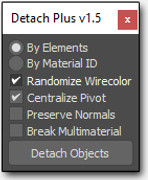
This simple tool allows you to detach Editable Poly and Editable Mesh objects in a specific way.
Script
 By barigazy · Credited author: Branko Živković · 2019-11-17
Tags: Editable Poly, material ID, detach, Elements
This simple tool allows you to detach Editable Poly and Editable Mesh objects in a specific way.
How it works: Just select a single Editable Poly object (without modifiers) and press the button. No need to select in sub-object mode
You can choose two types of detaching method:
#1 by Elements (every element will be detached to a single object)
#2 by Face Material ID (every Face ID group will be detached to a single object)
Additional Options (see tooltips on checkboxes)
*Randomize Wirecolor* - add random wirecolor to detached objects
*Centralize Pivot* - place pivot at the center of detached objects
*Preserve Normals* - every detached object will preserve existing normals
*Break Multimaterial* - every object will have assigned original material
This tool is requested on this page page by EricRLA , 1rv and harumscarum
update 1.1 now detached object (by MaterialID) will have name "Object Name_Material Name_Unique Number"
update 1.2 now supports Editable Mesh objects
update 1.5 The maxscript is rewritten from scratch
- There is 2 versions: for Max2022 and below and for Max 2023 and up
- Version for Max2023 uses two new functions which was recently added "polyOp.getFacesByMatId" and "meshOp.getFacesByMatId"
- Added support to do detach operation on multiple selected objects
- Improved support for EditablePoly and EditableMesh objects
- UNDO support
- Random Wirecolor option produces more intense colors now
- Preserve Normals affects border edges of Elements or Face ID polygons affer detaching
- Break Multimaterial now works for both methods:
- If detached part has several MatIDs, the tool will asign new multimaterial only with sub-materials which matches with Face ID
- All sub-materials will be instance of original Multimaterial
- All Face ID will be condensed, so if we have for example IDs:3,5,8 on detached part, they will be reseted to IDs:1,2,3
- If detached part has only one FaceID, single material will be assigned
Theobarbosa · 2023-10-25
Awesome script! For those want to make a button to speed it up the everyday use, here is a nice tutorial: https://www.youtube.com/watch?v=U2KgYYJ6yiI
Theobarbosa · 2023-10-25
Awesome script! For those want to make a button to speed it up the everyday use, here is a nice tutorial: https://www.youtube.com/watch?v=U2KgYYJ6yiI
barigazy · 2022-07-11
The script is updated to version 1.5
- bga_detachplus_v1.5_max2022 works with max2023 and versions before max2023
- bga_detachplus_v1.5_max2023 works only with max2023 and future versions of 3dsmax
bugmenot · 2022-07-15
beautiful work my friend. as you can imagine sometimes editable poly mode will break the geometry of meshes with islands or windows without support loops. now with working editable meshes this is so powerful. Only nice to have would be distribution in mcr format though i've adapted that for myself already. great work!
barigazy · 2022-07-16
thanks man
yes, max recalculate geometry every time when detach or delete some polygones.
This ruins existing normals on the borders, and also leave multimaterial even on elements with single face ID.
With this tool that problem is solved.
Editable Mesh not working
bugmenot · 2022-06-23
Hi, excellent script.
I notice in changelogs you say editable mesh is now supported but i've tried both downloads and it errors out on editable meshes.
Settings are 'By Material ID', Randomize Color, Centralize Pivot, Detach MultiMtl:
---------------------------
MAXScript Rollout Handler Exception
---------------------------
-- Unknown property: "selectByMaterial" in $amhouse_15
---------------------------
OK
---------------------------
line 58
Multiple objects
dmitrybelonosov · 2020-04-14
Good afternoon! Thank you, cool tool! Is it possible to process multiple objects at once together?
barigazy · 2021-05-12
@dmitrybelonosov
I avoid to use detach operation for multiple objects because of performance
Theobarbosa · 2020-03-15
Hi, how can I find button to add in my toolbar?
Theobarbosa · 2020-03-15
Awesome job! How can I add mesh to options? I can´t turn to poly, will crack my model.
barigazy · 2021-05-12
@Theobarbosa
Just added. Check out update 1.2
I added macro version "bga_macro_detachplus_v1.2.ms"
Drag and drop in viewport and you can find it in bgaTools category
Fix bounding box + Force instancing
igamaximus · 2019-12-10
Branko,
Thank you for your fantastic work on this tool.
Would it possible to add 2 more magic checkboxes named "Force instancing" and "Fix bounding box"? If these 2 would be checked, at detach phase, the script would check if some of detached objects (elements) are the same, and if they are, these would be turned to instances with fixed (aligned) bounding boxes. No problem if this phase would take some more time to calculate, it would save huge amount of manual work if this would be doable, making it simply the most complete detacher anywhere.
barigazy · 2021-05-12
@igamaximus
Then this script would be commercial for now I'm just doing it for free because I'm busy with other things
 todor · 2019-12-02
Works good, thank you :)
barigazy · 2019-12-02
This is the version that you want
- detach by material ID by default and all checkboxes on
- detached object will have only material name
Just epic!
1rv · 2019-12-05
Simply epic!
1rv · 2019-12-01
Many thanks! It worked.
P.S. What should I change to make "by material id" option + all combo boxes checked by default?
barigazy · 2019-11-27
Just change line 19
obj.name = substituteString obj.name "part" (obj.mat[id].name+"_")
if you want only material name without unique number then
obj.name = obj.mat[id].name
or if you want to add unique number at the end then
obj.name = uniquename obj.mat[id].name1rv · 2019-11-25
'Object Name_Material Name_Unique Number' naming convention is problematic
Could you throw away 'Object Name_' please?
1rv · 2019-11-24
It's a pity one could plus only once :)
Thank you
1rv · 2019-11-22
There's one problem:
After detaching, could the meshes be named by their materials (not Model_partXXX...)
Thank you
barigazy · 2019-11-24
Update 1.1 requested by 1rv
1rv · 2019-11-18
The life saver! Absolutely the best detacher. Many thanks Barigazi!