Cut-connect two selected verts or edges of the current Editable poly object.
Script
 By Swordslayer · Credited author: Vojtech Cada · 2019-04-19
Tags: cut, Editable Poly, edit poly, connect, cross-cut
Cut-connect two selected verts or edges of the current Editable poly object.
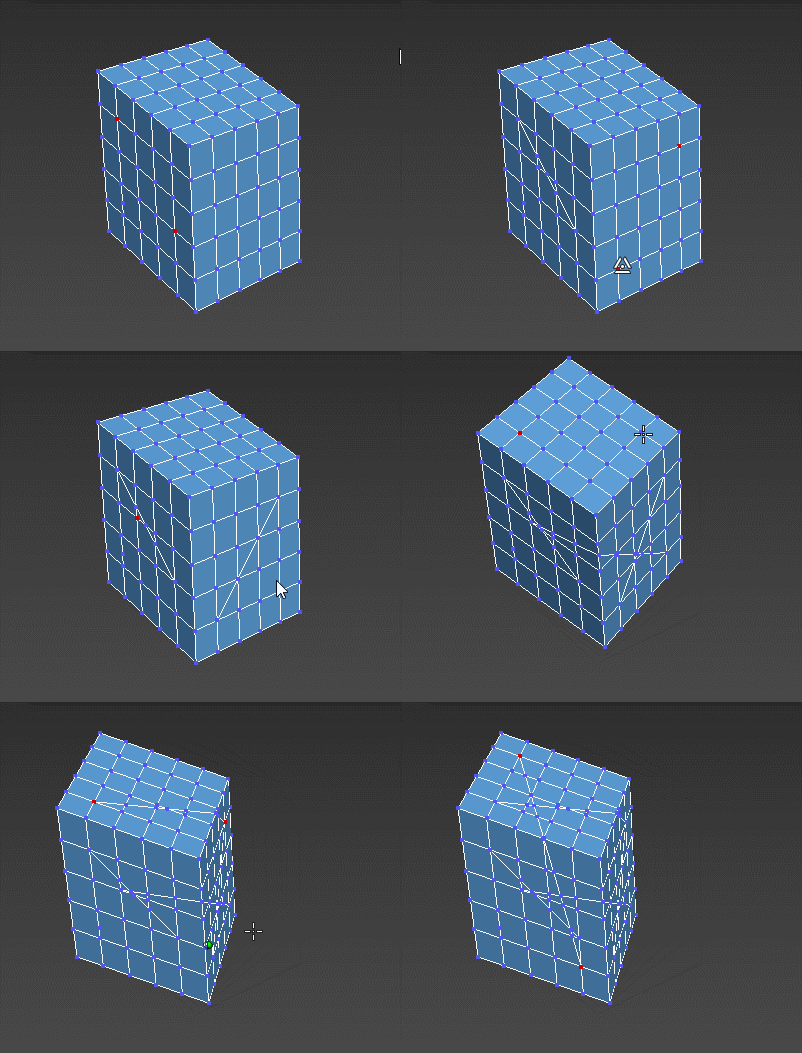
Installation: Run the .mcr file once. It creates an item in the Shortcuts category under Customize UI, which you can then add to a quadmenu or assign a shortcut to it (that's what I'm showing in the preview gif). To use it while inside Editable Poly, select two verts or two edges and press the button/keyboard shortcut. The byNormal macro uses projection direction averaged from the start and end normal, the screenSpace macro uses screen-space projection (same as what a Cut tool would use, shown in the gif).
Edit Poly support: If you need Edit Poly modifier support, you can install the polyModOp function library. The macros are made to utilize it when it's present.
pick
old man · 2020-12-29
very nice
milie · 2019-04-25
thanks for the script!
i have some suggestions regarding crossCutScreenSpace:
- there are some situations when, depending on the view direction, the script will cut the opposite side; you can easily see that on your test cube if you look at it slightly from the bottom and redo the cuts with the same vertices.
as a solution, i've multiplied "invDir" by -1.0 and it fixes this issue
- the script could easily replace the connect function in max, if you add the rest of the connect operations
for example, i've modified the script so if vertices > 2 then the $.EditablePoly.ConnectVertices() is used; also, for the edge too, if more than two are connected, then $.EditablePoly.ConnectEdges() takes place
i modified the script to my use case with the things above, as a general connect tool (ended up removing polySwitch just to see things clearer :D)..
StormBrig · 2019-04-21
Indeed very useful.
 staughost · 2019-04-20
Just wanted to say thanks :)
Swordslayer · 2019-04-21
My pleasure, wouldn't have made it without you asking :)
 barigazy · 2019-04-19
Excellent work, man +1
Is it difficult to implement a solution between two selected edges?
Something like:
- add vert in the middle of the selected edge
- convert edge to vert selection and connect
Swordslayer · 2019-04-20
Updated with edge support :)
barigazy · 2019-04-20
Hi Vojtěch, thanks for update ;)
I can not believe how poorly the Cut method is explained in MXS Help.
I always skip that part.
Anyway ... I play with your Fn and add a different approach for edge cutting.
Also, I try to create Edit_Poly support but "damn" matrices. :(
Take a look this in the attachment.
Cheers!
Edit Poly support
Swordslayer · 2019-04-20
Don't make it hard for yourself, check polyModOp, I made that for this exact purpose, to avoid having to write two different versions of code. I've updated the macros to use it.