
Version 1.7
Simple script that converts any NormalBump map to VRayNormalMap and vice versa.
Script
Convert Normal Maps
 By barigazy · Credited author: Branko Živković · 2015-07-11
- Version
- v1.7
- Version requirement
- max2014+ vray 2+ vray 3+
- Date updated
- 2017-04-14
- Votes
- 9
Downloads
- bga_convertnormalmaps_v1.7.mcr — bga_convertnormalmaps_v1.7.mcr3.0 KB
- bga_convertnormalmaps_v1.7.ms — bga_convertnormalmaps_v1.7.ms2.9 KB
- bga_convertnormalmaps_v1.6.ms — bga_convertnormalmaps_v1.6.ms2.7 KB
- bga_convertnormalmaps_v1.5.ms — bga_convertnormalmaps_v1.5.ms2.3 KB
- bga_convertnormalmaps_v1.4.ms — bga_convertnormalmaps_v1.4.ms1.7 KB
Tags: normal map vray convert
Description
Additional Info
This tool works on any object in the scene with assigned VRay material.
Requested here: http://www.scriptspot.com/forums/3ds-max/scripts-wanted/switch-maps-text…
>>> Update v1.4 (max2010+):
- affect only selected objects or convert all scene materials
- preserve instances
- optimized code
>>> Update v1.5 (max2014+):
- added support for gamma override (works in max2014 and up)
- optimized code
>>> Update v1.6 (max2014+):
- optimized code
- fixed some bugs requested by TwilightZoney
NOTE: script will close MEditor before start converting process.
>>> Update v1.7 :
- rewritten code from scratch
- supports max 2017 and vray 3+
NOTE: all new parameters of VRay NormalMap will be converted to standard normal map and vice versa. Also make sure to save the scene before use this tool ;)
Comments (28)
Doesn''t work with Multi/Subs
junglejuz · 2018-07-06
Does not work when the vray material with the normal map is within a multi/sub material.
works perfectly on max 2018 and vray 3.60
 crystal3d · 2017-11-06
4 stars, cause it needs a category and a toolbar location for frequent use.
barigazy · 2017-11-06
I added macroscript by your request
3dsmax2017 vray 3.5 compatibility
m4cron · 2017-04-13
Dear Branko,
I used youre script since some of the latest vray updates because of the normal bump issues. Since I work with max17 at work Id like to use that script, too. But when I run it, it does not change anything and there are no error messages. Could you please check for a compatibility to max17? That would be awesome.
version 1.7
barigazy · 2017-04-13
The script is updated to version 1.7
Update
m4cron · 2017-04-18
Thank you very much!
Thanks a lot ! Time saver
pixelab · 2016-11-05
Only small issue, it converts the Normal map into multiple Vraynormal maps if it's used multiple times.
lost bump maps
CGough88 · 2016-08-22
Hi, is it at all possible to carry over the bump map slot too? When I've been using it the script will only carry over the bitmap for the normal map slot and loose the bitmap from the bump slot.
many thanks though, this script has been a great help.
version 1.6
barigazy · 2016-07-19
Fixed some bugs requested here
Blend Materials
Elooder · 2016-04-20
Now if only there was a capacity to convert standard blend materials to vrayblendmtl, since from version 3.3 of vray standard blend materials are no longer supported...
barigazy · 2016-07-19
@Elooder
Sorry but this tool is not material convertor but only texture map in this case Normal Bump convertor
Doesn't work as expected
Tommy_LedZep · 2016-02-03
Hi,
Thank you for this great idea but unfortunately it doesn't work as I expected.
Once I ran the script, all the NormalBump maps have been replaced with a single VRayNormalMap instanced in all the slots.
Please see the screenshot:
Attachments
- normalbump_script.jpg — normalbump_script.jpg442 KB

Thanks
obaida · 2015-09-06
Very important script thank you "Branko" for making it ,
I just want to ask you if you can make it global (i mean replacing Normal Map with Vray Normal Map) wherever it was (in my case it was in Mix Map not directly in Bump Slot) .
Thank you in advanced.
Attachments
- 2015-09-06_175203.jpg — 2015-09-06_175203.jpg142 KB

Error on Material with a lot of multi-sub materials
NeoHaus · 2015-08-29
Hi,
First of all, this script help me a lot, it is much easier than looking for materials one by one. And it is working for me 99% of times.
But I am having a problem, I have some Vray proxies (a car in that case) that have a lot of materials (Multi/Sub-Object), 47 to be precise. And after I run the script, it gets its bump slots all with the same map.
Attached some prints that shows the problem.
Any ideas whats happening, and how to fixed it?
Thanks!
Sorry my bad english...
Attachments
- car_after_script.jpg — car_after_script.jpg42 KB
- car_materials.jpg — car_materials.jpg162 KB
- car_original.jpg — car_original.jpg34 KB

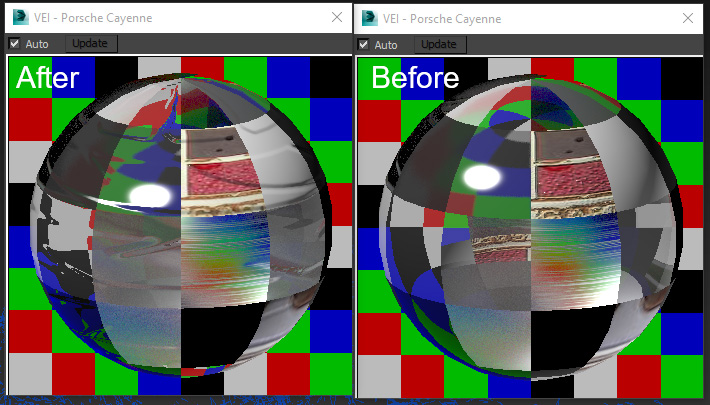

Everything is working GREAT NOW!
 mustafa mamdouh · 2015-07-15
Thanks Branko,
I can now confirm it's working great with V-Ray 3 and also on complex scenes ..
No more crashes or weird artifacts .. You saved us precious time!
P.S: anyone had crashes before with multiscatter plugin or even random crashes caused by normal bump map .. You should try this script!
Error
mustafa mamdouh · 2015-07-14
Thanks again for your response! but unfortunately It didn't work with me and I got this error:
-- Error occurred in mtl loop; filename: ; position: 1386; line: 33
-- Frame:
-- mtl: #Multi/Sub-Object:male_03(VRayMtl:body, VRayMtl:Head, VRayMtl:case, VRayMtl:metal, VRayMtl:cigaret)
-- called in map loop; filename: ; position: 1386; line: 33
-- Frame:
-- map: Map #3:VRayNormalMap
-- e: Map #3:Normal Bump
-- called in btn.pressed(); filename: ; position: 1393; line: 34
-- Frame:
-- Array: #(Map #3:VRayNormalMap)
-- node: (DataPair a:Normal_Bump b:VRayNormalMap)
>> MAXScript Rollout Handler Exception:
-- Unknown property: "texmap_bump" in #Multi/Sub-Object:male_03(VRayMtl:body, VRayMtl:Head, VRayMtl:case, VRayMtl:metal, VRayMtl:cigaret) <<
My Config.: Max 2014 + V-Ray 3
barigazy · 2015-07-14
@mustafa
I test this tool with max2014 and vray 2.4.
Probably works fine with vray3.0 ;)
obbboo · 2015-07-14
Test scene and error message
Attachments
- test.zip — test.zip18 MB
- 2558-07-14_21_34_47-c__program_files_autodesk_3ds_max_design_2011_scripts_bga_convertnormalmaps_v1.2.jpg — 2558-07-14_21_34_47-c__program_files_autodesk_3ds_max_design_2011_scripts_bga_convertnormalmaps_v1.2.jpg532 KB

barigazy · 2015-07-14
Thanks *obbboo* for test scene. I fixed and optimized both version of this tool.
Can you try it again on complex scene? Please let me know how work new version.
Cheers!
obbboo · 2015-07-14
It works perfectly.
Thank you.
+1
pixamoon · 2015-07-14
Great idea :) great time saver !
barigazy · 2015-07-14
Thanks guys :)
obbboo · 2015-07-14
I have test with V1.1 and V1.2.
It works with the first multisub material only then the script was error
barigazy · 2015-07-14
Can you send me test scene and error message?
 3dbybrunolopes · 2015-07-13
One nice adicion is to be able to force the normal map gamma.
Nice script btw
barigazy · 2015-07-13
Thank for suggestion. I just added this option in v1.2
+1
mustafa mamdouh · 2015-07-11
thanks so much for your help ..
I did a quick test and it's working with vraymatl but it didn't work at multisub materials .. could you fix it please?
also if possible to add option for Appying the script on selected objects or all scene materials ..
Thanks again!
Regards,
Mustafa
barigazy · 2015-07-12
Hey Mustafa try v1.1. I think that all works fine now ;)