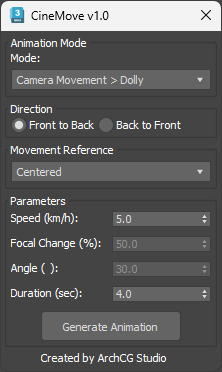
CineMove — Simple. Precise. Cinematic.
CineMove is a powerful yet intuitive camera animation tool for 3ds Max. Whether you're creating architectural walkthroughs or cinematic shots, CineMove helps you animate your cameras with real-world precision — effortlessly.
What CineMove does:
- Animate any camera with just a few clicks
- Supports CoronaCam, V-Ray Physical Camera, Free Camera, and Target Camera
- Choose from 8 cinematic motion types:
- → Dolly, Truck, Pedestal, Pan, Tilt, Zoom, Pan Orbit, Tilt Orbit
- Set your own speed (km/h or deg/s) or duration — CineMove handles the math
- Clean, center-aligned or directional movement options (start / end at current)
Key Features:
Real-world speed input (km/h or degrees/sec)
Automatic keyframes with midpoint interpolation
Target-aware logic — works perfectly with targeted and free cameras
Built-in motion path spline generation for orbit modes
Fully compatible with Corona Renderer & V-Ray workflows
Perfect for:
- ArchViz walkthroughs and property showcase videos
- Interior/exterior flythroughs with cinematic feel
- Motion designers or 3D generalists who value precision
- Anyone looking to save time on camera rigging
Requirements:
- Autodesk 3ds Max 2021+
- Works with CoronaCam, VRayPhysicalCamera and TargetCamera
Included:
.mzp installer (drag and drop into Max)
Email support for bugs & feedback
v1.2 - Added Handheld Shaking, option to animate Current Camera directly, and critical bug fixes.
v1.1 - Tilt and Pan Update