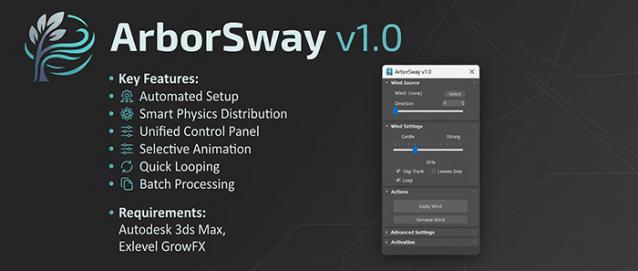
 ArborSway: One-Click Wind Setup for GrowFX
Overview
Adding wind to GrowFX trees in 3ds Max usually involves repetitive manual work: selecting individual paths, adding modifiers one by one, linking Wind Helpers, and trying to guess the correct stiffness values for different branches.
ArborSway is a utility MaxScript that handles this repetitive setup for you, allowing you to add natural-looking wind to your vegetation assets in seconds.
Key Features
- Automated Setup: Select a GrowFX tree and click "Apply Wind." The script automatically creates a Wind Helper, adds the required Wind Modifiers to your paths, and links everything instantly.
- Smart Physics Distribution: ArborSway automatically assigns varying stiffness and amplitude based on the tree structure. Main trunks stay rigid, while thinner branches and leaves sway more freely.
- Unified Control Panel: Adjust overall wind intensity, stiffness, and speed directly from a single floating dialog instead of digging into the modifier stack.
- Selective Animation: Use checkboxes to skip main trunks or restrict animation to leaf and flower models to save on viewport performance.
- Quick Looping: A single toggle recalculates stiffness and amplitude to provide smoother looping animations for video renders.
- Batch Processing: Select multiple GrowFX trees at once to apply or remove the wind setup simultaneously.
-v2.1
- Generate Point Cache: Bake wind animations into Point Cache sequences to optimize heavy scenes, reduce viewport lag, and lock in perfect loops.
- Other Fixes: Fixed a "server connection failed" error affecting activation on older 3ds Max versions (e.g., 2021).
-v2.0
- Full support for GrowFX 2.1.2 or later: Now natively compatible with the latest node-based architecture.
- Special Thanks: Huge thanks to Eduard (Exlevel) for his incredibly fast response in updating the GrowFX API to make this version possible!
-v1.1
- Tree Growth Animation (Beta): Instantly generate organic sequence animations for your GrowFX trees. Adjustable start frames, durations, and tier overlaps to make your plants grow naturally from trunk to leaves.
- Custom Settings Presets: Save your own studio-standard physics numbers (e.g., custom stiffness or amplitude) into a preset. ArborSway will permanently use your saved baseline, and the main intensity slider will smoothly scale based on your custom input.
- Precise Looping Control: Define the exact frame length required for your project (e.g., 100, 150, or 300 frames) and save it as your default looping duration.
Technical Compatibility
- Object Requirement: This script works ONLY with GrowFX objects. It has been developed and tested primarily using Maxtree GrowFX models.
- No Mesh Support: It will NOT work on trees that have been converted to Editable Mesh or Editable Poly.
- GrowFX Version: GrowFX 1.9.x and GrowFX 2.1.2 or later.
- Platform: Autodesk 3ds Max 2018 or newer.
Quick Workflow
- Select your GrowFX tree(s) in the viewport.
- Open ArborSway and click Apply Wind.
- Adjust the master Intensity Slider to test the resulting sway.