ScriptSpot

Script

Biped Manipulator

By Royal Ghost · 2007-01-14

Version
2.1.1
Version requirement
2024
Date updated
2023-06-19
Votes
28
Download
Download
Description

Biped Manipulator – 3dsmax MAXScript, allows to select fast any objects/bones and also the whole groups of objects as arms, legs and spine. Since manipulator uses objects names to select objects/bones it is possible to use it with any rigs systems like Character Studio, CAT, custom rigs etc. Biped Manipulator doesn’t occupy much screen place. If there are several bipeds on the scene it is possible to use for convenience several Biped Manipulators.
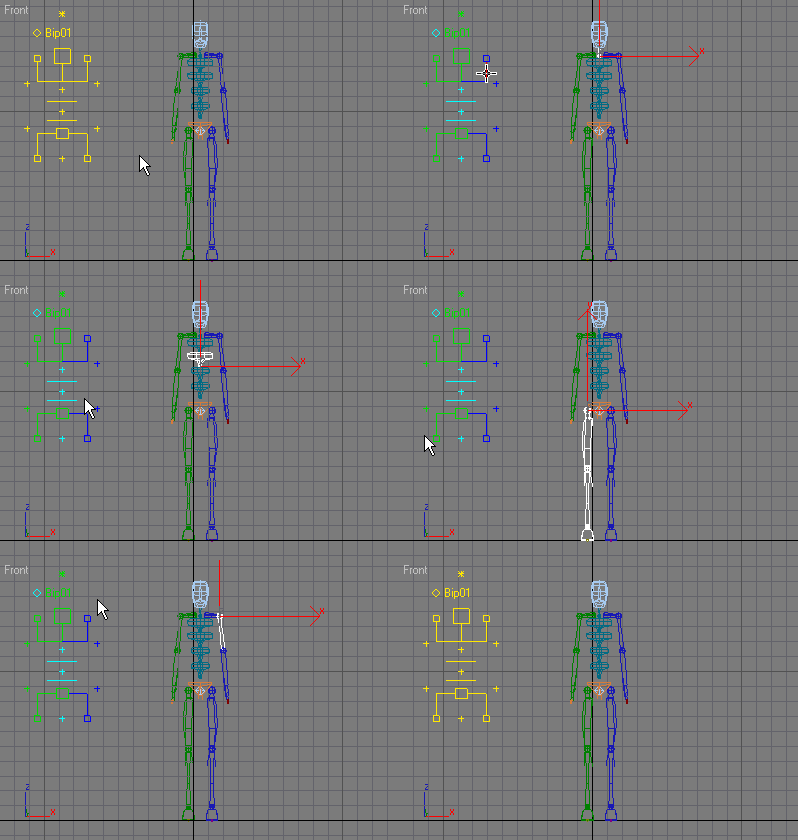
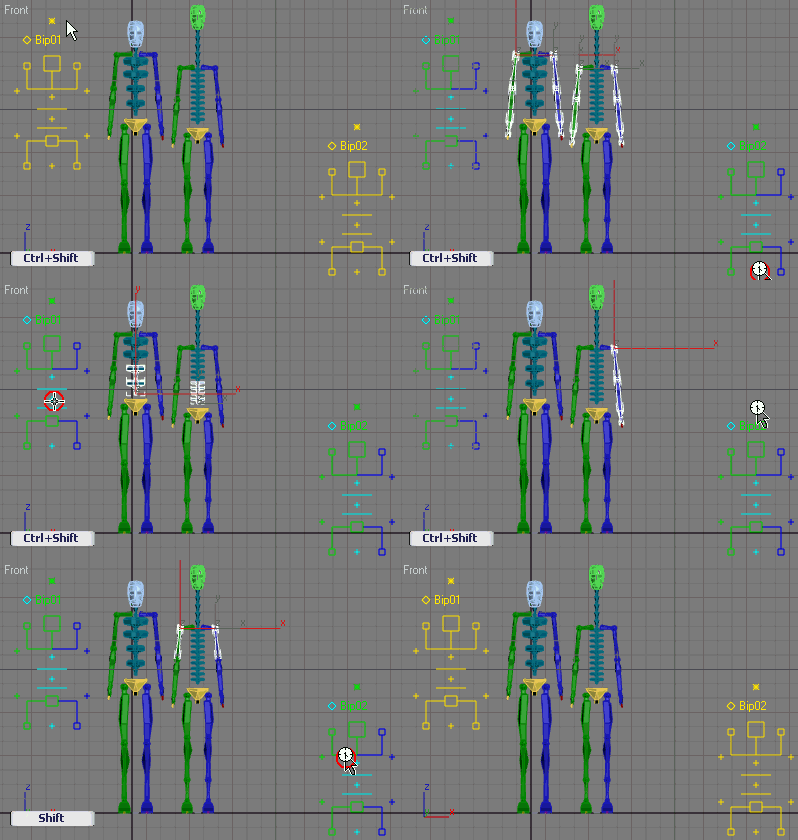
v2.1.1 (19.06.2023) Fixed manipulator color and installation paths for 3ds Max 2024+

 v2.1.0 (03.12.2009)
- Added support for Biped Knuckles bones (default).
- "Unhide Selection" macro script included.

v2.0.0 (01.04.2009) 
- Hand Manipulator is merged with Biped Manipulator. To switch between them use Shift+click on "F/f".
- All manipulator parts are configurable.
- Rewritten selection functions

Additional Info

Installation: Scripted Objects/Helpers (*.ms) should be placed in maxroot/plugins/ and are then accessed through the “Create panel” in 3dsmax. How to use manipulators read in the 3dsmax help, chapter Manipulator Helper Objects

Tags: Biped, Manipulators, Bones, CAT

Comments (19)

64bit?

airun · 2011-08-06

How about 2010 64bit?

Royal Ghost · 2011-08-07

There no special code for x64 so it should work well.

one808 · 2009-12-17

very usefull,
thank you.

capcaverna · 2009-11-27

very usefull, thanks for sharing this.

Halduke · 2009-04-25

Hey guys, just in case, remember to change the default name BIP 01 (at PARAMETERS of the biped UI) to the name that you are using in your OWN biped.

Royal Ghost · 2009-03-26

SoftWhitePlume: I fully didn't understand what you drag out :/

For use manipulator you must:

1. Copy .ms to /plugins folder, and restart max.

2. Create manipulator as you create an object

3. Activate manipulate mode by pressing "Select and Manipulate" button:


p.s. I'm planing to poste during next week new 2.0 version of this script which allows to manipulate with bones,CAT,Puppetshop and any other humanoid skeletons. All manipulate parts of manipulator will be configurable. 

Royal Ghost | veda3d.com

SoftWhitePlume · 2009-03-25

I tried this on max 9, when I go to helpers and onto manipulators to drag it out, nothing comes outs, what is wrong?

thanks

nikiken · 2008-12-13

thank you, it is very tiptop

Royal Ghost · 2008-12-10

nhdeitmers, I didn't add claviles because I don't see right place where to add it :). If you have suggestion where to add claviles send me screenshot of your vision.

Royal Ghost | veda3d.com

nhdeitmers · 2008-10-31

Thank you for this cool script. Very professional. Do you think you will add the clavicle to it? I wonder why you left it out, right now I'm using JJTools biped selector in addition to your script. Hope to fully rely on yours some day ;) Thanks anyways

Admin · 2008-10-09

I just ran the script and it worked in in 2009 x64. Have you tried running the script? Typically all scripts are forward compatible unless they're really old (circa max 2/3) or used ActiveX controls (which this doesn't) and then they don't work with 64bit Windows even though they're forward compatible with Max...

Hope that helps,
Christopher Grant
ScriptSpot.com

smallc28 · 2008-10-08

need 1 for 2009

Royal Ghost · 2008-08-25

julienm3d: Thank you. :)
matkitdc: I'm planing next week to release "hand manipulator" which will allow to select in similar way hands parts...
Royal Ghost | veda3d.com

matkitdc · 2008-08-22

I like the script. Its very useful... tnx, I wont having trouble anymore of selecting those bones except for the COM and FINGERS...

Is there any other way to add those features.. tnx...

Royal Ghost · 2008-06-18

>>how about max 8 ?
It is working well.

Royal Ghost | veda3d.com

julienm3d · 2008-06-19

Thanks! this is a great script and an awesome tools for animators.

sevenplace · 2008-06-15

how about max 8 ?

Royal Ghost · 2008-06-15

I'm working now at my character and use BipManip & max2009. And averything is working well.
Please describe in detail what is wrong?
Royal Ghost | veda3d.com

javierdl · 2008-06-15

Thanks for sharing RG :)
I tried it in 2009 but it didn't work. It worked in 2008 though. Is there a work around?
Thanks,

JDL
drpeppercan at gmail dot com