ScriptSpot

Script

Biped Helper + Picker

By lbrooks · Credited author: Lorne Brooks · 2014-09-15

Version
3.5
Version requirement
3dsmax 2020-2025
Date updated
2024-06-18
Votes
7
Description

Biped Helper is a support interface designed to be used in conjunction with the main Biped panel.

It is intended to provide both quick access to existing Biped panel tools, as well as functionality that is not supported by the Biped panel.


See online guide in links section. 


Features include:

  • Limited parts selection with IK limb pivot settings
  • A dedicated Picker UI that uses most of the same functionality as the main UI
  • Display options
  • References: Ghosting, Pose buffering, Geometry snapshots, Placed trajectory helpers
  • Time range settings (for all range-based operations)
  • Keying operations
  • TCB settings
  • Apply transform and foot-step cleanup
  • Limb space settings (Body/Object)
  • Load and save animation clips
  • Layers management and IK constraints retargeting
  • Pose or Posture copy/paste
  • Limb mirroring
  • Finger and spine alignment
  • Biped or prop alignment and baking tools


IK Pivots Selection...


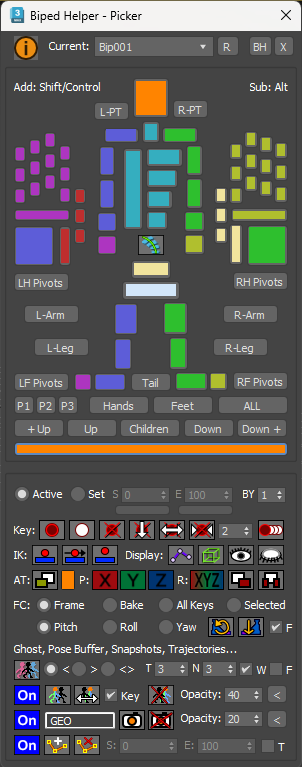
Picker UI...
 

Latest Updates:

Version 3.5;

  • Added the Apply Transform and Foot Cleanup functionality to the Picker UI.

Version 3.4;

  • Added a new Biped Picker UI which works with the Biped Helper functions. This can be opened in several ways including: From the main Biped Helper UI using a picker button; By clicking the Biped Helper toolbar icon while holding Shift; By assigning a hotkey to a macro; Or by placing a dedicated toolbar icon. The picker has been designed to work with a standard human Biped configuration.
  • Moved pose buffering into the Reference rollout.
  • Toggle trajectories now behaves as a check button and queries the current Biped state.
  • Added new ability to toggle ghost on selected objects with all ghost settings in the Reference rollout.
  • Added the ability to swap to the Pose Buffer when one is available and toggled active. Used after altering a pose to allow swapping between the new pose and pose buffer while keeping it active.
  • Prevented pose buffer mesh from using display by layer property which resulted in an opaque rendering and not using opacity setting.
  • Added new ability to copy the transform of an object (e.g. a hand or foot) then paste or bake to either the current frame or a selected time range. Different axes for position and rotation can be set when pasting or baking. Can also be applied generically to non-Biped objects. Found in the Keys rollout.
  • Added new ability to cleanup footsteps by re-orienting a foot in pitch, roll or yaw, as well as snapping the base of the foot to the ground plane. Found in the Keys rollout.
  • Added the apply increment functionaily (without displaying the dialog) to the Keys rollout.
  • Added box mode and bend links toggles.
  • Added new selection buttons for getting the parent, child, all children, or growing seleection up or down the hierarchy.
  • Added new ability to add trajectory helpers to the surface of picked Biped parts, with the option to trim using a time range. Found in the Reference rollout.


Additional Info

The script can be found in category “LB Tools”.

The script creates its own macro to be placed as a toolbar icon or a keyboard shortcut added.

Installation:

Drag the MZP file into your Max viewport.

Files will be copied to...

C:\Users\<userName>\AppData\Local\Autodesk\3dsMax\<maxVersion>\ENU\scripts\startup

and...

C:\Users\<userName>\AppData\Local\Autodesk\3dsMax\<maxVersion>\ENU\usericons

Attachments

Tags: Animation, Biped, align, bake, helper, selector, picker

Comments (32)

Updated installer

lbrooks · 2024-04-12

Have re-uploaded the installer with missing button image that resulted in script crashing on start. No other changes.

seamless loop

jgk1981 · 2021-04-09

if possible can you add a feature to make seamless loop on first and last keys of the biped? is one of the things that is missing on the biped.

Animated align

jgk1981 · 2021-02-12

Hello i was wondering if is possible to have a new feature on this biped helper.
Many times i found my self the need to animate align the biped to another object(mostly the base node), but that needs a lot of cleaning after and is not always working correctly. So i was thinking if there is a chance to have an animated align, only on keyframes of the object we wanna have it instead of manual align that takes lot of time specially when there is a scene with lots of frames. Thank you in advance.

Re: Animated align

lbrooks · 2021-02-21

I've added a new rollout with a button to align animate to a picked object. It will only re-animate keys that already exist on the root and not bake all frames. It also keeps the existing limb IK settings.

jgk1981 · 2021-02-21

Thank you for the update. It works but for some reason only partially. I tried to do the alignment from your script to the biped central node but it aligned it only on some of the frames and not on all. For example i wanted to bake the motion from an forward biped to the in place biped that is having the same motion but it aligned it only in some of the frames and not to all the keys. I tried to use the script on a normal mesh that had the same motion on it and did the same thing. On both attempts i did the result was like bungee motion instead. I tried it that on different versions of max and all gave the same result. But the fact that it keeps the Ik limps behave normal is an amazing feature.
Looking forward for your fix on this issue :)
Thanks

Re: Animated align

lbrooks · 2021-02-22

I've kept the previous method I did and renamed it Align To Offset. I also created a new method called Align To Match, which might do what you want. It will re-animate all the root keys on the current Biped to match a target object's motion, which could be another Biped root - as well as preserve the limb IK settings.

Let me know if that works for you.

Cheers.

jgk1981 · 2021-02-23

On the little i tested the new version is working great. Align to match was did exactly what i wanted. You are a life savior. talking about hours of work saved with this neat feature. thanks for your amazing work.

jgk1981 · 2020-10-27

Is possible to add a button for swapping from layer to base?
Is truly annoying when you wanna swap from layer to base and vise versa and having the 3dsmax change the ordder layout of biped tools like the one of Copy/Collection. Thank you in advance

Re: Is possible to add a button

lbrooks · 2020-11-02

I've added a new rollout called Quick Layers to enable layer navigation as well as toggling the active layers.

jgk1981 · 2020-11-02

Amazing work once again.
a little add on on this will be the ability to have the Snap & Setkey and the Retarget Arm and legs with the Ik check and "update" in one mini floating panel just like you did on the Hands and feet.
Once again thanks for you awesome work.

Re: Amazing work once again

lbrooks · 2020-11-09

I've added the Snap & Set Key button and separate UI for retargeting. They should function the same as the biped panel.

jgk1981 · 2020-11-09

Perfect!
Thank you :)

IK Points addition?

jgk1981 · 2020-10-01

Is it possible to add a window menu that will have the IK points of hands and fingers, so that can pick the point we need on each limb faster? Thanks.

Re: IK Points addition?

lbrooks · 2020-10-05

I've added the ability to change IK pivots via dialogs that mirror the build-in ones that Biped has in its panel. I omitted the toes on the foot dialog as mostly you want to edit the foot pivots, but they can be added easily if that's required. The hands dialogs have all fingers available for editing.

jgk1981 · 2020-10-06

Thank you. Your script is the best i ever used.

jgk1981 · 2020-09-21

Is it possible to add save .bip file button instead of having to go to the biped menu to do that? Thank you

Re: Is it possible to add save

lbrooks · 2020-09-24

Hi,

I've added the ability to load and save BIP files using either dialogs or quick methods, which overwrites the same file. The usage is based one which biped you have selected from the dropdown list. Makes it easy to transfer animations from one biped to another.

jgk1981 · 2020-09-25

Big thank you for your effort :)

jgk1981 · 2020-05-08

Works Great in max2021
Is it possible to add bake option for head too?

Re: Works Great in max2021 Is it

lbrooks · 2020-05-10

I've added the ability to bake the head rotation for tracking a Look At Target, which will get removed afterwards.

jgk1981 · 2020-05-10

Thank you for the quick reply and adding my request to you neat tool. Keep up the good work :)

jgk1981 · 2017-06-27

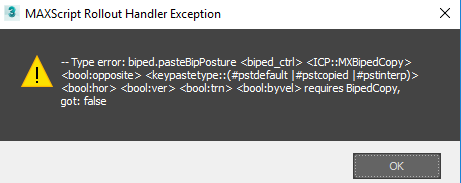
The Posture grabber tool gives this error when I try to paste the pose on the selected parts. normal or opposite in max 2017

Attachments

Re: The Posture grabber tool

lbrooks · 2017-06-28

Hi,

I've fixed the problem with the crash, which was due to non-Biped parts (or even no Biped parts) being selected when trying to copy a posture. This caused the pasting to not be able to find the copied posture in the collection and hence crash.

You should now be able to have non-Biped parts selected (in addition to Biped parts) when copying and the script will filter those out.

Thanks for the find.

jgk1981 · 2017-06-28

Thanks for the quick update. Works like a charm now :)

awesome script

ramin92003 · 2016-08-15

I was wondering, it is possible for you to guide me how to extract biped rotation for each part.

this is my code but but the rotations dosen't correct.

if checkboxRotation.checked == true then
(
curRots = parseRotationsAnimated readerPoint
rotationZChannelString = rotationZChannelString + returnText + " " + currentFrameText + " " +(curRots[1] as string)
rotationXChannelString = rotationXChannelString + returnText + " " + currentFrameText + " " +(curRots[2] as string)
rotationYChannelString = rotationYChannelString + returnText + " " + currentFrameText + " " +(curRots[3] as string)
)

C_Man777 · 2016-02-05

Yes I can confirm works fine in Max 2016. Dragging the .mzp didn't work the first time, but I just repeated it and the drag worked the second time for whatever reason. Thanks again for the useful script. It is definitely helping my workflow as I block scenes with multiple biped characters.

Biped Helper minor error to report

C_Man777 · 2016-02-04

Thanks for the useful script. Apaprently the current version of the script does not copy the image file, "LBTools_PDF_Image.bmp" to the usericons directory and the script throws up an error message. I did fix it simply by creating a pdf icon and placing it in the correct directory with the name, "LBTools_PDF_Image.bmp". Not a big deal, but thought that you might like to know.

By the way, does this work in Max 2016?

Re: Biped Helper minor error to report

lbrooks · 2016-02-05

Good catch, thanks. I've updated the installer.

Yes, it should work fine in 2016 - tested using service pack 2.

In 2016 - Drag and dropping the MZP doesn't work for me. You may need to run the script from the utility panel.

Biped Helper not working.

jenumba · 2017-05-06

Hi,

Thanks for the great looking script! But I can't get it to run in 3DS Max 2016. Drag n Drop does'n't work for me, and loading manually doesn't seem to work either.

Re: Biped Helper not working

lbrooks · 2017-05-08

Hi,

Unfortunately, Max version 2016 somehow broke the ability to load MZP files by dragging them directly into the viewport.

If you run the MZP from the Utilties panel (or top menu bar) as though it were a .ms file, the necessary files will be installed. However, the macro for the script won't have run yet, so you'll need to restart Max. The menu item should then be visible in the Customize User Interface > Toolbars > LB Tools category.

jintat87 · 2015-06-30

Nice script. Adding scroll would be nice. Unable to access the expanded menu. Thank you :)

Re: Nice script. Adding scroll

lbrooks · 2015-06-30

Hi,

I've added a floater version which can be installed along side the full height dialog.