ScriptSpot

Script

Batch Camera Render

By sergo · Credited author: Sergo Pogosyan · 2009-02-12

Version
1.19
Version requirement
3ds max 2008-202x
Date updated
2025-11-08
Votes
273
Description

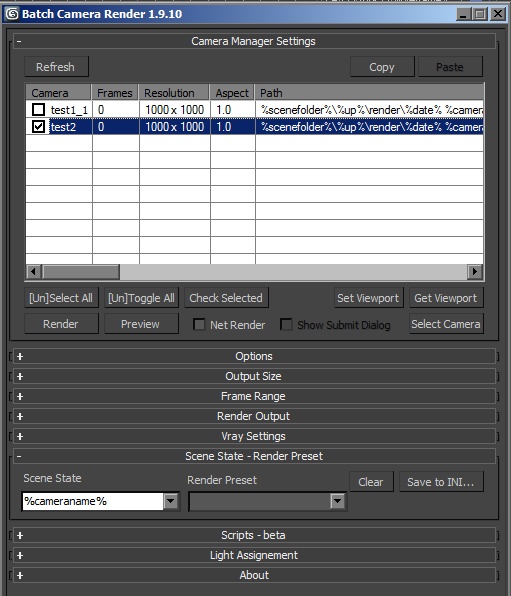
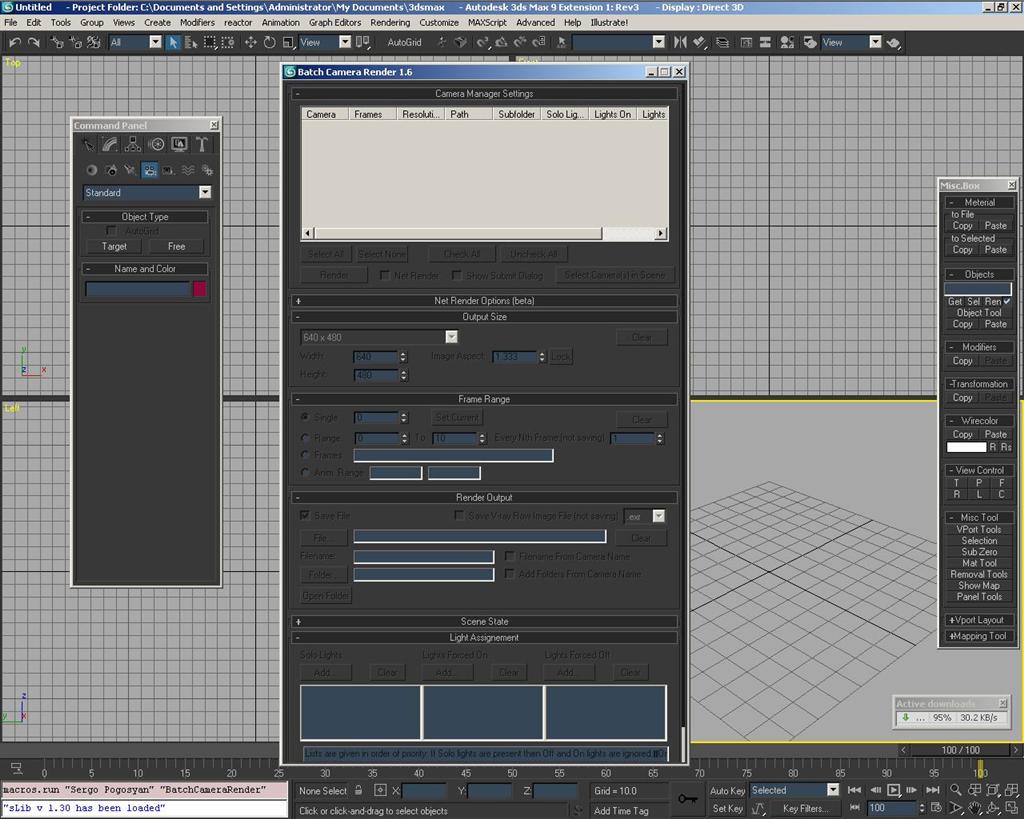
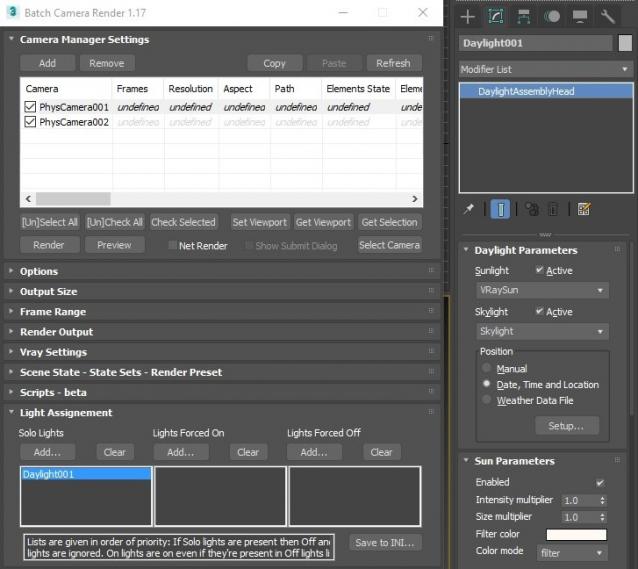
This script aims to replace standard 3dsmax's Batch Render and imitates Houdini Output Node workflow. Using it you can specify rendering parameters - frame size, frame number, output path - directly to camera object, so every camera in scene 'knows' what it intended to render. Additional functionality is Lighting Assignment - you can specify which light will be turn on or off for selected camera during the rendering.

1.19:

  • Support 3ds max 2026

1.18:

  • Support for 3ds max 2023 Update fixed

1.17:

  • Corona and Vray Sun inside Daylight System fixed (thanks to busseynova for reporting)

1.16:

  • CoronaSun supported inside Daylight System

1.15:

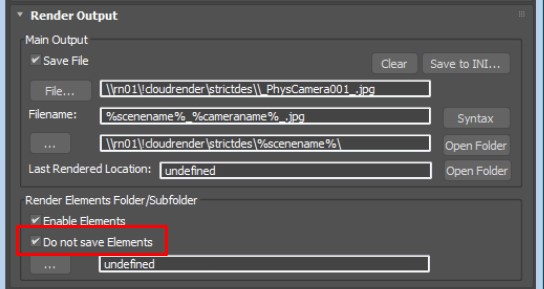
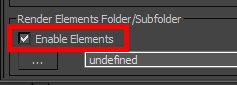
  • Don't Save Render Elements Checkbox (Thanks to antomor)
  • Limited support for camera objects in xref scene files (Only root objects in first level xrefs. Cameras in nested xrefs not supported)

1.13 Bugfix:

  • Deadline submission should work now

1.12 New Feature:

  • Deadline support.
    Very basic imlementation, it allows you to submit your jobs on a deadline server. Enter deadline repository address and check "Use Deadline" checkbox. Other checkbox doesn't matter in this case ("Net render", "Show Submit Dialog").
    Probably it requires Deadline 3ds max Submitter installed. I didn't have a chance to check it on a clean machine.

1.11 Features and fixes:

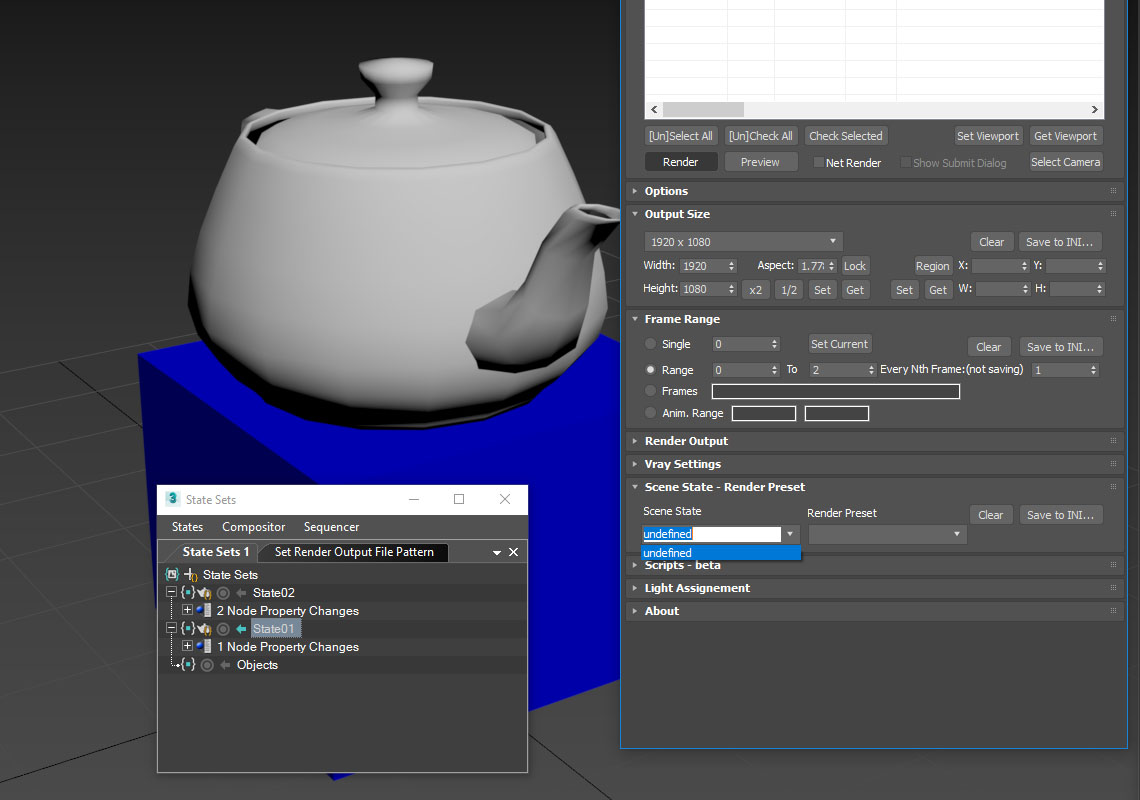
  • State sets support added
  • "projectname" keyword added which resolves to project's folder name
  • other fixes and improvements

1.10.3b Fixes:

  • Crash when vray ir/lcache maps are set to auto-save
  • Region render was not set properly during the rendering

This is major update of the script, so it may not be as stable as before. Backup scenes or cameras at least before running this version. More information can be found here - 1.10b Multiple presets for each camera

Previous updates:

1.10.2b Fixes:

  • Problems with render elements paths
  • Copy/paste of render region settings
  • Properly convert render region values when change resolution

New features:

  • Multiple presets for each camera
  • New keyword %presetname% to support multiple presets
  • Distributed rendering checkbox added to vray common settings
  • Bugfix - Net render not starting after cancelling during local rendering.
  • Improved performance with scenes with lots of cameras
  • Added support of Vray RT as a production renderer
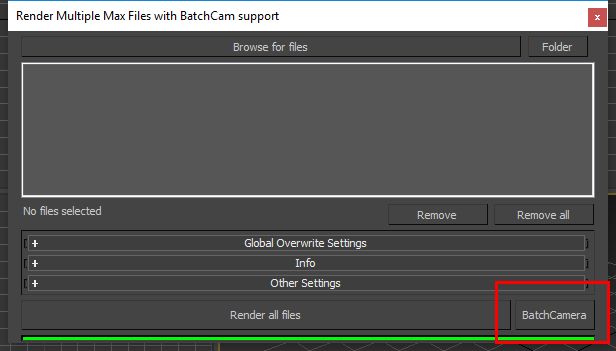
  • Added support of using MFRender script to render scenes through BatchCamera script.
  • Bugfix - Error was popping up sometimes during drag-n-drop
  • Bugfix - Render elements didn't render in certain conditions
  • Bugfix - Pre-render/post-render scripts didn't work on network rendering
  • Bugfix - Select All and Toggle All buttons didn't work properly

Here are some details: http://usakhelo.github.io/batchcam/batchcam-1.9.20.html

Script's website - http://usakhelo.github.io/batchcam/

Github - https://github.com/usakhelo/batchcam

2015 Updates

  • Region render parameter can be specified for each camera
  • Set Viewport button sets viewport camera and resolution and aspect as well
  • It is possible now to specify backburner servers and server groups for silent rendering submit (code editing required)
  • Vray Elements fixed for Vray 3 and Vray output saving with VFB color correction
  • Cancelling of rendering of multiple cameras at once,
  • Hierarchical ini files

2013 Updates

  • Drag-n-drop of cameras in list
  • Camera list window size can be changed (script restart required)
  • When committing region render it is possible to switch to view render without restarting the render
  • Keyword syntax can be used in Scene State names - thanks to Stefan Runevik for suggestion

2011 Updates

  • Preview button added - renders only current frame without saving anything - no images, no vray maps, no scripts running, no elements.
  • Ortho mode added to Vray rollout - it turns any camera to orthographic, including Vray Physical camera.
  • Copy/Paste from one camera to one/several cameras - use new buttons at the top of the window.
  • Submit Scripts section - you can assign script files that will run on each render submit. Per Submit script runs once per render submit and Per Camera script runs for each camera before submit. All these scripts run on local machine, not on render server.
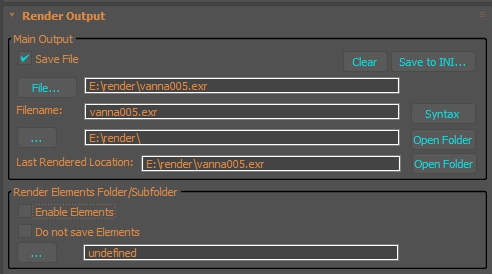
  • Last Rendered Location field - here is stored last render file location. Very useful for locating last-time rendered images.

Additional Info

Installation:

Run this script with Maxscript -> Run Script command from any folder on your hard drive, then go to the *'Customize User Interface' -> 'Toolbars'*, browse to category 'Sergo Pogosyan' and add 'Render scene cameras...' button to the toolbar or to the menu.

Usage:

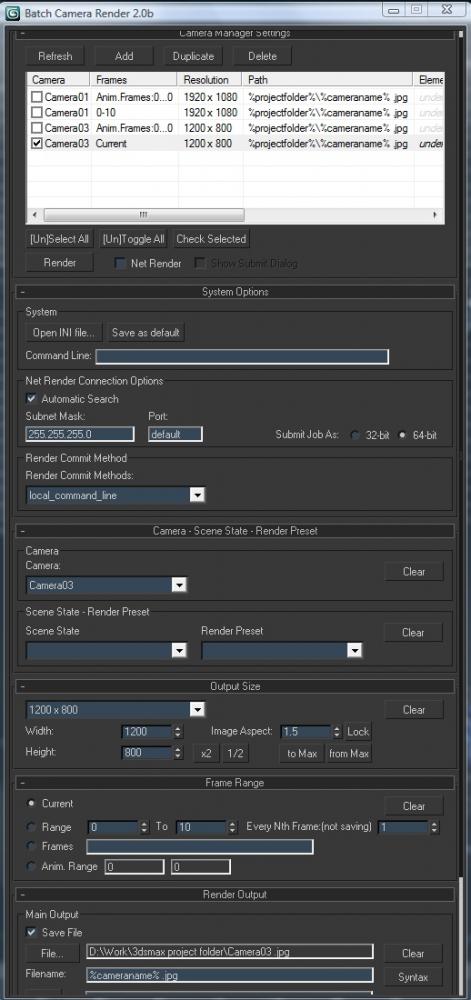
When you start this script it iterate over all cameras in scene and list them in the dialog box. To each of these cameras you can assign frame resolution, number of frames to render including nonsequential frames, output file location and lighting setup. All these properties can be changed for one or several selected cameras. Output file location is split to folder path and file name, so you can specify new folder for all selected cameras in scene. 'Lighting assignement' section contains three list: Solo light list contains lights that will be only lights turned on during the rendering, 'Forced On' and 'Forced Off' lights are turned on or off respectively during the rendering. After all these setting will be set up (if some properties is not set value from the Render Setup will be used), check the camera(s) in the list and hit Render button. Check Net Render checkbox to submit network render job.

Supported lights: All bundled 3ds max lights, all Vray Lights
Supported cameras: All bundled 3ds max cameras, Vray PhysicalCamera

Attachments

Tags: Rendering, VRay, Render Cameras, Rendering Manager, Batch Render

Comments (465)

Update BCR to Max2026

CiscoCD1 · 2025-11-03

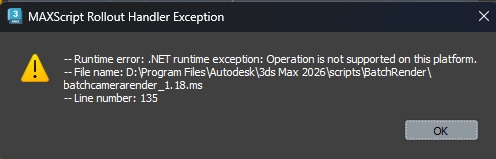
Love your script. I recently upgraded to Max 2026 and now I receive this error.
Help?

Attachments

2026 update

sergo · 2025-11-08

Oh wow, somebody updated the script already. That's nice.
I attached my update here as well.

Overwrite existing file error

troy_1234 · 2025-07-25

Hi there,

Love your script and use it every day, thanks very much!! I was just wondering if you know why every now and again I get an error where it tries to write each image as the first camera's name when I use the syntax %cameraname%.jpg. It seems to happen randomly and ends up with the error 'do you want to overwrite existing file'.

Thanks for your help.

Troy

fantastic script

bcoyle · 2024-12-20

Thank you for sharing this with us. This script has been integral in my workflow for years now. I can't imagine working without it. I fear the day it isn't supported any longer

Waseem3D · 2024-11-06

I wonder if there is a way that the "get" resolution button can take different resolutions from each camera according to it's setting from "camera resolution script" automatically.

fajar · 2024-11-07

It could be done , but first we must know what script you mention about ? is it stored in camera, user node or another ?

Change Priority

brodie · 2024-03-20

How can I change the Priority that my job will be sent at when submitting through Deadline.

THANK YOU!

e_samurai · 2023-12-06

Once again, a BIG THANK YOU for this! It has been part of my workflow for years and it made a lot of things possible.

Now that I have been using deadline extensively, it would be really neat and helpful if you could add a checkbox to "Add comment" when submitting.
For my use case, I always want that comment to be the active StateSet name, but it can be just anything and you can use the Syntax you like to implement it.

SUPPORT FOR CORONA

mak4max · 2023-11-03

When I render in corona, I cannot take *.EXR output in addition to beauty pass ( VFB Color corrected ). It is possible when I'm rendering in V-RAY. Can you please do something about it. Thanks & regards.

error when submitting with no batch render dialog.

nimitz · 2023-08-17

If i render with batch render dialog all works, but without, it saves the files, but after that, script listener only shows "unknown error" , looking to backburner manager it says render job already exists. It seems to don't enumerate the existing jobs in the right way.

Of course "create new paths silently" is activated.

Enhancing Camera Management: Alphabetize Your Way to Simplicity

hippiearchitect · 2023-08-01

This script is absolutely fantastic! It has proven to be incredibly helpful in managing cameras for my scenes. I'm genuinely grateful for this great piece of work. However, I was wondering if it would be possible to add a small enhancement to the camera manager settings. It would be incredible if you could include the ability to sort the columns, with a primary focus on alphabetizing the cameras.

I must say, the existing functionality has already been a lifesaver, but somehow I managed to get all the cameras out of order. With more than 50 cameras in a scene, this additional feature would make the process so much easier to handle. Thank you again for your wonderful script, and I'm looking forward to seeing how it becomes even better!

Thanks for suggestion!

sergo · 2023-08-02

I agree it's useful. I'll try to fix it when I have time.

Enhancing Camera Management: Alphabetize Your Way to Simplicity

hippiearchitect · 2023-08-01

This script is absolutely fantastic! It has proven to be incredibly helpful in managing cameras for my scenes. I'm genuinely grateful for this great piece of work. However, I was wondering if it would be possible to add a small enhancement to the camera manager settings. It would be incredible if you could include the ability to sort the columns, with a primary focus on alphabetizing the cameras.

I must say, the existing functionality has already been a lifesaver, but somehow I managed to get all the cameras out of order. With more than 50 cameras in a scene, this additional feature would make the process so much easier to handle. Thank you again for your wonderful script, and I'm looking forward to seeing how it becomes even better!

Fair

sergo · 2023-02-24

@hannes, GitHub is up to date now. Thanks for pointing out.

command line rendering - batch creation

nakama · 2023-02-13

I'm not sure, maybe i missed it somehow. But is it possible, that the script allowes a batch-creation for command line rendering?

Can you change the priority before submitting to Deadline?

brodie · 2022-08-30

It seems to just use the last priority used when you sent a job. Not being able to adjust that before submitting is a bit of an issue for me.

Solution.

locb · 2022-08-01

I found solution.
You need to open script in text editor and remove big text block from line 5 to line 24. ( all line from /* to */).
And it work like charm.

Attachments

sergo · 2022-08-04

Good job finding the solution @locb, thanks!

I attached slightly updated version 1.18, it should work with 2023 + Update.

Max 2023

locb · 2022-07-30

Only my script doesn't work in Max 2023?
Script not load after restart 3d max.
On toolbar i see missing:Sergo Pogosyan...
All other scripts work normal

Problem in max 2023

krajek1985 · 2022-08-01

I have the same problem as a user locb

"Only my script doesn't work in Max 2023?
Script not load after restart 3d max.
On toolbar i see missing:Sergo Pogosyan...
All other scripts work normal"

Thanks alot and Need a syntax

7man · 2022-06-16

Hi,
Great time saver script.
I use %cameraname% but also love to use like %foldername% :)

%foldername%_%cameraname%.jpg
IkeaChair_cam01.jpg

where the max file is inside the IkeaChair folder.

Memory Frame Buffer OFF + Orthographic

PaleBlue.Design · 2022-06-02

I've noticed a minor bug:
When rendering with Vray Memory Frame Buffer turned off while having orthographic projection for camera turned on in render setup the result is some random zoom out/in and even wrong camera being rendered.
I know it's a very specific setup but it's better to call it anyway. :)
Best regards!

Locked viewport override problem

PaleBlue.Design · 2022-03-24

Hi,
I love this script, I've been using it for a long time.
I've noticed a small problem though and was wondering if you could add this feature.
So, when you have some viewport locked in Render Setup, then the script renders from that view no matter which camera it's supposed to render.
If you could add a viewport lock check and override that would be awesome. :)
I've attached an image in case it's not clear what I'm refering to.

[EDIT]
I see that there is already that kind of state check and it works properly but only if you start batch rendering while the active/current viewport (with highlighted borders) is the one that is set as locked in Max's Render Setup dialog box. For example: There are four viewports, and in Render Setup the viewport No.2 is set as locked, then starting rendering in Batch Camera Render with any of the other viewports being current (viewports No. 1, 3 or 4) causes this error to occur.
It may be a 3DS Max problem, rather than something wrong with the script.
Tested on 3DS Max 2021.

Best regards!

Attachments

%trynum%

locb · 2022-01-25

Please move the " Render Try Counter %trunum% ", to the Render Output tab.
I use %trunum% all the time, and I often have to manually change its value, and it is in an awkward place (deep inside the "Option" rollout).
I tried moving it myself by moving lines of code inside the script, but it only broke the script.
Maybe it will be useful not only for me.
Or tell me how to transfer it yourself.

save in open exr format with render element

dead_lyric · 2022-01-16

found a solution in the settings vray settings!
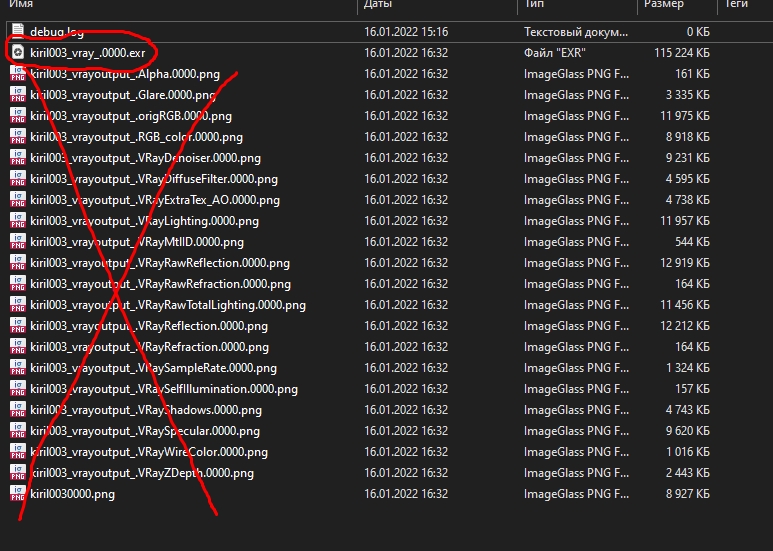
is it possible to save one file with all layers without separate layers?

Attachments

Sorry for late replies

sergo · 2022-01-25

@dead_lyric:
Please make sure you don't have "separate files" checkbox enabled in your Render Setup dialog, Vray section.

@tikox90,
Thanks for kind words!

@simplychenable,
Do you mean Deadline priority setting for each camera? Or for each submission? You could set deadline priority in standard Deadline Submitter dialog in 3ds max and this script will use the same priority. That's kind of a quick workaround.

@Managing Scene,
What do you mean by tyPreview batch? It's animation preview tool as far as I can tell.

save in open exr format with render element

dead_lyric · 2022-01-14

need help. save in open exr format with render element. I use these settings.
but only one layer is saved in the file! and VFB correction settings are not visible in the file (exposure, denoiser) what am I doing wrong?

Attachments

Vray Sun

busseynova · 2022-01-13

Excellent Script, I use it all the time these days, total gamechanger, especially in conjunction with deadline! But I just noticed I can't add a VraySun to light selection. Any chance of getting that added, preferably inside a daylight system?

Great Tool

tikox90 · 2021-12-12

Hello, Sergo!
My appreciation for this script. Finally, we were able to get rid of the default MAX batch render tool as a result of this! It is very helpful and contains all of the missing options that we all needed. Շնորհակալություն։

Deadline Priority Setting

simplychenable · 2021-10-19

Thanks for the script, Sergo. Would it be possible to include Deadline priority setting and preview frame options into the Deadline section of the script?

Deadline Priority Setting

simplychenable · 2021-10-19

Thanks for the script, Sergo. Would it be possible to include Deadline priority setting and preview frame options into the Deadline section of the script?

tyPreview integration

Managing Scene States. · 2021-10-15

tyPreview batch would be fantastic

tyPreview integration

Managing Scene States. · 2021-10-15

tyPreview batch would be fantastic

Script not working at Home

Kheng · 2021-04-29

Hi Sergo,

I have this script running perfectly fine in the office but at home I cannot seem to get it to run. When i go run script nothing happens (it does seem to pause for a few seconds with no resukts), no error nothing even if i try assign it to a hotkey or quad menu item. Is there any dependency i need to run it?

I have copied it into my /program files/autodesk/3d studio max 2021/scripts folder

I am running both max 2021 at home and at office

EDIT:
When i assign it to a quad menu item it shows a Tick that it is running but no window is shown. have attached a screenshot.
I have also tried running 1.15 which does not seem to work either

*UPDATE*
So i deleted all the ini files and batchcam and ran the 3dsmax to try reinstall and it just worked without even the script file there! weird. Anyway case closed thankyou

Attachments

Find the script in customize window

sergo · 2021-05-04

Hi Kheng,
When you run this script for the first time it silently installs itself to your %localappdata% folder. After that you simply go to Customize->User Interface->Toolbars and find it in the Sergo Pogosyan category.
From there you can add that command to your toolbar, quadmenu or assign a shortcut and it will run normally.

So you don't need to copy this script to your 3ds max folder. Just run it from any location and then find it in the Customize window.

Hope this helps,
Sergo.

locb · 2021-04-15

Thanks for the answer, knowing about this feature I will use either copies of cameras in one place, tying them to each other or tying the necessary parameters through wire parametrs

locb · 2021-03-29

Unfortunately, the problem was repeated in max 2016, physical camera.
When I create a camera, then make its instance copy 2 times, then when I click add I get 2 copies of the last copied.
But when copying without instance everything works as it should.
https://pastenow.ru/C1HYR (screen of batchrender window)
Maybe it can be fixed?

Unfortunately no fix for instanced camera issue right now

sergo · 2021-04-15

Hi locb
Unfortunately that is how the script works right now. I don't see how it can be fixed for camera instances.
If you are interested in technical details this is what's happening: Additional camera presets are store on the special object called CustomAttribute. When you add CustomAttribute to the instance, all the instances basically share the same custom object. That's why you see multiple additional items, but it's actually the same custom attribute that all the instances share.

It's annoying I agree. I will keep that issue in mind and I'll fix it if I find the solution.

locb · 2021-03-26

Exactly.
In the 5-camera scene, all the instances.
In the script, you can see all of them.
But when I try to make a duplicate of all cameras, instead of 5 duplicates of each camera I get five duplicates of one of them.
In a clean scene I have the same.
An earlier version of the script behaves the same way.
Maybe the reason for my version I will try to remove ENU and maybe this will help.

locb · 2021-02-16

HI.
I got problem,when i click add in scene where 5 instanced cameras dublecated only one camera but 5 times? when cameras unique add work well (windows 10, physical cameras)
What i do wrong?

sergo · 2021-03-26

Hi,

@locb, I don't really understand what's the problem. Are you trying to add 5 instanced cameras and it doesn't work?

@pfbelesa, I'll check the script with 2021 Max, see if I can reproduce this.

Thanks for reporting!

THINKTANK · 2020-08-14

still use this regularly, such a great script!

do you think you could get Scene states to do a cycle on a camera? that way I could have same camera once, then just flick off and on different layers (using state scenes), if you could include a outputname like %scenestates% that would save the name of the state that has just cycled.

would love that feature :)D

Unable to save gamma..

ChinmayT · 2020-06-30

Hello,

I am unable to save gamma type while saving render..

Could you please guide me..
how to save output gamma to override 1.0 instead of automatic 2.2

Right now render is washed out.. automatic mode. I need override mode.

Thank you for the script.. :)

1.16 works on 2020

sergo · 2020-05-23

Hi @HarryPlotter,
I checked the script on max 2020 and it works fine. I didn't check vray because I don't have it.

Edited the title: 1.9.16 -> 1.16.

sergo · 2020-05-10

Hi,

@dead_lyric - note the Vray Multiplier setting in your screenshot shows 2.2, that's why vray buffer is 2200.

@HarryPlotter - I don't have access to 3ds max right now, so I won't be able to fix it now. Could you post the error message? Hopefully next week I'll be able to check.

sergo

dead_lyric · 2020-05-11

I'm a fool! I thought it was a gamma! thank

resolution problem

dead_lyric · 2020-05-10

why this happen?
all default settings

Attachments

BatchCamerRender 3DS Max 2020

HarryPlotter · 2020-03-30

Hello Sergo!
I am using your script for years now and really do not want to miss it a single day.
But since we moved from 2019 to 2020, it does not work anymore.
Some years ago, you tweaked the script for my workflow. Is it possible to send you the script, so that you can compile it for 2020?
Thank you, Harald

Need a test case

sergo · 2020-03-04

Hi,
if you have troubles with the script in certain circumstances I will need to reproduce those on my machine. You will need to prepare a minimal scene where the problem is reproducible and email it to me.

Thanks,
Sergo.

Error

Kheng · 2020-02-25

I am having error with my batchcam after one render it will give the error:

-- runtime error: isGroupHead requires a node

Theobarbosa · 2020-02-13

Please, make it Corona-based!

TSchmiesing · 2020-02-12

This continues to be hands down the best batch script out there. I love that it works with State Sets. Very happy to see it continuing to be developed, you should definitely make a donate button at the minimum, or just charge a nominal fee.

Disable warning of overwriting files

arcadio · 2020-01-26

Amazing script. Im use it everyday. But there is one small thing which bother me a lot. When you render one set and after some corrections rerender again there is warning that files will be overwrited. when I render during whole night and in the middle there is this warning, half of my job wasnt finished.
I can disable it when warning pop up, but when I restart max, I have to disable it again.
So would be nice to have option to disable this warning or have some automatic renaming.
Anyway this sript is perfect. Perfect work. I can donnate if it would help to the developement.

Thanks!

sergo · 2020-01-24

@kaisergrendel:
Thanks for the kind words! You can paypal to poserge@live.com if you feel generous :)

@Kheng:
Can you reproduce deleting the sun object? It's very strange, I don't understand how it's possible.

@sanhita:
1. Batch render overrides standard render settings when you render from the script
2. I don't have plans to add corona render settings right now, sorry

Corona Sun

Kheng · 2020-01-24

I am not sure how the script works but does it create a new sun when loading a scene state?
In the previous version 1.15 using a corona sun would duplicate the sun (so I would have multiple instances linked to one daylight system). I am thinking it might be if i cancel the render before it has time to create the new sun then it might have disabled it? It does not happen every time but what normally happens is i will be doing a batch fine then one day i will run it and realise it has no sun. I check my daylight system and my sun is set to None (instead of coronaSun). Even if i change that to coronaSun it will not render it until i delete the daylight system and create the scene states again manually. I am running BatchCamera 1.16 on 3dsmax 2019.

Sergo is a God Among Men

kaisergrendel · 2020-01-23

Hi Sergo, thanks so much for your script, it has already saved me hundreds of hours and helped me concentrate on the art instead. I can't believe it's free!

Do you have some sort of link I can donate to?

Corona Sun Still getting deleted

Kheng · 2020-01-22

Hi Sergo,

Thankyou for the update to support daylight system with corona sun

I have noticed (not every time but sometimes) after running a batch my corona sun gets deleted and i have to remake my scene states.

Corona Settings

sanhita · 2020-01-06

Thanks so much for this script. 2 questions
1.Does the camera path in batch camera render get overwritten if the save file option is checked in the render settings?
2. Any roadmap on getting the Corona render settings included?:)

Once again, many thanks for this very useful and robust script.

Corona

wolh · 2019-12-12

Any progress with corona support? Looks like it is possible a bit to render it, but without render elements :(

Updated with CoronaSun support

sergo · 2019-12-13

Hi guys,

I updated the script to support CoronaSun inside Daylight System.

Could you elaborate on render elements in Corona renderer? I tried it on max 2019 and render elements worked fine.

StormBrig · 2019-12-13

Thank you for the Corona support.

Kheng · 2020-01-06

Thankyou Sergo, Much appreciated!

Render elements

wolh · 2020-01-08

Yea, sorry, i forgot to mention that i figured out how to render corona elements.
It works perfect even on max 2020.
But big thanks for the update anyway!
Btw, maybe there is a way to save separate render element? Always lacked the possibility to just save the RenderID jpeg file among the main file

Corona Sun

Kheng · 2019-12-11

Hi Sergo,

I am getting a script error when trying to use a corona sun in a daylight system:

-- Unknown property: "enabled" in CoronaSun

Line 1688:

if temp_sun != undefined then
sun_state = temp_sun.enabled

Thankyou!

Useful

todor · 2019-12-02

Very useful script! Thank you very much !

Timeout

Fixtion · 2019-12-01

Thx, very useful script!
one problem ... how to change the timeout in silent mode?
because silent mode ... set the default value: 600, if I change it in: Submotting->Advanced-> Wait for MAX to Render: 6000, nothing change! the script uses 600 by default.

Xrefs!

speile · 2019-11-20

I've just found your script and im liking it so far, but it would be nice if it was possible for the script to grab all the cameras that are x-referenced into the scene as well.

I tried to edit the script to do it myself but I cant get it to work.

I realise that the script saves custom attributes into the scene objects so, scene xrefs are kind of not feasible for saving settings, but i would find it very useful to just have the cameras come into the batch cam with the default file/batch/render settings.

Keep up the great work

sergo · 2019-11-21

This is interesting, speile.
Let me check if I can make it work with xrefs. You are right, all the parameters stored in attributes, but applying default parameters sounds possible.
Thanks for the suggestion.

Hey speile

sergo · 2019-12-01

I updated the script with support of xref scenes. Could you test it when you have time?

As you suggested these cameras only support default parameters because there's no way anything is saved in their custom attributes. But with carefully customized default parameters it is still possible to automate certain things.

Thanks for suggestion,
Sergo.

add new function in you script

antomor · 2019-09-04

Hi. I litle edit you script and add a new function: "Do not save Render Elements"


I am use it for rendering Multilayered formats exr, cxr... when need a rendering RE but not need save its in separate files. Good work with deadline.

link to download: https://www.dropbox.com/s/qpi5v2q41eaozou/Sergo%20Pogosyan-BatchCameraRe…

Houpe you add this function in you script

Thanks antomor

sergo · 2019-11-21

I'll check your version. Is the change vray related?

sergo · 2019-09-04

I think antomor is right. Whataever settings you have in deadline submitter are going to be used when you submit with batchrender.

Deadline

MrDorian · 2019-09-03

Hello guys! First of all, thank you for the script!

Quick question, when I send cameras to deadline, each camera picks one random node in deadline, is there a way to select how many nodes I can use for rendering?

This might be a deadline question, but maybe someone here knows and can help me.

Cheers!

Re: Deadline

antomor · 2019-09-03

Try setup all settings in Deadline Submitter script. Then use a Batch Camera Render

Vray Next

THINKTANK · 2019-07-03

I can confirm the script works with Vray Next, i continue to add several hundred cameras to deadline with no problems!

Would be great to add camera override settings in Batch camera so I could set the camera to render as a spherical image for example - currently trying to do this does not work for me.

Another thing would be great to control multiple physical camera settings in terms of Focal Length, is this possible? I seriously think this is the best script available for controlling large quantities of cameras, honestly would be lost without it and Chaos Group / Autodesk should buy it up!!!

sergo · 2019-07-03

Hi Thinktank,
What I think I can do is to add a special line where you put little maxscripts and that way you can control anything per camera, any vray or camera setting.
It's been on my list for quite some time but I kept getting distracted.

Actually there's already a way to do it - via per-camera maxscripts section. You just need to save your commands into script file. It's not very convenient but still can help if you really need it.

Vray Next

THINKTANK · 2019-05-14

Hi Sergo! I have not tested or installed Vray next yet but I wondered if Batch render will work / support Vray next?

thanks!
A

Possible support of Corona lights soon

sergo · 2019-04-17

I'll try to add support for Corona lights soon

Does this tool work for exr files?

Waseem3D · 2019-04-16

Does this tool work for saving exr files?

TSchmiesing · 2019-02-28

Hi Sergo,

I love your script but haven't been able to use it when working with Corona. Are the errors I am receiving on my side or should I not be using the script when using Corona? h

ttps://pasteboard.co/I3hopO8.jpg

Batch Render Include Maps

MediasphereGreg · 2018-12-12

Hi Sergo,
I am trying to submit my batch job to Backburner but it does not include the maps unless I tick show dialog and do each one manually. As you suggested in a previous comment I have tried submitting one like this but it does not remember the option.

Need a way to add custom commands

sergo · 2018-12-21

Hi,
I keep getting suggestions to add many different options, but unfortunately I can't add them all.
I'm thinking of the way to add custom commands to the cameras, so that anything can be changed in the scene or in the job.
Bad thing is that I don't have enough time to implement it right now.

Camera Batch

THINKTANK · 2019-02-01

Hi Sergo, I hope you are well?

I use your script daily and is very useful for me, I am willing to donate some money to you if you can potentially fix something for me?

I have 150+ cameras that are being sent to Deadline, for some reason every time it sends a camera to Deadline it will 'save', this is very annoying and takes agessss to send all camera jobs. is there a way to stop the save every time it sends a job?

thank you!
A

sergo · 2019-02-13

Hi Thinktank,

This should be fixed I agree. I'm not sure when. I was thinking about setting up Patreon or something, but I'm not sure about that either.

solution for your problem

amir3dsmax · 2019-02-17

i have solution for your problem . you can email me if you want .

Corona CXR file with Batch Camera Render

lacapra3D · 2018-12-03

Hello Sergo,

Thanks for your script!

I would like to ask you an information,
could be possible in the setting to have also the possibility to save for each camera the CXR file in Corona?

Best
lacapra3D

Please provide maxscript listener output

sergo · 2018-10-16

Hi,
Could you please provide maxscript listener output so I can see where the error happend? Just copy and paste what's shown in red. Or send me a PM so that sensitive information doesn't go public.

Thanks,
Sergo.

Deadline

Mirel · 2018-11-08

Hello Sergo,

As requested, i am attaching the maxscript listener output.

Thank you,
Mirel

Attachments

Deadline

Mirel · 2018-10-15

Thanks for this great script!

While sending a scene to deadline, if that contains a Daylight system it gives an error regarding an unknown property of the CoronaSun (see attached image).

Is there a fix for this?

Thank you,

Mirel

Attachments

Vray Elements in Deadline

m.moraes · 2018-08-22

I can't generate render elements using vray and deadline. Am I missing something?

Vray Elements in Deadline

THINKTANK · 2018-08-24

I concur I can't get them either, it's a brilliant addition and it honestly completes my pipeline brilliantly we just need to get it to save out the elements individually. I did notice you can do it by getting it to save out a .exr version with the layers saved inside.

Vray Elements in Deadline

m.moraes · 2018-08-29

EXR and EXR-IO for Photoshop solved my problem. Thanks !

Backburner error

mali · 2018-07-03

I've been getting an error lately while submitting net renders to Backburner using version 1.13 in Max 2015 SP4. This line is highlighted: " if not (batchManager.connect (if Net_Render_Options_Rollout.Auto_Search.checked then #automatic else #manual) Net_Render_Options_Rollout.Name_Or_Mask.text port:netrender_port platform:platform_var)
"

It's pretty much random, I don't know how to reproduce it. Sometimes it fails at the first camera, sometimes at any other... I'm not sure when this started, maybe it's due to a windows update? I usually restart max to make it work again.

frame range with negative numbers

MyGalaxy · 2018-06-22

It's bad that the frame range with negative numbers is not supported. For example, I need to render from -30 to 30 frames. How to do it?

Elements file type saving

uMandef · 2018-05-30

Hi Sergo,
first of all thank you for this amazing script and for the continuous updates!

I'm writing here to ask you how to save render elements with a different file type than the one of the main render: if I save the file in .exr I cannot find the way to save render elements in .jpg (as they are set in render setup - render lements) as it saves in .exr them too.
Am I missing something or isn't it possible?

Thank you!
Manuel

sergo · 2018-05-28

Thanks for the feedback! I'll check newer version with negative frames.

Спасибо за отзыв! Проверю на днях новую версия с отрицательными кадрами.

JuanDAO · 2018-06-09

Thanks for the awesome script!
But there is a problem with GAMMA settings when using CORONA render. Looks like gamma overrides to 1 (must be 2.2) when render with this script.
This happen's when used corona converter.

Пожалуйста, предложите решение проблем с ГАММОЙ при рендере КОРОНОЙ.

Thanks!

SAME ERROR

studiotetris · 2019-01-15

I have the same problem with max 2019. Any solution?
There is a problem with GAMMA settings when using CORONA render.
Looks like gamma overrides to 1 (must be 2.2) when render with this script.
Thanks

negative frame

povelitel · 2018-05-26

Добрый день!
Спасибо за ценный скрипт!

Нашёл баг.
Поставил нормальную анимацию солнца с анимацией кучи света и геометрии для вечернего рендера. После кадра 3 у меня уже вечер, добавлять дневные положения солнца можно только в отрицательную шкалу (где ещё день), которая не воспринимается скриптом.
Решил ситуацию копированием камеры и выставлением ей отрицательного кадра в поле Single.
Моя версия скрипта 1.9.20.

---------------------
Hi!

Negative frame in frame number list doesn't allow to render, for example: -1,4. I made a copy of camera and rendered negative frame in single frame field.

Thanks a lot for the script!

sergo · 2018-05-07

Hi antomor,
I'll check it tomorrow, but as a quick fix try to run Deadline Submitter first and then run BatchCamera script.

Please send/post the full error message!

sergo · 2018-04-22

Hi,
Could you send me the error message that appear on the script listener? Just press F11 when you you get that error and you'll see long text in red. Please send it to me and I'll be able to fix it.

Thanks,
Sergo.

Deadline support ready!

sergo · 2018-03-16

Hi, I've finally managed to add support of Deadline renderfarms.

In order to submit your jobs on Deadline do the following:

  1. Enter deadline repository address
  2. Check "Use Deadline" checkbox. Other checkboxes don't matter in this case ("Net render", "Show Submit Dialog").
  3. It probably requires Deadline 3ds max Submitter installed. I didn't have a chance to check it on a clean machine.

Let me know how it works,
Sergo

Problem Net Render

studiotetris · 2018-04-21

Thanks a lot for this plugin...it's spectacular!
I have 3dsmax 2017 64bit.
When I try to render with the checkbox "net render" activated and "show submit dialog" deactivated the program crash with "Unknow system exception" and open "Sergo Pogosyan-BatchCameraRender.mcr": i pay attention to check the box save file.
When I send in 3dsmax 2017 64 bit with the same options (but the checkbox 32 bit activated) the plugin is ok but Backburner don't render in 32 bit because I have 3dsmax 64 bit.
Do I make any mistakes?
Thanks

Thank you!!!

Grant_ · 2018-04-24

Sergo, you are a god! Thank you for adding deadline support!!

Have error with deadline supporting

antomor · 2018-05-06

Hello, Have error when try rendering with deadline. First time work fine, but now not working.
http://take.ms/u46Py - screen of error

sergo · 2018-05-07

This should fix it I think. See the attachment. I'll update the post later.

Attachments

batchcamerarender_1.13

antomor · 2018-05-10

Yes. Now working. Thanks!

Gamma Overide when saving final output

ereju · 2018-03-14

Hello, great script exactly what I was looking for: batch render through VFB with all elements and denoiser too, great job.

I have only one question how can i override gamma after saving the final render to 1,0. All renders come out washed out with gamma 2.2. Please advice this is important.

Thank you in advance

3DSMAX 2014
Vray 3.60

Gamma Overide when saving final output

ereju · 2018-03-15

never mind I figured it out. Yoy have to go color mapping set gamma to 1,0 and in the VFB enable button Display colors in sRGB space.

v1.11 Bugs

Grant_ · 2017-12-13

Hi Sergo,

I have noticed a few bugs outlined below:

- When submitting lots of cameras to back burner, only 1-3 will actually submit properly. I haven't found a work around for this yet, I either have to keep submitting slowly unticking each camera that has sent successfully or use "show submit dialog"

- When adding V-ray Alpha as a render element, this is not saved when using "enable elements", "enable VFB" and "Save vray seperate channels". All other elements save without any issues.

Thanks for the continued support on this script, it's awesome and a true time saver!

(max 2014, V-ray 3.5)

Kind Regards
Grant

Hi, What it means not properly?

sergo · 2017-12-13

Also, are those presets additional presets or camera presets? Hope it's not confusing. There's a preset with camera and other presets that can be added to that camera.

state set support : check!

crystal3d · 2017-11-22

looks handyawesomeamazingorgeous!

Vray Camera Type

paulorosario · 2017-11-17

Hi Sergo.
Thanks for your great script.
I would like to sugest add vray camera type support.
I use to render diferent camera types in my scenes and I currently have to create a preset for each type of camera in each scene. It would be great if I could set this directly in the script.

Thanks.

Deadline will be added soon

sergo · 2017-09-27

Hi guys,
I need some more time but Deadline support will definitely be added.

TSchmiesing · 2017-09-20

I second the request for Deadline support. We recently switched to using Deadline and I didn't realize I would lose the ability to use this amazing script when we switched.

Cheers.

afelicio02 · 2017-09-15

It'd be nice to have an "invert sequence" button on the Camera Manager Settings...

locb · 2017-09-12

I constantly use %trunum%, but I often have to manually change its meaning, and it is in an uncomfortable place (deep inside "Option" rollout). Can it be more convenient to transfer it to "Render output" rollut, and it will be useful not only for me?

It doesn't work anymore

haph81 · 2017-09-11

Please help me to fix this bug, I use max 2016.
I used this script before and it is working well
But when I updated max and update script 1.11, it doesn't work anymore

It works

haph81 · 2017-09-12

I reinstall 3dsmax 2017 and its return on working

Need to check deadline scripting support

sergo · 2017-07-26

Hi Grant,

Let me check deadline scripting support and I'll let you know.

Sergo.

Deadline Support

Grant_ · 2017-07-25

Hi Sergo,

Just wondering if you are thinking of adding deadline support to this script? We have recently moved away from back burner due to instability but miss using this awesome script!

If this is a complex task that would take some time, i'm sure we could come to some arrangement to cover costs?

Grant
Cadpeople.com

MFrender Support

sergo · 2017-06-15

This is how it looks:

And the script is in attachment.


Attachments

THANKS!

Mirko_pgn · 2017-06-20

thank you Sergo!

I will try it asap, but you are already my hero!

many many thanks again!

MFrender Support

Mirko_pgn · 2017-06-13

Hi Sergo! Grate script really!
Just a question: How do I can make it working with MFrender?

sergo · 2017-05-18

Hi, Sorry it took a while to answer the question. So you want to get batchcam properties from camera, is that right? You can access currently rendered camera in pre/post render script using batchCameraRender_currentcamera global variable Then you need to get properties from it. It got little bit more complicated since I added multiple setting per camera but it comes to this call: getAppData camera_object property_id

And here's the list of property names and id's that you can access:

"BatchCameraRender_frames":                    property_id = 7801
        "BatchCameraRender_framerange_from":        property_id = 7802
        "BatchCameraRender_framerange_to":            property_id = 7803
        "BatchCameraRender_anim_frame_range":        property_id = 7804
        "BatchCameraRender_frame_width":                property_id = 7805
        "BatchCameraRender_frame_heigth":            property_id = 7806
        "BatchCameraRender_render_output":            property_id = 7807
        "BatchCameraRender_elements_state":            property_id = 7808
        "BatchCameraRender_elements_output":        property_id = 7809
        "BatchCameraRender_solo_lights":                property_id = 7810
        "BatchCameraRender_on_lights":                    property_id = 7811
        "BatchCameraRender_off_lights":                    property_id = 7812
        "BatchCameraRender_scene_state":                property_id = 7813
        "BatchCameraRender_render_preset":            property_id = 7814
        "BatchCameraRender_irmap_mode":                property_id = 7815
        "BatchCameraRender_auto_save_irmap":        property_id = 7816
        "BatchCameraRender_auto_switch_irmap":    property_id = 7817
        "BatchCameraRender_irmap_read_file":            property_id = 7818
        "BatchCameraRender_irmap_save_file":            property_id = 7819
        "BatchCameraRender_lcmap_mode":                property_id = 7820
        "BatchCameraRender_auto_save_lcmap":        property_id = 7821
        "BatchCameraRender_auto_switch_lcmap":    property_id = 7822
        "BatchCameraRender_lcmap_read_file":            property_id = 7823
        "BatchCameraRender_lcmap_save_file":        property_id = 7824
        "BatchCameraRender_prerender_script":        property_id = 7825
        "BatchCameraRender_prerender_enabled":        property_id = 7826
        "BatchCameraRender_postrender_script":        property_id = 7827
        "BatchCameraRender_postrender_enabled":    property_id = 7828
        "BatchCameraRender_image_aspect":            property_id = 7829
       
        "BatchCameraRender_UserKey1":                    property_id = 7830
        "BatchCameraRender_UserKey2":                    property_id = 7831
        "BatchCameraRender_UserKey3":                    property_id = 7832       
       
        "BatchCameraRender_UserVal1":                    property_id = 7833
        "BatchCameraRender_UserVal2":                    property_id = 7834
        "BatchCameraRender_UserVal3":                    property_id = 7835
       
        "BatchCameraRender_bbJobName":                property_id = 7836
        "BatchCameraRender_elementName":            property_id = 7837
       
        "BatchCameraRender_OnSubmitScriptEnable":    property_id = 7838
        "BatchCameraRender_OnSubmitScript":                property_id = 7839       
        "BatchCameraRender_perCameraScriptEnable":    property_id = 7840
        "BatchCameraRender_perCameraScript":            property_id = 7841
       
        "BatchCameraRender_lastRenderPath":        property_id = 7842
       
        "BatchCameraRender_vray_ortho_mode":        property_id = 7844
        "BatchCameraRender_item_index":        property_id = 7845
       
        "BatchCameraRender_region_enabled":        property_id = 7846
        "BatchCameraRender_region_x":        property_id = 7847
        "BatchCameraRender_region_y":        property_id = 7848
        "BatchCameraRender_region_w":        property_id = 7849
        "BatchCameraRender_region_h":        property_id = 7850

Great script!

e_samurai · 2017-05-10

Thank you Sergo for that amazing script! It really helped me a lot with automating most of my rendering work.

I wanted to ask though whether I could access some parameters through maxscript?

For example, I want to automatically log each camera total render time, so is there a way to parse the "current" or the "last" rendered camera name/frame size/frames/etc through maxscript directly and add them to a spreadsheet or XML file. Is that possible?

I tried the INI file but it has only a limited amount of information.

Thanks again!

need to check state sets

deam · 2017-05-05

Hello

I found the way to use state sets

1. Create the different STATE SETS
2. open the MANAGE SCENE STATES panel
3. Create different SCENE STATES based on your STATE SETS
4. This way in batch camera you will find the SCENE STATE for each camera

regards

Attachments

State Sets support is on its way

sergo · 2017-05-10

Hi, I'll add state sets support soon! Already working on it:

state sets are buggy as hell but that s the only thing that let

crystal3d · 2017-11-22

me switch layers on and off so, i am looking forward to it.

Hi Sergo,Thanks for your

ricou · 2017-05-15

Hello Sergo, Sorry for the delay. Sorry again because, it was my fault...Cam was locked ! Oups :) Thanks again for your great Batchcam

============================================================================================

Hi Sergo,
Thanks for your answer.
I can send you every scene I did, this problem is always here... I forget to say that I'm using batch render_1.9.22
Will try to send you something ASAP.
Thanks for your support !

never seen anything like that

sergo · 2017-04-18

Hi, could you send me the file please? Empty file, with just cameras.

Several cameras but only one taking in account

ricou · 2017-04-18

Hi,
thanks for this great tool !

But as I said in the title, I can have several cameras, only the first one is taking in account.

I'm really surprised since I use Vray 3.5, several time, I had the following problem :
All my renders come from the first cam in the list.
I can have several cam, only the first one is ok then all my others renders are from the same cam (the first one)

Do you aware about that problem ?

Choosing .rps file

ratatouille · 2017-03-22

Hi,
i have tested this one. script is very awesone and detail. But i cannot select previously saved render preset.
I dont know if im missing anything.

i have copied my .rps file in
Here:
C:\Users\*****\AppData\Local\Autodesk\3dsMax\2014 - 64bit\ENU\en-US\plugcfg\BatchCameraRender
and here:
C:\Program Files\Autodesk\3ds Max 2014\renderpresets

But still not showing in the list.

Thnaks.

PSD MANAGER

nikobus · 2017-03-17

Thanks for the script, is awesome!! Anyway to use PSD Manager or any other effect in the render output? This is the only missing thing.

Regards,

sergo · 2017-03-19

Since it's an effect, I'm wondering why it doesn't work with the script?

Psd Manager

nikobus · 2017-03-28

Hi, do you know how to add an effect to the script section? Thanks!

vray 3.5 denoiser

mali · 2017-03-09

There seems to be a bit of a change in the denoiser workflow in V-Ray 3.5. With 3.4 the script would save RGB color element as the main output and the denoiser element separately, but now with 3.5 the main output is the denoised result. So I get 2 identical denoised images saved.

Do you think there is a way to get the old workflow back? Meaning I would like to save both the non-denoised render and the denoise element because sometimes the denoiser is too strong in certain parts of the image and I like to have the option to decide which to use and to mix both in PS if necessary. Hopefully I explained this well enough :D

vray 3.5 denoiser

deam · 2017-05-05

What you are looking for can be set from the vray denoiser panel

Thanks

meerarajput · 2017-03-01

I am looking for this thanks for sharing :)

never tested it with Corona

sergo · 2017-02-24

I've never tested it with Corona, so thanks for reminding me. I'll check. Can't believe script actually deletes anything on purpose, but some render elements are weird, so let me see...

UPD

SUPERCOMBO · 2017-02-27

The settings of LightSelect elements delete max preset option, not Batch Camera Render, sorry about I had not noticed it before. Script is awesome, may thanks!

Can it use camera name?

Dariusz · 2017-01-25

Hey

Can this script use camera name and prefix? - it can. Amazing piece of code!!! THANK YOU!

Regards
Dariusz

Can you reproduce the error?

sergo · 2016-12-11

I could not model the case to make that string in the script to fail. Is the crash random or it happens all the time?

pixelab · 2016-12-12

I made some tests and I can't, so I guess it's linked to my file. Will retry more and let you know

unknnow system exception

pixelab · 2016-12-10

I got this error, and it points to line 1123 when I try to submit 10 render to backburner

1123 render_servers = batchManager.GetServers()

Also, the "custom keyword and name" is a bit confusing, is there where you put backbuner job name ? syntax is like file names ? %cmameraname% will work ?

To get the alpha with the render, should I use max render elements, or will it work with VRAy ?

You should do a FAQ on your site, and a donate button :)

need to check state sets

sergo · 2016-11-27

@Angrymodeler, @koltscho - I need some time to learn how to use state sets. If they work in the way old-style scene states work then it will be possible to add them.

@mali - 1) If I understand correctly you can just select all the presets and change the path for all of them.
2) FOV parameter adding is possible, but requires some time. Let's see if any more people request it.

Thanks!

mali · 2016-11-28

Oh man, I feel silly now. I never thought of doing it like that :D Thanks a lot for the tip!

Gracepoint · 2016-11-23

Waiting for 3Ds max 2017 version.

A couple questions

mali · 2016-11-23

1) Would it be possible to change the output for all cameras at once? For example, I have 15 cameras and want to save all renders in one folder, tomorrow after doing some revisions I want to save them all in another folder. So I have to do this 15 times each day (First world problems, I know :D

2) Would it be possible to add vray camera type and FOV override (found in the render settings) per camera? For example, I have 15 regular views and 1 panorama view which I set to spherical type with 360 FOV.

Thanks!

scene states - Max 2017

koltscho · 2016-11-23

Hi Sergo,
great script. But I have a problem. I am using max 2017 and I can't set my scene states. When I click the scene state rollout I don't see any states (doesn't work in max 2017 batch render either). I know your version requirement says: 3ds max 2008-2016. 32-bit and 64-bit. But can you tell if there is going to be a version for max 2017?

Attachments

State set

happydaydreamer · 2017-01-06

Maybe I misunderstand you, but the scene states and state sets are two different things.
Try to make two different scene states (not state sets) and see if that works.

Best regards,
Morten

add some Keywords

arcadio · 2016-10-31

Hi.
First I want to thank you for perfect script. I appreciate your time spend with development.
Second I have an idea that with "keywords" in your script (for example %scenestate%) you can also use a vray "keywords"

for example if you use: D:\Work\%cameraname%_%rendertime%.jpg

it would be very useful, but I dont know if you have access to this variables, or if it isnt too time consuming to add that. Thanks again for prefect script.

Custom keywords

sergo · 2016-11-03

Hi,

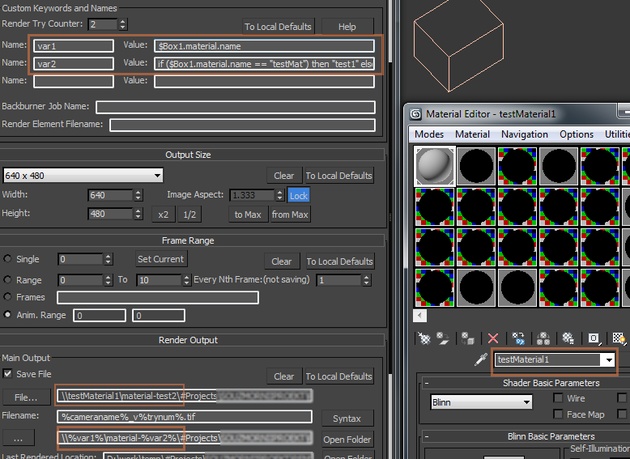
I would suggest trying Custom Keywords section in Options rollout. This is exactly what they have been done for. You simply put name of the keyword and next to it a maxscript string, to "calculate" value of the keyword. Then you use your keyword as standard keywords.

I'll post working example shortly if you can't figure it out.

Great script! Minor problems (and how to fix)

e_samurai · 2016-10-22

Hi! Thanks for the incredibly useful script! Although I totally love it because it's the only free solution for what I'm doing, I've been struggling with it for the last 4 hours or so. Been debugging some issues that caused random Unhandled Exceptions and other rendering glitches. I'm working with 3Ds Max 2014, Vray 3.2 and Win7 Ultimate. Please note that I am very much a beginner in Maxscript so I tried as hard as I could. Here are my most important observations:

1- The script doesn't render sequences if the renderer in 3Ds max is set to "Iteration render" OR when it is set to render a single frame in the Common tab. Solution: For now, I just added this snippet as a global Pre-render script. That should save all the hassle of forgetting to switch those two options to the right setup


try ( renderSceneDialog.close() ) 
catch() 
macros.run "Render" "RenderButtonMenu_Switch_To_Production_Mode" 
rendTimeType = 2 

The try catch thing is because these changes will not be applied unless the dialog is closed.


2- For an extremely weird reason, when working with Vray Sky and a manual sun node, if you save this in a Render Preset or a Scene State the sun node will magically disappear from the sky map when the script loads the sequence (or even whenever the render preset is changed). I simply wrote a code to recreate the map or repair the node where possible. Before doing that, the script caused "Unhandled Exception" with Vray when I simply kept re-assigning the same map to the environment map.

P.S: The IR and LC modes don't work properly in most cases (PrePass - Rendering) for animation.

Other than that, it's GREAT! Sometimes things do disappear (checkboxes or paths) but the most incredibly useful feature is the %name% tags that saved my life today! Thanks again and keep up the great work!

Net Render and Distributed Rendering

gLab · 2016-10-18

Hi Sergo,
thanks a lot for this useful script! We use it every day.
One suggestion though: We'd like to submit jobs to backburner with distributed rendering to only one computer. With 3ds max batch render you can do this easily as the submit dialogue appears only once and all the jobs are submitted to the selected computer. With your script the submit dialogue appears for every single job and you have to hit submit manually every time which can take too long for complex scenes with many cameras. So the question is if it's possible to have the submit dialogue open only once so you can select a node and all jobs will be submitted to this node.

Thanks and best regards,
g.

sending to net render

marcwe · 2016-09-15

hi, your script look great,
but just a suggestion,
Also the script can send to net render all the camera if you opt not to open the submit dialog,
through the original batch render, sending to net render do open the submit dialog, but only one time and you get automatically all the job added with job name updated automatically by sending it only one time. Also it does it very quickly compared to your helpful script who send separately each job.

standard batch render is faster?

sergo · 2016-09-16

Hi,

are you sure standard Batchrender does it faster? Isn't it sending whole scene for each of its presets?

Crashes after rendering

jgodbey · 2016-09-13

First of all, thanks for the awesome script! It's been a big help. Has anyone ever had problems with Max crashing when starting to render another camera? It started for me after I upgraded to Windows 10. The script worked perfectly on Win 7. There doesn't seem to be a pattern to the crashes though. Sometimes it will go through 7-10 cameras ok before crashing and sometimes it will crash after rendering just one camera. I don't believe it's a memory issue since it worked ok when I was on Windows 7.

Any help is much appreciated!
Jason

*Update*
I did a test and it renders fine 100% of the time when I just select one camera and nothing else. If any other cameras are queued up, Max is prone to crash.

sergo · 2016-09-14

This is interesting... Could you post versions of 3ds max and which renderer do you use? And what kind of settings do you have for cameras? Simple things like paths and resolutions or scenestates and render presets? Could you send me empty max file with cameras so I could check the settings?

e_samurai · 2016-10-23

Is the crash happening with an unhandled exception? Are you using scene states or render presets? I got the same issue and fixed it by correcting whatever goes wrong when the second camera loads (another render preset). Check out my comment above. Hopefully will help you!

Probable solutions...

sergo · 2016-08-18

Hi!

1. If I get your case right I think you can put folders to the root of the project by using %up% keyword in elements path. That keyword moves path one folder up.
Other option is to use %scenefolder% keyword in both paths, which forces them to start from the scene folder.
And there's also %projectfolder%, if you are using max's project folder.

2. You can resize the camera list with parameter "Listview Height" in Options rollout. It doesn't resize immediately, you need to restart the script.

3. Never came across that kind of thing. Which version of max you're using?

nobo · 2016-08-19

Thanks for the informations and your reactivity!

1.the options with %scenefolder% and %projectfolder% are not usable in my case. The only solution will be usable is %up%. I have trying but it don't work. I use this:

Render Elements Folder/Subfolder:
%up%%cameraname%_Mask_%elementname%

and the main path is like that:
\\SERVER\render\%cameraname%_diffuse\%cameraname%_diffuse_.png

2. great!

3. i'am using 3ds max 2016 SP3. I can assign the servers who don't rendering images by the backburner monitor interface, but i don't understand for wich reason they don't do the job when i unchecked "show submit dialog".

4. is it possible to desactivate a render element pass for one camera and let's it activate for the other cameras?

Thanks Sergo

To turn on/off render elements for presets

sergo · 2016-08-22

@nobo:
To turn on/off render elements for presets you can use this checkbox:

sergo · 2016-08-08

Good suggestions, thanks. Will definitely add them to top of todo list.

Two Suggestions / Requests

hippiearchitect · 2016-08-04

Hey Sergo, I cannot stop singing the praises of this sctipt. However I have two suggestions / requests:
1. Ability to organize cameras by name alphabetical order, or frames, or resolution, or aspect (basically the tabs under camera manager settings).
2. When clicking "Set Viewport" the aspect ratio of the safe frame updates to the settings of the camera, could the scene states also update? I use several scene states and usually link them to cameras so when switching cameras if the scene states could update in the viewport as well that would be awesome!

Again Thank you so much for your hard work on this wonderful script.

locb · 2016-07-19

Multiple presets is work for me, this script is brilliant.
Now i render 5 cameras with 4 diffrent scene states.
Thank you.

1922 ->1.10 b?

fajar · 2016-07-12

Just little question, is there something behind why after v1.922 it became 1.10b, is there any big change behind it regardless new feature or its just on a whim ?

Thanks

1.9.22 -> 1.10

sergo · 2016-07-13

Yes, multiple presets per camera seems pretty major change to me :)

Render element

nobo · 2016-07-21

Hi Sergo,
It's a powerful script!!
but I've got a problem with the render element Folder/Subfolder.
when i enter a path in this field a message error appear "unknown property: "baseObject" in "Cam01a"
the main output is like this:
\\SERVER\projet\Cam01a_diffuse\
and the subfolder is like this:
\\SERVER\projet\Cam01a_diffuse\matte
I don't understand what i should input in this field
have you got an idea for solve this problem
thanks

bugfix uploaded

sergo · 2016-07-27

That was a bug. I fixed it and uploaded new version.
You can put full path into subfolder or you can put only subfolder name there. In your case that should look like:
main output: \\SERVER\projet\Cam01a_diffuse\
subfolder (slashes are optional here): \matte\

Hope this helps. Thanks for the report!

nobo · 2016-08-17

Hi Sergo,
Thanks for the bug fix, it's ok for me!
I'd like to mention 3 differents points:

1- just a suggestion: it will be interesting to put the files pass of render element in a folder located in the root of the project like this:
my project/camera_01_main_pass
my project/camera_01_matte

At the moment, the render elements pass are located in the camera_01_main_pass.
For big projects it's not easy to have everything in the same folder.

2- another suggestion:
it will be useful to be able to resize the camera manager setting where the camera list appears.
with many cameras, the scroll bar is not useful.

3- Last thing:
When i send a net render with "show submit dialog" unchecked, i have some kind of bug. Several servers don't render the images, it's like if this machine don't see the request. The backburner server is active, obviously. If i check "show submit dialog", it works but then it become tedious.
Have you got an idea to solve this problem?

Thanks

not possible yet but coming soon

sergo · 2016-06-16

It is not possible yet but coming soon.
In the meanwhile the only way is to duplicate cameras.

Multiple renders for the same camera?

jodonnell · 2016-06-14

Hi, can you tell me if it's possible to process multiple renders from the same camera with different scene states? Currently I can't seem to find a way to do that?!

can not input negative numbers

antomor · 2016-05-31

Hi. I can not input negative numbers in Frame Range section. For example from -15 to 120

sergo · 2016-06-02

Ok, let me check, I'll fix it if it is a bug.

fajar · 2016-04-28

Press cancel doesnt stop all batch rendering at once.

sergo · 2016-05-04

fajar, is it possible you are using non-english 3ds max?
Is your rendering window title says "Rendering - image_file.ext"?

do not work net render

antomor · 2016-04-27

when i render in normal mode, and then want use Net Render mode - script (and max too) not send task to backburner. I need restart 3ds max and then Net Render work fine.

sergo · 2016-04-28

That's interesting. I checked on max 2016 and it seems to work. Can you reproduce the bug with some simple scene? Could you check script listener if it shows some errors and send me those?

Thanks!

sergo · 2016-05-04

antomor, I think I found the cause of your problem - it happens when you render in normal mode and hit cancel. After that it stops to send to net render.
I fixed the bug and I'm uploading new version right now...

thank you

antomor · 2016-05-04

Good news. Thank you :)

fajar · 2016-04-26

Btw sergo , how do I cancel all batch rendering at once?

Thanks

sergo · 2016-04-26

Press cancel in rendering dialog. It should work.

fajar · 2016-04-26

Ok thank you very much sergo.

Mine working when vfb turned

fajar · 2016-04-25

Mine working when vray VFB turned on....
I can provide you the scene to test but it'll take a time..maybe tommorow .. sorry bro cant help much ...still on the deadline time.

Basically it just box , create vray phy camera , setup your v-batch render, setup main output , and check save channel and provide the folder....and press render that's all. In vray 3, vray VFB on as default so I didn't need to disable vray VFB first, just hit render.

New functions

antomor · 2016-04-19

Hi. thanks for update and fix errors.
You can add new function in future? Get settings from standard Batch Render. It actual for me when people send to me scene, but using standard Batch Render, and setup all 16 cameras with resolutions and scene states. And i need manually transfer settings to script.
I think with this function people can fast start using you script

Good idea!

sergo · 2016-04-22

Good idea, I'll try to add it.
I should fix multiple presets per camera first. After that standard render presets will be converted seamlessly.

V-Ray 3 save render element - FIX

fajar · 2016-04-24

Hey sergo ,its been a while ...

I tried your new script but its not saving render element when using vray 3, like in your previous version...so I modified your script a little to make it saving VRAY RENDER ELEMENT....

Hope you tried it

Note : you can find what modified just by search "#tagged by fajar" in your script

Bye and thanks for very useful script

regard

fajar

Attachments

Hi fajar,your fix renders

sergo · 2016-04-25

Hi fajar,

your fix renders only locally right?

I don't remember exactly but new version should work with vray 3 and vray elements should work as well, provided the right checkboxes are selected in vray section. As far as I remember vray frame buffer should be turned off in order to save separate channels, OR "vray frame buffer" + "save separate channels" should be chosen.

UPDATE: have just checked on vray 3 and everything is working and saving fine. Could you provide your setup or an empty scene where vray render elements are not saving?

Animation

Greenbean · 2016-04-08

Could someone explain how to render animation for multiple camera's?
The only way It seems to work for me is by duplicating the camera 2 times so it renders Lc, irr, and final render. But this workflow is not reliable.

Thank you very much.

BTw, i love this script have been using it for renderig stills for a long time now :)

do not work "Select all" button in 1.9.20 version

antomor · 2016-03-23

unselect work, but select all cameras do not work. And "Check All" do not work, when cameras not selected

Thanks for the report!

sergo · 2016-03-24

I'll fix it in couple of days.

Fixed Select All and Toggle All buttons!

sergo · 2016-04-19

@antomor: It took a month to fix select all instead of couple of days but it's better late than never isn't it? :)

@Greenbean: If you need different settings for one camera you need to clone that camera. Unfortunately this is the only way right now.

Same problem with recent version?

sergo · 2016-03-23

Are you using the latest version?
I thought I've fixed that problem:
- Improved performance with scenes with lots of cameras

Sorry

antomor · 2016-03-23

I use 1.9.16 version.
Downloading a new version ))
Thanks for you work. Script realy very useful

slow work with many cameras

antomor · 2016-03-23

When work with 10 cameras and more, script vary slow select all cameras in list. You can fix this? Maybe make as in version 2 of this script? Batch Camera Render 2 very fast work with cameras in list.

Cancel with Cancel button

sergo · 2016-01-21

Unfortunately right now you can only cancel all the cameras by pressing Cancel button in render progress dialog.

Render cancel

YevhenK · 2016-01-20

I can't cancel all render at once with ESC button? Sometimes it's the only way to cancel in my situation... I need to cancel every batched render before it stops! Can it be fixed?

doesn't switch cameras

3dcrgr · 2016-01-05

I upgraded to 3Ds Max 2016 to SP2 and V-Ray to 3.30.03 and since then Batch Camera Render stopped switching cameras.

Also, it could be nice if changing the path name for files saving was enough and the folder was created automatically... otherwise file will not save.

Make sure you have right checkbox set

sergo · 2016-01-07

Please make sure you have this checkbox set in order to create folders automatically:

As for the cameras not switching I could not reproduce this on my 2016 max. If problem persists you can upload your scene with cameras only so that I could check it.

amir3dsmax · 2015-12-09

where is MFRender option ??
how to use it ?
thank for good script i us it everyday

sergo · 2015-12-11

Attached is the version of MFRender that supports BatchCamera script. It has additional render button BatchCam.
I tested it quickly but didn't use it in production.

Attachments

Correction Control "Multipass" in VRay 3.20.03

Vadim Sadykov · 2015-09-26

Привет. Мне помог скрипт решить некоторые задачи, но я заметил что вывод пассов происходит отдельными файлами для color correction, я думаю стоит тебе попробовать сделать multipass для одного exr файла с сохраненным Color Correction.

Hi. Script helped me to solve some issues, but I noticed that passes' output comes with single files for the color correction, I think it's worth a try to make multipass for one "exr" file with saved Color Correction.

no color correction for Raw Exr-s

sergo · 2015-09-29

Hi,
Are you talking about vray raw exr with multiple passes inside? AFAIK there's no way to save those raw exr-s with baked vray color correction. If you know how to do it just let me know!
Thanks!

great looking batch script

bcoyle · 2015-09-02

Question, is there a camera limit to this script? I have a scene with 57 cameras and when I try to select all to do some batch editing, the script hangs and I have to force quit out of 3dsmax.

I'm using a mix of vray cameras and max cameras, running 3dsmax 2012, with vray 3.0

It looks like clicking even a single camera in the script takes a chunk of time - so maybe it's a matter of waiting a few minutes for it to process the situation. Any way to speed it up?

Script doesn't alter camera roll

sergo · 2015-08-28

I've tried the script on camera with animated roll angle and I could not reproduce roll reset.
If you can reproduce the bug please post the steps so that I could follow and get the same result.

camera roll is overwritten

bloomimages · 2015-08-27

very useful script I would love to use on all my projects.

One bad bug: The camera roll parameter is reset to 0,0 which is very annoying as I am trying to render 11 different aerial views with different camera roll parameters from one file. I guess it is back to traditional batch render without passes...

locb · 2015-04-28

Sorry for my bad english )

Not "merge", some times i need to show two renders from 1 camera with diffrent "scene states", like when i'm render room with sofa in there and without. I use rmb>save scenestate and use it in standart batchrender(one camera and diffrent scene state)

In BatchCameraRender i can choose scene state for camera, but only once, for diffrent scene state i need to change it manualy.

So is it possible to make function render from 1 camera with diffrent scene state without manual changes after every render?

Не понял про "merge", иногда мне нужно сделать рендер с одной камеры, но разными scene state, к примеру мне нужне рендер комнаты с софой и без нее. Я использую rmb>save scenestate и стандартный batchrender (беру одну камеру и назначаю ей разные scene stat)

В BatchCameraRender, я могу выбрать scene state, для камеры, но только один раз, и для второго scene state, я должен переключить его в ручную.

Отсюда вопрос, можно ли добавить функцию рендера с одной камеры но разными scene state без постоянно переключения вручную?

sergo · 2015-04-28

No, sorry, there's no way to set two different settings for one camera.
You need to duplicate actual camera, then copy/paste settings and then set scene state to different one.

locb · 2015-04-27

Hi Sergo
Is it possible to add a function to duplicate the camera to do with one camera render two sceen state?

Привет, есть ли возможность добавить функцию дублирования камеры, чтобы с одной камеры делать рендер 2х sceen state?

sergo · 2015-04-28

I'm not sure if I get it right - are you going to "merge" scene states?

Save file(

zyuka2 · 2015-04-07

Hello!
All time included render output_Save file. Accordingly, the need to manually validate prompted to overwrite the file. How to get rid of this problems? Really like your script)))

Attachments

sergo · 2015-04-08

I'm not sure if I get it right - If you don't want to save the file you can uncheck Save File checkbox, if you are rendering to the same file you will be prompted with resave file dialog box. Which problem do you want to get rid of?

Напишите по-русски, не очень понятно что происходит, можно в личку.

subfeel · 2015-03-08

as for me this is the most useful script ever :)
big thnx and respect for sharing it!

asymptote · 2015-03-08

..

fajar · 2015-03-06

@Waltez : are you sure u know how to install it? , n btw who is nobody?
mine's work great. Try read in google how to install macroscript in 3dsmax.

It Works !

Waltez · 2015-03-07

It Works
correct the problem.
It should be installed with the Customize, does not work with only "Maxscript_Run .."

"mea culpa"!

Problems in Autodesk max 2015

Waltez · 2015-03-06

Tried these scripts:

batchcamerarender_1.9.14.ms /..1.9.15 ... 1.9.16

NOT work!

Nobody works in MAXScript ..

"be nice to people" mode on

sergo · 2015-03-07

@Waltez - what you probably mean is that nobody around you works in maxscript to help you fix that script, right?
Ok, so first you need to run this script via Maxscript->Run script menu. That will install new command to your 3ds max. To actually run the script you need to go to Customize dialog and in the Toolbar section you need to find Sergo Pogosyan in category list and then you'll see Batch render command in command list. You need to drag it to the toolbar, so you'll have new button. Hit that button to run the script. That's it.

@levi - I'll add this to next version, thanks for suggestion. Someone was posting about the same thing here not long time before...

VFB Stop Button Image :)

levi26 · 2015-02-12

Hey Sergo :)

Thanks, yeah sometimes I need to skip a batched render and with the vanilla batch render the VFB stop button skips to the next render in the sequence. Say if I skip the first few renders then use the cancel button on the render progress dialog box, that's when it doesn't stop completely. Its like it takes on the same action as the VFB Stop button.
I have attached a screenshot of the VFB Stop Button for you.

Hope its not hard to fix, I have some work colleagues that will be very happy if you can figure it out, not to mention myself. :)

Many thanks for this, love your work.
Let me know if you need any more information.

Levi

Attachments

levi26 · 2015-02-16

Works Perfectly, thanks you so much.

Great script.

Hey one more questions is there a way to save the toggled cameras boxes to an ini file, or can we do that already way. It seems ever time I reopen a Max file all the toggle camera's I usually render are untoggled.

Thank you so much again, this has saved a lot of time.

sergo · 2015-02-12

Oh, now you're making things complicated ;)

What is the stop button? I've never used it. Is it on vray vfb? Right now rendering stops only if Cancel button is clicked on the render progress dialog. I'll try to make it work on Esc button.
Without you mentioning it I would not even think about stop button, so thank you! I'll take a look on that direction too.

Cancel button doesnt stop batch completely after first camera

levi26 · 2015-02-12

Hey Sergo

Love the script, helps me a lot with my workflow.

Just having an issue with canceling a batch after the first camera. It works on the first camera but if you hit the stop button on the VFB then try and hit cancel on the next camera. It continues through the batch one by one. I will usually 30 plus cameras in a scene which takes a while to cancel if you don't do it on the first camera.

Any chance you could help, Am I doing something wrong. Is there a way to cancel the batch completely after the first camera has been skipped using the stop button on the VFB or pressing ESC?

Currently using v1.9.15

Thanks
Levi

"bump" on several wishes :)

NicolasC · 2015-02-03

Hello Sergo,

Thanks a lot for the great work you've done on your BCR, it's definitely a must-have !!
However, something is missing for me to be able to use it at its full potential. I regularly need to render more than 10 cameras for a project, and I'd need to send them to BB "silently", that means with Show Submit Dialog being off. BUT when it's off, it's not possible to: choose only a servers group or a single server to submit to ...
My suggestion would then be to add some more controls available when Show Submit Dialog is off: a dropdown list with servers available (for single-server submission) and a dropdown list with servers group available.
Do you think it can be done ?

Thanks a lot,

Best regards.

sergo · 2015-02-05

Hi,

I don't promise to add UI elements to choose server groups, but you probably will be able to specify them somewhere in script's code.

Hello Sergo :)

NicolasC · 2015-02-05

OK, I understand - anyway, sicne I'll always be using the same servers group, I guess it's even simpler to code it directly :)
But what about single-server submission ? do you think it's possible ?

Thanks.

New version is ready

sergo · 2015-02-07

Hi Nicolas,

I've uploaded new version, give it a try and let me know how it works.

@theedge - Thanks for the idea, it is in this version, try it out.

oh shit !! :)

NicolasC · 2015-02-13

thanks a lot, I can't try to test that !!
You've made my day (week, month ??).

Cheers.

Thank you! :D

mali · 2015-01-21

Oh man, it works perfectly now, even with backburner. Thank you so much, Sergo :)
I like how it saves both with and without the VFB colour corrections, nice touch.

Thanks for trying it out

sergo · 2015-01-22

Glad to hear that and thanks for trying. I'm not using it that much to test all the cases.

Backburner not saving elements

mali · 2015-01-15

Fajar, your update seems like it doesn't save the elements if you render via backburner :/ Is there some quick fix to this maybe?

AFAIK you can't duplicate cameras in the list

NicolasC · 2015-01-13

The only solution I found is to duplicate your camera in the scene ... certainly to put on the wishlist, the ability to duplicate tasks in the batch list ;)

locb · 2015-01-13

How can i render one camera with 2 diffrenet scene state ?

"little" wish

NicolasC · 2015-01-07

Hello,

The more I test your Batch Camera Render, the more I'm starting to love it ... because we heavily need a robust batch rendering system, and the one that ships with 3dsmax is, well, a bit crappy to say the least ;)
However, I'd really like 2 additions to BB submitting, if possible:

- being able to submitt to only one BB Server when needed. Would it be tricky to implement an option for that, including a dropdown list to pick one server ?

- being able to submitt to a group of servers. Same suggestion as above, with a dropdown list listing the available servers groups ...

Thanks a lot for your work on this very useful tool :)

Any way to increment output ?

NicolasC · 2015-01-06

For example, if you have to render newer versions of the cameras, but in the same output folder. You've already rendered cam01_01.tif, cam02_01.tif ... cam08_01.tif, and just need to render again, but incrementing all (selected) cameras' output to cam01_02.tif, cam02_02.tif ... cam08_02.tif. Maybe am I missing something ?
Thanks.

%trynum%

sergo · 2015-01-07

You can use cam01_%trynum%.tif, cam02_%trynum%.tif path and this keyword will be incremented with each hit of render button.
Be careful - this counter gets reset to 0 on each max session. (if I remember it correctly)

oh ok thanks Sergo !

NicolasC · 2015-01-07

I was pretty sure I was missing something :)

Thanks for the update !

NicolasC · 2015-01-05

Nice to see you still work on this :)

sergo · 2014-12-23

@k2000 - have been thinking about that but it needs some re-design to implement.
@theedge - good idea, I'll probably add this to next version

@fajar - please, could you explain in plain English what is wrong with Vray 3 and why script doesn't work with it?

Thank you fajar!

mali · 2014-12-22

Your update seems to work nicely so far :)

add/delete camera

k2000 · 2014-12-22

Hi Sergo!
Is it possible to make the feature to be able add/delete/choose camera same as in v.2 (I really got used to it but you do not support it any more...)
Thanks!

Suggestion : Match resolution when setting viewport

theedge · 2014-12-16

Hello,
First of all thank you for this very useful script.
I noticed that when I click the "Set Viewport" button, the viewport is assigned the selected camera as intended. But the output resolution is not reflected. So I have to click on a second button in another rollout : Output Size>to Max.
Wouldn't it make more sense to change the camera AND its corresponding output resolution at once ?

backburner ini not being used unless show dialog enabled

chris erskine · 2014-10-29

I'm trying to set my renders up so I don't need to edit each render to change the timeout on high res stills.

I've managed to change my backburner.ini file, and i've gotten it work through the standard network render. and it will also work when show submit dialog is enabled.

but it won't use those settings when I submit the renders in the normal way.

I'm using batch cam 1.9.10 3dsmax 2015, vray 2.5

thanks

chris

Maxscript doesn't control backburner.ini

sergo · 2014-11-03

Unfortunately I can't make 3ds max to read or to not read backburner.ini file. At least I don't know the legal maxscript way of doing this.

fajar · 2014-10-27

Hey Sergo , Thanks for the script, I made little fix to save render element, it now can save render element on vray 3.xx too [hope I didnt mess up here], its support vray version 2.2 to vray 3, about vray 1.5 sp xxx, it dont, I dont own those vray version. Btw you can check the code simply by search "tagged by fajar".

Attachments

Nice job fajar!

sergo · 2014-10-28

Thanks for contributing!
I didn't check it but I'm happy you have the courage to deal with this horrible code :)

render elements in vray3

mali · 2014-09-03

There are scene states, I put my shortcuts back on the quad menu.
Sergo, any news on the update? I noticed now when I switched to vray 3 and max 2015 that render elements are not saved. Thank you for your scripts!
EDIT: Now I see that when I disable VFB in the script, it renders out all the passes, but it saves them double as tga and without AA. I can't see where I would change this setting...

Gamma

tomaszzero · 2014-07-23

Hey Sergo, thanx for this great script. I have one problem with both Camera Batch render and Camera Batch Render 2. When i render the pic with vray frame buffer enabled it is much darker than it should be, and when i render it without vfb it is brighter. I think it is some gamma problem. I found your advice to save renders as exr with gamma set to 1 and also your workaround method in Camera Batch Render 2 thread, but nothing worked for me... Help please, because this is the best batch camera script so far...

Edit:
I've just noticed, that when max is computing irr map and light cache it looks similar (i mean brightness) for renders with script and without it - so there is problem probably with only final render's brightnes. When i enable vfb in script also IRRmap and LC looks darker when processing... Weird

Edit2:
The problem occurs only in frame window while computing rendering. Saved file has gamma = 1 while i need it to be gamma 2.2.

Edit 3:
I figured out what about your workaround method and it worked but image was saved with gamma 2.2 and this gamma is the same as in frame buffer - too bright (normally, rendering without script is darker - this is proper brightness)

Thinkbox Deadline Support?

jnknll · 2014-07-09

Since we had troubles with backburner, we switched to thinkbox deadline. Are you considering doing a support for that too?

@asymptote: Scene States do not open in 3dsmax2014 any more, the only way to get working states is starting your scene with at least one state in 2012 or 2013 and then open the (empty) scene in 2014. (but I didn't try 2015)

No scenestates in max2014? What the ...!!!

sergo · 2014-07-10

Sorry guys, but I'm still using 2012, so I have no idea what's going on newer verions.
There are scenestate commands in Customize->Toolbars but they don't seem to work. Why they kept toolbar commands then?!

asymptote · 2014-06-23

"so I'll start to update my script soon."

This is good news indeed!

Is it just me or do Scene States not work with Max 2014 ? I never get any in the drop down, no matter how many I set up in the scene.

you are rendering with no assigned file ..how can i avoid that.

Managing Scene States. · 2014-06-04

each camera have embedded exr channels....and they render fine on use current frame but when i change it to frame 2 i get (you are rendering with no assigned file) 

I've never came across that kind of bug

sergo · 2014-06-05

Let me check on my machine.

The other thing - I've got Vray 3.0 now, so I'll start to update my script soon.

fajar · 2014-05-22

also theres no element saved in vray 2.4 ! I try v2 and its perfectly save my element.

niighthawk · 2014-05-22

you should add an option to only render element in the memory without save, like that when the render is over it would save everything in the same .exr ( all layers + elements ) like the original VFB already does

EXR

niighthawk · 2014-05-22

Hi any update on the EXR multilayer elements ?

Also the VFB EXR is not

niighthawk · 2014-05-15

When I select "SAVE VRAY RAW IMAGE FILE" to .EXR in the F10 menu I've got 1 file.exr with inside it all's ELEMENT separed by Layers.

When I select the "SAVE VRAY RAW IMAGE FILE" in the Camerabatch
the .EXR files are empty and only have in it the ALPHA ( RGBA ) nothing else ..

can you check that please ?

because I really need to launch a couple of camera and to be saved all file into a SINGLE .EXR where every element are separed by layer in photoshop like the original SAVE VRAY RAW IAMGE work in the Render panel.

Thank you if you need me to test something for you just ask!

As soon as I get vray 3.0

sergo · 2014-05-15

I will check it as soon as I get vray 3.0 :)

niighthawk · 2014-05-15

ok. I hope this will be soon lol ;)

vray 3.0

niighthawk · 2014-05-15

No Elements are saved with vray 3.0 and batch camera 1.9.8.10 can you check this please ...

pedro_s · 2014-05-07

wow!
thanks for your fast answer! I also read your answer in the BatchCam2 forum and I will follow your advice :)
I found the .tga place in script. If necessary I’ll change there! But I have one more question.
In BactchCam1.9.x is it possible to render two images from the same camera but with different scenes?

Many thanks!!

No, that's not possible.

sergo · 2014-05-14

I think you've already figured that out. This is the main drawback of this script - it only renders one preset per camera. If you need different settings for same view you'll need to clone the camera.

pedro_s · 2014-05-07

Hi Sergo,

Many thanks for this amazing script and for the batch cam 2 too! I'm testing both and they work fine! But I've a question here, and two for the BatchCam2 :P
- Can I choose the extension for the elements in BatchCam1.9.8.10? (or, what I’m doing wrong?) I render tests through farm in .png/ .tif and .jpg but the elements extension file always save .tga

ex:CAM03t100000.png /CAM03t10.VRayDiffuseFilter.0000.tga

Best Regards!

Pedro

type is hardcoded (but can be changed in script)

sergo · 2014-05-07

Hi Pedro,

as far as I remember I have tga type hardcoded in script. This was done because some file types makes element go crazy. I can give you the exact place in script where you can change default element type.

fajar · 2014-03-17

Any chance to add shutdown/restart/hibernate after render.

Suggestion: Autoload Scene state that has identical name

crystal3d · 2014-03-17

as the camera :)
That would be perfect fit for my workflow.

Autoload Scene state is possible in current version

sergo · 2014-03-19

That is already possible in current version. Just use %cameraname% as your scenestate in the script and you are done!

Setup is like this: You have cameras, you have scene states named after camera names and you have %cameraname% put for each camera in the script.

'Use camera path' option for vray GI solution calculations

birket · 2014-01-27

I have a scene with 10 to 20 animated vray cameras. I need to create a solution for each camera (using lightcache and irmap). Normally, when I do them one at a time by hand, I have the options checked to 'use camera path' for the solution.
This means the GI solution is only caluculated for what the camera 'sees'.

Could this option be added to Batch Camera Render?

(I've just tested a batch job where I told each of my 3 animated cameras to save the lightcache and irmaps. They don't appear to have saved them. Any ideas why?)

sergo · 2014-01-28

You can have that option checked in standard render dialog, it will not be touched by the script.
Here is my quick setup that saves lightcache and irmap using camera name as filename, hope that helps:

Wildcards for saving light cache don't work

sclifford · 2015-06-30

Hi - maybe I've got my render dialog set incorrectly but I can't get the script to save my Light Cache to the defined filename per your example (%cameraname%.vrlmap). It works fine for the Irradiance Map but not light cache. It won't override the setting of the Vray dialog. Which means the vrlmap gets overwritten for each camera, and can't be loaded for the final pass.

I tried turning off autosave in the Vray dialog but then it won't save anything.

I'm using Vray 3.2 on Max 2016.

Thanks! This script would be a life saver if I could get it working for me.

sergo · 2015-07-01

That's interesting. Could you just post render settings screenshot here?

I've tried on 2012+vray 2.3 and it seems to work. It may be because of vray 3, but I need to test further.

link is dead

amir3dsmax · 2013-12-14

can any one give me link ?? link is dead

Attached script to post

sergo · 2013-12-15

Hi guys!
That broken link forced me to update the script. I've listed some of the most visible new features, later I'll add all new features and update description (hopefully).

Enjoy and happy holidays!

file name + current frame number

Alex_H · 2013-07-14

Hello, thank you Sergo for that great script.

Do anybody of you have a idea how to implement the current frame number to a file name ?

I try to save a range of numbered Irradiance map and LC-files from a short animation (a camera movement with five different camera and sun positions) like: House_LC_0001.vrlmap , House_LC_0002.vrlmap ....

I set the custom Keyword:
framenr = (currentTime.frame as integer) as string
Unfortunelya file name "House_LC_%framenr%.vrlmap" gives me just the nr of the first used frame.

I see, there is a method with a callback, but I do not have a idea, how to use this
((callbacks.notificationParam())[13].Frame as string)

Kind regards
Alex

You can use Vray commands

sergo · 2013-07-14

renderers.current.saveIrradianceMap "filename.vrmap"
renderers.current.loadIrradianceMap "filename.vrmap"

To register that commands as callbacks run this code before rendering starts

callbacks.addScript #postRenderFrame "renderers.current.saveIrradianceMap (\"file_path_and_name\" + ((currentTime as integer) as string) + \".vrmap\")"

But you should manually delete that command to not have irmaps resaved after each and every render in current scene

callbacks.removeScripts #postRenderFrame

problem

maxpoz · 2013-06-06

Hello
sometime, in some project i have a problem with 1.9.8.1 version.
I render 10 cameras for example,
cam1: frame 10
cam2: frame 5
cam3: frame 15
...
..

result of image are for example always cam2(frame 10-5-15....)
why? exist a solution?

I use batchcamera to rendering images with diferent light direction.

%cameraname%. jpg

sergo · 2013-06-11

Are you using %cameraname% keyword for your file name?

Marcowhich · 2013-01-28

Well done. This is a great script, although I couldn't use it much.
Basically I am rendering various scenes on different cameras.
Due to the large number of objects, I cannot batch render all of my cameras because if I turn all lights on, the render time increases dramatically.
This script could be a perfect solution and I could set all lights to get ON and OFF as needed. But As I start setting up the lights in "BATCH CAMERA RENDER", it freezes and I need to restart 3DMax. I'm not sure if this is the script's bug or 3DMax limits.
Again, thanks for dedicating your time to develop such a useful script.

site is temporarily down

ajaxtricet · 2013-01-17

hi,
please is there any other way to download your script?

thanks

Updated the link

sergo · 2013-01-18

Sorry guys,

Now should work.

ajaxtricet · 2013-01-19

great! thank you!
it's an excellent script!

asymptote · 2012-07-26

thx for the suggestion sergo, but it doesn't solve the issue, if I send without dialogue. maps are not sent with the scene, even after submitting one with the option checked.

Using Max 2010 64, with VRay 2.20.02 on Win 7 64.

hope there's a fix

thx

asymptote · 2012-07-25

When submitting jobs for net render, maps are not sent with the scenes unless I check "Show Submit Dialogue" and assign them manually.
Is it possible to automatically include maps.....or am i missing a setting ;) ?

thx

sergo · 2012-07-26

I thought that after you submit one time with Include Maps flag through the Submit Dialog, next time silent submit should consider that flag. Could you try this workaround?

asymptote · 2012-07-15

Love the script,gives me great control of scenes. I did find your filename syntax a bit fiddly piddly to set up, I would have preferred check boxes :)

thx

+1

btw is it possible to change the date range format from 2012-07-15 to 15_07_2012 ?

exposure/curves settings

jwscott · 2012-01-19

Sergo,

When I adjust curves and exposure settings in the frame buffer, those settings are not baked into the output files from Batchcam (the changes are visible in frame buffer, though). I want what I'm seeing in the frame buffer to be what's saved to disk.

If I save the file manually, it looks right. Is there a setting I'm missing? I'm using version 1.9.8.1 with vray 2.20.0, 64bit, Windows 7.

Thanks,

Scott

sergo · 2012-01-19

Vray frame buffer editing is saved only when you save file manually from the framebuffer (by the save image button).

VFB editing

jwscott · 2012-01-19

ok. Is version 2 the same way?

sergo · 2012-01-20

It is a matter of how vray works not script.

k2000 · 2012-01-18

One more question just poped out...

How the syntax works with "Custom Keywords and Names" ?
Can I use it in filename?
Example please.

Thanks

sergo · 2012-01-18

I've just thought that Custom Keywords may be helpfull when you want to switch the paths based on some criteria.

Here's an example:

var1 variable is set to name of box1.material

var2 is the conditional operation: if box1.material.name == something then var2 will be set to "test1"

So you can use any maxscript properties in Value field and then use variable name in paths.

New featureIs it possible to

k2000 · 2012-01-18

New feature

Is it possible to add second OUTPUT PATH? And check boxes for each path.
During the work process I save files locally and then copy to the server.
When rendering overnight I normally save to the server.
So I need to change save path many times back&forth.
Maybe it's not very usefull for someone. But for me this could be very usefull.

Thanks

k2000 · 2012-01-18

Realized I was using 1.9.7 instead of 1.9.8 couple of days ago...
Tried to switch to 1.9.8. But when I press "RENDER" button I got error message window

-- Unknown property: "SetElementsActive" in undefined

any ideas?

for the new scene script works fine.

Thanks

sergo · 2012-01-18

>Realized I was using 1.9.7 instead of 1.9.8 couple of days ago...
>Tried to switch to 1.9.8. But when I press "RENDER" button I got error message window
> -- Unknown property: "SetElementsActive" in undefined
>any ideas?

Send me your scene if you can.

UPDATE - bug fixed in version 1.9.8.1

render elements windows

k2000 · 2011-11-09

Hi,
I upgraded to 1.9.7.2 recently.
In 1.9.5 Render Elements windows automatically close after render is done.
Now all the windows are open and you have to close all of them manually. Not a big deal but... (this was a nice feature if compare to standard render window, if you need 10-15 render elements and then close then one by one)

Thx

P.S. didn't go for v2 yet as I need "scene state" feature for my current project.

sergo · 2011-11-09

as far as I remember I didn't change anything in render elements section in later version, except custom element naming. Ok, thank you, I'll make tests and see what's going on there.

P.S. But scene state works in v2. Do you mean lighting state?

k2000 · 2011-11-09

oh, I see
just misunderstood the comparison description
surely will go for v2

THX !

thank so much

hiepkts · 2011-09-14

this script is very good. I like it. Thank you!

sergo · 2011-09-14

Thank you :)

themaxxer · 2011-09-09

"I believe there are many tools for this puporse on the scriptspot. Unfortunately it is different task, so I'm not sure I'll add this feature to the script."

hm, I don't find anything, which one do you mean? thanks.

by the way... is your website down? I can't download nor reach the site!

best regards
themaxxer

sergo · 2011-09-09

Thank you for site related tip, it is down, and unfortunately will be down until Monday.

Regarding the tools - are you talking about batch file rendering tool? I remember that there were one or more things on scriptspot for this kind of task, but I can't tell exactly the names. And yes, this is not the feature I'm planning to add to script in near future.

GushingDizzy · 2011-07-12

That's a good idea! Next to the file output name you could have a VRay Framebuffer checkbox, that would disable the Max output. Keep in mind though that the VRay Framebuffer can only save to .exr or .vrimg formats.

People on the VRay forum were just telling me that sometimes the framebuffer doesn't always save all the channels you want into EXRs, so they render to .vrimg and use the converter. Perhaps conversion at the end could another option.

GushingDizzy · 2011-07-12

I see that you have a switch to turn that on and off, but I don't see a way to specify a filename for its output.

What works well is leaving the Main output blank while the VRay Framebuffer does the saving. You get a warning that you are rendering a sequence without specifying a file output, but VRay has that covered, so you just say Ok.

Again, this is so that all the elements will be properly included in the EXR file. Outputting through the Main file output and saving the elements to separate files works fine, but it's nicer to just have everything in one EXR file sequence.

sergo · 2011-07-12

Thank you for testing.

Now I see your point. Let's deal with it.
Do you have some suggestion how to make this work more properly?

I really don't want to add new field with Vray image file name. Would it be convinient to save Vray-image file with same name as the main output + "vray" or something like that?

VRay Frame Buffer?

GushingDizzy · 2011-07-12

Perhaps this has already been asked, but is there a way to get this to function with the VRay Frame Buffer? As far as I know, saving through the VRay Frame Buffer is the only way to get all of your VRay Render Elements saved PROPERLY into an EXR file (and it's the only way to save to .vrimg format).

sergo · 2011-07-12

Take a closer look to vray section, there would be the way to save multichannel-ed exr. As far as I remeber you should Enable VFB and disable "Save Separate Channels". To be true I don't use this functionality, so I can't gurantee the result. But all this checkboxes are the same as the checkboxes in standard Render Setup's Vray Frame Buffer rollout. If you can get correct result with standard dialog this should be possible to accomplish in maxscript too.

You are the greatest

vklein · 2011-07-08

I see multiple jobs per camera on your version 2 screen. You are turning my wishes into reality. THANKS A LOT !!! When will it be available??? ;-)

themaxxer · 2011-07-07

hello great script!

some time ago there was a plugin from 3ddragon.com to batch render. the real big thing was to load different max scene and render the cams.

http://3ddragon.com/images/VR-autorender.gif

is it possible to implement? this would be so great, because I would use it a lot.

thanks for your effort!

best regards
themaxxer

themaxxer,I believe there

sergo · 2011-07-07


themaxxer,
I believe there are many tools for this puporse on the scriptspot. Unfortunately it is different task, so I'm not sure I'll add this feature to the script.

TSchmiesing,
bat file export will be possible in BatchCam version 2. And possibly render node assigning too, though I'm not sure about this.

BTW here's the screen shot of BatchCam2, it is work-in-progress, so I'm posting only the screenshot. Don't want to upload half-working version:


TSchmiesing · 2011-06-24

Also, ...a way to import and export to a batch file would be awesome. Similar to how you can with the standard batch render.

Or maybe a drop down that contains different states/resolutions. High res, low res, etc..

Target Render Farm Node

TSchmiesing · 2011-06-23

It would be nice if there was a way to target a specific renderfarm node when sending to network render. Sure I can do this through the dialog, but that requires time. It would be a lot faster to simply type in the name of the machine that it should use on the render farm.

Again though, this is one of my top scripts.

sergo · 2011-06-08

Working on that. Thank you.

rleuchovius · 2011-06-08

Up again, thank you :-)

web page

rleuchovius · 2011-06-08

Hi! seems like your web page is down?
Regards, Ragnar

Thanks Sergo!

renndermonkey · 2011-05-26

This script has become ESSENTIAL to my workflow, thanks so much.

I use this script mostly to help with stereoscopic animations of product renders. I can set output paths and then submit left&right cameras all at once with the %variables%.

I know this is a batch camera render, and not a render pass manager, but it would speed up workflow even more if I could choose multiple scene states to render per camera.

For example:

I submit a left and right camera, with 3 different multimatte render elements- I also have two scene states setup, one is an RGB pass for object mattes, and the other is setup for reflections in alpha channel. Is there a way to send these additional scene states at the same time?

sergo · 2011-05-27

In current version there's no way, sorry.

I know guys, this is the main drawback of this script. I'm working on a new version and it will be available sooner or later. I work on these scripts in my spare time, so it takes some times.

TSchmiesing · 2011-05-25

We can not get independent resolutions for each camera. Are we doing something wrong? No matter what we seem to do the Resolution stays set to 'Undefined.'

sergo · 2011-05-25

That's strange. Send me cameras from your scene if you still didn't manage to solve the problem.

TSchmiesing · 2011-05-25

Odd. It seems to be working this morning. Thanks for the follow up though.

sergo · 2011-05-25

Script requires some adaptation.

leverkusen · 2011-05-19

Thank you so much for your script, I use it since 2 years now!
One request I would have: Could it be possible to include maps as default, without showing the Submit Dialog?
(I hate to rename the job names in this dialog over and over again..) Thank you, Elke

sergo · 2011-05-19

You can submit your job one time in a regular way and check Include Maps checkbox. After that you can submit jobs by the script, checkbox remains checked and, AFAIK will remain in this scene all the time.

NicolasC · 2011-05-06

Hello :)

Your website seems offline ...

sergo · 2011-05-06

Thank you, Nicolas!
It works now.

vklein · 2011-04-19

Wonderful script I have 3 main wishes:

1: Could you make it possible to have multiple render jobs per camera? I think it's a basis workflow principle. (I think houdini also could hook multiple output-nodes based one the same cameara). Not everything is possible through render elements. We need this a lot. (i.e. one camera multiple passes for transparency animations with different object-sets being rendered separately and blended in/out in compositing, separate masks/uv passes).

2: Could it be made possible to be able to select and copy the keywords from the "Syntax" Messagebox under "Render Output" or better click to insert the keywords?

3: Could you for resolutions also respect the pixel aspect? So the default D1/D1wide resolution (720x576) or fancy stereoscopy side by side resolutions work?

sergo · 2011-04-19

Hi vklein!

Multiple presets per camera is not possible in this version.

MessageBox was added just as a hint, but I understood your point and I will try to make it possible to copy this text.

Script uses Pixel aspect values as it is set in the standard Render Setup window. Yes, this value will be the same for all cameras.
You can also use Render Preset setting in the script to specify different pixel aspect for each camera.

maxpoz · 2011-03-26

Thanks for all,
I have a problem on only one pc,
when i try to chose light, 3dsmax crash
Have you a solution?

Max

sergo · 2011-03-27

If you talking about choosing lights in Light Assignment section then yes, it is happening from time to time, max hangs on pressing "choose light" button. And I don't know why. It seems that it is a maxscript bug, because script doesn't make something unusual in this place.

somemistake

sxp · 2011-03-23

  just like this  :  No " "getAppData" "function for undefined,

So sad!

Thanks!

sergo · 2011-03-23

Please provide more detailed steps to reproduce the error.

This kind of error might occur if you delete the camera and then try to select it in the script window. Press Refresh button after you delete the camera object and if script was open during deletion.

pixela · 2011-02-08

Thanks for your answer :)

vray 2 and max 2011

pixela · 2011-02-07

Does the script support Max 2011 and Vray 2.0 ?

sergo · 2011-02-07

3ds max 2011 - no problem.
vray 2.0 - didn't try.

renndermonkey · 2011-02-04

just downloaded 1.9.5 - the ability to save multiple versions of the same type of render element is a great improvement! Thanks!!

birket · 2010-09-10

We are using Max2009 x64 and Vray1.5 and get the following error:-

Attachments

sergo · 2010-09-10

Thank you and sorry. Uploaded right file, you can try it now.

tafkaandre · 2010-08-03

I sergey, thank for your fast answer, I just sent you by mail a TEST scene, and explained well what's the problem.
I hope your're right, and maybe It's just my wrong way to use the script.

Attachments

fajar · 2010-05-22

New Features and Improvements:

- 3ds max version checking added in several places to run script under 3ds max 2008 and 3ds max 9. Render presets parameter doesn't work in old version of max. 

is this mean 3dsMax 9 user cant save the render preset param ? so sad...
BTW thank for the script always awesome improvement.....

thank many sergo , your my life rescuer.

tafkaandre · 2010-08-02

RenderElements doesn't work!
unfortunally RenderElements are not saved correctly if there are more then one. I think becouse It doesn't recognize their names exactly.
I hope you fix this!

sergo · 2010-08-02

Please send me the camera objects from the scene that doesn't work well. I'll try to fix it. I need just the camera objects, just save selected them.

I've made the tests with render elements and they rendered as they should be.

sergo · 2010-04-28

Can not test under max2011.

pixela · 2010-04-29

Ok I will wait...
But is there something I can be doing wrong? I run the ms file from the Maxscript/Runscript.
This is all- right?

pifitas · 2010-05-03

thanks for this new version!
Too many fixes and new features :) nice

It makes me remember in RENDER / DONT RENDER certain objects in scene feature (please, stilll need it),
and now script is almost doing everything, what about SHUTDOWN PC when finish job? as well send email with small final images to user?

BTW every new update from this script is just awesome Sergo
CONGRATULATIONS!!!

thanks

pixela · 2010-04-28

Yes but there is not such category "sergo pogosyan". It doesnt appear anymore in max 2011.

pixela · 2010-04-28

I tried installing into max 2011 today. I run the ms file from Maxscript menu and restart 3dsmax. But I can't see any Sergo Pagosyan category anymore.
Where is it?

fajar · 2010-04-28

macroScript BatchCameraRender
category:"Sergo Pogosyan"
toolTip:"Render scene cameras with specified rendering parameters"
buttonText:"BatchCam"

just read .ms file , and you'll know where its placed.

fajar · 2010-04-28

is it posible sergo to add some callback script to add camera that newly created in checklist automatically ?

thank for the answer.

fajar · 2010-04-28

I see the version requirementi is running down again, Im really glad ....

Thank Sergo

pressenter · 2010-04-10

There is only one thing keeping this script away from perfection: possibility to render from different files, something like: "open 1.max -> Camera01 -> render -> finished -> open 2.max -> camera100 -> render -> finished -> open bla.max -> render -> finished...". Would be really cool.

vklein · 2010-03-18

1 Camera multiple jobs?

Hi, we have switched away from

1. Hi, could it be made possible to duplicate camera-entries for rendering multiple passes with the same cam? Duplicating the camera itself leads to too much confusion and different animations errors.

2. Could you please random-color the camera-entries so one could better distinguish cams in scenes with a lot of cams?
This could also improve 1. by using the same color for a camera and all it's copies.

What do you think of my suggestions?

sergo · 2010-03-18

Duplicating camera-entries would be implemented, but it is a major change, leading to change script's base principles, so it's hard to say when it would be possible for me to do.

Different colors of camera enries is interesting idea, but I don't understand the principle. The color of the list entry should be the same as the color of camera object?

Thank you for suggestion. It's a pity you've decided to switch off from my script :(

vklein · 2010-04-01

Sergo: Different colors of camera enries is interesting idea, but I don't understand the principle. The color of the list entry should be the same as the color of camera object?

No, I mean to simply assign custom colors to the camera entries, helping the user distinguish between different cameras more easily. If you implement the multiple entries per Camera idea you could color all entries of Camera01 the same color, all Camera02 entries another an so on. The user could assign custom colors to distinguish and help sort the cams, so red cams for real rendering, green for masks and UVs, blue for lightpasses and so.
I saw you introduced the new data structure. Does this brink us closer to the multiple entries per camera?

sergo · 2010-04-01

Thank you for the suggestion!

New data structure introduced to make camera data independent from the scene states. Old, "user properties" structure are stored in the scene states, and change when user switches the scene states. Appdata stays the same all the time.

Multiple entries requires a lot of time. This is what I don't have any at this time.

on open_current_folder

fajar · 2010-03-13

on open_current_folder pressed do
		(
			temp_path = getFilenamePath file_path.text
			
			while (temp_path != "") and (not (doesFileExist temp_path)) do
				temp_path = pathConfig.removePathLeaf temp_path
			
			if temp_path[temp_path.count] != @"\" then
			append temp_path @"\"		--complete path with slash to navigate to that folder	
			
			if (doesFileExist temp_path) then
				temp_res = ShellLaunch ("explorer.exe") ( "/n, " + temp_path)
			else
				messagebox ("Path does not exist: "+ temp_path) title:"Error"
		)

this line make error in max 9 especially in

if temp_path[temp_path.count] != @"\" then
			append temp_path @"\"		--complete path with slash to navigate to that folder	

Sergo, please fix this so I can still work on it on max 9.

Thank

sergo · 2010-03-13

Sorry guys, but script is fully functional only under 3dsmax 2009 and above. Not your message, fajar, nor pifitas's one are the errors - simply some functions and commands don't exist in maxscript of version below the 2009.

P.S. Fajar, try to delete all @ symbols and recompile and rerun the script. That error should be gone, but I suppose some others appear.

pifitas · 2010-03-13

Hey Fajar

Script works fine (untill now) on 2008x64 and vray 1.5.17
maybe you can try it

sergo · 2010-03-13

No no, only under max2009 and above. Render presets don't work with the versions below 2009.

pifitas · 2010-03-12

Finally! the long-waited script!

Thank you Sergo.

I'm testing it on max 2008 and vray 1.5.17 both x64 and found next bugs

- It shows --No "map" function for undefined pop-up window every time I start script.
- when tryin to set path save for Lighcache or Irradiance maps max randomly crashes.

And what about adding REFRESH BUTTON, in order to update script if new cameras are added to scene?

sergo · 2010-03-12

Sorry, but I can only test script under 3dsmax 2009 and 2010, and under Vray Build 1.50.SP2 for 3dsmax 2009.

Version Requirement: 3ds max 2009 32-bit, 64-bit, 3ds max 2010 32-bit, 64-bit

Could you send me full script listener window content on the e-mail?

pifitas · 2010-03-12

I've sent you an email

Thanks for your help. hope it works for 2008 :)

BorisK · 2010-03-12

Nice tool, but can you do possible create events from one camera but with different properties (lights etc.)? Or I simply not found it?

---

Классная штука, но нельзя ли сделать возможность создания несколько эвентов с одной камеры?

sergo · 2010-03-12

It is not possible in current script design, but I'm planning to implement such functionality in future versions.
----
В настоящее время это сделать не получится в силу особенностей работы скрипта. Но в будущем планирую ввести такую возможность.

renndermonkey · 2010-03-10

This script is really helpfull, but I keep getting "--unable to convert: undefined to type: FileName" after it submits a job through backburner

sergo · 2010-03-10

Are you using new Vray for 3dsMax2010? I'm aware of this bug and already fixed it in a new version that would be uploaded very soon.

renndermonkey · 2010-03-11

Yes, I'm on max2010. Looking forward to this new version, Thank you!

sergo · 2010-02-26

Hi!

You can uncheck "Render to max frame buffer" checkbox in standard max Render Setup window and this setting will be applied to all camera presets in script.

It is something not very pleasant to replicate all vray settings in script, you know. I'll add render preset setting in next version, and you could set different render settings for each camera preset.

pifitas · 2010-02-26

ps

Sorry in any mistake, English is not my first language :P

I guess "bucket" is correct word instead of "cluster"

:D

pifitas · 2010-02-26

I've noticed Vrimg file is rendered to Max's "memory frame buffer", and for me, one of most important use of saving "cluster by cluster" Vrimg images is that I can re-start render again in case max crash.

I always save VRMAP and VRLMAP, and de-activate "Render to max frame buffer", so if something wrong happens on rendering (specially for HUGE resolutions) -for example on 90% render - Vrimg is partially completed, so I only have to continue where max crash by loading vrmaps and rendering by region :)

So, Can you add or change to save vrimg mode to "Don't render to memory frame buffer"?

Thanks again sergo!

birket · 2010-02-16

Hi
Great script. However, it doesn't seem to 'remember' which folder you assign to save the elements in: it always falls back to the place you tell it to save the main image.

sergo · 2010-02-16

Thank you for the bugreport!

I can't upload a new version since it's not finished, but you can correct this bug for yourself:
Click right mouse button on script button and browse to line 2662. At the end of that line replace the file_path.text command with elements_path.text. Evaluate script by pressing Ctrl+E. That's all.

leverkusen · 2010-04-27

I tried this, but on line 2662: there is no such file path.
how can I fix this? thank you sergo

pifitas · 2010-02-13

:D yessss!

thank you
I'll be waiting for it

:D!!!!

sergo · 2010-02-13

I've already started to add vray maps options. But now I'm busy with some other work, so new version will be ready in two weeks or so.
Stay tuned :)

pifitas · 2010-02-13

I still using it everyday

and yes, SAVE/LOAD Vray VR and VRLMaps needed please :(

please plaease pleaseeee

sergo · 2010-01-27

I've rendered your scene as it was opened and it rendered ok. I've only changed E: drive to D:. All folders and output files have been created.
Then I've tryed to switch the scene states and found that when camera properties are saved to scene state, switching them couses changing the user properties of the camera objects. And this means that if you changed batch camera properties in different scene states they will mess up when you switch them. It is really, really bad, since script is not checking if the properties are changing during script is running.

pixela · 2010-01-27

I understood.
Actually there were 7 states for each camera with some differences in materials and object properties. And when I was making test renders, I am not sure if I have tested with BatchCamera. Probably I did. So batchcamera settings were probably saved inside scene states. Actually I was not aware of this- that batchcamera setting were saved into scene states too.
Anyway I reverted back to the latest draft and my scene started to render. Unfortunately I can't use BatchCamera :( Is there a chance that this will be fixed? I mean when sacing scene states, why batchcamera is saved with camera?

sergo · 2010-01-27

Just don't save "Object Properties" with scene state and you can freely use scene state with Batch Camera script.
You've said that you made scene states for different materials, so you don't need to save Object Properties.

Regarding your final crash I don't think it was caused by the Batch Render script. We're three who using it at our company nearly a year and we didn't have such a problem.

Anyway, your case showed me the problem with scene states, and I will work to find the workaround.

Thank you, and hope you coped with the render problems.

pixela · 2010-01-28

Thank you for your care and support :) All is fine now. Looking forward to the update for this great script :)

pixela · 2010-01-27

I think I found the mistake: the settings of batch render change when different states are leoaded. I think the batch camera settings are saved with scene states too.
So when I assign different states for cameras,the settings of batch render change too.

pixela · 2010-01-27

pls urgent help.
my scene dont render at all anymore. when I click render button nothing happens. I can't render from max too.

sergo · 2010-01-27

pixela, could you send me your camera objects?

pixela · 2010-01-27

only cameras?
By the way, the scene has states.

pixela · 2010-01-27

I have some problem with output-save file. I have 7 cameras in scene. I assigned them each different folder and give seperate names. And I checked. But somehow the output folders and names got mixed up. I thought it was my mistake. And I re-made the same thing for each camera. I checked twice. But now again all names are mixed up.
Is this a bug? Or am I making a mistake somewhere?

Furyofaseraph · 2010-01-24

I will have to take a closer look, but what I'd like to be able to do is save a sequence of bitmaps (which I know is possible) with the naming convention of "C:\Renders\TheFile_%framenumber%_%cameraname%" It seems as though every renderer I see adds framecount to the end.

sergo · 2010-01-24

Aha, now I see. It's interesting, but when you render sequences max will add framenumber at the end of file name automatically and in any case. So you'll get the sequence of files like this:
TheFile_0001_%cameraname%_0001
TheFile_0002_%cameraname%_0002
TheFile_0003_%cameraname%_0003
TheFile_0004_%cameraname%_0004

Don't know how work around of this.

Furyofaseraph · 2010-01-23

Would it be possible to add a %framenumber% keyword to the file syntax? I would like to be able to render a single frame from each direction, then advance to the next frame. Or at least have it saved sequentially that way. (it is a weird way that this one game compiles sprites :-/)

sergo · 2010-01-23

It is possible but right now you can render single frame with frame number in the filename if you use network render. If I don't miss something in your question.

pixela · 2010-01-22

VFB works :)
Region render on VFB works too! Thanks again.

sergo · 2010-01-22

Thank you for testing!
Enjoy! :)

pixela · 2010-01-22

Sergo, thanks a million for your great efforts!

I can't find the link for the latest version (january 2010). I followed links but I reach to the April-2009 version. Where is it?

Any news about supporting VrayFrame Buffer?

pixela · 2010-01-22

Thanks, you are great with great support :)

ANDDNA · 2010-01-13

Fantastic script! This saved my a$$ since the max 2010 / backburner file incrementing bug has yet to be fixed. I know there's a workaround but it didn't work for me...

Here's something I've found with regard to rendering V-Ray raw images.

When I render using the standard Render Setup>V-Ray tab and check the 'raw image file' box I can browse and specify where the .exr will be saved, and any elements I have selected on the Render Elements tab will be saved WITHIN that one .exr file - not a bunch of different element files.

I have not been able to reproduce this with your script - the settings are a little confusing, or maybe I'm just not setting things up correctly, or both.

I read above that I need to uncheck 'Save File' under Main Output if I want the V-Ray raw .exr file only.

>> I set the path for output using the '...' button in the field below 'Filename'. Then if I don't check 'Enable Elements' the .exr file doesn't store any extra elements. Checking 'Enable Elements' and setting a path within that section creates a separate .exr file for each render element. I want just one output file.

Am I doing something wrong here?  Does .vrimg work properly in this regard?

Thanks!

sergo · 2010-01-14

In current version enabling Render Elements checkbox causes saving separate files in any case. I've made some tests with exr and with vrimg, and in my case both files contain extra channels, along with the separate files unless you've unchecked Render Elements checkbox.
Your message helped to find some bugs, also I've changed file type of the render elements to main file type. I've added new checkbox to enable/disable saving separate channel files with vray, so now you can render just vray raw file with extra channels.
I would like to send you this bugfix release for testing, before posting it here, could you give me your email?

ANDDNA · 2010-01-14

Wow that was fast. Thanks for being awesome!

I'd be happy to take a look at the bugfix - pm sent!

ANDDNA · 2010-01-16

Yaay new version!

I look forward to having ooodles of frames waiting for me tuesday!

sergo · 2010-01-02

Thank you oompa_l!

I've uploaded new version with vray elements fixed. Script works well under x64 bit Windows and with max 2009 and 2010.

I don't use render elements much, just made some tests. So you need to make some tests before using script in production. Try it and let me know how it works.

my scripts and tips/tricks:
www.sergepogosyan.com

pifitas · 2009-12-18

Thanks for keyword tips Sergey, I've never used them

And what about FORCE TO HIDE / UNHIDE OBJETS Feature?

I would like to suggest votation for VR and VRL maps

Thanks!

sergo · 2009-12-19

What you think about scene states as a method to hide/unhide objects for different cameras?

I've never tried but I think hide/unhide objects will make script little bit slow... Don't know, have to try...

my scripts and tips/tricks:
www.sergepogosyan.com

pifitas · 2009-12-20

Hi again sergo

I tried to use scene states, but I didn't understand how it works, also searched on your web page, but nothing :( can you explain more about this feature please?

Maybe you're right when you said FORCE TO HIDE / UNHIDE objects will make script bit slow, so what about FORCE TO RENDER / DON'T RENDER certain objets, instead of hiding them?

Thank you!

sergo · 2009-12-20

Hi piftas!

Scene states is a 3ds max's feature, not script's. You have to read 3ds max's manual to understands how it works. In two words - scene state lets you remember named states of scene, state of materials, objects hide/unhide state and so on. In Batch Camera Render  you can assign certain scene state to each rendered camera.

So using BatchCameraScript with predefined scene state you can specify which object will be rendered.

my scripts and tips/tricks:
www.sergepogosyan.com

oompa_l · 2010-01-02

sergo, your script is a HUGE lifesaver. thank you a hundred times over.

is there anything I need to be aware of using it with 2009 x64? I noticed that ppl were having trouble with it, but then you specify that this version is supported...so is it ok?

i need all the render elements working with my vray, is there anything I need to know about using this setup?

gfa2 · 2009-12-17

+1 for Save and Load Irradiance and Lightcache maps. Awesome script!

>>The only bug that I could

Kstudio · 2009-12-15

>>The only bug that I could not solve is that Render Elements don't render when "Enable VFB" is on.

>>I've posted the problem on cgtalk.com and on chaosgroup.com but there is no answer yet.

>>Any help is much appreciated.

Hi Sergo.

I had the same problem in my script VrayMultiStageRender

I found the solution:


bm_filename = sysInfo.tempdir + "tmp.jpg"
bm=Bitmap 10 10 fileName: bm_filename
save bm
close bm
vrayrnd.output_splitbitmap=bm
deleteFile bm_filename

----------------------

3d-kstudio.com


FilePathFinder-for search, relink, collect, sort and rename asset filles...

sergo · 2009-12-16

Thank you Track!

It works! Cool! :) Will point guys from chaosgroup to this post.

my scripts and tips/tricks:
www.sergepogosyan.com

Hi pifitas! > -

sergo · 2009-12-14

Hi pifitas!

> - Automatically add name to cameras / files instead one by one as well as

> automatically use current folder to save.

Did you try to use keywords in filenames, such as %cameraname%? Using keywords you can set output for all your cameras at once - just select them all and type  %cameraname%.ext to the file name! One thing you have to do is to name correctly your cameras - I'm using names such "livingroom", "outside" etc. And this should be done one time! Normally you don't want to rename your output.

As for me, I don't even change file extension - I'm always render to .exr. For previews I'm using relatively small resolution.


my scripts and tips/tricks:
www.sergepogosyan.com

pifitas · 2009-12-13

Hello again Sergey

Nice update :)

I'm still wondering if my suggestions can be cosidered in coming versions:

 - Save / Load VRL and VR vray Maps PLEASE PLEASE :(

- Override format output for all files, instead slecting one by one

- Automatically add name to cameras / files instead one by one as well as automatically use current folder to save.

- Area selection (View, region, etc)

- Force to Hide / Unhide objetcs (like lights) (NEW SUGGESTION)

By adding names to cameras and output files, as well as override output file format, practically you simplify job in 3 STEPS:

Open batch render

1) select cameras (they already have camera's name and output format name)

2)override format and output path

3)Render... :) easy.

BTW Congratulation for this amazing script :D!!!!

fajar · 2009-12-13

Ahh......Im so relieve......if this become comercial i dont have any money to get it! hehehehe.......

 But I'll be happy to make money with scripting, and if some studio needs to implement something totally customized, it not strange to do it for some reward.

I agree with you, no offend!

and thank for 1.8 update!!

fajar · 2009-12-12

Become comercial ?

sergo · 2009-12-12

No, no.  I didn't say that. I don't like that "became popular - become commercial" situation. But I'll be happy to make money with scripting, and if some studio needs to implement something totally customized, it not strange to do it for some reward.

And it doesn't mean that sun/sky setting is something strange. It's ok, and it will be added, sooner or later.

my scripts and tips/tricks:
www.sergepogosyan.com

sergo · 2009-12-11

Didn't try under max 9, but I guess it should work. Why not?...

I add sun/sky setting to the todo list. If there would more people demanding such setting that feature will get higher priority. Can not say that there is too many people with suggestions, but anyway, there are some features I've already planned to implement.

I hope scriptspot will have voting system in near future, so it would be easier to decide which feature is most popular. Until that time (and after that too) I'm ready to customize (or to build from scratch) scripts for the inhouse use, as a paid job, of course.

my scripts and tips/tricks:
www.sergepogosyan.com

fajar · 2009-12-11

is this support max 9 ?

sergo · 2009-12-10

With current version you can not render ONLY vrimg file, sorry, I didn't understand you well.

You know, lighting state setup is already implemented in the script, and since sun/sky is the light source it should be treated as a light source. This behavior is cleaner by design of the script.

To be honest I don't use sun/sky systems at all, and implementation of this feature would be the contribution to the community, so the bigger is the community the bigger is the chance that this feature would be implemented. May be it would be usefull to have some sort of voting system at this site. But voting itself is also the question of popularity.

my scripts and tips/tricks:
www.sergepogosyan.com

sergo · 2009-12-11

Here's new version with some improvements. Namely Render Elements path support and some vray specific features.

to birket: Now you can render ONLY vray image files. Just turn off save file checkbox in main output, and turn on save vray image file in vray settings rollout.

my scripts and tips/tricks:
www.sergepogosyan.com

birket · 2009-12-11

Fair enough - it was only a suggestion.

We always use the sun system as our clients demand that we use correct (realistic) times of day for their images.

birket · 2009-12-10

Sergo
Thanks for the prompt reply. I will test again saving ONLY a vrimg file and see what happens.

WRT the sun/sky system, is there no way of controling the time/day per camera rather than having multiple daylight systems? It would just seem to me to be a cleaner/simpler interface/idea than having different skylight and sunlight systems floating about your scene.

sergo · 2009-12-10

Hi birket

Render region option is already in near future todo list. Vray image should be saved separately if you've checked save vray image checkbox. Just let me know if it doesn't work.

I've just discovered that script doesn't support sun/sky systems! Thank you for the pointing out. I'll make the script see sun/sky systems as lights and it will be possible to add different sun/sky systems for different cameras. Just as you can do with other lights now. Not through the separate parameters for the days and hours, but through adding several sun/sky system to the scene, each for the different camera, and pointing these systems as on or off or single for the corresponding camera.

As for the external tools, I don't sure if it will be added to the script. But I'm planning to add custom script-running feature, (just like post-render scripts in max) after each camera, or after all camera. And by using that feature you can run whatever external tool you like.

my scripts and tips/tricks:
www.sergepogosyan.com

birket · 2009-12-10

Yet another idea: how about combing it with shimakaze's tools for extracting all the exr files out of the vrimg file. Now that would be nice!

birket · 2009-12-10

Just having a look at this and it could prove to be a very useful little script.

I'd also like to ask for the render region option, and I can't seem to be able to save out a vrimg on its own at the moment. I seem to have to save an image as well. This could just be my lack of understanding though.

Another useful feature would be to set the sun/daylight system time of day/year so that each camera can have a different time associated with it.

capcaverna · 2009-11-27

very usefull to render many scenes

fajar · 2009-11-18

finally someone who knows how knows V-Ray raise a hand!! I like it very much your idea pifitas

sergo · 2009-11-18

I didn't mean to write vray-oriented batch renderer! But it seems that no one uses other renderers...

my scripts and tips/tricks:
www.sergepogosyan.com

pifitas · 2009-11-15

Nice work Sergo :) . I've using it since v1.4

I would like to suggest some features if possible:

- Override format output to all files(jpg, bmp, tiff, including settings)
- Automatically add camera names to file output (Image, vrimg, vrmap, vrlmaps) (ex. 01.jpg, 01.vrimg, 01.vrmap, 01.vrlmap)
- Add prefix to files
- Don't render final image (usefull for pre calcs)
- Save and Load Irradiance and Lightcache maps, as well as modes (single, add to current, flytrough, etc). (Very usefull for Vray users)

BTW, I'm don't know anything about maxscript, but I hope you find those features interesting to improve you work.

I attached my Photoshoped version for your script :)

God bless you man!

Image Hosted by ImageShack.us
By pifitas at 2009-11-15

sergo · 2009-11-18

Thank you for your suggestions, pifitas!  I've send you an email.

my scripts and tips/tricks:
www.sergepogosyan.com

pixela · 2009-11-11

Thanks a lot for this script! I believe it is great.

pixela · 2009-11-11

OK thank you very much.
Then if I put alfa channel in render passes, will that be saved too?

sergo · 2009-11-11

:) I think yes, but you should take care of the paths for the render passes - current version of the script handles only main image file's path.

my scripts and tips/tricks:
www.sergepogosyan.com

pixela · 2009-11-11

OK thank you :)
I am about to make long renders so I have one last question.
If I enable from VrayRender Properties, will the irradiance map be saved?

sergo · 2009-11-11

I think yes, all settings that are not set by this script should work as they work without any script.

my scripts and tips/tricks:
www.sergepogosyan.com

sergo · 2009-11-10

Yes, of course! I'm using it with vray cameras.

my scripts and tips/tricks:
www.sergepogosyan.com

pixela · 2009-11-10

Thanks a lot.

I installed and using for the first time :)
Render started but I see no frame buffer.
First VrayFrameBuffer was active and I thought - that is why. I canceled and disabled VFB. I hit render again. I see irradiance map progress in render dialog window but see no frame buffer at all.
Is this normal?
I will be only see the renders as saved files render output?

sergo · 2009-11-10

I've tested script with vray frame buffer and in my environment standard frame buffer showing every time unless Rendered Frame Window flag is unchecked in Common tab. Try to check this flag to turn on Standard Frame Buffer.

On the contrary Vray Frame Buffer doesn't appear at all... Quite strange, I didn't test this script with Vray Frame Buffer. Will try to fix it.

Thank you!

my scripts and tips/tricks:
www.sergepogosyan.com

pixela · 2009-11-10

Is this compatible with Vray and VrayCameras?

sergo · 2009-11-04

I've found something useful! Actually there is a switch in maxscript to change submitting job from 32 to 64-bit and vice versa, so I'll add this option soon. Just need some testing.

Thank you! You're helping me to make my script perfect :)

my scripts and tips/tricks:
www.sergepogosyan.com

sergo · 2009-11-02

I've checked maxscript reference and couldn't find any method to choose 32 or 64-bit job type. I'm not sure, but I think there's no way to set that property from the maxscript. Will check further later.

my scripts and tips/tricks:
www.sergepogosyan.com

sergo · 2009-11-02

You know, I'm trying to override as little parameters as possible to not overload UI with different settings.

Since script uses all non-set parameters with default values you can send 32-bit render jobs silently if you send one job through the submission dialogue and switch job to 32-bit. All subsequent (silently submitted) jobs should have same setting, I believe...

Try it and let me know, please. I'm working in 32-bit environment and can't check it myself.

my scripts and tips/tricks:
www.sergepogosyan.com

a-ezz · 2009-11-04

thanks for your follow up
i did as you said before reading your post, but unfortunatly , it doesn't send the default as 32bit , even when switching it in a preceeding job, then render with your script
always send the job in 3dsmax's build

a-ezz · 2009-11-02

oh, my bad
i checked today the render monitor , and the reason the job didn't start is that it's assigend as a 64bit job
i always submit the jobs in my render as 32bit jobs
but i work on max 64bit
so, the render manager complains about not having any render nodes for 64bit jobs
that's normal
my mistake

but just to note as i use the submission dialogue in max and send the jobs as 32bit, could you provide that override as max, as it seems that your method of sending the job uses the working max build

thanks again for your efforts

sergo · 2009-11-01

It's something strange, a-ezz. You have so many problems, I don't even know where to start from.

There is one thing you should consider when you use this script - any other setting that is not set by this script, is using with default value. I think you should check such settings as Initialy suspended and Server Usage in Network Job Assignment dialog. Just check Show Submit Dialog checkbox in script, set these settings, and submit a job. After that, when you submit jobs silently, that settings will be used as default.

Could you send me screenshots of  your backburner manager window with error messages?

my scripts and tips/tricks:
www.sergepogosyan.com

a-ezz · 2009-11-01

i did specially register today to thank you for this marvellous script
there is one issue though with the new silent submission to net render

the job doesn't automatically start on the render farm , you have to start it manually, the default batch render start it automatically

in the mean time , i will test it for the multi element render in single file exr , that vray support, as you have added the magic support for vray raw image render

oh , i found that it didn't auto start the render because it didn't assign any available render node for the job

i did edit it twice, ok, when i silently send the job to render farm, it says that there is no plugin available to handle the job, when i use the submit dialogue , it renders okay

sergo · 2009-10-29

Yes, fajar, I thought about it. It needs many such callbacks - refresh when cameras added or deleted in scene, refresh when new scene is loaded. I'll add these callbacks sooner or later.

my scripts and tips/tricks:
www.sergepogosyan.com

fajar · 2009-10-29

I think this script need auto camera refresh when new camera added.....

sergo · 2009-10-26

Thank you, le1setreter!

Render elements support is in my main todo features. I'm very interested in it, but as always, don't have enough time to implement it. Could you send me your modifications?

my scripts and tips/tricks:
www.sergepogosyan.com

le1setreter · 2009-10-26

hey sergey, great job!

this script is a really nice time(ages) saver. many, many thanks for that. :)

for special needs i had to add some code lines to support (vray) render elements. let me know if you are interested in them so maybe you can implement the feature in an upcoming release. i also added you in skype.

best wishes!

fajar · 2009-09-10

in the prev ver , the script don't act like that, so I assume this is bug.

fajar · 2009-09-09

Bug (3dsMax 9-32bit) , some blank dotnet when scene don't have camera
Chack Attachment!

Thank

Attachments

> Bug (3dsMax 9-32bit) ,

sergo · 2009-09-10

> Bug (3dsMax 9-32bit) , some blank dotnet when scene don't have camera

Thank you, but it's not a bug - there's no reason in this script when you don't have a camera in your scene.

my scripts and tips/tricks:
www.sergepogosyan.com

fajar · 2009-09-09

I hope you put some papper size print preset (like A4, A3, envelope, etc)

Thank

sergo · 2009-09-06

New version is ready!

Major new feature is netrender job autosubmitting. I was wrong saying that committing netrender jobs
requires exclusive backburner control. So now it is implemented and working with script became much more productive.

Enjoy and let me know how script works!

my scripts and tips/tricks:
www.sergepogosyan.com

sergo · 2009-04-18

I've found the workaround!

Maxscript gives almost full access to Batch Render functions, so I've decided to change the way this script is submitting render jobs.

Presently it submits jobs in simple cycle through all checked camera, one by one. This is why user should name network jobs one by one. I think it should be better if this script will be something like frontend for the max's standard Batch Render command. Workflow will be something like that - when you hit render button in this script it creates render jobs for the max's Batch Render and submits network rendering through it. So naming network job problem will be gone, since this is what makes max's Batch Render so useful. And light state information could be passed by the dynamically created scene states.

It'll take some time, to implement this algorithm, but I think it makes whole workflow clearer and more familiar to max users.

Ideas and suggestions are welcome.

my scripts and tips/tricks:
www.sergepogosyan.com

sergo · 2009-04-17

Hi!

This script is a macroscript thing, so you can not run it simply from the  MaxScript Listener Run command. It deliberately configured to run from toolbar button or rightclick menu command. And I didn't change anything in this configuration since the very first version. You can run this macroscript by the macros.run "Sergo Pogosyan" "BatchCameraRender"command entered to the listener.

About render job autonaming I've written in the description at http://forums.cgsociety.org/showthread.php?f=98&t=729386. This is known drawback and I really don't know what to do with it.

Maxscript's netrender interface allows you to name netrender jobs before submitting, BUT you  have to be queue controller to submit render job. As for me to request queuecontrol everytime I submit the render job is more evil restriction then to name each render job manually. Anyway, I should confess that this is a serious drawback, and I'll be thankful if someone shows me the workaround.


my scripts and tips/tricks:
www.sergepogosyan.com

bragibjornson · 2009-04-16

Odd issue with Batch Camera Render 1.4, plus one improvement.

The odd thing happening is that the script only works if i make a shortcut button to a toolbar through "Customize/Toolbar/Sergo Pogosyan"

If i try to open the script in the editor and evaluate it, it doesn't run. It does produce the following in the listner "27654"

Also - i have a custom ui interface/dialog bar (similar to rappa tools) that i use, and if i create a button and link it to the path where i saved the 1.4 script, the script will not run (Although the previous versions of it ran just fine)

What changed since earlier versions that would cause this?

One Improvement would be the auto-naming of render jobs to backburner when using the "Net Render" feature.

Currently, I have to name each job being sent. The native batch render in max allows you to specify a generic name, then it tags the generic name with the camera name which is displayed in backburner. For Example:

lets say i want to send a network job to backburner through the batch renderer, I select two cameras: Shot_01 and Shot_02.

In the network job assignment dialogue I type "Test_Frames_" as the Job Name. Batch Renderer then Sends both jobs, using the Job Name + Camera Name, resulting in the following in Backburner.

Test_Frames_Shot_01
Test_Frames_Shot_02

I suppose that this could be a checkbox, so folks who want to name each job individually could, and lazy folks like myself could just let max figure it out! :)

Many thanks,

Smola Martin · 2009-03-31

Robust script and really save your time for creative.

bragibjornson · 2009-03-14

Sergo:

This is a great script. Wondering if you could make one improvement. I was trying to use this yesterday to submit tests of several animations that are in one file.

It would be great if under the FrameRange Groupbox, there was an option to render "Every Nth Frame" like in the main renderer.

This way - you could have say, five animations in the top matrix, but instead of rendering every frame, you could render only ever say, 24th frame.

Then, when your done with the tests, you can shut off "Every Nth Frame", and render the whole thing.

Anyway - just a thought, thanks again for the script.

sergo · 2009-03-15

Ok, it's not a problem to add this field to the script. Added to TODO list.

Thank you for suggestion!

my scripts and tips/tricks:
www.sergepogosyan.com