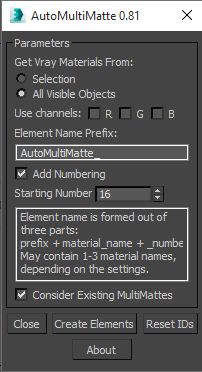
This script utilizes new EffectID property of the VrayMaterials in Vray 2.0 and creates MultiMatte render elements for the all or for the selected objects' Vray materials and assigns proper values to their Effects ID property.
Script
By sergo · Credited author: Sergo Pogosyan · 2011-01-08
Tags: Material, VRay, EffectsChannel, RenderElements
This script utilizes new EffectID property of the VrayMaterials in Vray 2.0 and creates MultiMatte render elements for the all or for the selected objects' Vray materials and assigns proper values to their Effects ID property.
Update 2015-07-31
Small update to support Vray 3+.
I just noticed that I've never uploaded 0.8 version, so this version includes 0.8 updates and Vray3 support. Other thing is that I don't remember what was the 0.8 imrovements :)
Update 2011-07-15
MultiMatte render element now formed of user prefix + material name + _number. May have 1-3 material name in one render element, depending on color channel selection. Number part is optional, if disabled then, in case when scene contains materials with same name, render element output name collisions are possible.
Thanks to Jaimie Forrester (UK London) for suggestions - http://www.scriptspot.com/users/j-forrester
Since the version 2.0 VRay renderer's VrayMaterial contains new option - "Effect ID" - for assigning more than 16 Effects ID-s.
As usual - run downloaded script with Maxscript -> Run Script command from any folder on your hard drive. Resulting command 'AutoMultiMatte' will be availlable in 'Sergo Pogosyan' category.
Usage:
Run script, select the material scope (selected or whole scene) and hit "Create Elements". Render.
In some cases set the starting number of Effect ID-s for selected materials and name prefix for the autogenerated render elements. This info will be stored in INI file.
Vray next update
Ali_essawy · 2019-02-25
Is their any update for vray next ?
thanks for your effort..
Vray next update (fix)
Ali_essawy · 2019-02-25
I found a way to work with vray Next by removing this part of the script
if (findString (renderers.current as string) "1_") != undefined then
(
messageBox "AutoMultiMatte script works only with VRay 2.x!" title:"Wrong VRay Version"
return()
)
LuisON · 2020-06-19
Thank you very much! :D
Corona Version
j.a.burrell · 2018-08-29
Hey I hacked this to work with Corona. Sergo, I love your script, perhaps you can take a look at my attempt and make an 'official' version of the Corona one?
Cheers!
Corona Update
 bergagonzalez · 2018-02-12
Hi Sergo,
I have used this script for many years and it's super helpful.
Now we have switched to Corona and I can't use it anymore.
I'd appreciate if you could tell me if you plan to make the Corona version.
If so I'll cry for joy like a little child.
Please let me know if I can do anything on my side to encourage you to go on this quest.
Best!!
sergo · 2018-02-21
Hi,
I'm not familiar with Corona. Which render element do you think is the replacement for MultliMatte? CMasking_ID or CMask_Mask?
Thanks,
Sergo.
Replacement for MultiMatte
croitorgeorge · 2018-02-22
Hi Sergo,
The replacement for MultiMatte is CMasking_Maks. There is an option to create Monocromatic mask or RGB masks.
Looking forward to test the Corona AutoMultiMatte!
If you have any questions please write me.
Best Regards,
George
bergagonzalez · 2018-03-20
Sorry I missed your question.
Looking forward to your progress!! Thanks Sergo!!!!!
Error when saving some passes
Schmeade · 2015-07-17
Hey Sergo.
Love this script however I'm having an issue when saving out passes.
Almost every time I use the script I'll get an error with one of the passes saying "Sorry can't write the output bitmap"
This will only happen with one of the passes but causes my render to restart when I sent it to Backburner.
Any idea why this is happening? I've attached the error.
I'm using Max 2014, vray 2.4.
Thanks mate
Updated to 0.8 - Vray3 support
sergo · 2016-04-19
Hi!
I've updated this script to 0.8. It has some improvements that I did while ago (for that reason I don't remember exactly what did I improve).
Could you check your case with that version and I'll try to help to fix it.
P.S. Your error attachment is not visible!
 asymptote · 2015-02-24
Was this updated for Vray 3.0 ??
 tiagodmed · 2014-11-28
Corona Renderer version? :DDD
fn myVrayVersion = ( str =
fajar · 2014-11-17
fn myVrayVersion =
(
	str = renderers.current as string
	char =trimleft str ":V_Ray_Adv_"
	aa= for i=1 to 7 collect char[i]
	version=""
	for j in aa where j!="_" do version+=j
	version as integer -- or as string
)

myVrayVersion()
Another fix:
stefanbrodd · 2014-11-17
Or just put comment tags around that whole block, like this:
/*	if (findString (renderers.current as string) "2_") == undefined then
(
messageBox "AutoMultiMatte script works only with VRay 2.x!" title:"Wrong VRay Version"
return()
) */
save, restart max -> profit.
Please update
emartin8907 · 2014-02-26
Awesome time saving script!!! I got really used to using it and then got really sad when I upgraded Vray to 3.0 and discovered this script doesn't support it!
Please update to work with Vray 3.0 :D
Fix for Vray 3.0
 gfa2 · 2014-06-04
Open the script and edit the line near the bottom that says (renderers.current as string) "2_") Just change "2_" to "3_"
Thanks for the fix
sergo · 2014-06-05
I got vray 3.0 now, so I'll update this script soon.
Thumbs up
dub73 · 2012-04-11
great script, very handy, thanks a lot for sharing !!! w7 3ds max 2012 x64
provide more info please
sergo · 2012-03-18
Could you provide more information about how exactly script behaves under 3ds max 2009? Error messages, dialog boxes, etc.
2009
 adibh31 · 2012-03-29
when i add this script it shows in customize track but when i add it to make new button it does'nt appear,it shows blank though i have named it to automultimatte as i did in max2012.Bottom line is the button that i created is blank so it does'nt work.
AutoMultiMatte
adibh31 · 2012-03-18
hi,Sergo i m aditya.I hav used your script on max 2012 64bit it is too great but unfortunately i m trying to use on 2009 64bit but it does not work so please can u provide me this script for my 2009 max 64bit.Please.
And yaa thank you for script...
bye for now..
sergo · 2012-02-06
I'll try but I think in that case different render elements overwrite one another.
spectra · 2012-02-06
Is it possible to add an option to not use material names at all, and just use numbers maybe?
Problem being that sometimes I end up with names that are really really long, and I've found problems sending things to render if some of the matte names are too long.
Im not very organised with material naming anyway!
any chance to
 crystal3d · 2012-01-17
add an option so that only one ID is assigned per element, you know the AAliasing spoils the mattes of bees, trees, whales the snails.
sergo · 2012-01-17
Choosing just one channel (r,g or b) doesn't force to use one ID per channel?
Possible idea
 birket · 2011-07-18
Quite often, we need mattes after a render has been created. Would it be possible to add some sort of temporary material overide, yet retain the multimatte information so that we can render out all the mattes quickly (without GI etc)?
sergo · 2011-07-18
Agree with you, we are making mattes after the render almost all the time :) I just turn off GI and lighting to render mattes quickly.
It is possible to override materials but how to deal with transparent materials?
themaxxer · 2011-07-08
great script, very useful. is it possible to add the option to set all ID's to 0 again?
thanks
themaxxer
sergo · 2011-07-15
Here's a version with reset button :)
More changes yet to come!