ScriptSpot

Script

AutoBack File Loader Zorb

By Jordan Walsh · 2009-05-14

Version
1.31
Version requirement
coded on max 2009 64bit
Date updated
2012-02-21
Votes
52
Description

*v1.31 - Bug fixes, removed error on opening on some max versions
*v1.30 - Now supports displaying 133 different date formats!! (Use the "Change Date Format" option in the right click menu)
*v1.21 - Updated for 2010 and added thumbnail support!

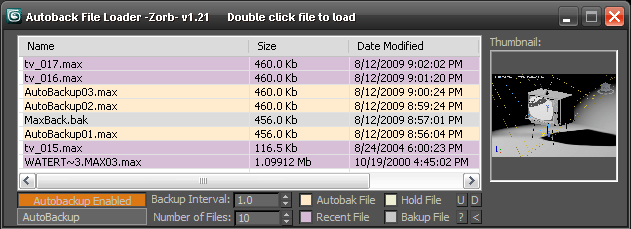
Tired of navigating to the autoback dir, selecting view as detail then sorting by date to find your latest autobak file. then comparing it to your last good saved file? This script will make it easy for you. Brings up a list of max files in your autobak dir, max hold files and your last opened file, sortable by date, size and name. Double clicking will load the file, right clicking will give you a delete option.Sort settings and files displayed are saved between sessions

Unzip to your Max root dir, will be available in macroscripts under "Zorb Tools", or run it as a script from the scrips directory
Attachments

Tags: Tools, tool, file, utility, zorb, load, pipeline, autoback, navigation, uitls, file load

Comments (43)

fajar · 2012-02-22

It does support, max 9n has dotnet support too....prove I can ran your previous autobackup 1.23 without hasle 


fajar · 2012-02-22

@jordan,: can you make it compatible with max 9 too, please.

Thanks

Jordan Walsh · 2012-02-22

Im not sure if max 9 has dotNet support....
unfortunately i dont have max 9 to test on :(

some more issues

harumscarum · 2012-02-18

works fine in max 2012, but in addition to my previous post i hope some more issues could be fixed
- thumbnails not working for autoback files
- gamma issue for recent file thumbnails (much darker)
- switch betwenn am/pm and 24h mode

thank you very much for this useful tool!

Hey Harum

Anubis · 2012-02-20

I was try to contact you via PM but looks like you're disable PM's, so will post here.

Well, did you try my version (Load AutoBackup File)?

Regards,
Anubis

@harumscarumIm glad you find

Jordan Walsh · 2012-02-22

@harumscarum
Im glad you find it useful.
In regards to your issues:

- thumbnails not working for autoback files

Im accessing the thumbnails that max creates for the recent file list so there are no available thumbnails for other files. I have no plans to implement any other method of retrieving thumbnails at the moment, sorry!

- gamma issue for recent file thumbnails (much darker)
Can you tell me your settings in the "Gamma and LUT" tab of your preference tab so I can fix this. Thanks.

- switch betwenn am/pm and 24h mode
Ill see what can be done. EDIT: Done in version 1.30... let me know if this works ok.

hello Jordan!

harumscarum · 2012-02-22

thank you very much for many data format options!
here i attach screenshots which illustrate what i mean by gamma isuue

regarding thumbnails - are there different thumbnails in recent and autoback files, so it is not possible to retrieve both? as for me more important to see preview of autoback file since it is nameless

thank you very much for your efforts)
viktor

Attachments

harumscarum · 2010-04-24

great script!
any chance to have 24 hour date format in script interface?

D.R. · 2009-10-23

I use 3ds max 2009 Design 64bit

I have been using the script for months and just started to a Runtime error:

No method found which matched argument list

Do have any idea what is happening.

Hi, no button with ">" on it

cecofuli · 2009-10-08

Hi,

no button with ">" on it down the bottom right. WinXP64 + 3ds max 2009 64 :)

Jordan Walsh · 2009-10-09

Thumbnail support in 2010 only, so there wont be any ">" in 2009.

>>Ghost - im not really sure

Royal Ghost · 2009-09-06

>>Ghost - im not really sure how to access the windows date settings from max, sorry!

:((

Under xp64+max2010x64 I don't see thumbnails (using 1.23). On another pc with xp32+max2010 all is ok. Bug?

Royal Ghost | veda3d.com

is there a button with ">"

Jordan Walsh · 2009-09-07

is there a button with ">" on it down the bottom right? If so press it. This hides/shows the thumbnails and its setting is saved so you might have it turned off.

fajar · 2009-08-25

OK Jordan Working great!!

Thank!

fajar · 2009-08-25

3dsMax = Tools ---> set Project Folder and Costumize --->userpath (change the autoBackup Folder), this is I do because My C is starting to full!

Thank! I'll try your new script now, if anything come to an a error, I'll send it to you( if U still want it though) ,I hope you don't get boring to me though!

Thank again

fajar · 2009-08-18

Hey jordan how about if the autobackup is not in getdir+autobackup! in my case in D: or something like that!

Jordan Walsh · 2009-08-25

v1.23 -- fixed error if you clicked on list where there is no file listed. -- Fixed reveal in explorer bug.

fajar: how are you setting where your autoback are saved? Or are you moving them somewhere else. So you would like to Add a search directory?

fajar · 2009-08-18

Hey Jordan this is my report from me!!

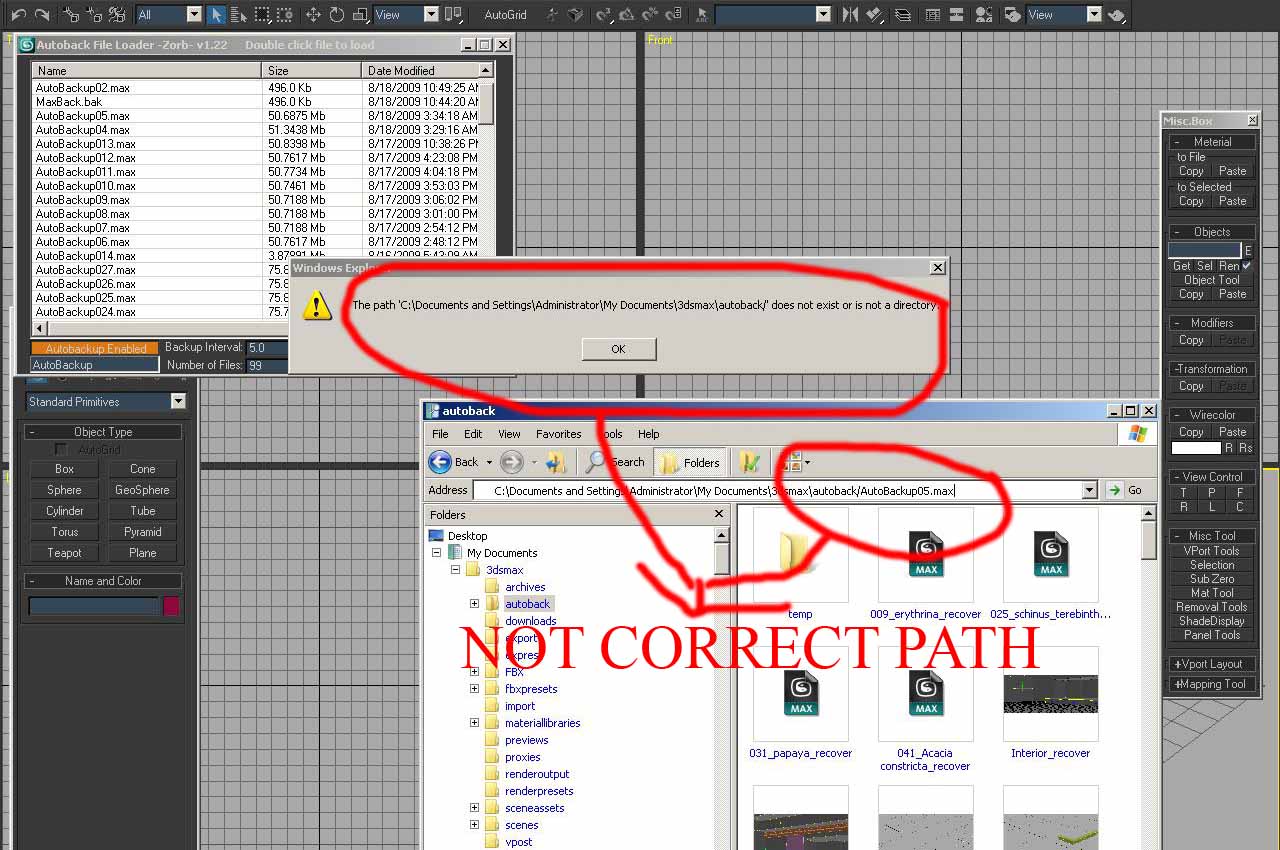
I guess, you give some wrong path here, check the attachment!
--->This is the path I get from your script ---> copy filepath to clipboard:
C:\Documents and Settings\Administrator\My Documents\3dsmax\autoback/AutoBackup012.max (/) in .../AutoBackup012.max
---> supposed to be like this :
C:\Documents and Settings\Administrator\My Documents\3dsmax\autoback\AutoBackup012.max (\)in ...\AutoBackup012.max

you see this is just a little different but windows can't recognize that!

Attachments

fajar · 2009-08-18

OK i"l give it soon! yes I using it in Max 9 (Loyal user for this max version!)

Thank Jordan!

Jordan Walsh · 2009-08-18

v1.22 - Changed the way the windows resize so its custom, not automatic. Now saves position and size betwen restarts.

fajar- "Reaveal in explorer" seems to work fine for me! I assume you are using version 9 of max, any more details you can give me so i can reproduce it?

fajar · 2009-08-17

maybe this will help you little

Windows Registry Editor Version 5.00

[HKEY_CLASSES_ROOT\.max\ShellEx\{BB2E617C-0920-11d1-9A0B-00C04FC2D6C1}]
@="{9DBD2C50-62AD-11d0-B806-00C04FD706EC}"

this is basic registry to enable preview maxfile in explorer! but I guest it'll hard to implemented it in your script! just forget what I say earlier!

fajar · 2009-08-15

@ harumscarum : "3. close script window after file is opened" it's will cause script useless though, can U imagine if the autobakcup you have is many, how about if you open the wrong autobackup and want to open another one, am I must to reload this script again? double work, not efficient!
@ harumscarum : "1. no thumbnailS in max2009?" it would be great to if this feature injecting in Max 9 too. I hope jordan will writte this down!!
@Jordan Walsh : thank again for the script!

Jordan Walsh · 2009-08-17

I am only able to access the thumbnails in max 2010 as they get cached as bmp files for the new max 2010 recent file menu. There is a way to get them (as shown by Lone Robot here http://lonerobot.net/?p=151 ) but its beyond the scope of this scripts.

 Harumscatum: fajar is spot on with the closing UI after file open. I actually originaly had it close automatically but would often need to open a few files to find the right one. I will add the screen position saving though!

harumscarum · 2009-08-15

some thoughts
1. no thumbnailS in max2009?
2. would be great to implement "save window size and position" feature
3. close script window after file is opened

fajar · 2009-08-15

OK I got it , as long as it's still work on max 9, I'll still loyal to use it!

question : how if I change the autobackup folder not in the usual place say in D:\\hallo is that still applicable (sometime I change my woking directory using tools ---> set project folder, is the new directory is still scanned?)

Thank!

fajar · 2009-08-14

Bug report (1) : Reveal in explorer always open in C:\\
Bug report (2) : windows can't resizing, if the autoback
number more than 20, it will become more than long drop windows!
Ask : at least give some scroll bar to this function to get more control!
Question : Why I can't see the thumb!? do I need do some configuration!

Tested using 3dsMax 9 (32bit)!

thank!

Attachments

Jordan Walsh · 2009-08-15

thats a lot of autoback files!!!! Thanks for the bug reports fajar, ill get on to them soon.

Thumbnails are only available in max 2010 and only for recent files 

Anubis · 2009-08-13

a hint about system time from the reference (i hope this help): localTime
Contains a String value that defines the current local date and time. This variable is read-only. An example of the value stored in localtime is:

s = localTime
"4/14/97 10:24:57 AM"

The format of this string is controlled by the date format selected in the main Windows Regional Settings control panel.

fajar · 2009-08-12

Thank's man this is become my favourite script latley, damn max 32bit, it keep give error when working with really large model!

Thank!

Royal Ghost · 2009-07-23

Thanx for this script! I have found it very useful for me. I have one suggestion, can you add to your script respect to system time format in file list. Now it is always AM/PM I need 24h.

Royal Ghost | veda3d.com

Jordan Walsh · 2009-08-12

*v1.21 - Updated for 2010 and added thumbnail support! Also added a right click menu when you click on the Recent File check button (the little purple square) you can choose how many recent files you wish to display.

Ghost - im not really sure how to access the windows date settings from max, sorry!

ipxstudios · 2009-06-17

Always been looking for something to shortcut the Autoback files - thanks!

Jordan Walsh · 2009-06-17

Version 1.10

Added Name and number of files for completeness :)

fajar · 2009-06-02

can I help you making installaton for this script!
The MCR file and startup script your describe the name, I'll writte it for U!

Jordan Walsh · 2009-06-02

Cheers fajar, but im not a fan of installers.

fajar · 2009-05-28

Working perfecto !
NB: Tested in Max 9-32bit with avg.dlx (plugins) installed in 3dsMax plugin directory!

thank man ! thank you very much!

thats all of report from me!

fajar · 2009-05-28

Ill try it now! just wait ya? I'll report it to you as fast as I could! still rendering procces now!

thank 4 patience!

fajar · 2009-05-28

still not fixed (1.04)I already tyied it today (28/05/2009)

This is 3dsMax 9 error report :
syntax error: at bad , expected
if not (((getdir #autoback)+@"\")==(getfilenamepath arr[i][1])) then RO_ABLoader.LB_Main.Items.item[i-1].BackColor = (dotNetClass "System.Drawing.Color").Thistle

hey if U suggest using avg.dlx please tell me where to put it!

Best regard for tou and thank!

Jordan Walsh · 2009-05-28

Ha! should have done a search for @ in the script! 1.05 done now

just chuck it in your plugin dir and you should be good to go


fajar · 2009-05-27

why I got some error saying this
syntax error: at bad , expected
in line: if (doesfileexist RecentFile1) and not (((getdir #autoback)+@"\")==(getfilenamepath RecentFile1)) then append ABFiles RecentFile1

in my case I use 3dsMax 9-32 bit and already had several autoback file in my HD

So please fix the error ya!

thank you very much, I guess meanwhile am gonna use the old script (ver 1.0)

ah yeah, the @"\" bit of the

Jordan Walsh · 2009-05-28

ah yeah, the @"\" bit of the code is 2009+ only, or maybe the AVG extensions for max 9 will help you out too.

Ill take it out when i get a sec

Jordan Walsh · 2009-05-28

Fixed for version 1.04

JohnnyRandom · 2009-05-25

Nice Jordan, handy tool, thanks :)

And yes I am tired of navigating to my autoback folder, clicking by date, ect, ect, ect... :D