ScriptSpot

Script

3DS Max Hot Box

By dandg · Credited author: David Mackenzie · 2010-08-27

Version
0.08
Version requirement
2009,2010,2011
Date updated
2010-08-27
Votes
200
Download
Download
Description

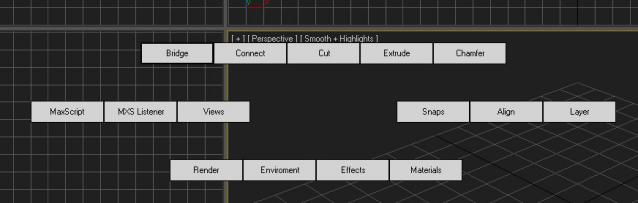
After being inspired by the video I saw of a Max hot box here on Script Spot I decided to work on my own. So here is the first version, its only a beta so some bugs or problems are to be expected. I am giving it out early as I want to get as much feedback as possible  I am currently debating whether to follow the Maya route or do something a bit different. 

Currently the entire GUI is created dynamically. I am working on a back-end that will let you run whatever scripts you want as well as create your own layouts. At this stage the back-end will most likely be stored in XML. As mentioned I would really appreciate any feedback, this will help decide the future direction of the Hotbox. 

Hope you guys like it.
Updates:
  • 07/09/2010 - I have fixed an issue that stopped the hotbox from working in 2011. It should work perfectly now :)
  • 31/08/2010 - User reported seeing the interface in black before it moved to the cursor. This has now been fixed. Users may still see some black the first time the hotbox is opened, after that it should be fine. I have also optimised the script so it should show faster.
  • 30/08/2010 I have rolled a new version which fixes the problem were UI controls become unresponsive. I have also added some controls in the center of UI to set the view port.  
Please keep the suggestions coming. 
Cheers, 
Dave


Tags: maya, menu, max, hotbox, popup, easy access

Comments (14)

amir3dsmax · 2016-03-31

there is no download link can anyone upload it ?

NikkoN · 2011-08-14

Thanks for the great script.

dandg · 2011-02-13

The source is now available for download on my site.

Cheers,
Dave

A.K.Gandhi · 2010-09-21

Hi Dave It doesn't work with max9 32 .If it's possible send it on my mail. akgandhi1011@hotmail.com
Thanks.

A.K.Gandhi · 2010-09-21

Well nice effort.

dandg · 2010-09-14

Hi Guys,

Just a quick update, I have large update coming soon adding many new features. I have tried incorporate as much of the feedback as possible. The update is about a week off.

Cheers,
Dave

Anubis · 2010-08-31

Do not get me wrong folks but I really do not understand why you like buttons on the screen.

Best Regards
Anubis

floetenmaul · 2010-09-02

Hi Anubis,
check out some of these maya hotbox videos on youtube.

eg. http://www.youtube.com/watch?v=d92sN3-zcuU

it speeds up the workflow significantly. i think you'll get the idea.
Regards

floetenmaul · 2010-08-31

Great! It's a lot faster now. Thanks

floetenmaul · 2010-08-30

Hey cool script! I'm really happy to see some maya workflow coming to 3dsmax.

My first impressions (i'm using max 2010 SP1 x64 in winxp 64, hotbox 0.05):

In general i'm missing (I don't know if this is possible in Max):
- use of the spacebar. if i remember correctly it was:
hitting the space bar will toggle the viewport fullscreen.
pressing and holding will open up the hotbox.
releasing the spacebar will close the hotbox.
- The "Recent Commands" button, and the possibility, to execute them
- The "Sub Hotboxes" in the 5 different hotbox zones
- the "Masks" which quickly altered the hotbox as you needed it (modeling, animation etc...)
- customization of the hotbox would be fantastic

see also this vid: http://www.youtube.com/watch?v=Xnri_4foMNg

These things doesn't work for me at the moment:
- modeling Operations only work in "Editable Polys" not on the "Edit Poly" Modifier
- Connect: doesn't do anything at all
- Chamfer: i'd rather like the little options box here

One additional note:
Performance is crucial. ATM the Hotbox opens up in the upper-left corner of my screen and is completely black. Then it jumps to the mouse position and gets rendered correctly. This takes about almost a second, which is too long in my opinion, to be a workflow enhancement.

I'd like to see some updates for this great script. Keep it up. Thank you!

Best Regards
Patrick

dandg · 2010-08-30

Thanks for the feedback.

I think most of what you mentioned should be possible although I will need to double check. I am not sure max needs a hotbox as complete as maya's but if that is what everyone wants I more than happy to write it.

I will fix the edit poly buttons not working on the modifier today, I cannot reproduce your issues with the connect button, it is working fine here. I will also change the Chamfer and extrude buttons to display the UI.

I am still working on getting more performance out the UI. I have fixed a couple bugs so expect that to get much better.

Cheers,
Dave

illusionist · 2010-08-30

Yes, when i am talking about the opacity I meant the buttons. This way it might be less intrusive in the viewport for those that hate menus covering their models.

Also, I was think maybe some color in the buttons would be nice. Probably make 3dsMax a bit more colorful. :)

illusionist · 2010-08-30

Thanks Dave!

Tested it on Max 2011 x64 and I think I found some bugs.

Bugs:
Firstly, I set HotBox(HB) to hotkey spacebar. HB will sometimes not close when attempting to close by hitting the X button. Not sure if it is a pattern or what, but every second or third time when HB is activated the polytools (bridge,cut,connect,etc..) fail to work. Sorry, didn't test out the others cause I do more modeling.

Improvements:
I think a customizable menu would be really nice. Maybe a preset of menus like for modeling, animation, or materials that offer more tools. Or, have a submenu open for more tools, like Maya.

Instead of having the close button in the middle you could place it on the top right corner. Using the spacebar works fine to open and close the HB.

Have a quick viewport changer in the center instead of the close button.

Have an opacity adjuster for HB.

I think the hotbox in Maya is sometimes too cluttered, even with customization. Personally, I would have a square face with each side dedicated to, for instance, polytools, anmitaion, materials, scripting, then when you mouse over submenus open. This way it will be clean and quick.

Thanks Dave for starting on something that Autodesk should have done a long time ago.

dandg · 2010-08-30

Wow, Thanks for the great feed back. I love the idea of having the view port switcher in the middle. When you mention opacity, are talking about the opacity of the buttons?

I to have experienced the buttons failing to work, I am currently working on that issue now.

Thanks for the great feedback. I should have a new version ready in a few days. As I get more feed back I will start to document future features.

Cheers,
Dave