Hello
I work on Lightwave for modelling and max for rendering....
I convert LW model to max and save. I open master scene file and merge the file.
When I make lot of changes in my model I do it again. But I have already assign material UVW mapping, etc... If I merge or replace my object with the new scene I loose all I did in max.
Is there a way to replace just geometry ?
Forum topic · Scripts Wanted
replace geometry only
By titane357 · 2009-01-14
Description
Comments (14)
titane357 · 2009-01-31
the end ?
 Budi G · 2009-01-21
hi titane, you're welcome. thank you.
I have new update script to next version, you can check here: COPY_MAT
hi anton you have great skill about script.
Indirectly I even also learn from you. thank you.
respect
 Anton Berg · 2009-01-17
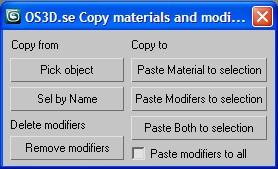
I have made a new version with the little added features you where asking about. And I will continue to see if a new merge tool would be possible to create...
Feature requests:
1) Apply modifiers to selection without checking if it already has modifiers already.
2) Select by name, you get a list to choose which model to copy from.
3) the pick object button does NOT let you pick an object instead it takes the currently selected object as an input.
REMEBER that this script only work with one input at the time. I am thinking of a way to automate several objects but this not solved yet.
Attachments
- OS3D copy materials and modifiers V07.jpg — OS3D copy materials and modifiers V07.jpg18 KB
- OS3D - Copy Materials and Modifiers v08.ms — OS3D - Copy Materials and Modifiers v08.ms4.4 KB
titane357 · 2009-01-18
Thank you very much Anton !
I join a screen shot of Cinema 4d. In C4d we can duplicate "layer manager" so we can put side by side two list of objects (without scrolling up and down)
So in c4d I can drag and drop "modifiers" from one object to another.
This workflow is similar to character retargetting : two list of objects side by side, so when automatic retargetting don't find an object you can make it by hand.
Attachments
- copy.png — copy.png255 KB

 W DIGITAL · 2011-09-03
this is great
but how to copy modifer instance so i can control all of them with one?
Anton Berg · 2009-01-17
This script is made in 3dsmax 2009.
I have made a first version of this script to just solve the copy and pasting of materials and modifiers. To test the attached script just dragNdrop it onto 3dsmax.
usage:
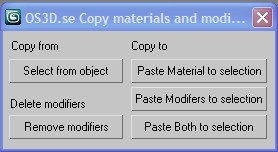
1. Press the select from button and then select the object you want to get the material/modifiers from
2. Select the other objects you want to paste to and press either of the 3 buttons to the right!
3. I have added a small feature that I needed when doing this and that was to remove all modifiers on the current selection. You might need this to.
Please reply to this so we can continue this development:
---------
I still haven´t figured out the best way to know how should the script know which is the old version of the model and which is the recently merged/imported one.
To solve this I need some input on your workflow.
1. I guess that you merge the new scene with the old one or?
2. Do you have several objects with the same name in 3dsmax?
3. If we talk about a single object: Do you have the same name on the old object and the new merged/imported one?
If yes. I am thinking of the best way of knowing which is the old one and which is the new one.
One solution would be to 1.save a state in 3dsmax before you merge the new scene. 2. import the new objects 3. compare the old objects with the new ones.
Another solution would be to create a new merge command that does approximatelty the same thing.
Attachments
- OS3D copy materials and modifiers V01.jpg — OS3D copy materials and modifiers V01.jpg14 KB
- OS3D - Copy Materials and Modifiers v05.ms — OS3D - Copy Materials and Modifiers v05.ms3.4 KB
titane357 · 2009-01-17
Whaoo !!!
Thanks you very much !!!
Hi budy, thank you very much for your script. It works great. More usefull scripts are not necessary more complexe ones.
I really think that "little" script like that can save hours of tedious tasks for people like me who can't (I hope just for now) make their own script.
Anton, you made a really good job. That works very well, thanks !!!!
If I can make some requests :
- I would prefer to select source object (copy from) rather than pick it, so I can use outliner or layer manager to select objects.
- could it be possible to have a "for all objects" option, because for a lot of object it is boring to clic "yes" if a modifier is already present.
I use max 2009 too.
For your questions :
1. yes I merge with the old scene
2. logically, there is just one object with the same name in my scene, because object name is the material name assigned in lightwave.
All polygons with "wall_white" material applied in LW will be gathered in one edit poly named "wall_white".
3. yes.
My dream should be to have a tool (new merge command, or replace command) which can replace objects in the scene by other in an another scene,
keeping modifier in master scene intact.
Thank you very much to all !!!
Budi G · 2009-01-16
hmm....well, i think it's about procedural problem.
Sorry if I miss something, ok ! :)
I have new upload about this, you can check and download macroscript here : COPY_MAT
that's same code. I have convert to macroscript tool.
ok, lets clear to usage of this script.
example:
reset or clear scene
- create 3 teapot in max scene.
- assign any material ( ex: material checker ) into 1 teapot of them.
-----------------------------------------------------------------
1. select 2 teapot whithout material ( it's 2 object when you want put material from 1 object ).
2. click "COPY_MAT" macroscript tool
3. pick 1 teapot (teapot have material checker)
4. done :) ( material automatic paste into 2 teapot.)
-----------------------------------------------------------------
well, you can try again with any object for make sense.
This macro is basic script still have too poor future.
if is usefull for someone maybe someday i will correct to next version.
well, I think in scriptspot maybe you can find it the script like this.
Budi G · 2009-01-15
Hello titane
Well, I have a little bit experience about Import/Export (i/e) between LW to max or vice versa.
You can try with "FBX", the FBX is default plugin in max i/e.
the model and animate can be transfered by FBX, but you must be add FBX L-scipt into LW.
The FBX L-scipt can be searched by google.
anyway, many way for in this case.
About quick copy material, you can try by this scipt :
-------------------------------------------------------
undo "copy Material Object " on
(
obj= pickObject prompt:"Pick object have material" rubberBand:selection.center
try (for i in selection do i.material = obj.material) catch ()
)
-------------------------------------------------------
usage:
select one or more object - run this script and then pick another object having material, it's automatic paste into object selection.
But if you have bad UVW on model the script can not fix it.
about copy modifier is too complex... I have problem code with array index modifiers for this time.
but if I find this trick, maybe someday I will upload in here.
suggestion from admin is also good.
Perhaps Anton or someone else can fix it.
sorry, for my bad english too ;-))
Regards
Budi G
titane357 · 2009-01-16
Hello Budy, I tried your script but nothing happen... I look into maxscript docs and try different things, but pickobject don't seem to do anything (cursor don't change its shape when on a shape) :-(((
 Admin · 2009-01-15
I think most of what you want is already implemented in Marco Brunetta's MatManager - http://www.scriptspot.com/3ds-max/matmanager ... Its a tool that allows you to save a library of materials used in one scene (including UVW mods) and then re-apply that automatically to a new scene.
Christopher Grant
ScriptSpot.com
Anton Berg · 2009-01-15
Interresting idea! To help you with this I need some input.
What fileformats do you use between max and LW?
How should the script comapare between the existing geometry in 3dsmax and the one that is being imported.
Is it ok to just compare the names of the objects.
if it is called "box_v01" in LW will it always be called that in 3dsmax? (you have more experience here since I am not a LW user).
If I only could compare the imported objects names and the existing objects names then this is fairlt easy to write.
But if I need to compare incoming geometry with exisit geometry it is a little more complicated.
Another question regarding modifiers.
If you are using modifiers that are depending on the topology like edit spline, mesh or poly. They need the exact amount of vertecies on the new object and the order of the verticeis needs to be the same of the old object and the new object to work correctly. You can try to rightclick on a edit mesh "modifier" (not base object) in the modifier stack and choose copy and try to paste this on different objects. You will have the same problem there.
The same problem occurs if you use a uvwunwrap modifier, you need to copy/paste this on another object with the same amount of vertecies and faces with the same ordering as the old one to get the correct result.
If you are using a "uvw-map" modifier like planar or box mapping it is not connected to the topology and should work.
So could you describe what a typical object would look like and what modifiers you are trying to copy/paste.
titane357 · 2009-01-15
Hello Anton
Happy to see that somebody is interrested :-))
In fact my problem has nothing to do with Lightwave: I import my LW file with Polytrans...I save a 3dsmax file.
Object name is material name assigned in Lightwave.
So logically "wood_01" should replace "wood_01".
I do architectural rendering, and I use in general just box or planar mapping....(lazy man).
I know that I can select object copy modifier, select the new object paste modifier, same for material.
But as it is a repeatable and boring task I'll better have a one clic button :-))
That is something that can be usable by a lot of people.
I don't know maxscript, I can't even imagine how many time that could take me to make such scripts !!.. :-(
Hope that can help ! :-)) (sorry for my bad english)
titane357 · 2009-01-14
or if it is too complex, is there a way to copy Material and modifiers from one object to another ? (select one object clic a button , select another object and clic to paste ?)