ScriptSpot

Forum topic · Scripts Wanted

Enhancement of 3Ds Max poly extrude

By blackfoxeye · 2009-07-06

Description

Hi All,

I have a question regarding 3Ds Max poly extrude technique. While modeling I faced a problem lots of time and I try to find some solution but didn't get any thing. I know scriptspot is great community of max scriptors. So if any one can do something, will be great.

I have made a picture, which may describe the problem more elaborately.

Normal Cube with three subdivision.

Middle Polys are selected for extrusion.

While Extrding it happened like this.

If the final result may look like this, then it would be great.
I did manual vertex manipulation to achieve the result.

Thanks $ Regards,
Subhendu

Comments (25)

Error when undoing

David Withers · 2016-03-17

Hi
Your scripts works perfect untill i try and undo the operation, 3ds max crashes. im using 2016.

Improved Version

Syphorlate · 2011-05-15

Here's a new version with a few bug-fixes. It's still a bad preview mode but kind of don't know how to make it faster/better. Any ideas are welcome.

Attachments

miauu · 2011-05-15

Hi!
The script with faster preview is already writen. I will see the improved version and will make the changes. But.... or ... there is one big problem with extrusion. I have 3 different versions of smartextrude script. The first one work verry fast and with no bugs only with single poly loop(every verts can belong to 2 or 3 faces). If there is a vert that belong(is common) to 4 verts the extrusion don't work. The second version work fine with verts that belong to 4 faces. The third version work with any combinations of face selection, but is a bit slower than first 2 version.

Syphorlate · 2011-05-15

When you change the script you need to take care that no vertex is processed twice. I had this problem at the beginning. Since I loop through the faces it happens that vertices are changed multiple times because more faces share one vertex. So you need to make sure that you don't change the same vertex more than once. For that purpose I keep an array of the indices of the vertices I changed already using "appendifunique" to prevent a vertex from being changed twice.

Instead of looping over the faces it might be possible to loop over the vertices. But you need the normal of the face for the calculation. So you need to get the faces that are using that vertex and pick the facenormal of one of them. This solution should be faster than looping over the faces where you have to maintain an array of already changed vertices. But you have to get the vertices of the selected faces somehow...

miauu · 2011-05-15

Every verts is processet once, but... Here the example:
Cub 4h4h4 sides. If I select faces only in one side - the script work with no errors. If I select the faces from 4 sides that for the loop - the script give the strange result(all verts is processed once). But, as I said there is a version of the script that works fine in every possible face selection. It is a little bit slower than my first two solutions, but it works.

Syphorlate · 2011-05-15

Ok this also happens in my version of the script? You have a screenshot? Also sometimes it happens that the underlying 3ds max extrusion gives crappy results due to overlapping or something. dont know...

Watch the video:

miauu · 2011-05-15

Watch the video:

Syphorlate · 2011-05-15

Ok. This is truly weird. Unfortunately I don't have enough code information to say why this is happening. I guess there must be something wrong with this vertinfo thing or this pogetvert function, don't even know what they're doing.But since I don't have these issues I guess the errors must be there somehow.

So without knowing complete code I can't say what the matter is. So it would be interesting to know how you actually improved the preview mode.

EDIT: it could even just be the order of the faces. since some vertices are altered and others not the order of how the vertices are changed might have an influence(this would be a downside of this method) although I don't really know if this can be the cause.
I discovered that in rare cases it can happen that "fac" becomes invalid. so it's best to ensure fac is between 1.0 and 1.4142...

miauu · 2011-05-15

The new script is uploaded. Download it, unpack the mzp file and look at the SmartPolyExtrude_v10.ms. The comented function give the errors. The uncomented use your method for extrusion - create the copy of the original object, but that copy is created only once, then the "theHold" is doing the preview, and that is faster then creating the new copy again and again.
In some cases your method do not straight the faces - watch the video - sphere and pyramid primitives. For that reason the Axis Poly Extrude is can do the job, but...
Anyway I hope that you don't mind to use your code in my script. :) If you want I can change the name and category of the script or I can put any informations that you want in the script body.

Best Regards!
:)

Syphorlate · 2011-05-16

Thanks miauu.You did a great job! This preview mode is really better than mine(better to see the selection). Really good work!

But I hope you don't mind if I criticize a few points. For instance when I select a lot of faces it seems to be slower than my method(unless I use the loop functionality then it is indeed faster). Also I had a crash when I tried to select another object "attempted to access deleted object".
Also there seems to be a problem with the implementation of my extrusion function. It doesn't produce the same results as my method when the extrusion value is negative. I don't know if someone would ever use a negative extrusion value. But it can be used for creating some sort of "folds" using the turbosmooth modifier. So i'd fix that.

One more thing I like to mention is that my method does indeed not produce straight results when there are faces which form a 3D volume. This is because I forgot or rather neglected that there are two angles involved that describe the orientation of a vector in a 3D space. Right now my method only uses one of them which produces nice results most of the time but there are situations where it doesn't work so well. I believe when I incorporate both of these angles I can make the extrusion model really stable even for complex 3d meshes.
Also I would like to implement a bevel version of the script in the near future which is not an easy task too.

And generally it is ok to use my work in your script as I stated already. I did this mainly so that scripters who need this functionality can put it inside their scripts. It would be nice however to mention my nickname inside the scriptUI to advertise my brand since I plan to add some other cool scripts on scriptspot under my nickname soon.

Thanks for your cooperation!
Syphorlate

miauu · 2011-05-16

Hi! The critics are always welcome. :)

For instance when I select a lot of faces it seems to be slower than my method(unless I use the loop functionality then it is indeed faster)

I think that the loop functionality is the right way  to doing the extrusion, but I can't figure out why the code works only for single poly loop.

Also I had a crash when I tried to select another object "attempted to access deleted object".

Can you describe me steb by step when this error occur? The most important part of the preview is to press the "Apply", "OK" or "Cancel" button when you don with the extrusion of one objectt. As you can see in the video of the script(in scriptspot page) I have no problems with selecting different objects while the script is open.

Also there seems to be a problem with the implementation of my extrusion function. It doesn't produce the same results as my method when the extrusion value is negative.

I have no problem with negative extrusion. Everything is like standart negative extrusion but with straight lines.


One more thing I like to mention is that my method does indeed not produce straight results when there are faces which form a 3D volume. This is because I forgot or rather neglected that there are two angles involved that describe the orientation of a vector in a 3D space. Right now my method only uses one of them which produces nice results most of the time but there are situations where it doesn't work so well. I believe when I incorporate both of these angles I can make the extrusion model really stable even for complex 3d meshes.
Also I would like to implement a bevel version of the script in the near future which is not an easy task too.

This will be aswame.


It would be nice however to mention my nickname inside the scriptUI to advertise my brand since I plan to add some other cool scripts on scriptspot under my nickname soon.

Your nickname is already in the script code, but I will add an about page to scriptUI. Just tell me what information(text) to put in the about page. 

Syphorlate · 2011-05-16

I think that the loop functionality is the right way  to doing the extrusion, but I can't figure out why the code works only for single poly loop.

Well, I take the view that it should be up to the user to decide how to extrude faces. Your loop mode is cool since it's really fast in usage. But usage shouldn't be restricted to loops alone. There are enough situations where you just need to select some faces here and there or some pattern for the extrusion. Loop is not wanted in every situation any selection of faces should be supported.

I have no problem with negative extrusion. Everything is like standart negative extrusion but with straight lines.

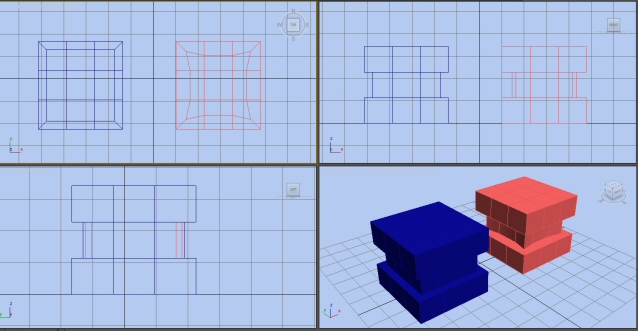
Here is a picture of the situation I encountered. The blue mesh is using my script the red one using yours. You can see the round edges on the red 3x3 cube.


Your nickname is already in the script code, but I will add an about page to scriptUI. Just tell me what information(text) to put in the about page.

Yes it would be cool if you could mention my nickname in the about page. Doesn't matter what it is saying exactly that's up to you :-)

miauu · 2011-05-16

Hi!

I think that the loop functionality is the right way  to doing the extrusion, but I can't figure out why the code works only for single poly loop.

Well, I take the view that it should be up to the user to decide how to extrude faces. Your loop mode is cool since it's really fast in usage. But usage shouldn't be restricted to loops alone. There are enough situations where you just need to select some faces here and there or some pattern for the extrusion. Loop is not wanted in every situation any selection of faces should be supported.

Sorry for my english. What i mean with "loop functionality" is  that part of the commented function:

                    vertInfo = #()
                    faceSel01Verts = #()
                    --    get starting face selection
                    faceSel01 = poGetFaceSelection curObj as array
                    for i in faceSel01 do
                    (
                        --    collect faces normals
                        faceNormal = poGetFaceNormal curObj i
                        --    collect faces verts
                        faceVerts = poGetFaceVerts curObj i
                        --    collect faces verts position
                        for i in faceVerts do
                        (
                                vx1 = poGetVert curObj i
                                append faceSel01Verts vx1
                        )
                        --    store values to main array
                        append vertInfo #( i, faceNormal, faceVerts, faceSel01Verts)
                    )


So, what I want to say is: it will be better(I think that) to collect all faces informations(verts, verts position, face normals etc.) in the begining of the extrusion and then when the user change the spinner value the script will use that information. There is no matter what the selection is - a poly loop or a something else(single faces here and there). I think this aproach will make the extrusion faster, but this is my opinion, may be I am wrong.

Anyway. after few minutes I will post the new version with "About" page. The future development of this script is in your hands. The matematical extrusion is your idea, so I think that is not fear to use your code to my script even if I give you a credit for that.

Fell free to use any part of my script, or the hole script if you want.


Best Regards!

:)

Syphorlate · 2011-05-16

Oh ok. Yes sure it is faster to precache the data than recreating there you're absolutely right! But I noticed that when I for example select a few faces on the mesh and then execute your script then the preview is somehow slower than my method. When I use the buttons for making a face-selection-loop then the preview is faster than using my method. So I found that a little weird!

I also noticed a crash when I select only one face and extrude it using your script.

Anyway. after few minutes I will post the new version with "About" page. The future development of this script is in your hands. The matematical extrusion is your idea, so I think that is not fear to use your code to my script even if I give you a credit for that.

Ok that's probably better since there will surely come more updates. As I said I still have to include the version which is using the 2 angles. This will allow a perfect extrusion which will work on all types of faces and thus will allow things that would never be possible with the 3ds max default extrusion. And also I will make a bevel version of the script. So I'll probably release a script on my own then soon.

Mathematical Solution

Syphorlate · 2011-05-12

There is actually a pretty elegant mathematical solution to this problem which yields perfect results and doesn't just scale the mesh which doesn't work properly for meshes with a lot of corners instead it keeps a perfect outline without the need to select any axis or stuff like that. Also it produces a stable topology which you can meshsmooth just like with the standard extrusion of 3ds max.

3DS max uses a radial extrusion (where all extruded vertices have the same distance from the original vertices) this produces a correct outline but those round edges are not always wanted.
To get rid of them you need to replace the radial extrusion with a quadratic one at the right places. For example when you have a 90° corner in your mesh you need to multiply the extrusion height for that corner point by 1.4142 (which is the diameter of a quad with extrusion height).This however only works for 90° degree corners of course.

But using cosinus function you can calculate the exact number for offsetting your vertices in a quadratic way so that those round edges vanish:

1.) For every vertex of an extruded mesh you need to calculate the angle between the normal of that face and the vector which connects the vertex of the original mesh with the vertex of the new extruded mesh:
vec1=normalize (newvert-oldvert)
vec2=facenormal
ang=acos( dot vec1 vec2)

2.)Then you build the cosinus value of that angle and invert it:
fac=1.0 / (cos ang)

3.) You can use this factor now to offset your radial extruded vertices so that they become quadratic:
newvert=oldvert+fac*(newvert-oldvert)

I attached a sample macroscript which I quickly hacked together. Here are a few pictures:

This is the original mesh

This is the typical 3dsmax extrusion for this mesh:

And this is the much cleaner version using my smartextrude script:

Attachments

miauu · 2011-05-12

Hi! Very elegant solution. :) I never tought about how the max extrude faces. :)
If you don't mind I will make some changes to speed up previews and fix the error that occur when I press the "apply" button and then select new faces on the same mesh - every time when I do that: "Runtime Error: Attempt to access deleted scene objects".

:)

Syphorlate · 2011-05-13

Thanks guys.Yes It's really slow and unstable. Didnt have much time to make a perfect and speedy script. Also the preview function is a messy hack since the object is deleted and recreated everytime you change the slider... So yeah would be great if you could improve speed and stability dont have the time to do that now.

Anubis · 2011-05-13

New ideas are always welcome.

I never dig for better method, even this one (2 years old) using scale was just quick solution, the 1st that come to my mind, and its fast but limited.

Nice maths. I'm sure the folks who need that feature will be happy :)

xyz3 · 2011-05-02

Hi miauu, PolyExtrudeIcons.png is missed, can you attach it?
Thanks¡

miauu · 2011-05-02

The new mzp with UI images is uploaded. Download it again, and sorry fot that stupid mistake. :)

xyz3 · 2011-05-02

Thanks Miauu, fantastic script¡

titane357 · 2009-07-07

It would be great if somebody make a script which automate scale transform, select border and make a bridge :-)))

blackfoxeye · 2009-07-07

Thank you very much Anubis.

Its a great idea to solve the problem. You are great man...

I tried one more thing with your idea, in the step:4 if we use Bridge option instead of Cap option then, we will get the proper topology.

Bridge

Thank you again.

Subhendu

Anubis · 2009-07-06

Here's what occurred to me...

1. Detach to element.

2. Calculate scale. Enter in Listener next code line:

scalePercentX = (($.max.x + 8) / $.max.x) * 100
-- here i test working with default box size (25,25,25)
-- and 8 is extrude amount, so return result is 164.0

3. In Non-uniform scale mod enter 164 by X and by Y.

There is result:

4. In Border sublevel select all (Ctrl+A) and press Cap.

Must to say, polygon topology is not the same.
This is only idea, not complete solving.
I have not more free time to spend now,
maybe you will find better way.