Say I've got a number of meshes (5)
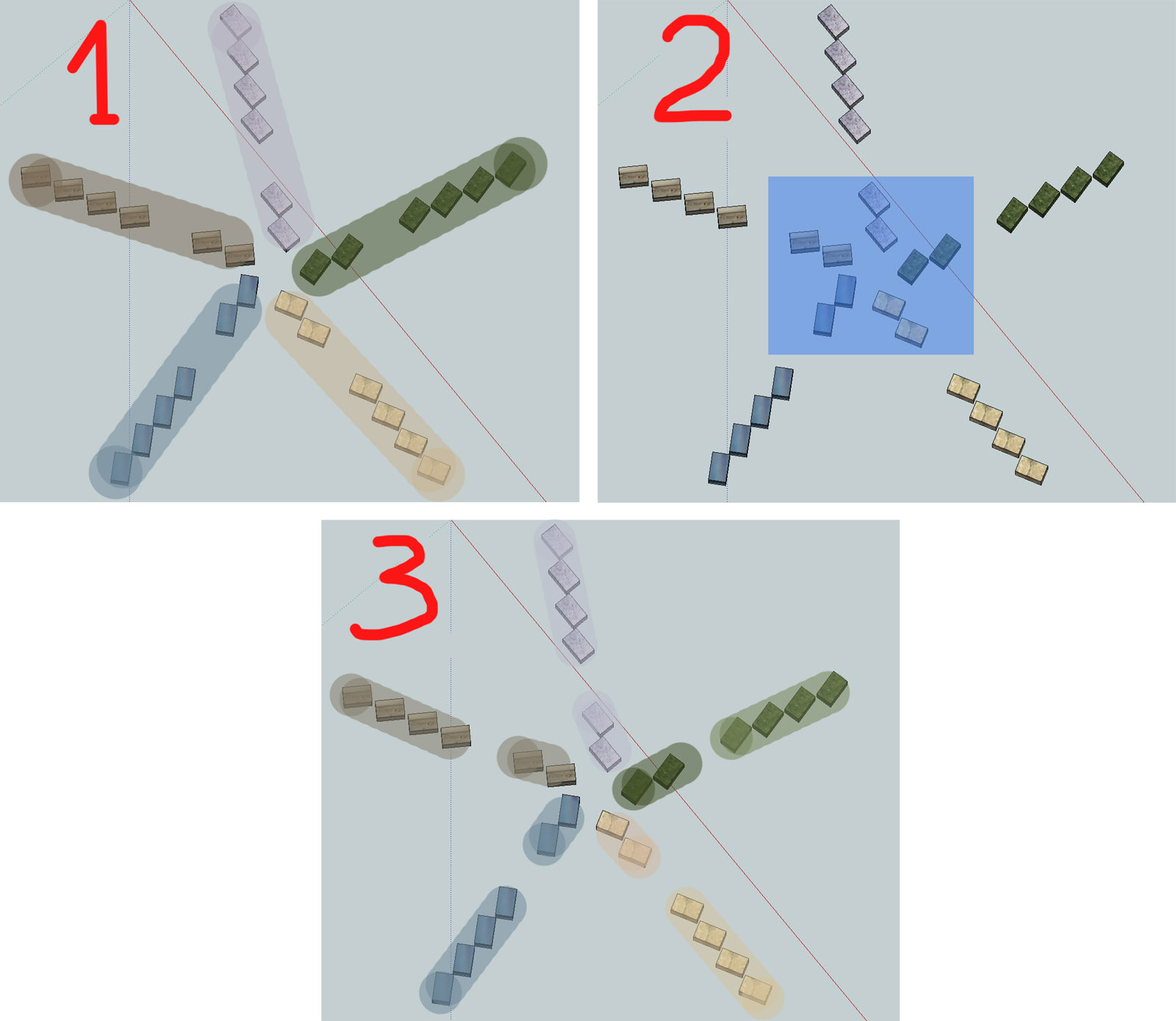
I'd fabulous to select some specific area with crossing window and all the portions (of those 5 meshes) within this window would be detached at once to 5 separate objects.
Thank you in advance.
Forum topic · Scripts Wanted
Detach from multiple meshes with standard select tool
By 1rv · 2013-01-16
Description
Comments (9)
 barigazy · 2013-01-16
Put some screenshots of your request.
1rv · 2013-01-16
In short:
1. we have 5 meshes (5 'trains' of cubes)
2. now run the wanted script and make selection
(blue square)
3. as result: we have 10 meshes (the portions located
within blue crossing window were detached from original
meshes.
P.S. It'd be nice if the script would support all standard
selection modes: lasso, spray,fence,circular, rectangular.
Thank you for the interest.
Attachments
- capture.jpg — capture.jpg200 KB
selection on sub-object level in Max works per-object
 Anubis · 2013-01-16
and Not per-screen (across multiple objects).
barigazy · 2013-01-16
there is the ways to do it, but not quite sure it is good solution:
#1 make array from selection (5 trains)
#2 draw a free-form shape using "startObjectCreation line"
with assigned extrude modifier (spline need to be closed)
#3 height of extrude modifier is selection (five train) max value of bounding box
#4)when spline creation process is over then everithing inside volume will be detached
1rv · 2013-01-21
do you mean that it's POSSIBLE to make a script that would detach one-by-one the portions (within the closed spline) from preselected meshes?
If so- no problem, it would be nice solution!
barigazy · 2013-01-21
That script must be commercial one.:)
1rv · 2013-01-17
Understood. But couldn't the script just memorize the selection window area and then step-by-step detach chunks mesh by mesh?
barigazy · 2013-01-17
Yes but that is not so easy to achive.
life is not picnic
1rv · 2013-01-17
only cats get born easily (: